Sponsored

FSD is fantastic but seems to hug the center lane marker and hugs left turns

Explorer HP

New member
First Name
Henry
Joined
Jun 7, 2025
Threads
2
Messages
4
Reaction score
2
Location
Daly City, CA
Vehicles
cybertruck
Country flag
My CT in FSD is fantastic but seems to hug the center lane marker and hugs left turns . Plus creeps up and tailgates on freeway speed. Can anyone help
Sponsored
 

That Beast Mode

Well-known member
First Name
Phil
Joined
Mar 15, 2025
Threads
14
Messages
1,363
Reaction score
1,821
Location
New Jersey
Vehicles
Cybertruck
Country flag
Welcome to the wonderful world of the CT, like everyone here has said a million times, it's an amazing vehicle. As for the lane hugging, there's not much you can do, we all have the same issue that will hopefully get worked out by updates in the future. As for the tailgating. While in FSD you can set the max speed it is allowed to go with the right scroll wheel up and down, and I believe you can set the follow distance by going left or right. That should help with that issue at least.
 

Cybergirl

Well-known member
Joined
Jul 3, 2020
Threads
40
Messages
873
Reaction score
2,938
Location
Illinois and Arizona
Vehicles
Tesla Model Y LR, Model Y SR, Cybertruck AWD FS
Country flag
When I had new tires installed, I was told that the truck needed alignment. It's too early to say, but so far on highways, staying in the center of the lane seems to have improved.
 

CyberGus

Well-known member
First Name
Gus
Joined
May 22, 2021
Threads
91
Messages
10,322
Reaction score
34,214
Location
Austin, TX
Vehicles
1981 DeLorean, 2024 Cybertruck
Occupation
IT Specialist
Country flag
While in FSD you can set the max speed it is allowed to go with the right scroll wheel up and down, and I believe you can set the follow distance by going left or right. That should help with that issue at least.
The left/right on the right scroll-wheel controls the FSD mode (chill, standard, hurry). AFAIK there is no manual adjustment to the following-distance.

I agree it follows a bit too closely.


CyberGus

Well-known member
First Name
Gus
Joined
May 22, 2021
Threads
91
Messages
10,322
Reaction score
34,214
Location
Austin, TX
Vehicles
1981 DeLorean, 2024 Cybertruck
Occupation
IT Specialist
Country flag
My CT in FSD is fantastic but seems to hug the center lane marker and hugs left turns .
FSD prioritizes obstacle avoidance over lane discipline. It will cross a double-yellow line to go around a stopped vehicle, for instance.

I've had it venture well over the highway lane marker to the left, while staying away from concrete barriers when present. It gets uncomfortably close to those barriers sometimes, but doesn't hit them. I did have FSD run over a few curbs on left turns, but that was right after launch and has not repeated in almost a year.

FSD across the other models does not appear to be left-leaning, so this is a software problem that will hopefully be addressed in a future update.
 

That Beast Mode

Well-known member
First Name
Phil
Joined
Mar 15, 2025
Threads
14
Messages
1,363
Reaction score
1,821
Location
New Jersey
Vehicles
Cybertruck
Country flag
The left/right on the right scroll-wheel controls the FSD mode (chill, standard, hurry). AFAIK there is no manual adjustment to the following-distance.

I agree it follows a bit too closely.
Adjusting the Following Distance
To adjust the following distance you want to maintain between Cybertruck and a vehicle traveling ahead of you, touch Controls > Autopilot and customize the Cruise Follow Distance, or press the right scroll button on the steering wheel to the left or right.

This is from Teslas website. I thought it was the same setting for FSD and autopilot? Doesn't this set it for both?
 

TS_Buffalo

Member
First Name
Allan
Joined
Sep 7, 2025
Threads
0
Messages
13
Reaction score
36
Location
Idaho
Vehicles
CyberTruck, Model 3
Occupation
Military
Country flag
FSD does not have the ability to adjust the following distance. That's an Autopilot only feature (and CyberTruck doesn't have Autopilot even if you don't have FSD).
 

CyberGus

Well-known member
First Name
Gus
Joined
May 22, 2021
Threads
91
Messages
10,322
Reaction score
34,214
Location
Austin, TX
Vehicles
1981 DeLorean, 2024 Cybertruck
Occupation
IT Specialist
Country flag
Adjusting the Following Distance
To adjust the following distance you want to maintain between Cybertruck and a vehicle traveling ahead of you, touch Controls > Autopilot and customize the Cruise Follow Distance, or press the right scroll button on the steering wheel to the left or right.

This is from Teslas website. I thought it was the same setting for FSD and autopilot? Doesn't this set it for both?
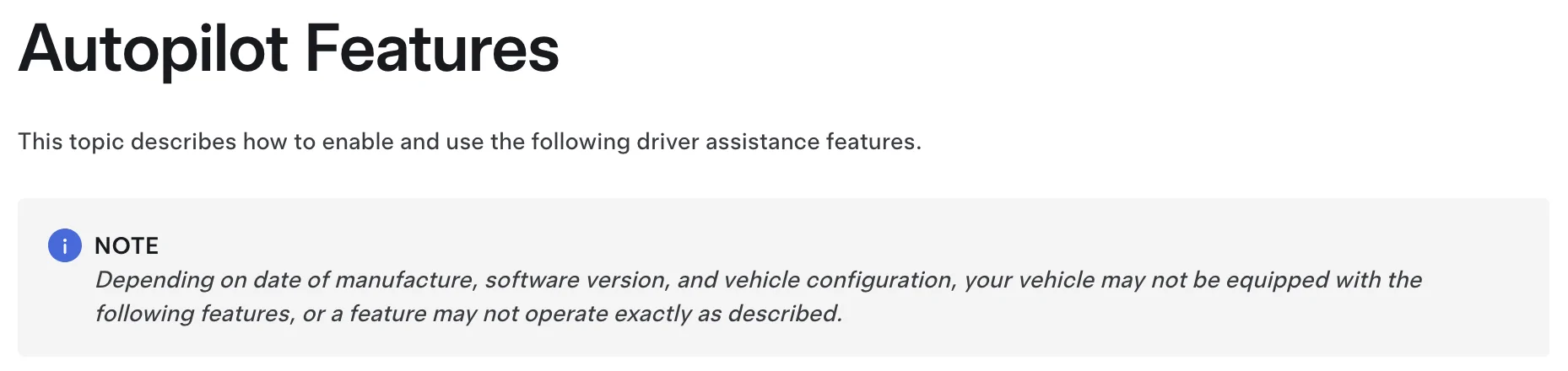
Tesla Cybertruck FSD is fantastic but seems to hug the center lane marker and hugs left turns Screenshot 2025-09-26 at 4.10.51 PM


"feature may not operate exactly as described" :ROFLMAO:
 

That Beast Mode

Well-known member
First Name
Phil
Joined
Mar 15, 2025
Threads
14
Messages
1,363
Reaction score
1,821
Location
New Jersey
Vehicles
Cybertruck
Country flag
FSD does not have the ability to adjust the following distance. That's an Autopilot only feature (and CyberTruck doesn't have Autopilot even if you don't have FSD).
Interesting, I know it doesn't have AP, I just thought it was set the same way for all of them.
 

That Beast Mode

Well-known member
First Name
Phil
Joined
Mar 15, 2025
Threads
14
Messages
1,363
Reaction score
1,821
Location
New Jersey
Vehicles
Cybertruck
Country flag
Screenshot 2025-09-26 at 4.10.51 PM.webp


"feature may not operate exactly as described" :ROFLMAO:
Case in point. lol That's probably there for those litigious types : you called it AutoPilot and it didn't fly me to my destination, now I'll need 20 mill for my anguish, pain and emotional suffering.
Sponsored


Top