Sponsored

Loudness

Well-known member
First Name
Jay
Joined
Mar 11, 2024
Threads
23
Messages
356
Reaction score
1,230
Location
Atlanta
Vehicles
Cybertruck (AWD)
Country flag
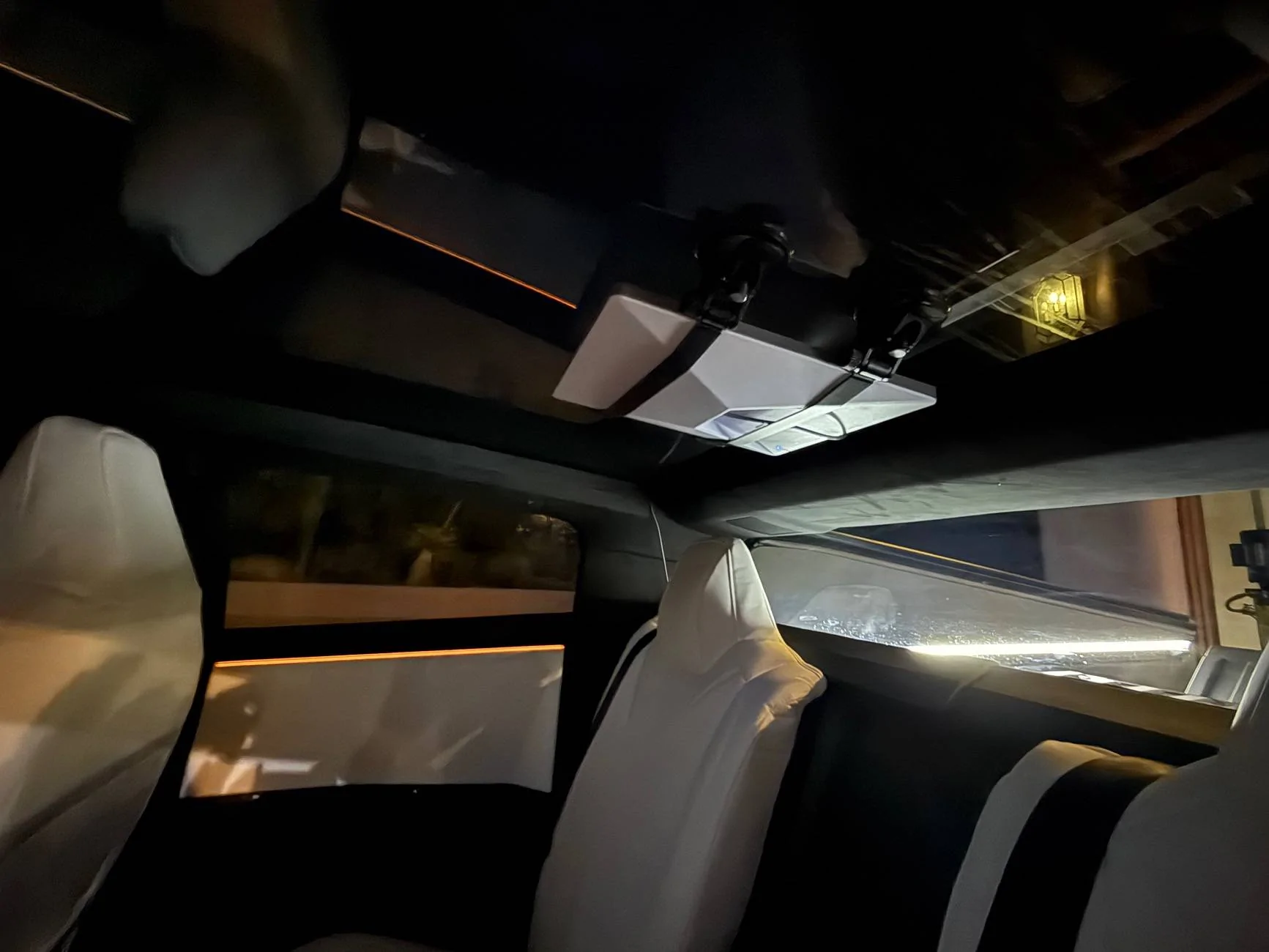
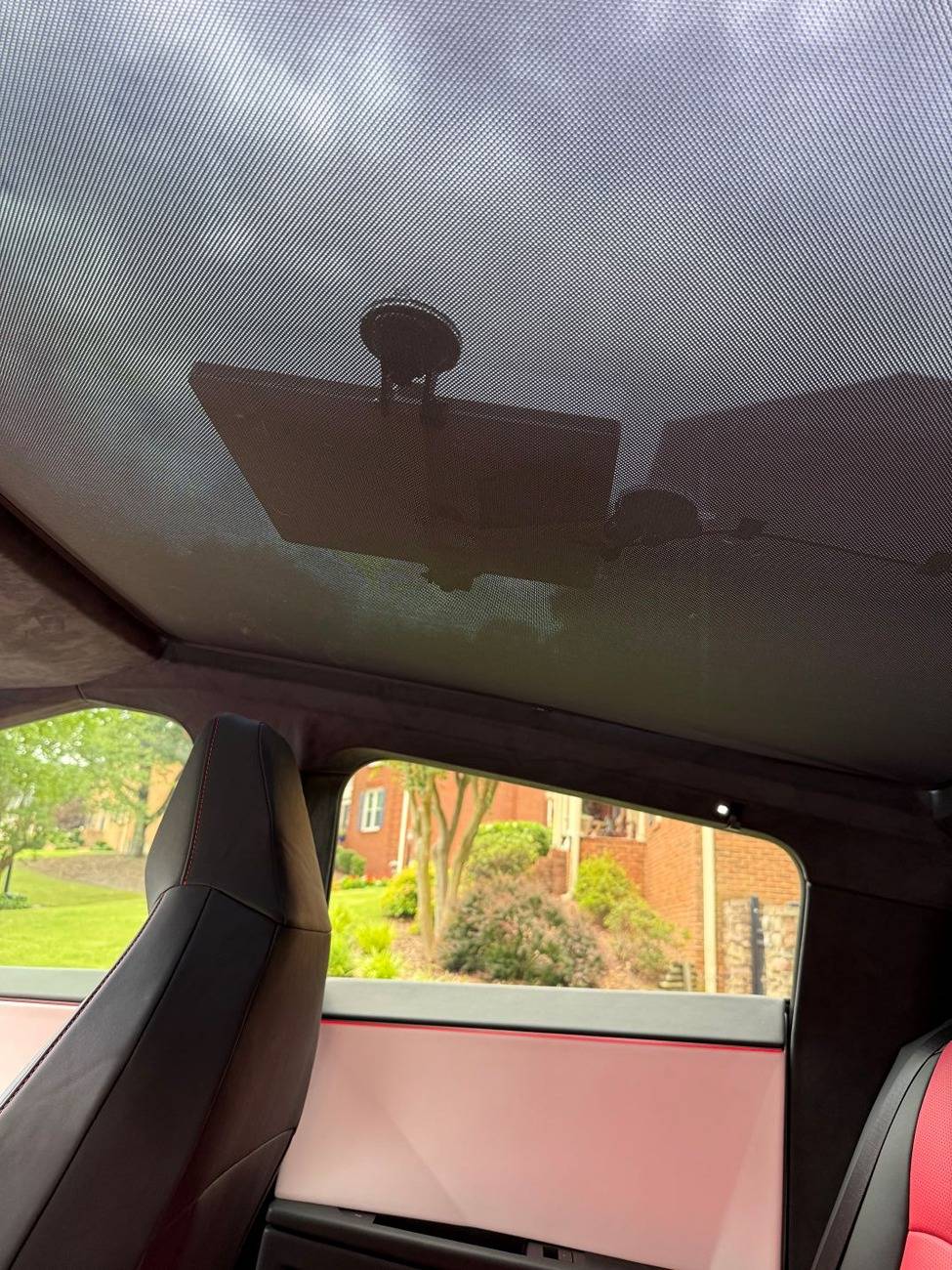
I recently took advantage of the $299 deal for the Starlink Mini, and decided to mount it to the inside of the Cybertruck’s panoramic roof glass. It's super clean, no wire visible (except a short bit between the dish and the trim) and fits beautifully under the OEM sunshade.

After a little research, I chose a suction cup mount from ContronX, which promised a secure hold without damaging the glass. The challenge was to route the power cable cleanly to the Cybertruck’s power outlet. Here’s how I made it happen.

I chose to mount it just behind the front seats, leaving enough room to slide it out of the mount if I want to use it without the CT. The ContronX mount makes it easy to remove the Mini without unlatching the suction cups. It would have been a little bit cleaner on the wiring if I lined it up next to the rear trim, but I didn't want to shrink the headroom for a middle seat occupant.

Tesla Cybertruck Installed Starlink Mini under roof glass starlink_mini1


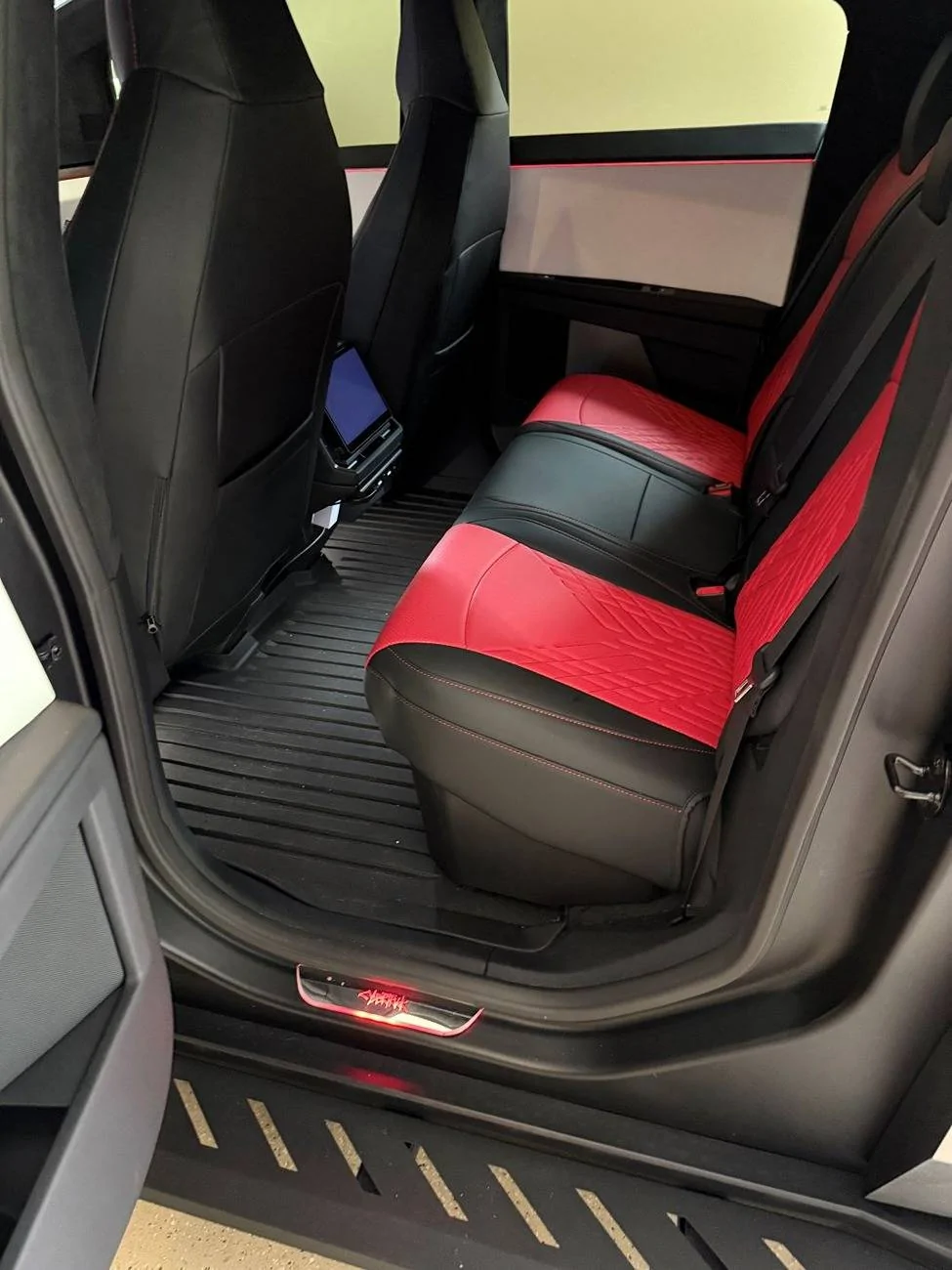
Running the power cable was the trickiest part, as I wanted a clean, factory-like look. Starting at the Starlink Mini, I tucked the cable under the interior trim along the back edge of the roof glass. The Cybertruck’s trim is flexible enough to gently pry up with a plastic trim tool, allowing me to hide the cable without damaging anything.

From there, I tucked the cable down along the rear seat edge, using a spudger to tuck it deep and hide it completely. To keep things seamless, I ran the cable across to the the center under the rear seats and then under the floor mat. Finally, I brought the cable up to the Cybertruck’s power outlet near the center console. You can see the white brick under there. I have an option to convert it to USB-C and use one of those plugs, but I already have another accessory there, and I'm not using the 120v for anything else at the moment. The entire process took about 15 minutes.

Tesla Cybertruck Installed Starlink Mini under roof glass starlink_mini2


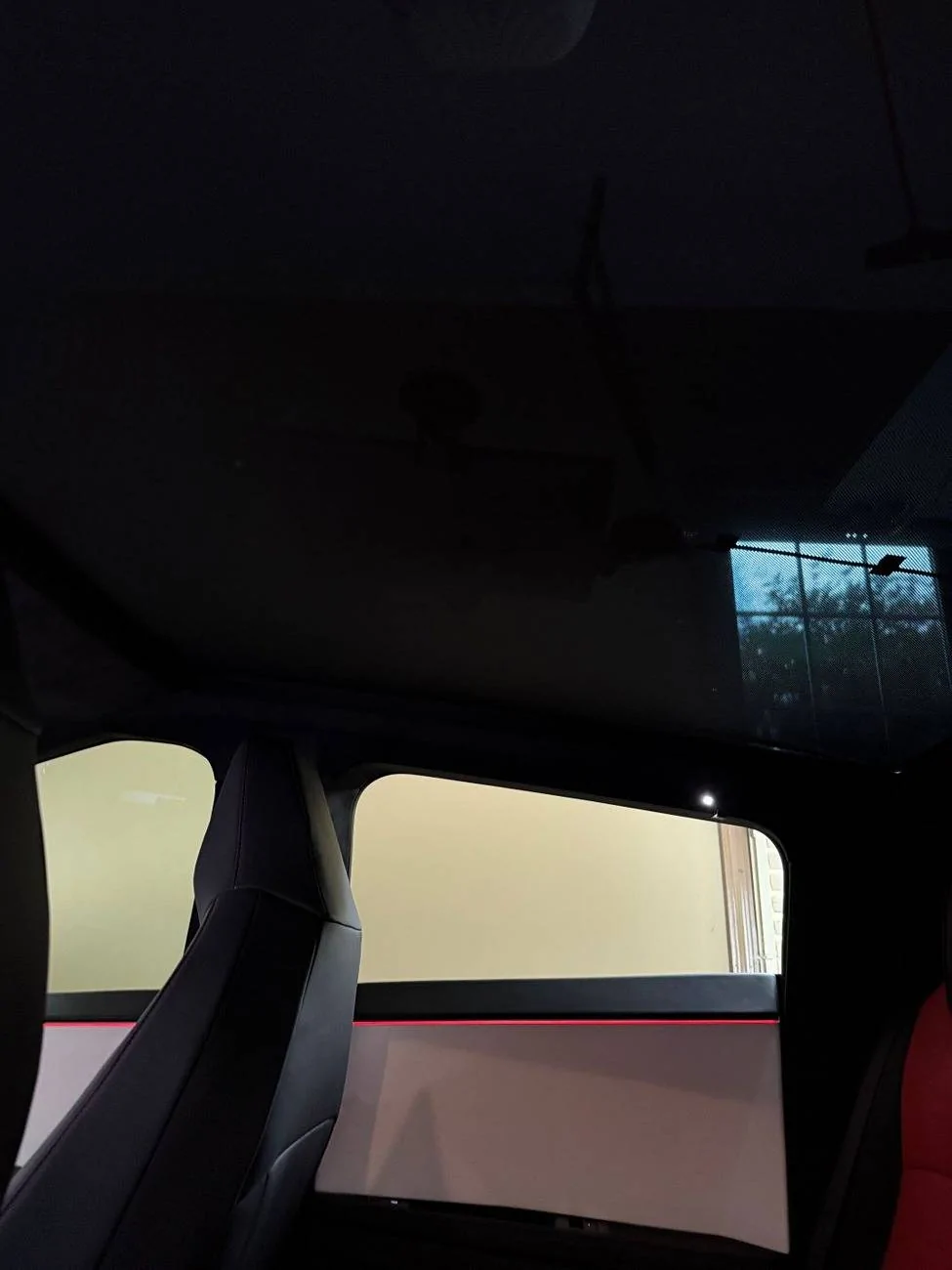
With the sunshade installed, you can't really see it unless you're looking for it, especially at night.

Tesla Cybertruck Installed Starlink Mini under roof glass starlink_mini3


The connectivity is great, I'm hitting about ~150Mbps up and ~14Mbps down with a 20ms ping while driving around. For me, something like this isn't really needed 90% of the time, since 5G on my phone is faster and the Foundation CT has lifetime premium connectivity over 4G (which works great), but it's nice to have for those times when I'm out in the boonies. Plus, it's fun being a 3.5 ton rolling hotspot ?
Sponsored


brur

Well-known member
First Name
bruce
Joined
Dec 27, 2023
Threads
9
Messages
98
Reaction score
86
Location
prescott az
Vehicles
tesla plaid
Occupation
retired
Country flag
Maybe it's my latitude, or maybe my skylight has more tint from the factory, but I can't get any connection through the glass. However, it is my experience that it is impossible to establish a connection with your installation style from my location.
In my case I have to place the dish outside the CT.
wish it was possible for me, as what you did was what I wanted.
 

dw321

Well-known member
Joined
Jun 10, 2023
Threads
4
Messages
73
Reaction score
97
Location
Arizona
Vehicles
Ram 2500, Toytota 4 Runner, Bikonit Ebike
Country flag
Maybe it's my latitude, or maybe my skylight has more tint from the factory, but I can't get any connection through the glass. However, it is my experience that it is impossible to establish a connection with your installation style from my location.
In my case I have to place the dish outside the CT.
wish it was possible for me, as what you did was what I wanted.
That seems weird. I just put my mini on the dash on a towell and great signal.
 
OP
OP
Loudness

Loudness

Well-known member
First Name
Jay
Joined
Mar 11, 2024
Threads
23
Messages
356
Reaction score
1,230
Location
Atlanta
Vehicles
Cybertruck (AWD)
Country flag
Maybe it's my latitude, or maybe my skylight has more tint from the factory, but I can't get any connection through the glass. However, it is my experience that it is impossible to establish a connection with your installation style from my location.
In my case I have to place the dish outside the CT.
wish it was possible for me, as what you did was what I wanted.
That's unfortunate, yeah. It's possible they changed the glass at some point. I got my AWD a little over a year ago, it's in the 10,500 VIN range, and it has no problem with passing the signal through.

That seems weird. I just put my mini on the dash on a towell and great signal.
Same, I had it there until the mount arrived. No issues at all with connectivity.
 

conorearly

Member
First Name
Conor
Joined
Sep 8, 2023
Threads
2
Messages
10
Reaction score
32
Location
Kalamazoo, MI
Vehicles
Model 3
Occupation
Nurse Anesthetist
Country flag
@Loudness Thank you for the kind words and the great write-up! We’re thrilled to hear the ConTronX Starlink mount is working well for you. Happy travels, and let us know if you ever need anything!

Second Comment (External Mount Details):
@brur – We also offer an external mount option, which we use on our own Cybertruck! It uses strong 120lb magnets to sandwich the glass, securing the mount while keeping the installation clean and non-invasive. The power cable is routed discreetly between the trim pieces to the rear bed outlet. The magnets provide a rock-solid grip while still allowing for quick and easy removal when needed.

Check out our setup here: https://www.cybertruckownersclub.co...how-do-you-keep-them-safe.39286/post-30552489

or at https://contronx.com/

Let us know if you have any questions—we’re happy to help!


TexasRaider

Well-known member
First Name
JR
Joined
Jan 10, 2023
Threads
33
Messages
923
Reaction score
835
Location
Denton
Vehicles
Cybertruck + MS
Occupation
Civil
Country flag
I recently took advantage of the $299 deal for the Starlink Mini, and decided to mount it to the inside of the Cybertruck’s panoramic roof glass. It's super clean, no wire visible (except a short bit between the dish and the trim) and fits beautifully under the OEM sunshade.

After a little research, I chose a suction cup mount from ContronX, which promised a secure hold without damaging the glass. The challenge was to route the power cable cleanly to the Cybertruck’s power outlet. Here’s how I made it happen.

I chose to mount it just behind the front seats, leaving enough room to slide it out of the mount if I want to use it without the CT. The ContronX mount makes it easy to remove the Mini without unlatching the suction cups. It would have been a little bit cleaner on the wiring if I lined it up next to the rear trim, but I didn't want to shrink the headroom for a middle seat occupant.
starlink_mini1.jpg


Running the power cable was the trickiest part, as I wanted a clean, factory-like look. Starting at the Starlink Mini, I tucked the cable under the interior trim along the back edge of the roof glass. The Cybertruck’s trim is flexible enough to gently pry up with a plastic trim tool, allowing me to hide the cable without damaging anything.

From there, I tucked the cable down along the rear seat edge, using a spudger to tuck it deep and hide it completely. To keep things seamless, I ran the cable across to the the center under the rear seats and then under the floor mat. Finally, I brought the cable up to the Cybertruck’s power outlet near the center console. You can see the white brick under there. I have an option to convert it to USB-C and use one of those plugs, but I already have another accessory there, and I'm not using the 120v for anything else at the moment. The entire process took about 15 minutes.
starlink_mini2.jpg


With the sunshade installed, you can't really see it unless you're looking for it, especially at night.
starlink_mini3.jpg


The connectivity is great, I'm hitting about ~150Mbps up and ~14Mbps down with a 20ms ping while driving around. For me, something like this isn't really needed 90% of the time, since 5G on my phone is faster and the Foundation CT has lifetime premium connectivity over 4G (which works great), but it's nice to have for those times when I'm out in the boonies. Plus, it's fun being a 3.5 ton rolling hotspot ?
Thanks for details and information.
How long have you used this setup?
 

area51

Well-known member
Joined
Apr 1, 2025
Threads
3
Messages
110
Reaction score
118
Location
Los Angeles
Vehicles
Cyberbeast
Occupation
Neurosurgeon
Country flag
That seems weird. I just put my mini on the dash on a towell and great signal.
Hate to be a downer. As a neurosurgeon I don’t recommend keeping any loose or easily detachable devices on the dash or mounted on the glass. In a bad accident these become projectiles that can cause serious skull, face and brain injuries.
 

araxara

Active member
First Name
Alex
Joined
Jan 25, 2024
Threads
0
Messages
37
Reaction score
56
Location
Tucson, AZ
Vehicles
CT, Model X, Lucid Air (DE-R)
Country flag
Tesla Cybertruck Installed Starlink Mini under roof glass IMG_2965

Works great in this position and cable gets tucked in and routed with no visibility. I’m in AZ and reception is decent. Anywhere from 20Mbps to 120Mbps while traveling in the mountains where there is no cell reception. I use it primarily to listen to XM and keep my phone connected.
 

DEAKBS

Well-known member
First Name
David
Joined
May 3, 2025
Threads
4
Messages
52
Reaction score
40
Location
Solvang
Vehicles
2025 AWD Cybertruck
Occupation
Radiologic/CT Technologist
Country flag
Question for anyone who already owns the Starlink Mini: if I purchase the Starlink Mini, do I have to start paying for the subscription service right away as well?


jonesw67

Well-known member
First Name
Warren
Joined
Jul 9, 2024
Threads
20
Messages
288
Reaction score
378
Location
AR
Vehicles
FS Cyberbeast
Country flag
Question for anyone who already owns the Starlink Mini: if I purchase the Starlink Mini, do I have to start paying for the subscription service right away as well?
When you activate it you will be charged the first month of $50 but you can then pause the service for following months until you need it.
 

CyberVeteran

Well-known member
First Name
Jason
Joined
Jan 22, 2024
Threads
3
Messages
90
Reaction score
141
Location
California
Vehicles
2024 Tesla Cybertruck
Occupation
Health Care
Country flag
Question for anyone who already owns the Starlink Mini: if I purchase the Starlink Mini, do I have to start paying for the subscription service right away as well?
No you do not, and it is nice because you can pause the subscription at any time. I installed mine about a week ago.
 

DEAKBS

Well-known member
First Name
David
Joined
May 3, 2025
Threads
4
Messages
52
Reaction score
40
Location
Solvang
Vehicles
2025 AWD Cybertruck
Occupation
Radiologic/CT Technologist
Country flag
When you activate it you will be charged the first month of $50 but you can then pause the service for following months until you need it.
So as long as I dont activate it, the $50 subscription fee will not go through?
 

jonesw67

Well-known member
First Name
Warren
Joined
Jul 9, 2024
Threads
20
Messages
288
Reaction score
378
Location
AR
Vehicles
FS Cyberbeast
Country flag
I recently took advantage of the $299 deal for the Starlink Mini, and decided to mount it to the inside of the Cybertruck’s panoramic roof glass. It's super clean, no wire visible (except a short bit between the dish and the trim) and fits beautifully under the OEM sunshade.

After a little research, I chose a suction cup mount from ContronX, which promised a secure hold without damaging the glass. The challenge was to route the power cable cleanly to the Cybertruck’s power outlet. Here’s how I made it happen.

I chose to mount it just behind the front seats, leaving enough room to slide it out of the mount if I want to use it without the CT. The ContronX mount makes it easy to remove the Mini without unlatching the suction cups. It would have been a little bit cleaner on the wiring if I lined it up next to the rear trim, but I didn't want to shrink the headroom for a middle seat occupant.

starlink_mini1.jpg


Running the power cable was the trickiest part, as I wanted a clean, factory-like look. Starting at the Starlink Mini, I tucked the cable under the interior trim along the back edge of the roof glass. The Cybertruck’s trim is flexible enough to gently pry up with a plastic trim tool, allowing me to hide the cable without damaging anything.

From there, I tucked the cable down along the rear seat edge, using a spudger to tuck it deep and hide it completely. To keep things seamless, I ran the cable across to the the center under the rear seats and then under the floor mat. Finally, I brought the cable up to the Cybertruck’s power outlet near the center console. You can see the white brick under there. I have an option to convert it to USB-C and use one of those plugs, but I already have another accessory there, and I'm not using the 120v for anything else at the moment. The entire process took about 15 minutes.

starlink_mini2.jpg


With the sunshade installed, you can't really see it unless you're looking for it, especially at night.

starlink_mini3.jpg


The connectivity is great, I'm hitting about ~150Mbps up and ~14Mbps down with a 20ms ping while driving around. For me, something like this isn't really needed 90% of the time, since 5G on my phone is faster and the Foundation CT has lifetime premium connectivity over 4G (which works great), but it's nice to have for those times when I'm out in the boonies. Plus, it's fun being a 3.5 ton rolling hotspot ?
Appreciate the write up

This is almost the exact same as I have just done. Slightly different mount as I dont plan on putting it in and out. and I went with the USB-C connection so I can control the "accessories" option in the outlet/power menu

My son loves being able to take his ipad in the car now and have access to his apps without us having to keep putting our phone hotspot on.


Top