Sponsored

Newbie Range Question

ChronoDog

Well-known member
First Name
David
Joined
Jul 22, 2025
Threads
8
Messages
51
Reaction score
152
Location
Houston and Las Vegas
Vehicles
Cybertruck, Jaguar XK, Jaguar E-Pace, Mercedes ML
Occupation
Investment Management
Country flag
So I have never owned an EV and got my CT 2 weeks ago. Tesla says range is low 300mi from full charge and 260 using the recommended 80% charge. Unfortunately i am not getting close to that and would estimate I am getting about 70% of that. I asked the Tesla service advisor and he just said it depends on how i drive but i am not driving crazy and use FSD most of the time.

Is this normal? Any tips on how to get better range? I want to take it on a road trip but kind of worried about having to stop every 150 miles or so.
Sponsored

 

ABILISK

Well-known member
Joined
Nov 6, 2024
Threads
22
Messages
2,133
Reaction score
3,865
Location
DFW
Website
ts.la
Vehicles
ā€˜24 Beast
Country flag
First step is understanding it. There’s lots of variables that affect your Wh/mi like how hard you accelerate, the incline, the wind, what you’re towing or hauling, etc. I drive kinda fast but nothing too crazy (in general). My lifetime Wh/mi is 479.

The equation for calculating your real world range: battery pack size (in kWh) divided by kWh/mi. Finding kWh/mi is easy. Divide your Wh/mi by 1,000. For me, that’s 0.479.

CT has a 123 kWh battery pack. Take my lifetime usage: 123/0.479 = 256.79 mi range. Although I only charge to 80%, only giving me 98.40 usable kWhs… 98.40/0.479 = 205.43 mi range.

Say I’m on a road trip and I’m at, say, 64% state of charge. Now I find 64% of 123 kWh (78.72), then do the math. 78.72/0.479 = 164.34 miles. If the supercharger is 170 miles away, I’m in trouble. You can play with the numbers and find out what Wh/mi you’ll need to get there. 78.72/0.463 = 170.02, so I’d certainly need to keep it below 463 Wh/mi to make it.

Knowing this is particularly useful when towing or hauling heavy loads. It’s not particularly hard to pull over 1,000 Wh/mi when doing truck stuff. If you’re someone who keeps your screen/app on miles instead of percentage, that number will fall like a ton of bricks and be nowhere close to real. Percentage always is.

Here are the numbers to shoot for if you want the actual quoted ranges:
Beast A/S (320 mi range): 384 Wh/mi
Beast A/T (301 mi range): 408 Wh/mi
AWD A/S (325 mi range): 378 Wh/mi
AWD A/T (314 mi range): 391 Wh/mi
 
Last edited:
OP
OP
ChronoDog

ChronoDog

Well-known member
First Name
David
Joined
Jul 22, 2025
Threads
8
Messages
51
Reaction score
152
Location
Houston and Las Vegas
Vehicles
Cybertruck, Jaguar XK, Jaguar E-Pace, Mercedes ML
Occupation
Investment Management
Country flag
First step is understanding it. There’s lots of variables that affect your Wh/mi like how hard you accelerate, the incline, the wind, what you’re towing or hailing, etc. I drive kinda fast but nothing too crazy (in general). My lifetime Wh/mi is 479.

The equation for calculating your real world range: battery pack size (in kWh) divided by kWh/mi. Finding kWh/mi is easy. Divide your Wh/mi by 1,000. For me, that’s 0.479.

CT has a 123 kWh battery pack. Take my lifetime usage: 123/0.479 = 256.79 mi range. Although I only charge to 80%, only giving me 98.40 usable kWhs… 98.40/0.479 = 205.43 mi range.

Say I’m on a road trip and I’m at, say, 64% state of charge. Now I find 64% of 123 kWh (78.72), then do the math. 78.72/0.479 = 164.34 miles. If the supercharger is 170 miles away, I’m in trouble. You can play with the numbers and find out what Wh/mi you’ll need to get there. 78.72/0.463 = 170.02, so I’d certainly need to keep it below 463 Wh/mi to make it.

Knowing this is particularly useful when towing or hauling heavy loads. It’s not particularly hard to pull over 1,000 Wh/mi when doing truck stuff. If you’re someone who keeps your screen/app on miles instead of percentage, that number will fall like a ton of bricks and be nowhere close to real. Percentage always is.

Here are the numbers to shoot for if you want the actual quoted ranges:
Beast A/S (320 mi range): 384 Wh/mi
Beast A/T (301 mi range): 408 Wh/mi
AWD A/S (325 mi range): 378 Wh/mi
AWD A/T (314 mi range): 391 Wh/mi
Wow thanks very informative. Trying to get the hang of this!
 

Raptor370

Well-known member
First Name
drew
Joined
Mar 13, 2025
Threads
1
Messages
74
Reaction score
116
Location
lafayette Indiana
Vehicles
raptor. 370z. expedition. soon to be cybertruck
Occupation
owner
Country flag
So I have never owned an EV and got my CT 2 weeks ago. Tesla says range is low 300mi from full charge and 260 using the recommended 80% charge. Unfortunately i am not getting close to that and would estimate I am getting about 70% of that. I asked the Tesla service advisor and he just said it depends on how i drive but i am not driving crazy and use FSD most of the time.

Is this normal? Any tips on how to get better range? I want to take it on a road trip but kind of worried about having to stop every 150 miles or so.
New to EVs myself. Love this truck. Have been disappointed in the range. Mostly because I didn’t understand it before I got this truck. After a number of road trips and about 8,000 miles over the last 3 months I have learned a little. Not a lot.
I equate my range more to the speed I drive. Faster speeds like interstate crush your range and it drops much faster. Highway is better. Basically I have found that the aerodynamics determine a lot of it. Acceleration does too, but the speed kills range the most for me.
On road trips if I put FSD on and drop speed by 5 or 10 mph then it helps range more than I thought.
Not a technical explanation. I am sure lots of guys on here will give much better answers, but for me and my simple understanding is the range is the inverse of speed. More speed less range. Less speed more range.
Hope that helps a little. Use the navigation a lot too. It really helps both planning stops and watch the range on trips as you go 10 over the speed limit vs closer to the speed limit or slower. It really has helped me get a better expectation and understanding of how my driving habits effect my range.
 
OP
OP
ChronoDog

ChronoDog

Well-known member
First Name
David
Joined
Jul 22, 2025
Threads
8
Messages
51
Reaction score
152
Location
Houston and Las Vegas
Vehicles
Cybertruck, Jaguar XK, Jaguar E-Pace, Mercedes ML
Occupation
Investment Management
Country flag
New to EVs myself. Love this truck. Have been disappointed in the range. Mostly because I didn’t understand it before I got this truck. After a number of road trips and about 8,000 miles over the last 3 months I have learned a little. Not a lot.
I equate my range more to the speed I drive. Faster speeds like interstate crush your range and it drops much faster. Highway is better. Basically I have found that the aerodynamics determine a lot of it. Acceleration does too, but the speed kills range the most for me.
On road trips if I put FSD on and drop speed by 5 or 10 mph then it helps range more than I thought.
Not a technical explanation. I am sure lots of guys on here will give much better answers, but for me and my simple understanding is the range is the inverse of speed. More speed less range. Less speed more range.
Hope that helps a little. Use the navigation a lot too. It really helps both planning stops and watch the range on trips as you go 10 over the speed limit vs closer to the speed limit or slower. It really has helped me get a better expectation and understanding of how my driving habits effect my range.
Thanks man that does help! I am thinking about taking a trip from Houston to Destin (over 500 miles) and figure I will have to stop around 4 times which isnt so bad


eswimm

Well-known member
Joined
Jun 6, 2024
Threads
3
Messages
556
Reaction score
995
Location
Charlotte, NC
Vehicles
Model Y, Cybertruck
Country flag
Thanks man that does help! I am thinking about taking a trip from Houston to Destin (over 500 miles) and figure I will have to stop around 4 times which isnt so bad
Biggest mistake people new to EVs make is braking. Anytime you're using the brake pedal, you're throwing away a lot of energy. 2nd is speed, > 80mph in the CT and you'll be eating up range. Keep the speed down and learn to anticipate stopping with regen so you never need the brakes. Also, keep your tires inflated at or a little above the recommended 50 psi. Low tires will kill efficiency and eat your tires up.
 

SlegMD

Well-known member
Joined
Apr 24, 2023
Threads
1
Messages
1,616
Reaction score
2,987
Location
Arizona
Vehicles
Lexus
Occupation
Medical
Country flag
20-80% is really your workable range if you’re on road trips, unless you have time for hour long charges. I’d plan your SC location based on that.

And yes, speed is big. Recently went on a 123 mile trip with 244miles of range, 4k incline with ideal temps. Went with speed of traffic which was 75-80 with occasional speed for passing, barely made it with 7%. Rural area with SC 40 minutes apart so was a nail biter.
Edit had to lower speed to 65 last 25 minutes to ensure arrival too
 

HaulingAss

Well-known member
Joined
Oct 3, 2020
Threads
28
Messages
10,308
Reaction score
20,724
Location
Western Washington, USA
Vehicles
Cybertruck DM, 2010 F-150, 2018 Performance Model 3, 2024 Performance Model 3
Country flag
So I have never owned an EV and got my CT 2 weeks ago. Tesla says range is low 300mi from full charge and 260 using the recommended 80% charge. Unfortunately i am not getting close to that and would estimate I am getting about 70% of that. I asked the Tesla service advisor and he just said it depends on how i drive but i am not driving crazy and use FSD most of the time.

Is this normal? Any tips on how to get better range? I want to take it on a road trip but kind of worried about having to stop every 150 miles or so.
Take it on a road trip and then tell us what your range is! Then you won't be an EV newbie anymore.

I get over 300 miles on a full charge if I keep it in the low 60's. But if I want to go faster, I do! If you take a road trip and it doesn't get the range you expect, it might be the wheels are a little bit our of alignment, the tire pressure is too low, or you drive by oscillating between accel and regen. This is not your grandpa's Chevy! It's better. Far better.
 

CyberGus

Well-known member
First Name
Gus
Joined
May 22, 2021
Threads
91
Messages
10,240
Reaction score
33,894
Location
Austin, TX
Vehicles
1981 DeLorean, 2024 Cybertruck
Occupation
IT Specialist
Country flag
I am thinking about taking a trip from Houston to Destin (over 500 miles) and figure I will have to stop around 4 times
Go ahead and actually put that destination into the nav. It will pick out Superchargers along the route, and show exactly how long you’ll need to charge at each stop.
 

Raptor370

Well-known member
First Name
drew
Joined
Mar 13, 2025
Threads
1
Messages
74
Reaction score
116
Location
lafayette Indiana
Vehicles
raptor. 370z. expedition. soon to be cybertruck
Occupation
owner
Country flag
Thanks man that does help! I am thinking about taking a trip from Houston to Destin (over 500 miles) and figure I will have to stop around 4 times which isnt so bad
My recent road trips were around 550 miles each way too. It really helped. I would mention a couple things.
-When you put the address in the nav check the top of the navigation box for options. I didn’t realize I had options at first. Mine defaults to fastest trip. Depending on the trip you can also select fewest stops or best amenities. When you cycle between it changes how many stops, where you stop, and how long you stop. It is interesting to see how fewer stops really increases the amount of time to charge. I was worried at first about finding all of the chargers and the time it would take to get on and off the interstate. I don’t worry about that now. The charge rate is so much quicker at the lower battery range that it makes it worth stopping more frequently for less time. On a trip like that the difference for me was about 1.5 hours quicker to stop more frequently. When you cycle through those you will see what I mean.
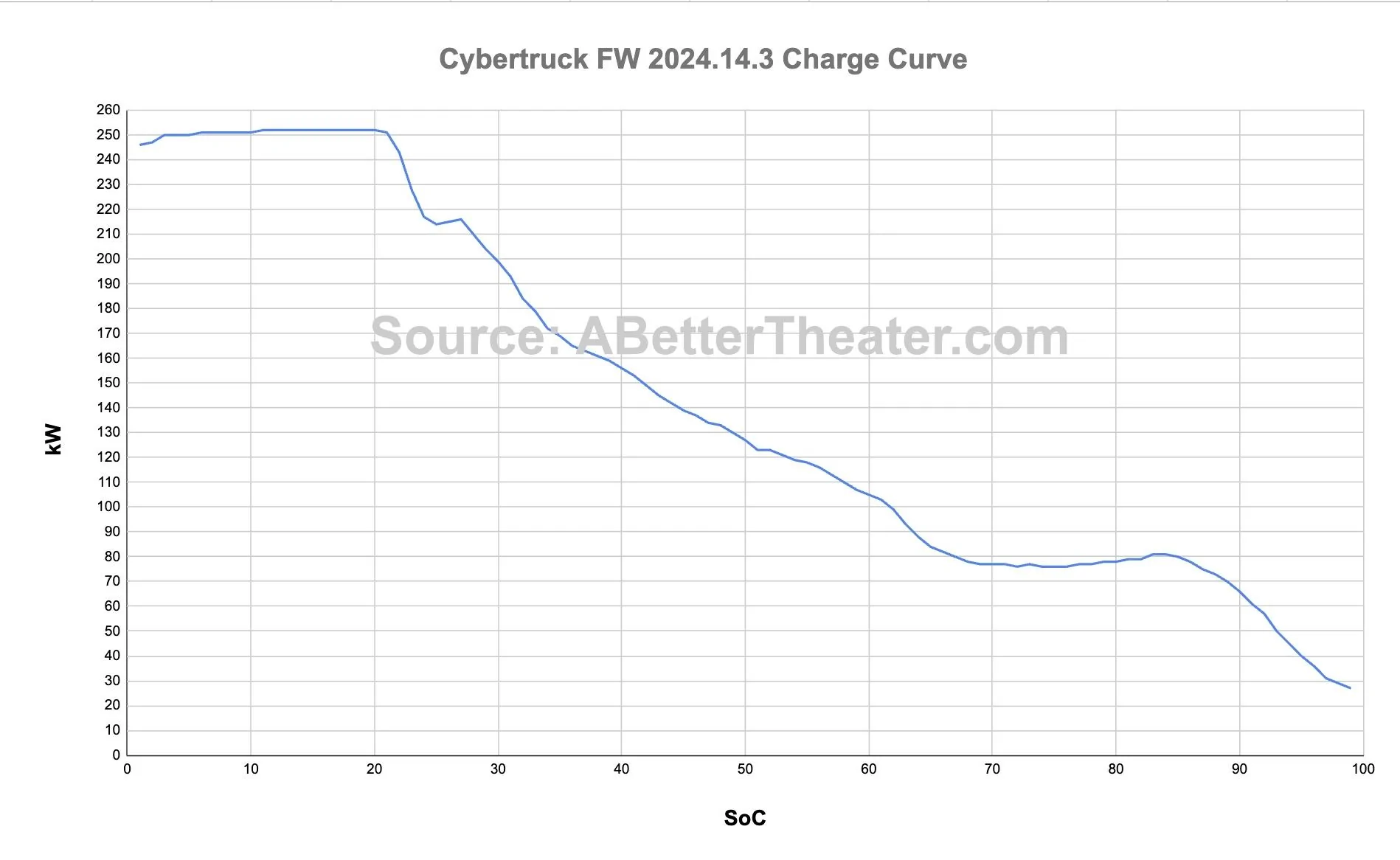
-Truck charges fast under 30% and then slows down. Then slows down again over 50% or 60%. I don’t remember which. Look into the charge curve or I am sure some of the guys on her can clarify that one. It charges at several percent a minute in that lower range. Then the higher percent the battery has the slower it charges. This is the difficult part when you are new. With ICE vehicles you always fill them up. It feels wrong at first getting back into the truck at only 35% or 40% to drive an hour and do it again. But the truck knows what it is doing and it will tell you when you have enough charge to continue your trip. I usually give another 5% or so for my own peace of mind, but it really is quicker to make more of those little stops as you will see your charge times down around 10 or 12 mins. If you try to go to fewer stops it shoots up to 40 or 50 mins per stop really quick.
-Other cools things with nav. After putting the address in it will show you an overview of the trip. That is when you can select which type of trip you want, as I mentioned above. You can also select any of the supercharger stops and it will give you more detailed information about the supercharger and what immunities are available there. Kind of nice for planning meals and things.
-if you sync your calendar with your truck then it will automatically pull in the address of your meeting and plan your trip for you. As long as you have the address in the meeting invite. So if you have a meeting at 10AM, you get in the truck around 9:30AM, it is a 20 min drive, then it will have the programmed directions already loaded on the navigation system when you get in. I find myself in a hurry from place to place frequently and this helps a lot. My wife makes most of our plans and I don’t always know exactly where we are going until she gets in the truck. Drives me crazy waiting for the address, not that any of us ever have to wait on our wives to get in the truck to leave. LOL. My wife is incredible and now she puts the address into the calendar invite that she sends me for any family trip. That way when I get in the truck, and begin my wait, the address is already in there. One of those little stress relievers and time savers that people don’t seem to talk T about. Killer feature though.
-You can schedule trips on the Tesla app and send the directions to your truck.
-You can also look up directions in Google maps or I think other map apps, and then you can hit the button you would normally use to text the address to somebody and it gives you the option for the Tesla app. If you click it then it will send the Google maps directions to your truck navigation.
Long post. Sorry for all the rambling , but these are neat little features that I didn’t know about, and have learned over the last few months. The longer I own the truck the more I learn and the more I love it. Has its quirks but it is incredible the way Tesla does things a little different than everybody else to make your life easier. Even the way the air works and how you point on the screen where you want the air to blow. Got back in my old truck yesterday and it seemed dumb to have to aim each vent individually and then hold my hands in front of it to see where it is blowing until I got them where I wanted them. I could also smell so much of the world around me. With the hospital grade HEPA filtration in the cybertruck I never smell anything. That has amazed my family. All the little things that people don’t talk about are simply incredible. I will stop my novel here. Good luck. You are going to love this thing.


CyberT

Well-known member
Joined
May 18, 2020
Threads
23
Messages
673
Reaction score
1,417
Location
Orange County, CA
Vehicles
2024 Cybertruck AWD and 2018 Model 3 LR RWD
Occupation
Service Technician
Country flag
Thanks man that does help! I am thinking about taking a trip from Houston to Destin (over 500 miles) and figure I will have to stop around 4 times which isnt so bad
You are going to love this road trip, especially with FSD. I just got home from a 4700 mile trip (CA > TN and back), I drove less than 2 miles the entire time, FSD made the trip relaxing. Pro tip, get a phone mount that clips to the top left of the screen (so you are looking straight ahead) and enjoy your favorite shows, BUT always, pay attention ;)

As for charging along the way, it sounds counterintuitive, but you want to charge more often, you spend less time overall charging if you charge enough to get to the next Supercharger.

On V3 (250kw) and V4 (350kw) you will max out your charging curve to around 35% ish. When you start charging up over 50% is when the curve really starts to drop and is totally fine if you want a longer stop like to eat lunch but during my long trip I was mostly stoping for 12 minutes at a time, just enough for a coffee and bathroom break, then drive about 1.5 hours to the next stop.

Most of my drive was between 77 and 80 mph with a few hundred pounds of gear in the vault, and I was averaging 417wh/mi. The Trip planner was so accurate that I felt comfortable arriving at superchargers in the 7-10% range to maximize the charging speed.
 

CyberGus

Well-known member
First Name
Gus
Joined
May 22, 2021
Threads
91
Messages
10,240
Reaction score
33,894
Location
Austin, TX
Vehicles
1981 DeLorean, 2024 Cybertruck
Occupation
IT Specialist
Country flag
Here is a sample charge curve:

Tesla Cybertruck Newbie Range Question image-4-30-24-at-8-28%E2%80%AFpm-jpeg


Think of the battery like a theater: the more people that are seated, the harder it is to find an open seat. So the "more full" the battery is, the harder it is to add more energy. The charge rate is automatically tapered down to avoid damage and promote longevity.

For maximum charge speed, you need to roll up to the charger just as you hit 0%, hahahaha. I guess it depends on your risk tolerance. (FYI, there's no harm to the battery to go below 20%, but the computer will start nagging you below this level to help you avoid being stranded.)
 

ABILISK

Well-known member
Joined
Nov 6, 2024
Threads
22
Messages
2,133
Reaction score
3,865
Location
DFW
Website
ts.la
Vehicles
ā€˜24 Beast
Country flag
Pro tip, get a phone mount that clips to the top left of the screen (so you are looking straight ahead) and enjoy your favorite shows, BUT always, pay attention ;)
I’d say it’s about time for an intermediate step towards unsupervised FSD. Like leave me alone on the freeway. Or at least any freeway that isn’t 5 lanes wide and during rush hour.
 

kpanda17

Well-known member
Joined
Jun 8, 2023
Threads
25
Messages
990
Reaction score
1,007
Location
USA
Vehicles
Tesla Model 3RWD, Tesla Model MYP
Country flag
First step is understanding it. There’s lots of variables that affect your Wh/mi like how hard you accelerate, the incline, the wind, what you’re towing or hailing, etc. I drive kinda fast but nothing too crazy (in general). My lifetime Wh/mi is 479.

The equation for calculating your real world range: battery pack size (in kWh) divided by kWh/mi. Finding kWh/mi is easy. Divide your Wh/mi by 1,000. For me, that’s 0.479.

CT has a 123 kWh battery pack. Take my lifetime usage: 123/0.479 = 256.79 mi range. Although I only charge to 80%, only giving me 98.40 usable kWhs… 98.40/0.479 = 205.43 mi range.

Say I’m on a road trip and I’m at, say, 64% state of charge. Now I find 64% of 123 kWh (78.72), then do the math. 78.72/0.479 = 164.34 miles. If the supercharger is 170 miles away, I’m in trouble. You can play with the numbers and find out what Wh/mi you’ll need to get there. 78.72/0.463 = 170.02, so I’d certainly need to keep it below 463 Wh/mi to make it.

Knowing this is particularly useful when towing or hauling heavy loads. It’s not particularly hard to pull over 1,000 Wh/mi when doing truck stuff. If you’re someone who keeps your screen/app on miles instead of percentage, that number will fall like a ton of bricks and be nowhere close to real. Percentage always is.

Here are the numbers to shoot for if you want the actual quoted ranges:
Beast A/S (320 mi range): 384 Wh/mi
Beast A/T (301 mi range): 408 Wh/mi
AWD A/S (325 mi range): 378 Wh/mi
AWD A/T (314 mi range): 391 Wh/mi
all of the above, great advice
but more importantly, learn the Tesla in-vehicle Energy app
it will show you how you are driving vs efficiency/consumption
its an eye opener that aggressive and/or high speed driving kills range
using the above, see which wh/mile relates to the model you are driving
alter your driving behavior so that, the Energy app show your consumption as close to the vehicles wh/mile rating
its that simple
 

Jhodgesatmb

Well-known member
First Name
Jack
Joined
Dec 1, 2019
Threads
89
Messages
6,487
Reaction score
9,025
Location
San Francisco Bay area
Website
www.arbor-studios.com
Vehicles
Tesla Cybertruck FS AWD, Tesla Model Y LR
Occupation
Retired AI researcher
Country flag
I use the 20-80 type rule for every day driving (but I generally have my charging set to 65 because I don’t drive very far every day). On trips I’ll increase the charge range to 10-85 even if I stop well before 85. In some places in the west (at least) we sometimes even go higher in the winter when battery charge depletion goes up.

Btw, the last time I checked my lifetime AWD/AT energy use was closer to .350 kWh/mile. I drive the speed limit and am a 1-pedal driver.
Sponsored


Top