Sponsored

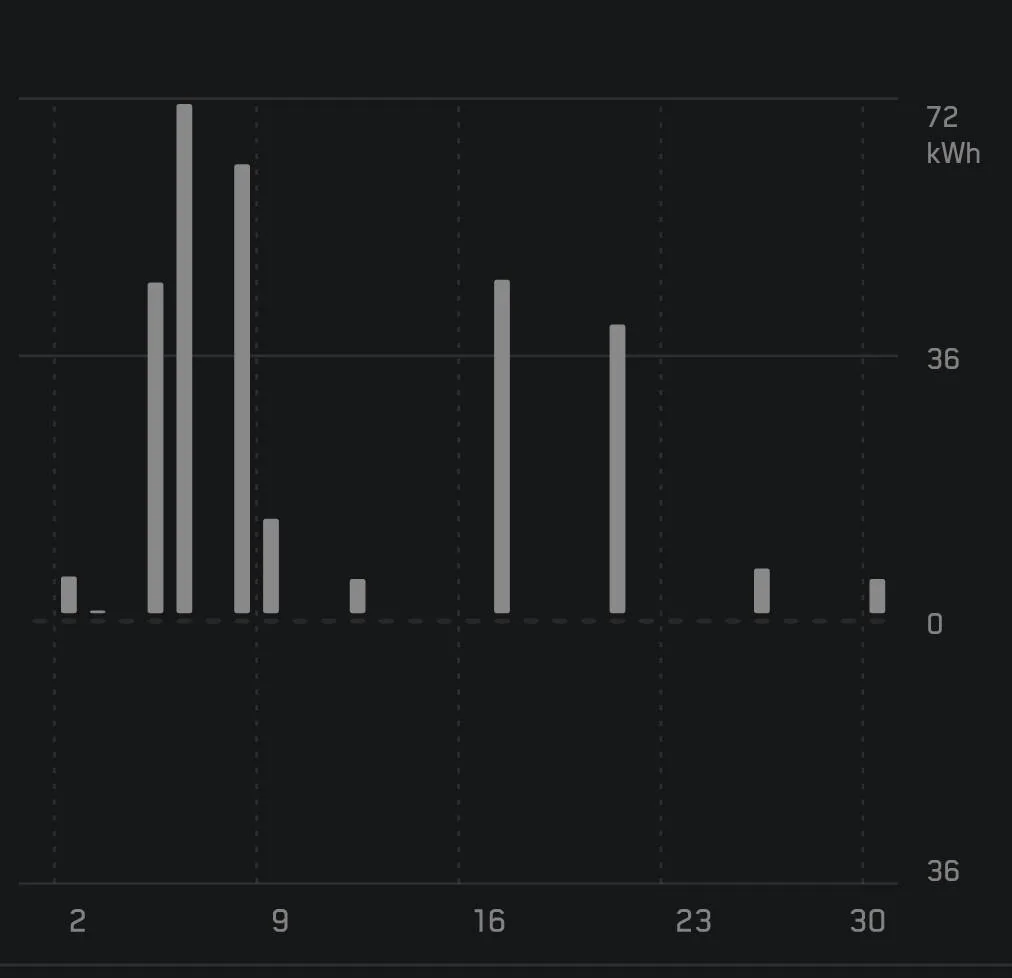
Left CT plugged in for a week while on vacation, 2-10kWh per day

OP
OP

jbtfd

Well-known member
First Name
jbtfd
Joined
Jun 1, 2025
Threads
11
Messages
60
Reaction score
37
Location
canada
Vehicles
cybertruck
Country flag
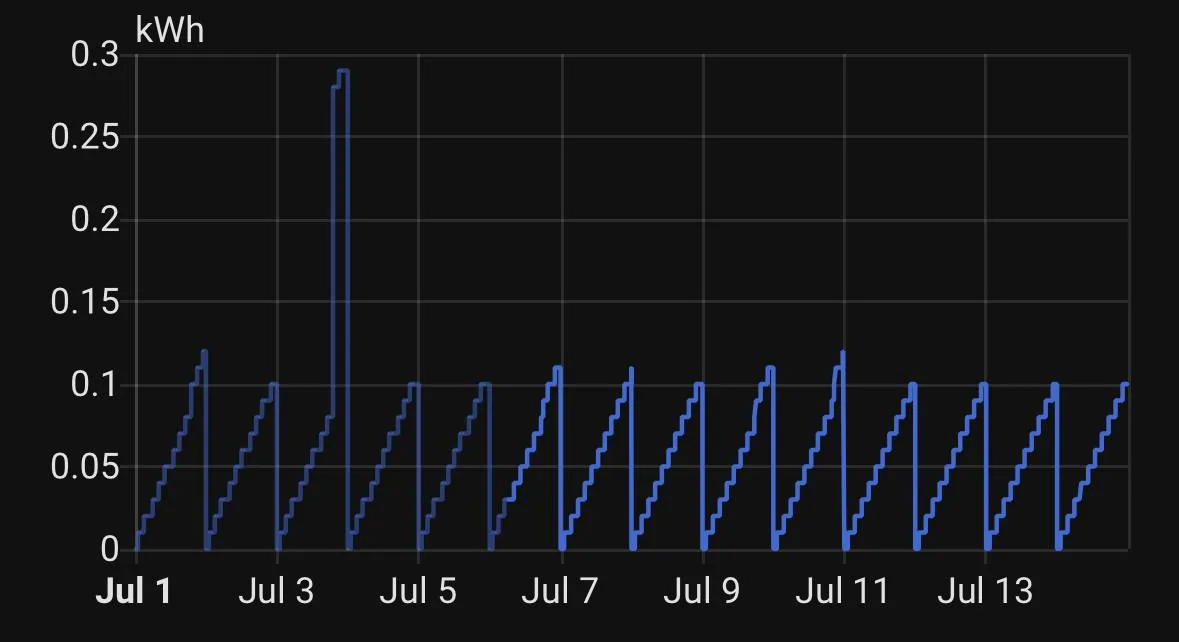
I got home today from a two week vacation. My truck was at 80% when I left and I turned the charge limit down to 50% so it wouldn’t charge while I was gone. It was at 70% today.

I have an eGauge power meter monitoring the circuit for the UWC. There is a constant four watt draw while idle which adds up to 96 watt hours a day.

Here is a graph of daily energy consumption during the two weeks:
IMG_1183.jpeg

Looks like it sat idle for all but one night. I was expecting the truck to draw more shore powder to save battery consumption.
that’s a really good idea, I should have dropped the max charge to 50% when I left

Now I’m not sure if my 8-10 kWh per day is out of whack or not while it was plugged in the whole time

I have a service appointment in August I’ll ask the service tech then and report back
Sponsored

 

mongo

Well-known member
Joined
May 27, 2024
Threads
5
Messages
4,527
Reaction score
5,508
Location
SE Michigan
Vehicles
Cyberbeast
Country flag
that’s a really good idea, I should have dropped the max charge to 50% when I left

Now I’m not sure if my 8-10 kWh per day is out of whack or not while it was plugged in the whole time

I have a service appointment in August I’ll ask the service tech then and report back
Mine goes days without charging if I leave it alone.
June:
Tesla Cybertruck Left CT plugged in for a week while on vacation, 2-10kWh per day SmartSelect_20250717_085710_Tesla
 

SanJuanCT

Member
First Name
Steve
Joined
Jun 14, 2025
Threads
0
Messages
15
Reaction score
13
Location
Telluride, CO.
Vehicles
2025 AWD Cybertruck, 2022 MYLR
Occupation
Business Owner
Country flag
I’m experiencing similar drain. Dropped the truck off to get wrapped Sunday night at 56% charge and this morning it’s at 28%. Sentry and COP are off. No accessory power is on. It’s like the truck has not gone to sleep the entire time it’s been at the shop.
 
OP
OP

jbtfd

Well-known member
First Name
jbtfd
Joined
Jun 1, 2025
Threads
11
Messages
60
Reaction score
37
Location
canada
Vehicles
cybertruck
Country flag
Mine goes days without charging if I leave it alone.
June:
SmartSelect_20250717_085710_Tesla.jpg
thats awesome no idea how to replicate that with mine... ive turned off everything including cabin protection at home and it's charging 4 kHw overnight


Solardude

Member
First Name
Larry
Joined
Mar 12, 2025
Threads
1
Messages
14
Reaction score
24
Location
Florida
Vehicles
2024 cybertruck
Occupation
Retired
Country flag
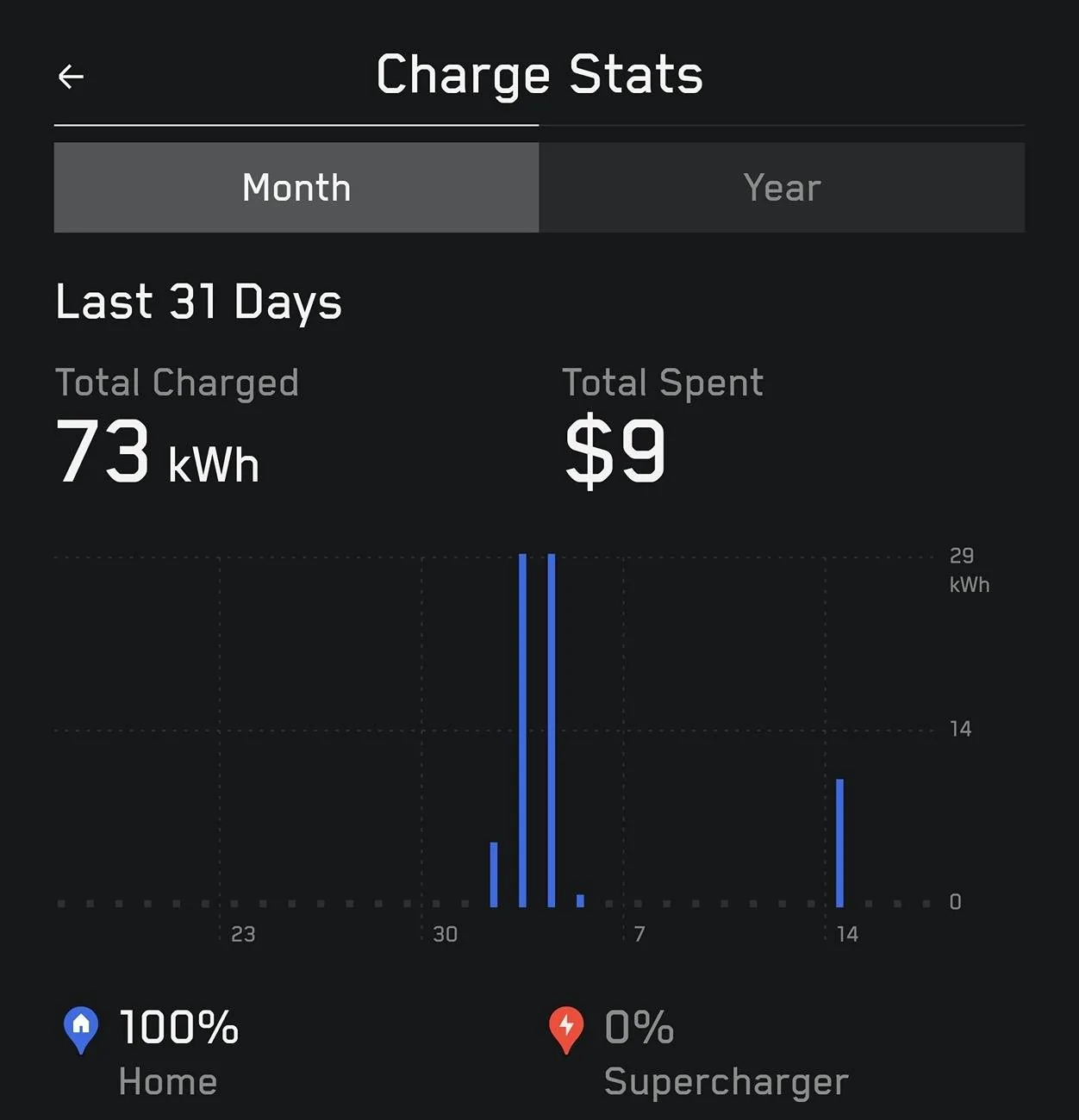
I've been on vacation since May 31st. I've had three software updates since we left. I noticed about 2.8 Miles a day lost. We got down almost 100 miles and had one of our children plug it in. Here's the charging it did so far on its own. We left with 260 miles range (80% charge). No sentry or climate settings on. These suckers lose alot of charge just sitting!

Tesla Cybertruck Left CT plugged in for a week while on vacation, 2-10kWh per day Screenshot_20250717_085708_Tesla
 

SanJuanCT

Member
First Name
Steve
Joined
Jun 14, 2025
Threads
0
Messages
15
Reaction score
13
Location
Telluride, CO.
Vehicles
2025 AWD Cybertruck, 2022 MYLR
Occupation
Business Owner
Country flag
Looks like there was a major bug involving the TCU not allowing the truck to go into sleep mode that was addressed in firmware 14.6 earlier this year. That’s before I had my truck but perhaps the bug is back in the latest update?

Did anyone have this issue early this year and noticed it improved after that update?
 

mongo

Well-known member
Joined
May 27, 2024
Threads
5
Messages
4,527
Reaction score
5,508
Location
SE Michigan
Vehicles
Cyberbeast
Country flag
thats awesome no idea how to replicate that with mine... ive turned off everything including cabin protection at home and it's charging 4 kHw overnight
Did you normally have scheduled departure (or charging) enabled?
 
OP
OP

jbtfd

Well-known member
First Name
jbtfd
Joined
Jun 1, 2025
Threads
11
Messages
60
Reaction score
37
Location
canada
Vehicles
cybertruck
Country flag
i dont have a scheduled departure or anything like that on the car, i just pull into garage and plug it in, it always charges until around 78-80%

but this time i was away for a week and left it plugged in, it was doing 8-10 kWh each day while i was away
 

mongo

Well-known member
Joined
May 27, 2024
Threads
5
Messages
4,527
Reaction score
5,508
Location
SE Michigan
Vehicles
Cyberbeast
Country flag
i dont have a scheduled departure or anything like that on the car, i just pull into garage and plug it in, it always charges until around 78-80%

but this time i was away for a week and left it plugged in, it was doing 8-10 kWh each day while i was away
It may be failing to sleep due to internal software issue and in need of a reset (press both scroll wheels until screen goes dark) and power off (Controls > Safety > Power Off).


CyberGus

Well-known member
First Name
Gus
Joined
May 22, 2021
Threads
91
Messages
10,248
Reaction score
33,923
Location
Austin, TX
Vehicles
1981 DeLorean, 2024 Cybertruck
Occupation
IT Specialist
Country flag
I got home today from a two week vacation. My truck was at 80% when I left and I turned the charge limit down to 50% so it wouldn’t charge while I was gone. It was at 70% today.

I have an eGauge power meter monitoring the circuit for the UWC. There is a constant four watt draw while idle which adds up to 96 watt hours a day.

Here is a graph of daily energy consumption during the two weeks:
IMG_1183.jpeg

Looks like it sat idle for all but one night. I was expecting the truck to draw more shore powder to save battery consumption.
This is my experience as well. When the truck sleeps, it consumes less than 1% per day (more like 1% every 2 days). In the app, you should see "Asleep for xxx minutes/hours/days", if it just says "Parked" then it is still awake.

If yours is using significantly more than that while idle, then it is not sleeping. The trick is to figure out why.

The early Cybertrucks never went to sleep, but this was fixed in a firmware update. I suppose there could be any number of minor malfunctions that might keep it awake. ?‍♂

(I only see the truck using shore power when pre-conditioning, or charging.)
 

CyberGus

Well-known member
First Name
Gus
Joined
May 22, 2021
Threads
91
Messages
10,248
Reaction score
33,923
Location
Austin, TX
Vehicles
1981 DeLorean, 2024 Cybertruck
Occupation
IT Specialist
Country flag
The Tessie app help page includes helpful information on this topic:


To eliminate phantom drain, simply go down the list.

Disable Sentry Mode

Sentry Mode will keep the vehicle awake to monitor the surroundings.

Disable Cabin Overheat Protection

Cabin Overheat Protection will keep the vehicle awake to monitor and cool the interior.

Disable Schedules

There is a Tesla firmware bug that may keep the vehicle awake when schedules are enabled.

You can disable schedules in the vehicle, Tesla app or Tessie app under Schedule.

Disable Data Sharing

When data sharing is enabled, the vehicle will wake and upload data to Tesla in the background.

You can disable it in the vehicle under Software > Data Sharing.

Disable Keep Accessory Power On

USB ports and low voltage outlets may consume energy even when no devices are connected.

You can disable it in the vehicle under Charging > Keep Accessory Power On.

Install pending software updates

The vehicle may stay wake when an update is pending but hasn't been fully downloaded and installed.

Move devices outside of Bluetooth range

When a Bluetooth connection occurs, the vehicle may wake up automatically.

Update the Tesla app on your devices

Certain Tesla app versions have a bug which will continuously wake the vehicle.

Move key fobs away from the vehicle

When a key fob is detected near the vehicle (including vertically, in a room above or below the vehicle), the vehicle may wake up automatically.

Improve the WiFi signal

Weak WiFi connections can cause the vehicle to stay awake due to constant disconnections and reconnections. You can turn off WiFi in the vehicle or move your WiFi router to improve the signal.

Disable Summon Standby

Summon Standby will keep the vehicle awake. You can disable it in the vehicle under Autopilot.

Restart the vehicle

There is a known computer issue that can prevent the vehicle from sleeping. You can restart the vehicle by pressing both scroll wheel buttons on the steering wheel until the screen turns off.

Power cycle the vehicle

Underlying firmware issues can prevent the vehicle from sleeping. You can perform a power cycle to eliminate them.

Contact Tesla

Tesla can remotely diagnose the issue and determine if there's a hardware or firmware issue.


https://help.tessie.com/article/77-eliminating-phantom-drain
 

mongo

Well-known member
Joined
May 27, 2024
Threads
5
Messages
4,527
Reaction score
5,508
Location
SE Michigan
Vehicles
Cyberbeast
Country flag
This is my experience as well. When the truck sleeps, it consumes less than 1% per day (more like 1% every 2 days). In the app, you should see "Asleep for xxx minutes/hours/days", if it just says "Parked" then it is still awake.

If yours is using significantly more than that while idle, then it is not sleeping. The trick is to figure out why.

The early Cybertrucks never went to sleep, but this was fixed in a firmware update. I suppose there could be any number of minor malfunctions that might keep it awake. ?‍♂

(I only see the truck using shore power when pre-conditioning, or charging.)
Great point!
Note that tapping the truck in the app wakes it up.
Asleep:
Tesla Cybertruck Left CT plugged in for a week while on vacation, 2-10kWh per day SmartSelect_20250717_113016_Tesla

After tap:
Tesla Cybertruck Left CT plugged in for a week while on vacation, 2-10kWh per day SmartSelect_20250717_113129_Tesla

You can also see the battery stats are greyed out when the truck hasn't been talked to recently.
 

AO-Pete

Well-known member
Site Sponsor
First Name
Pete
Joined
May 6, 2024
Threads
17
Messages
441
Reaction score
615
Location
Dallas/Fort Worth
Website
abstractocean.com
Vehicles
2024 CT, 2024 Model 3 Highland, 2022 R1T
Occupation
Founder & CEO
Country flag
I'm loosing 2-3% per day when it's parked in the garage at home, no sentry, no schedules, no COP, nothing to keep it awake beyond the usual stuff that's also active in the Model Y, which is generally <1% per day. No question CT is more thirsty when it's busy doing nothing, but I can't even be bothered to bring this to service's attention at the moment, they give no $hits.
 

machmax

Well-known member
First Name
JP
Joined
Nov 10, 2024
Threads
7
Messages
101
Reaction score
100
Location
Tampa, FL
Vehicles
‘24 CT (Non-FS), ‘15 Model S
Occupation
retired
Country flag
If not driving for a while such as vacation, keep it plugged in to keep both batts charged and always good idea to drop it down to 50% as lithium-ion batteries are best stored around that level. That’s why when you buy new rechargeable li-on batts they don’t come fully charged.
Sponsored


Top