Sponsored

Blurry interior drivers camera, digital mirror and FSD nags advice

That Beast Mode

Well-known member
First Name
Phil
Joined
Mar 15, 2025
Threads
14
Messages
1,349
Reaction score
1,799
Location
New Jersey
Vehicles
Cybertruck
Country flag
Hey guys, so I wanted to get some feedback on an issue. I have posted before about my FSD at night giving me constant nags to move the wheel (no hats or glasses) and it saying attention monitoring unavailable. I recently installed the hanshow digital mirror, the new version.

Well I think I figured out why I was getting the constant nags - i checked the cameras on the truck and the interior driver facing camera is super blurry (yes I wiped the lens clean to make sure). I think it just cant see well and that's why im getting the nags. I posted about this issue way before I ever got the digital mirror, I've just never checked the trucks cameras until today. I know there is no way they are related. I even unplugged the mirrors power and checked to make sure.

To my point, I made a service appt to have it looked at, do you think they are going to say it is related to the digital mirror somehow? Should I take the mirror off and move the wires? Has anyone else had this problem with the interior camera being so blurry?
Thanks
Sponsored
 

eser50

Well-known member
First Name
Enrique
Joined
Nov 7, 2024
Threads
0
Messages
78
Reaction score
62
Location
Oceanside, CA
Vehicles
'24 AWD CT, '18 Model S, '16 Mustang GT, '19 XC90
Country flag
Can you post a picture of what the cabin camera preview looks like? If it's blurry there, it's likely an issue with the camera itself. Otherwise, it could likely be the mirror.

Take off the mirror and move the wires, that'll be the first thing they'll point at and rightly so.

Sounds like a have a separate issue, I have the v1 Hanshow mirror that tends to give me problems when it's hot out.
My guess is that it overheats and causes the e-fuse for the inside camera's IR light to go out which causes problems for the cabin camera's visbility. To be fair, I have both my radar detector and mirror tapped into the 12v at the forward facing camera area.
 

JCERRN

Well-known member
First Name
J
Joined
May 3, 2021
Threads
33
Messages
1,243
Reaction score
1,422
Location
Around
Vehicles
Yeah
Country flag
I would definitely put back the original mirror before you go to service
 
OP
OP
That Beast Mode

That Beast Mode

Well-known member
First Name
Phil
Joined
Mar 15, 2025
Threads
14
Messages
1,349
Reaction score
1,799
Location
New Jersey
Vehicles
Cybertruck
Country flag
Can you post a picture of what the cabin camera preview looks like? If it's blurry there, it's likely an issue with the camera itself. Otherwise, it could likely be the mirror.

Take off the mirror and move the wires, that'll be the first thing they'll point at and rightly so.

Sounds like a have a separate issue, I have the v1 Hanshow mirror that tends to give me problems when it's hot out.
My guess is that it overheats and causes the e-fuse for the inside camera's IR light to go out which causes problems for the cabin camera's visbility. To be fair, I have both my radar detector and mirror tapped into the 12v at the forward facing camera area.
I disconnected the power from the mirror just to make sure, eventhough I was certain it had nothing to do with it. I was having issues with the FSD attention monitoring way before I even got the mirror. I just never checked the trucks cameras to connect the dots.

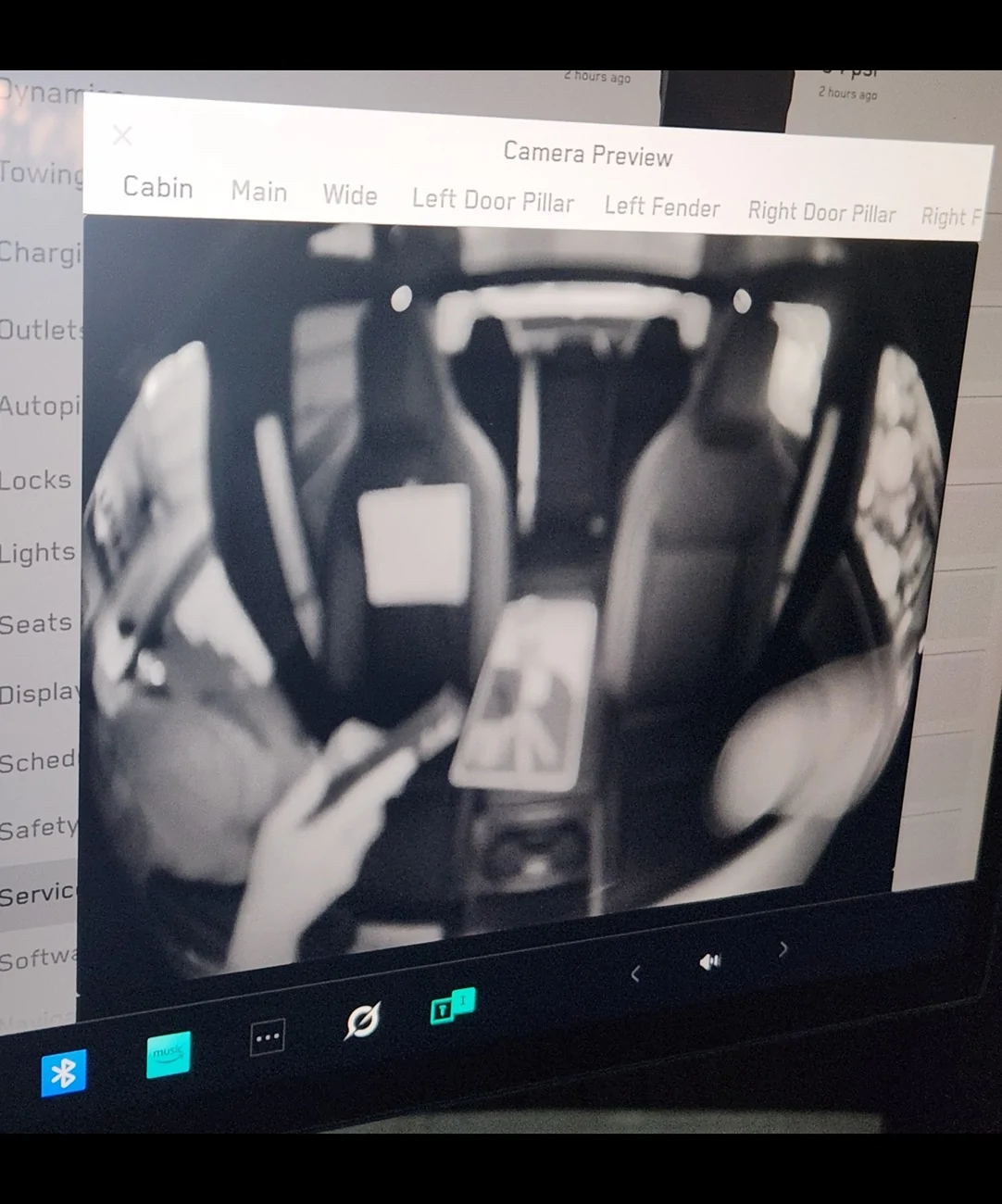
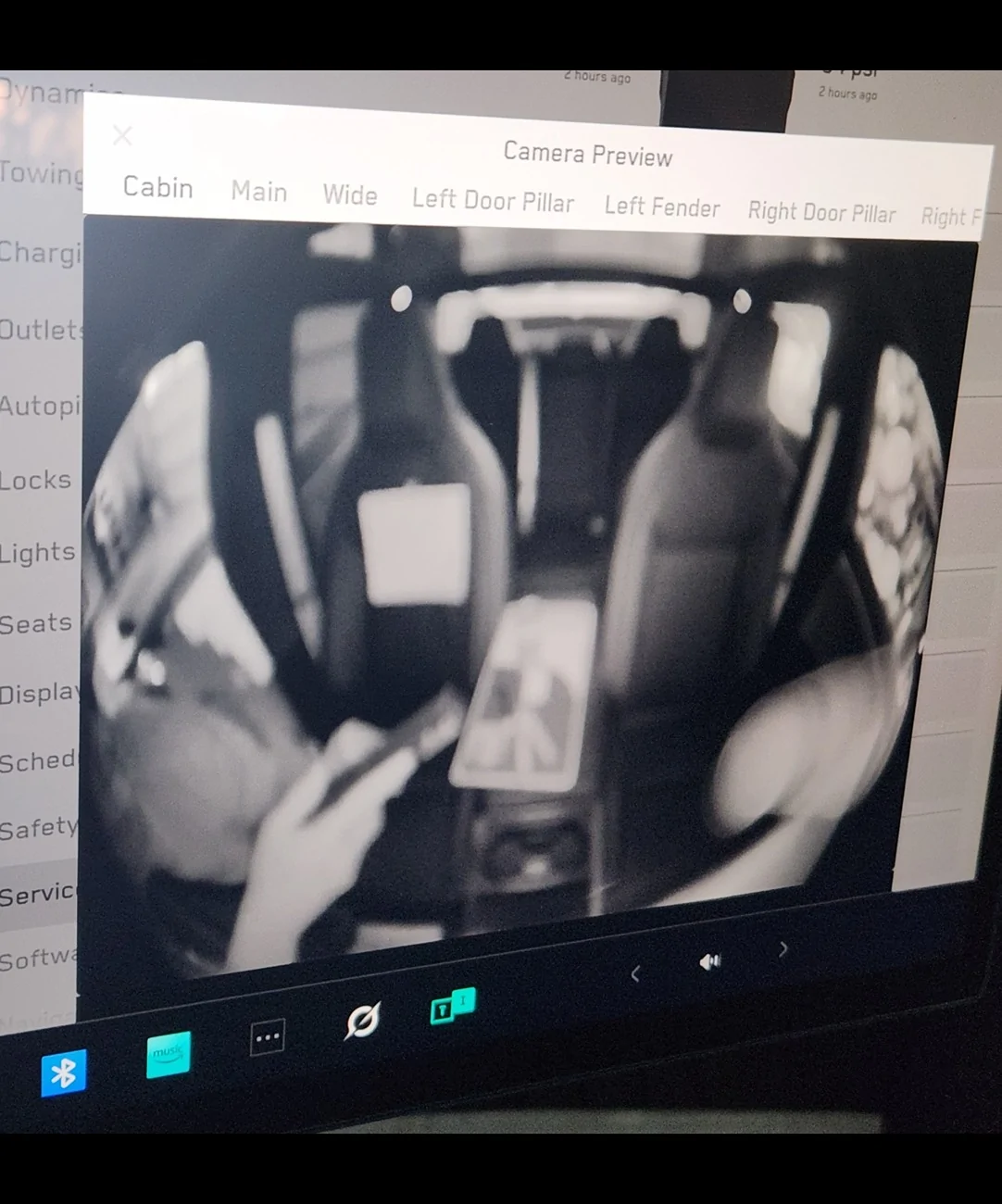
Here is a pic of what the interior camera is seeing. I even taped a note to the seat which you cant read at all, also, there is a can of soda and a ups envelope that you cant even make it out.


Tesla Cybertruck Blurry interior drivers camera, digital mirror and FSD nags advice Screenshot_20250827_152056_Gallery


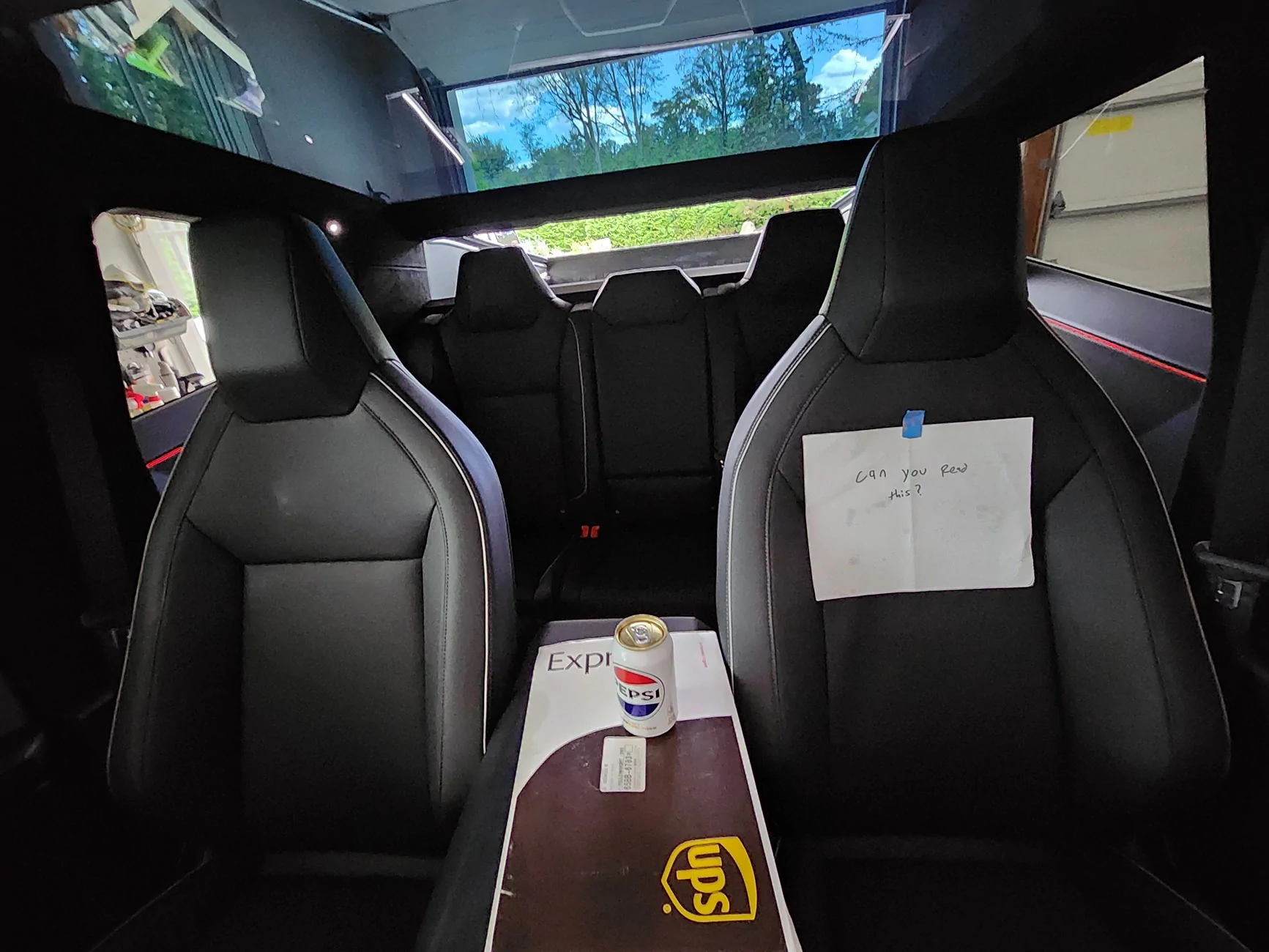
Here is a pic from my phone camera of roughly the same angle where u can clearly see what everything looks like. For some reason my phone flipped the pic of the screen, but they are the same.
Tesla Cybertruck Blurry interior drivers camera, digital mirror and FSD nags advice 20250827_150749
 

Mal

Well-known member
First Name
Mal
Joined
Feb 13, 2024
Threads
31
Messages
637
Reaction score
1,619
Location
WA
Vehicles
Foundation CB "Rocinante"
Country flag
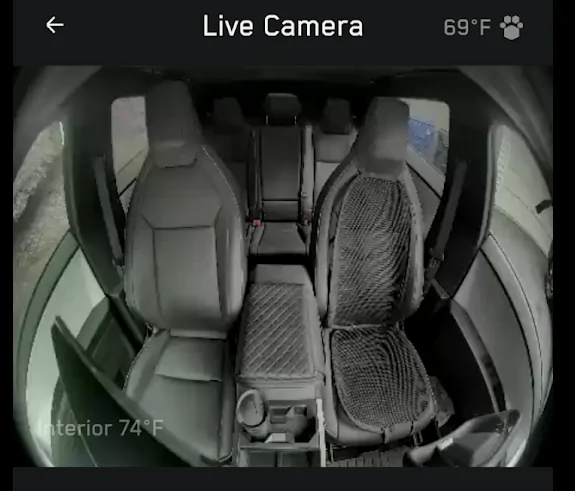
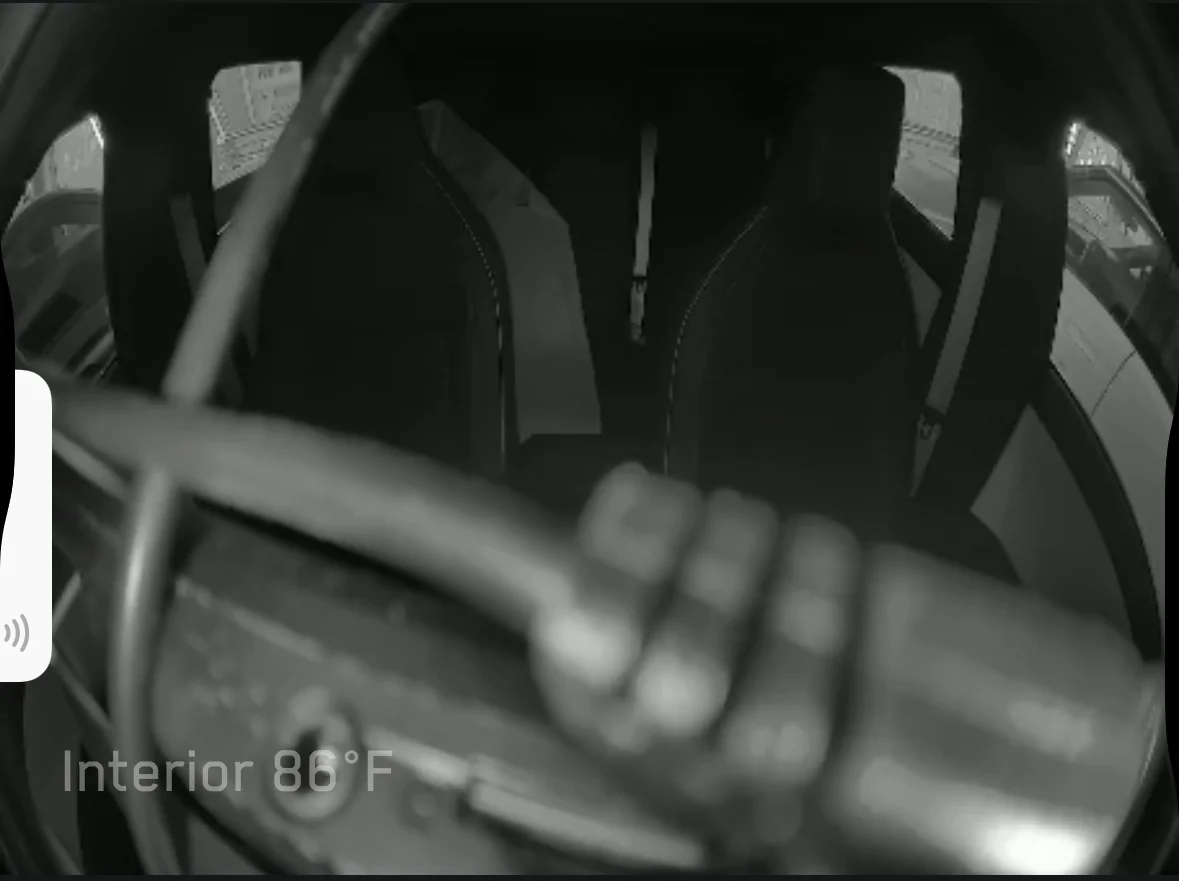
That's got to be at least part of the problem. Here's my interior camera, from the app:

Tesla Cybertruck Blurry interior drivers camera, digital mirror and FSD nags advice 1756324409839-f5


Not perfect, but much clearer than yours. And I get zero nags, day or night (unless I really push it).


OP
OP
That Beast Mode

That Beast Mode

Well-known member
First Name
Phil
Joined
Mar 15, 2025
Threads
14
Messages
1,349
Reaction score
1,799
Location
New Jersey
Vehicles
Cybertruck
Country flag
That's got to be at least part of the problem. Here's my interior camera, from the app:

1756324409839-f5.png


Not perfect, but much clearer than yours. And I get zero nags, day or night (unless I really push it).
Yeah that's a night and day difference between mine and yours. Yours is perfectly clear. I really feel that's the issue I've been having all along. i know a lot of other people post their fsd works fine just like yours. Mine never works at night and I know its not me because im doing what I normally do, paying attention.

To all the others saying they have the same issue with fsd and constant nags check your cabin camera.
 

JCERRN

Well-known member
First Name
J
Joined
May 3, 2021
Threads
33
Messages
1,243
Reaction score
1,422
Location
Around
Vehicles
Yeah
Country flag
Yeah that's a night and day difference between mine and yours. Yours is perfectly clear. I really feel that's the issue I've been having all along. i know a lot of other people post their fsd works fine just like yours. Mine never works at night and I know its not me because im doing what I normally do, paying attention.

To all the others saying they have the same issue with fsd and constant nags check your cabin camera.
Id say likely is the case
 

eswimm

Well-known member
Joined
Jun 6, 2024
Threads
3
Messages
556
Reaction score
995
Location
Charlotte, NC
Vehicles
Model Y, Cybertruck
Country flag
Here’s mine, with a digital mirror attached, I get nag free FSD.

You shouldn’t need to detach it, but it couldn’t hurt.

y
Tesla Cybertruck Blurry interior drivers camera, digital mirror and FSD nags advice IMG_3356
 
OP
OP
That Beast Mode

That Beast Mode

Well-known member
First Name
Phil
Joined
Mar 15, 2025
Threads
14
Messages
1,349
Reaction score
1,799
Location
New Jersey
Vehicles
Cybertruck
Country flag
Here’s mine, with a digital mirror attached, I get nag free FSD.

You shouldn’t need to detach it, but it couldn’t hurt.

y
IMG_3356.jpeg
Yeah yours is more clear than mine even with the cable in the way. I'm really hoping they replace the camera or something and it fixes the issue.

You're completely right, I really shouldn't have to remove the mirror cause anyone who's installed one knows there is absolutley no way it could cause that, you literally just feed a cable through a hole in the plastic, yet I dont want to get blamed for it and have to deal with defending myself.


eser50

Well-known member
First Name
Enrique
Joined
Nov 7, 2024
Threads
0
Messages
78
Reaction score
62
Location
Oceanside, CA
Vehicles
'24 AWD CT, '18 Model S, '16 Mustang GT, '19 XC90
Country flag
I disconnected the power from the mirror just to make sure, eventhough I was certain it had nothing to do with it. I was having issues with the FSD attention monitoring way before I even got the mirror. I just never checked the trucks cameras to connect the dots.

Here is a pic of what the interior camera is seeing. I even taped a note to the seat which you cant read at all, also, there is a can of soda and a ups envelope that you cant even make it out.


Screenshot_20250827_152056_Gallery.jpg


Here is a pic from my phone camera of roughly the same angle where u can clearly see what everything looks like. For some reason my phone flipped the pic of the screen, but they are the same.
20250827_150749.jpg
Oh wow, that is pretty bad. I think you're definitely in for a replacement.
Still, take off the mirror when you take it in so it becomes less of a pain in the ass for everyone. I always just take mine off whenever they'll be working on the front/cabin cameras.
 

mongo

Well-known member
Joined
May 27, 2024
Threads
5
Messages
4,527
Reaction score
5,508
Location
SE Michigan
Vehicles
Cyberbeast
Country flag
I disconnected the power from the mirror just to make sure, eventhough I was certain it had nothing to do with it. I was having issues with the FSD attention monitoring way before I even got the mirror. I just never checked the trucks cameras to connect the dots.

Here is a pic of what the interior camera is seeing. I even taped a note to the seat which you cant read at all, also, there is a can of soda and a ups envelope that you cant even make it out.


Screenshot_20250827_152056_Gallery.jpg


Here is a pic from my phone camera of roughly the same angle where u can clearly see what everything looks like. For some reason my phone flipped the pic of the screen, but they are the same.
20250827_150749.jpg
It lacks focus...
I think the lens came undone (or some such weirdness)
 

CT_AZ_4x4

Well-known member
First Name
Jay
Joined
May 22, 2024
Threads
46
Messages
840
Reaction score
1,406
Location
Scottsdale, AZ
Vehicles
AWD CT
Occupation
Self employed
Country flag
Hey guys, so I wanted to get some feedback on an issue. I have posted before about my FSD at night giving me constant nags to move the wheel (no hats or glasses) and it saying attention monitoring unavailable. I recently installed the hanshow digital mirror, the new version.

Well I think I figured out why I was getting the constant nags - i checked the cameras on the truck and the interior driver facing camera is super blurry (yes I wiped the lens clean to make sure). I think it just cant see well and that's why im getting the nags. I posted about this issue way before I ever got the digital mirror, I've just never checked the trucks cameras until today. I know there is no way they are related. I even unplugged the mirrors power and checked to make sure.

To my point, I made a service appt to have it looked at, do you think they are going to say it is related to the digital mirror somehow? Should I take the mirror off and move the wires? Has anyone else had this problem with the interior camera being so blurry?
Thanks
My service center tried to tell me that my digital rearview mirror was overheating the front camera housing, causing it to go into self-protection mode and shut down due to overheating.

The digital rearview only draws 11 watts. And there is airflow between the mirror and the front camera housing. And the front camera housing is encased in a plastic covering that will not allow transference of heat, especially from such a low-wattage device.

They asked me to remove the digital camera, and I did as a courtesy, and they had me sign a waiver that they would not be responsible for damage to the rearview.

Once they had the signed waiver the less-than-craftsman-like technician tore out my wiring for the digital rearview and intentionally tore some of the wiring apart. Even. Though. I. Had. Removed. The. Digital. Review.

It was entirely disconnected.

Of course this did not solve the issue because the rearview was not causing the front camera to overheat. So they destroyed my wiring without purpose and without cause.

Some of them seem to have zero troubleshooting/analytic ability and very few of them are craftsmen.
 
OP
OP
That Beast Mode

That Beast Mode

Well-known member
First Name
Phil
Joined
Mar 15, 2025
Threads
14
Messages
1,349
Reaction score
1,799
Location
New Jersey
Vehicles
Cybertruck
Country flag
My service center tried to tell me that my digital rearview mirror was overheating the front camera housing, causing it to go into self-protection mode and shut down due to overheating.

The digital rearview only draws 11 watts. And there is airflow between the mirror and the front camera housing. And the front camera housing is encased in a plastic covering that will not allow transference of heat, especially from such a low-wattage device.

They asked me to remove the digital camera, and I did as a courtesy, and they had me sign a waiver that they would not be responsible for damage to the rearview.

Once they had the signed waiver the less-than-craftsman-like technician tore out my wiring for the digital rearview and intentionally tore some of the wiring apart. Even. Though. I. Had. Removed. The. Digital. Review.

It was entirely disconnected.

Of course this did not solve the issue because the rearview was not causing the front camera to overheat. So they destroyed my wiring without purpose and without cause.

Some of them seem to have zero troubleshooting/analytic ability and very few of them are craftsmen.
Yikes... exactly what i was afraid of - really stretching to try and connect some dots that dont fit. So you removed the mirror and left the wires hanging there for it and they intentionally destroyed it?
 

CT_AZ_4x4

Well-known member
First Name
Jay
Joined
May 22, 2024
Threads
46
Messages
840
Reaction score
1,406
Location
Scottsdale, AZ
Vehicles
AWD CT
Occupation
Self employed
Country flag
Yikes... exactly what i was afraid of - really stretching to try and connect some dots that dont fit. So you removed the mirror and left the wires hanging there for it and they intentionally destroyed it?
Yes! Only after I was stupid enough to sign a waiver. They destroyed my digital rearview’s wiring intentionally.
Sponsored


Top