Sponsored

8% phantom discharge in 24 hours while parked at home without sentry mode

Vagis9780

Well-known member
First Name
David
Joined
Jan 25, 2021
Threads
10
Messages
193
Reaction score
202
Location
Louisiana
Vehicles
Cyber Truck
Occupation
Retired
Country flag
I’m seeing 8% battery drain in a day when parked at home without sentry mode. When parked outside without sentry mode, there is only 1% drain in 8-9 hours. I’m suspecting phone being nearby could be causing this but when I turn off phone Bluetooth at home, I see the same phantom drain. I didn’t change any settings on the Truck. It started happening a month ago. I’m taking it to service next week. WiFi signal is strong in the garage. I don’t know what else could be causing this! I don’t have any other Tesla apps on my phone. The truck is not sending any data through any other 3rd party apps. I don’t have climate control or any other settings enabled that could drain the battery. This happens on a good warm day as well.

The truck keeps making thud sound and wakes up often at home. I don’t check the App constantly but whenever I open after a few hours, the truck will be awake.

Any idea why this is happening?
Do you have “low-power” activated. Since turning, I see zero battery drain for days. You can also see when open your Tesla app, how long it has been since last “wakened”
Sponsored


Ken in Miami

Well-known member
First Name
Ken
Joined
Aug 29, 2024
Threads
4
Messages
355
Reaction score
449
Location
Miami, Fl.
Vehicles
2024 Foundation series
Occupation
Real Estate/ Agriculture
Country flag
Check your bed lights. While back I saw a glow from the bed so I turned off the bed light dimming the light all the way.
I have almost zero drain when not in use. Everything should turn off when you walk away.
 

REM

Well-known member
Joined
Dec 9, 2023
Threads
14
Messages
3,578
Reaction score
6,645
Location
NC
Vehicles
2020 Model 3 Standard Range++ & Diet Cybertruck, Dual Motor
Occupation
Professional Retard
Country flag
You guys need to also account for data sharing with Tesla. How else do you think FSD is being trained?

Takes quite a bit of power to upload hundred of GBs of data.
 
OP
OP

Cyber Man

Well-known member
Joined
Dec 30, 2023
Threads
11
Messages
1,049
Reaction score
2,259
Location
California
Vehicles
BMW X1, Porsche Cayenne, R1T Perf max, Cyberbeast
Country flag
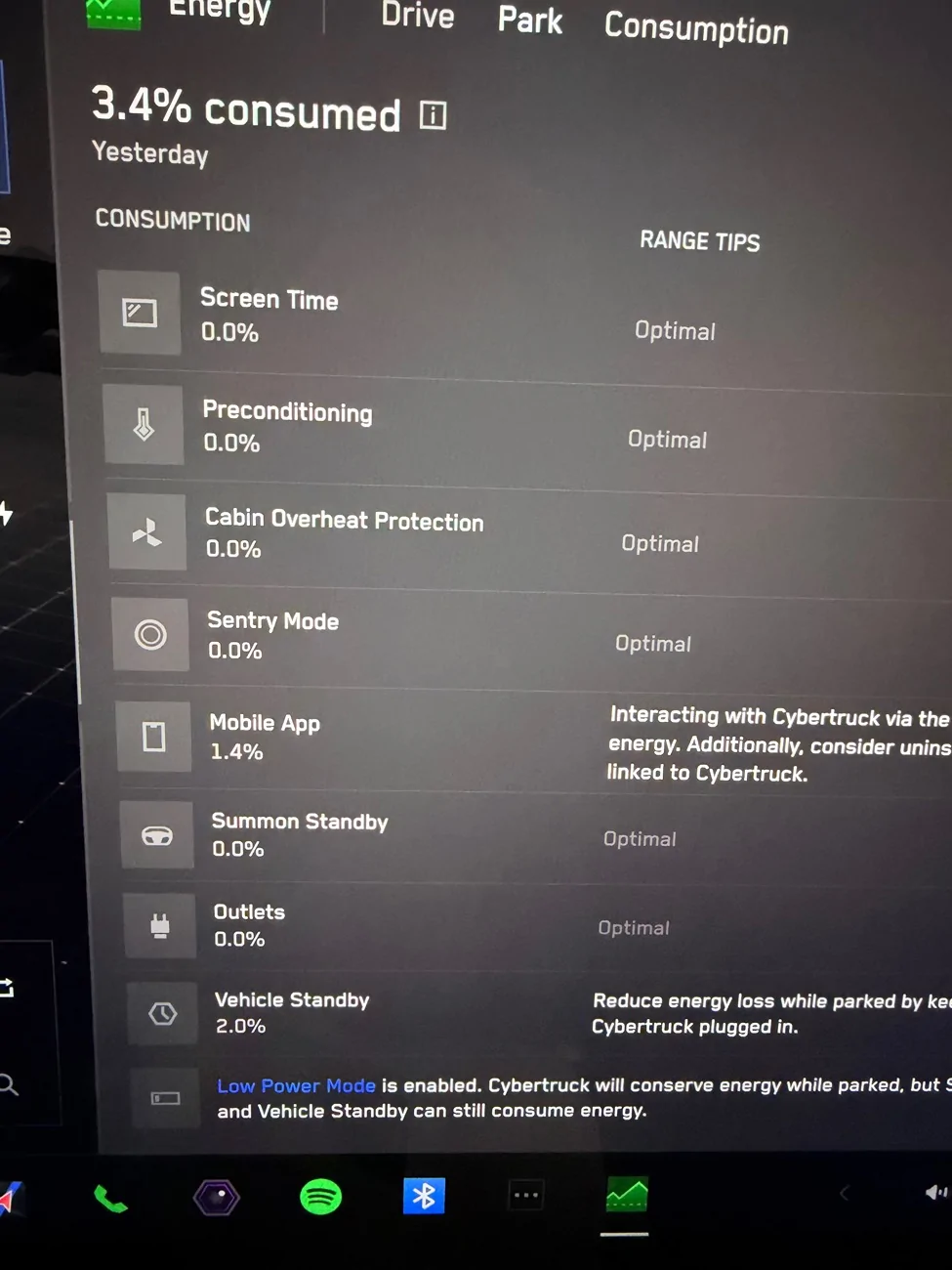
I’m using the Energy App in the Truck to see where the drain is happening. I have disabled each and every source of power consumption during idle, and I have enabled low power mode as well. The source appears to be “something” signaling to the truck to communicate with the phone and also do some background activity. Hope Service can get to the bottom of this. Here’s the screenshot of energy drain at Park when the Phone didn’t open the App at all for 12 hours. I saw 3% drain! It says “Mobile App” 1.4% and “Vehicle Standby” 2.0%. If I sign out of the App, I don’t see this drain!

Tesla Cybertruck 8% phantom discharge in 24 hours while parked at home without sentry mode IMG_6296
 
OP
OP

Cyber Man

Well-known member
Joined
Dec 30, 2023
Threads
11
Messages
1,049
Reaction score
2,259
Location
California
Vehicles
BMW X1, Porsche Cayenne, R1T Perf max, Cyberbeast
Country flag
You guys need to also account for data sharing with Tesla. How else do you think FSD is being trained?

Takes quite a bit of power to upload hundred of GBs of data.
You are right. I remember disabling the option to send FSD data, but I don’t see it in the settings anymore!
 
  • Like
Reactions: REM


mongo

Well-known member
Joined
May 27, 2024
Threads
5
Messages
4,522
Reaction score
5,502
Location
SE Michigan
Vehicles
Cyberbeast
Country flag
I’m seeing 8% battery drain in a day when parked at home without sentry mode. When parked outside without sentry mode, there is only 1% drain in 8-9 hours. I’m suspecting phone being nearby could be causing this but when I turn off phone Bluetooth at home, I see the same phantom drain. I didn’t change any settings on the Truck. It started happening a month ago. I’m taking it to service next week. WiFi signal is strong in the garage. I don’t know what else could be causing this! I don’t have any other Tesla apps on my phone. The truck is not sending any data through any other 3rd party apps. I don’t have climate control or any other settings enabled that could drain the battery. This happens on a good warm day as well.

The truck keeps making thud sound and wakes up often at home. I don’t check the App constantly but whenever I open after a few hours, the truck will be awake.

Any idea why this is happening?
Have you tried dual scroll wheel reset followed by Power Off?
 

eswimm

Well-known member
Joined
Jun 6, 2024
Threads
3
Messages
556
Reaction score
995
Location
Charlotte, NC
Vehicles
Model Y, Cybertruck
Country flag
You really need to get some insight into how often the truck is awake vs. sleeping. One of the properly configured monitoring apps, should be able to give you some insight. Improperly configured, those same apps can increase drain by preventing the vehicle from sleeping. Personally, I use TeslaMate since I can host it all myself and there's no subscription or other app costs. I have Powershare, so my truck stays plugged in at home and it generally wakes up for about 15 minutes every 12 or so hours. If I park away from home, unplugged, with everything off, it will stay asleep for days with little to no drain. If you can establish that your truck isn't sleeping properly, you'll probably need to work with Tesla to figure out why. It could be a bad 48V battery, forcing the truck to wake up and top off from the HV batt; it could be a module that failed to update properly keeping the truck from sleeping or it could be an aftermarket accessory.

Cold weather can give the appearance of vampire drain, but it often looks worse than it actually is, since energy "lost" while cold returns when the battery warms back up. Real vampire drain is usually directly tied to the truck being awake instead of sleeping. It takes a lot of power to keep the systems running and staying awake will result in a lot of wasted power.
 

SpykeDaddy

Well-known member
First Name
Michael
Joined
Jan 10, 2024
Threads
2
Messages
142
Reaction score
229
Location
Marine on St. Croix
Vehicles
2010 Roadster, 2018 Model S, 2024 CyberTruck
Country flag
I have a 2010 Roadster, 2018 Model S and 2024 Cybertruck and live in a cold climate (Minnesota) and for week-long parking at an airport ramp for a week, my Model S performs the best. If it is very cold (0F or lower), the Model S will drain about 40% over seven or eight days with sentry off. If it is warm (over 32F), I see maybe 3% drain over that same duration. My Cybertruck would never be trusted to park unplugged for a week at the airport in any temperature, especially in extreme cold. The drain is crazy bad on the CT vs. my Model S. It has gotten better, but something is not fully solved on the CT in my case. (Yes, I have ticked off all the related draining settings.)

I had a situation where I was in Antigua for a week while it was -20 to -30F in MN and was terrified about getting to 0%. Had about 8% left on the last day, and as Murphy's Law would dictate, Delta cancelled the ONE flight home that day. God bless the fact that my son was willing to run over there and charge it up and save me the headache.
 

SpykeDaddy

Well-known member
First Name
Michael
Joined
Jan 10, 2024
Threads
2
Messages
142
Reaction score
229
Location
Marine on St. Croix
Vehicles
2010 Roadster, 2018 Model S, 2024 CyberTruck
Country flag
Cold weather can give the appearance of vampire drain, but it often looks worse than it actually is, since energy "lost" while cold returns when the battery warms back up. Real vampire drain is usually directly tied to the truck being awake instead of sleeping. It takes a lot of power to keep the systems running and staying awake will result in a lot of wasted power.
I appreciate this point, by the way. It could be part of what I was experiencing in my long winter-bound airport parking situations. In theory here, if I pull out and get on my way for the hour drive home on that frozen battery, I should gain range?


eswimm

Well-known member
Joined
Jun 6, 2024
Threads
3
Messages
556
Reaction score
995
Location
Charlotte, NC
Vehicles
Model Y, Cybertruck
Country flag
I appreciate this point, by the way. It could be part of what I was experiencing in my long winter-bound airport parking situations. In theory here, if I pull out and get on my way for the hour drive home on that frozen battery, I should gain range?
You'll recover the inaccessible energy, but you're probably never going to see the displayed range increase. Consumption from driving and heating, are still higher in cold weather, but if you had 4kW of battery inaccessible then that energy will become available as the battery heats up through normal processes. If you have a long enough trip, you may see your projected arrival energy increase.
 
Last edited:
OP
OP

Cyber Man

Well-known member
Joined
Dec 30, 2023
Threads
11
Messages
1,049
Reaction score
2,259
Location
California
Vehicles
BMW X1, Porsche Cayenne, R1T Perf max, Cyberbeast
Country flag
You really need to get some insight into how often the truck is awake vs. sleeping. One of the properly configured monitoring apps, should be able to give you some insight. Improperly configured, those same apps can increase drain by preventing the vehicle from sleeping. Personally, I use TeslaMate since I can host it all myself and there's no subscription or other app costs. I have Powershare, so my truck stays plugged in at home and it generally wakes up for about 15 minutes every 12 or so hours. If I park away from home, unplugged, with everything off, it will stay asleep for days with little to no drain. If you can establish that your truck isn't sleeping properly, you'll probably need to work with Tesla to figure out why. It could be a bad 48V battery, forcing the truck to wake up and top off from the HV batt; it could be a module that failed to update properly keeping the truck from sleeping or it could be an aftermarket accessory.

Cold weather can give the appearance of vampire drain, but it often looks worse than it actually is, since energy "lost" while cold returns when the battery warms back up. Real vampire drain is usually directly tied to the truck being awake instead of sleeping. It takes a lot of power to keep the systems running and staying awake will result in a lot of wasted power.
Thanks for sharing your great insights. You are absolutely right. My truck is not sleeping properly at home for some reason. I keep hearing the “thud” sound every few minutes at night. I thought only I had insomnia, lol!

In fact I was thinking earlier today - it would be a great feature for Tesla to add sleep/wake history in the energy App instead of we reverse engineering all of this with a 3rd party app. This vampire drain is a real thing. This crucial information could save customers so much headache.

How do we get Tesla to take this feature request seriously?
 

CyberWalrus

Well-known member
Joined
Sep 6, 2025
Threads
1
Messages
123
Reaction score
240
Location
FL
Vehicles
CYBERTRUCK
Country flag
I lose 1% a day. It only shows updated percentage when you wake the truck.

Keep in mind, If you just look and is still in low power or sleep, it will just report what the charge percentage was last. Only when you wake it, then will update the percentage.
 

roadrunner32

Well-known member
First Name
Charles
Joined
Oct 27, 2020
Threads
61
Messages
320
Reaction score
314
Location
houston
Vehicles
'21 model Y, 2025 cybertruck
Occupation
retired electrical engineer
Country flag
Does one get get phantom discharge while the sound system is actively playing through and advancing songs even at a reduced volume. I had lost 8 miles in a day sitting in the garage. AND.... I've not yet learned how to turn the music off. I can pause it but it is still there at the bottom of the screen. It's not any of the apps like Apple Music or or Spotify? It is what ever system that responds when I tell the truck "play the song ______ by _____"
 

mongo

Well-known member
Joined
May 27, 2024
Threads
5
Messages
4,522
Reaction score
5,502
Location
SE Michigan
Vehicles
Cyberbeast
Country flag
Does one get get phantom discharge while the sound system is actively playing through and advancing songs even at a reduced volume. I had lost 8 miles in a day sitting in the garage. AND.... I've not yet learned how to turn the music off. I can pause it but it is still there at the bottom of the screen. It's not any of the apps like Apple Music or or Spotify? It is what ever system that responds when I tell the truck "play the song ______ by _____"
Yes, if the truck is doing anything, it is on and using power at its usual active rate.

Music should stop when you walk away. Try turning on low power mode from your phone, it will tell you if any keep-awake features are enabled.
Sponsored


Top