Sponsored

MilliVanilli

Well-known member
Joined
Nov 30, 2023
Threads
9
Messages
145
Reaction score
276
Location
DMV
Vehicles
S
Country flag
TL;DR:

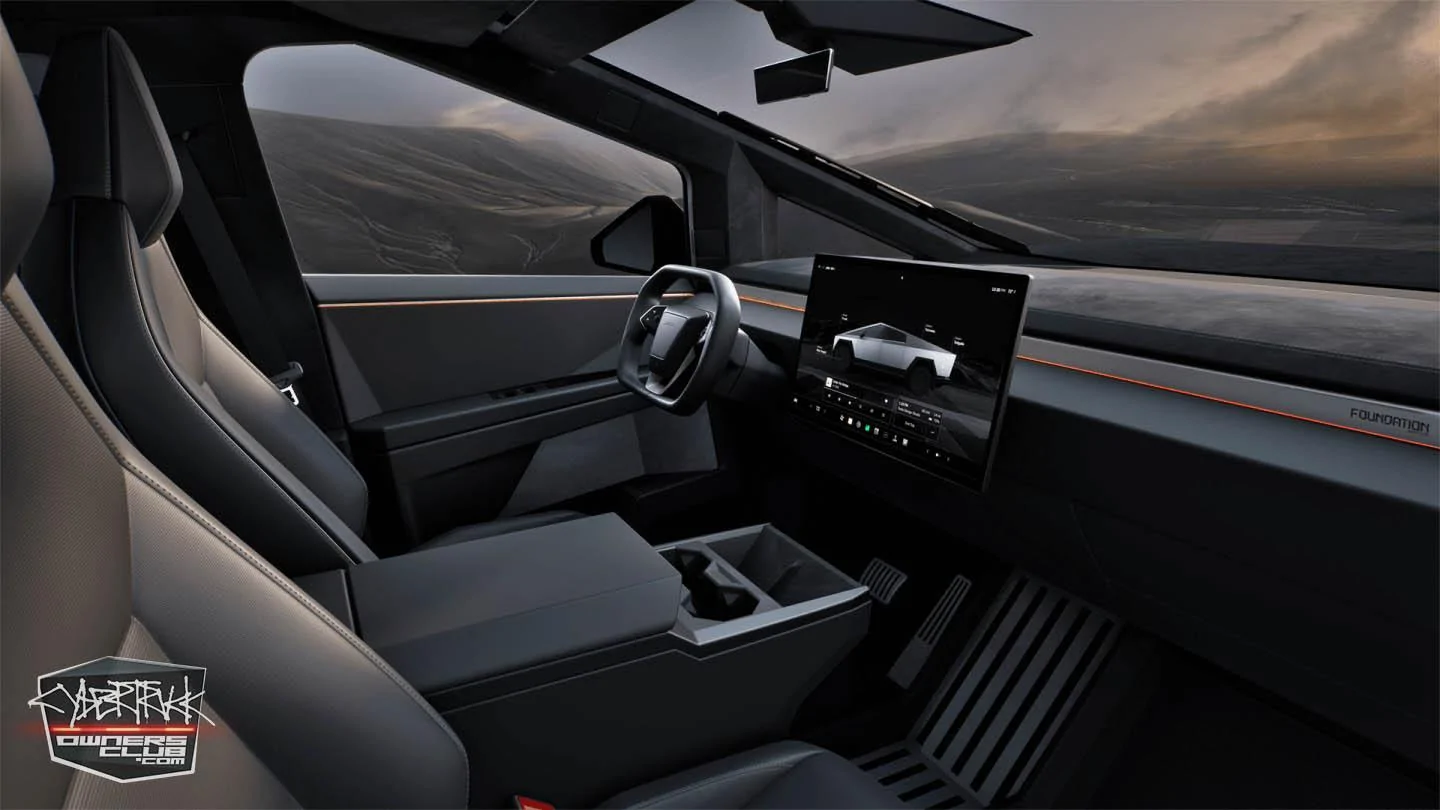
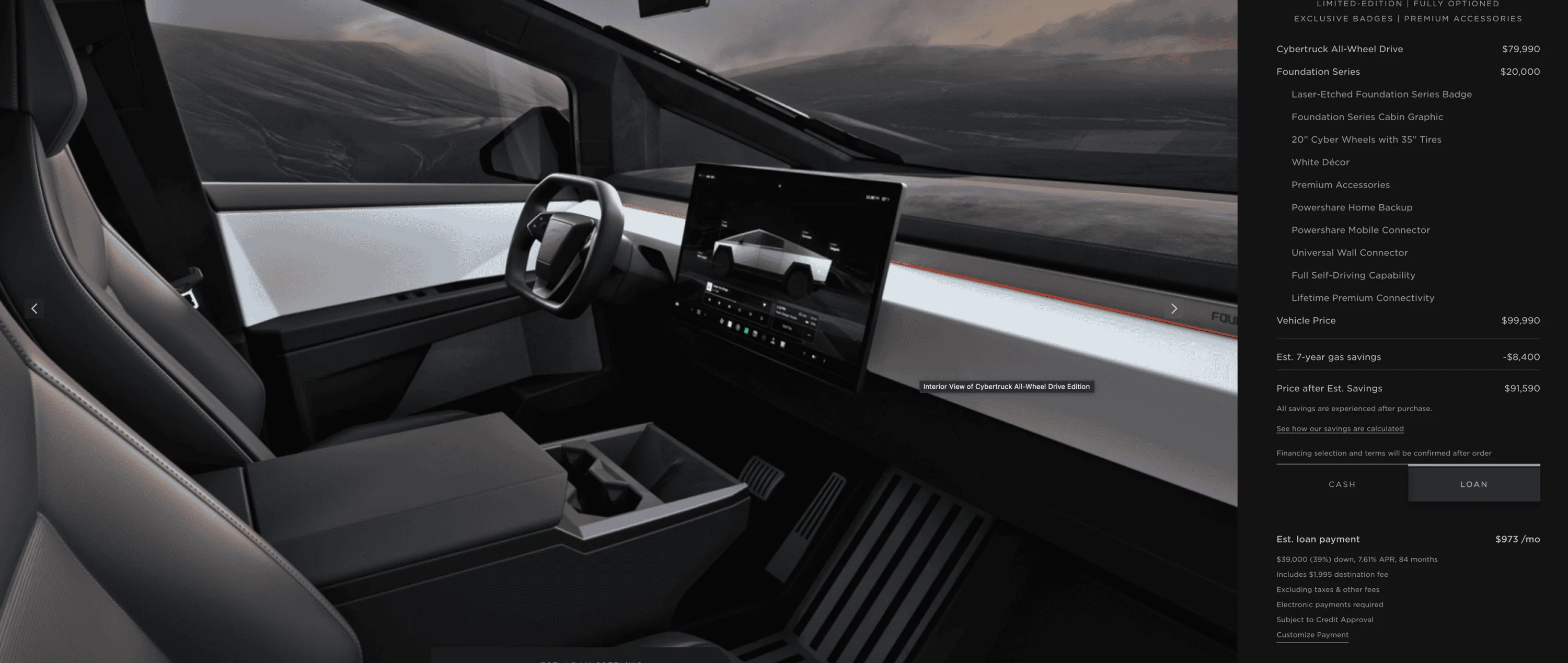
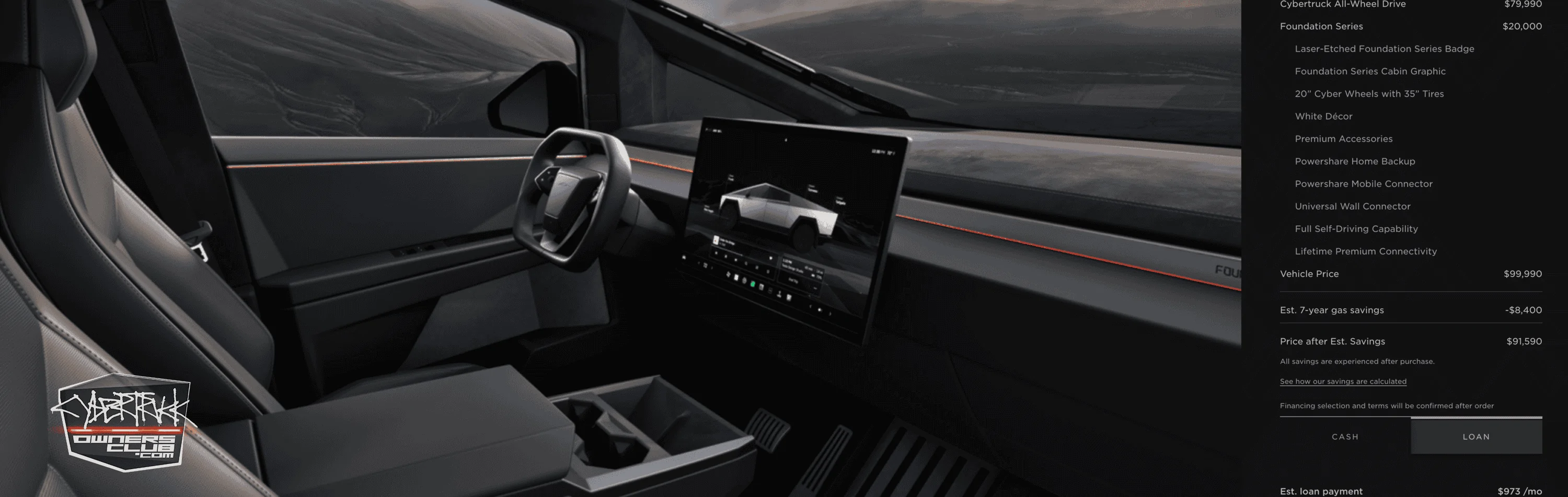
CT gray interior:
https://static-assets.tesla.com/con...R&model=ct&size=1441&bkba_opt=2&crop=0,0,0,0&

CT white interior:
https://static-assets.tesla.com/con...R&model=ct&size=1441&bkba_opt=2&crop=0,0,0,0&

(note the change IG01 for gray and IW01 for white)

Details on how to dig through Tesla's website:

Open up a configurator that is currently available (Model Y, for example). Open your browser's debugger mode (on Safari it's Option-Command-I...search to see how to open it on your browser). View the interior image and use the debugger to "target" and click on the image. From there you can find the URL for that composite image; it'll look something like this: https://static-assets.tesla.com/con...T&model=my&size=1441&bkba_opt=2&crop=0,0,0,0&

Note a bunch of things here. There's a "model" designator. And there are a bunch of option codes.

Now, go to the CT order page. They don't actually have a configurator up so it's a little trickier. We know we need to find some option codes specific to CT. Note on the Model Y URL there's a "view=STUD_SEAT" attribute. In your debugger [still on CT page], do a find for "STUD_SEAT". You'll land in the heart of the JavaScript that runs their compositor (specifically the JSON object that defines available values, etc.).

Scroll up a bit and you'll see "model": "ct". That's your model key (pretty easy to guess since Model Y's compositor is "my" and Model 3 is "m3").

You'll also see that CT's compositor has sections for "exterior" and "interior". For "interior", you'll find:
"available": ["STUD_INTERIOR", "INTERIOR_ROW1"]

So let's find "STUD_INTERIOR". Under that object, you'll see:
"relevant_groups": ["INTERIOR", "PAINT", "DRIVE", "TRIM"]

Those are the option codes we need to find. Search for:
"groups":
And you'll find a list of these objects:

"code": "MODEL",
"name": "MODEL",
"context": "default",
"groups": [],
"options": ["$CYBR"],
"required": true,
"exclusive": true,
"default_options": ["$CYBR"]

"code": "TRIM",
"name": "TRIM",
"context": "default",
"groups": [],
"options": ["$MTC03", "$MTC04", "$MTC05"],
"required": true,
"exclusive": true,
"default_options": ["$MTC03"]

"code": "INTERIOR",
"name": "Interior",
"context": "default",
"extra_copy": [],
"groups": [],
"options": ["$IG01", "$IW01", "$IG02"],
"required": true,
"exclusive": true,
"default_options": []

"code": "PAINT",
"name": "Color",
"context": "default",
"groups": [],
"options": ["$PDD"],
"required": false,
"exclusive": true,
"default_options": ["$PDD"]

Those are the option codes you can play around with to create your compositor URL. See how they apply to the final URLs:

CT gray interior:
https://static-assets.tesla.com/configurator/compositor?context=design_studio_2&options=$CYBR,$IG01,$PDD,$MTC03&view=STUD_INTERIOR&model=ct&size=1441&bkba_opt=2&crop=0,0,0,0&

CT white interior:
https://static-assets.tesla.com/configurator/compositor?context=design_studio_2&options=$CYBR,$IW01,$PDD,$MTC03&view=STUD_INTERIOR&model=ct&size=1441&bkba_opt=2&crop=0,0,0,0&
Sponsored

 
Last edited:
OP
OP
Gurule92

Gurule92

Well-known member
Joined
Sep 2, 2021
Threads
201
Messages
3,825
Reaction score
7,373
Location
Colorado Springs
Vehicles
MYP
Occupation
"Cyber" stuff
Country flag
TL;DR:

CT gray interior:
https://static-assets.tesla.com/con...R&model=ct&size=1441&bkba_opt=2&crop=0,0,0,0&

CT white interior:
https://static-assets.tesla.com/con...R&model=ct&size=1441&bkba_opt=2&crop=0,0,0,0&

(note the change IG01 for gray and IW01 for white)

Details on how to dig through Tesla's website:

Open up a configurator that is open (Model Y, for example). Open your browser's debugger mode (on Safari it's Option-Command-I...search to see how to open it on your browser). Go to the interior view and use the debugger to "target" and click on the image. From there you can find the URL for that composite image; it'll look something like this: https://static-assets.tesla.com/con...T&model=my&size=1441&bkba_opt=2&crop=0,0,0,0&

Note a bunch of things here. There's a "model" designator. And there are a bunch of option codes.

Now, go to the CT order page. They don't actually have a configurator up so it's a little trickier. We know we need to find some option codes. Note on the Model Y URL there's a "view=STUD_SEAT" attribute. In your debugger [still on CT page], do a find for "STUD_SEAT". You'll land in the heart of the JavaScript that runs their compositor (specifically the JSON object that defines available values, etc.).

Scroll up a bit and you'll see "model": "ct". That's your model key (pretty easy to guess since Model Y's compositor is "my" and Model 3 is "m3").

You'll also see that CT's compositor has sections for "exterior" and "interior". For "interior", you'll find:
"available": ["STUD_INTERIOR", "INTERIOR_ROW1"]

So let's find "STUD_INTERIOR". Under that object, you'll see:
"relevant_groups": ["INTERIOR", "PAINT", "DRIVE", "TRIM"]

Those are the option codes we need to find. Search for:
"groups":
And you'll find a list of these objects:

"code": "MODEL",
"name": "MODEL",
"context": "default",
"groups": [],
"options": ["$CYBR"],
"required": true,
"exclusive": true,
"default_options": ["$CYBR"]

"code": "TRIM",
"name": "TRIM",
"context": "default",
"groups": [],
"options": ["$MTC03", "$MTC04", "$MTC05"],
"required": true,
"exclusive": true,
"default_options": ["$MTC03"]

"code": "INTERIOR",
"name": "Interior",
"context": "default",
"extra_copy": [],
"groups": [],
"options": ["$IG01", "$IW01", "$IG02"],
"required": true,
"exclusive": true,
"default_options": []

"code": "PAINT",
"name": "Color",
"context": "default",
"groups": [],
"options": ["$PDD"],
"required": false,
"exclusive": true,
"default_options": ["$PDD"]

Those are the option codes you can play around with to create your compositor URL. See how they apply to the final URLs:

CT gray interior:
https://static-assets.tesla.com/configurator/compositor?context=design_studio_2&options=$CYBR,$IG01,$PDD,$MTC03&view=STUD_INTERIOR&model=ct&size=1441&bkba_opt=2&crop=0,0,0,0&

CT white interior:
https://static-assets.tesla.com/configurator/compositor?context=design_studio_2&options=$CYBR,$IW01,$PDD,$MTC03&view=STUD_INTERIOR&model=ct&size=1441&bkba_opt=2&crop=0,0,0,0&
Oh so now you believe me?

You need to move the LED accent strip on the dash up more and remove the Foundation Series logo to make it more believable. See the production models on wrapping videos for examples. The accent strip goes between the top dash and the vertical-ish dashboard panel—it doesn't go across the middle of it.
You can also change the trim level to see the different foundation badges $MTC01 and MTC02 if I remember right as well as add light bar to the top of different versions. $LB01. (Helps that I have the actual configurator for foundation)

More in the site code deep dive thread I posted a long time ago
 
Last edited:

WHIZZARD OF OZ

Well-known member
First Name
Ivan
Joined
Mar 11, 2021
Threads
1
Messages
2,288
Reaction score
2,090
Location
Australia
Vehicles
VW Up!
Occupation
Electric Wheelchair Builder
Country flag
Trucks have no business offering white panels imo
What say you to comfy seats.... heated + cooled. Maybe too 'MANHAUS' CYBERTRUCK......
'More Sportscar Than a Sportscar'
'More Utility Than a Utility'
'More Pick-up Than a Pick-up'
Comes with a 'Dash Of White'
 

WHIZZARD OF OZ

Well-known member
First Name
Ivan
Joined
Mar 11, 2021
Threads
1
Messages
2,288
Reaction score
2,090
Location
Australia
Vehicles
VW Up!
Occupation
Electric Wheelchair Builder
Country flag
TL;DR:

CT gray interior:
https://static-assets.tesla.com/con...R&model=ct&size=1441&bkba_opt=2&crop=0,0,0,0&

CT white interior:
https://static-assets.tesla.com/con...R&model=ct&size=1441&bkba_opt=2&crop=0,0,0,0&

(note the change IG01 for gray and IW01 for white)

Details on how to dig through Tesla's website:

Open up a configurator that is open (Model Y, for example). Open your browser's debugger mode (on Safari it's Option-Command-I...search to see how to open it on your browser). Go to the interior view and use the debugger to "target" and click on the image. From there you can find the URL for that composite image; it'll look something like this: https://static-assets.tesla.com/con...T&model=my&size=1441&bkba_opt=2&crop=0,0,0,0&

Note a bunch of things here. There's a "model" designator. And there are a bunch of option codes.

Now, go to the CT order page. They don't actually have a configurator up so it's a little trickier. We know we need to find some option codes. Note on the Model Y URL there's a "view=STUD_SEAT" attribute. In your debugger [still on CT page], do a find for "STUD_SEAT". You'll land in the heart of the JavaScript that runs their compositor (specifically the JSON object that defines available values, etc.).

Scroll up a bit and you'll see "model": "ct". That's your model key (pretty easy to guess since Model Y's compositor is "my" and Model 3 is "m3").

You'll also see that CT's compositor has sections for "exterior" and "interior". For "interior", you'll find:
"available": ["STUD_INTERIOR", "INTERIOR_ROW1"]

So let's find "STUD_INTERIOR". Under that object, you'll see:
"relevant_groups": ["INTERIOR", "PAINT", "DRIVE", "TRIM"]

Those are the option codes we need to find. Search for:
"groups":
And you'll find a list of these objects:

"code": "MODEL",
"name": "MODEL",
"context": "default",
"groups": [],
"options": ["$CYBR"],
"required": true,
"exclusive": true,
"default_options": ["$CYBR"]

"code": "TRIM",
"name": "TRIM",
"context": "default",
"groups": [],
"options": ["$MTC03", "$MTC04", "$MTC05"],
"required": true,
"exclusive": true,
"default_options": ["$MTC03"]

"code": "INTERIOR",
"name": "Interior",
"context": "default",
"extra_copy": [],
"groups": [],
"options": ["$IG01", "$IW01", "$IG02"],
"required": true,
"exclusive": true,
"default_options": []

"code": "PAINT",
"name": "Color",
"context": "default",
"groups": [],
"options": ["$PDD"],
"required": false,
"exclusive": true,
"default_options": ["$PDD"]

Those are the option codes you can play around with to create your compositor URL. See how they apply to the final URLs:

CT gray interior:
https://static-assets.tesla.com/configurator/compositor?context=design_studio_2&options=$CYBR,$IG01,$PDD,$MTC03&view=STUD_INTERIOR&model=ct&size=1441&bkba_opt=2&crop=0,0,0,0&

CT white interior:
https://static-assets.tesla.com/configurator/compositor?context=design_studio_2&options=$CYBR,$IW01,$PDD,$MTC03&view=STUD_INTERIOR&model=ct&size=1441&bkba_opt=2&crop=0,0,0,0&
I'll take "STUD_INTERIOR"

It MATCHES my eyes......kinda like REDHEADS.
As a 13 year old l knocked on the side door of 'BRYANT & MAY' in Richmond. I was the first European voted in as House Captain at the North Richmond Primary School and never thought much about crazy stunts like this one The man that came to the wooden door asked if he could help. After explaining to him that l wanted to build the Eiffel Tower out of matches for my grade 6 school project, he returned with a bag of Redhead matches without the red 'head! I was THRILLED.


WHIZZARD OF OZ

Well-known member
First Name
Ivan
Joined
Mar 11, 2021
Threads
1
Messages
2,288
Reaction score
2,090
Location
Australia
Vehicles
VW Up!
Occupation
Electric Wheelchair Builder
Country flag
My use is for recreation, the white provides a cleaner open space feel, nice for cruising.

If I was using it in a dusty work environment, it would be a horror.
Like in the OUTBACK(!)
RED 'BULLDUST' should be an option!
A 'TERRACOTTA' Shade.....Great Aussie Byte!
 

Cybertruck 1974

Well-known member
Joined
Dec 15, 2019
Threads
51
Messages
1,193
Reaction score
1,623
Location
Everywhere
Vehicles
Cybertruck, H2, Samurai, Ford Transit, Chevy Silverado EV, Jaguar, Corvette, M38
hmm. didn't see any option to select interior or anything other than what they offered when I actually ordered my AWD FS December 22nd.
 

Jethro

Well-known member
First Name
Jethro
Joined
May 10, 2021
Threads
20
Messages
167
Reaction score
175
Location
boulder
Vehicles
Cybertruck
Occupation
consultant
I dig it. I want some stone grey seats instead of black. Probably do some black wood accents kind of like the Rivian for the dash and doors
YEAH… let’s do that at a minimum. The lighter the better. I see that black interior getting 150° degrees in the Colorado sun.


WHIZZARD OF OZ

Well-known member
First Name
Ivan
Joined
Mar 11, 2021
Threads
1
Messages
2,288
Reaction score
2,090
Location
Australia
Vehicles
VW Up!
Occupation
Electric Wheelchair Builder
Country flag
I'm not saying it's a shot from an actual truck. It's the website configurator shot for the grey interior. It's not photoshopped lol. Here is the white one
1703887345022.png


and heres the grey

1703887392411.webp
The 'MONOCHROMATIC' look is greying on me!
I think like it!?!?!?!
More 'Alcantara'..... More 'Cowbell'
[HORN]
 

WHIZZARD OF OZ

Well-known member
First Name
Ivan
Joined
Mar 11, 2021
Threads
1
Messages
2,288
Reaction score
2,090
Location
Australia
Vehicles
VW Up!
Occupation
Electric Wheelchair Builder
Country flag
AGREED! It’s like we need those plastic couch covers from the 70s

I’s like to see some carbon fiber options….maybe after market
All the ' Beverly Hillbillies ' be wantin' that(!)
 

TTz

Active member
First Name
TTz
Joined
Feb 1, 2020
Threads
0
Messages
31
Reaction score
49
Location
USA
Vehicles
None
Country flag
No, had to ninja it
Has any one looked into forming an LLC for purpose of trading reservation numbers? I think it could be structured with protections for both parties and not run afoul to Tesla rules.
Sponsored


Top