Sponsored

Can I get PowerShare when I already have solar panels + Power Walls

JJ_CT

Member
First Name
Jiwon
Joined
Apr 23, 2024
Threads
2
Messages
18
Reaction score
15
Location
Pennsylvania
Vehicles
Model 3, Cyber Truck
Country flag
I already have solar panels and Tesla Powerwalls. I'll be getting the CyberTruck next week and was wondering if someone could help me with the following questions.

(1) If I have solar panels + 3 Power Walls, can I still get the PowerShare feature?
(2) Can I guy the cheaper Wall Connector and still get this PowerShare feature? Or must I buy the Universal Wall Connector?
(3) Once I get the connector from #2, is a software update all that I need? (hopefully my gateway is not outdated or anything)
Sponsored

 

Makeodds101

Well-known member
First Name
Ro
Joined
Dec 20, 2022
Threads
12
Messages
195
Reaction score
302
Location
Rhode Island
Vehicles
CYBERTRUCK AWD
Country flag
According to what I’ve seen Tesla say in my emails…. You need a universal Tesla charger and the update for PowerShare with what you have already.
 
OP
OP

JJ_CT

Member
First Name
Jiwon
Joined
Apr 23, 2024
Threads
2
Messages
18
Reaction score
15
Location
Pennsylvania
Vehicles
Model 3, Cyber Truck
Country flag
According to what I’ve seen Tesla say in my emails…. You need a universal Tesla charger and the update for PowerShare with what you have already.
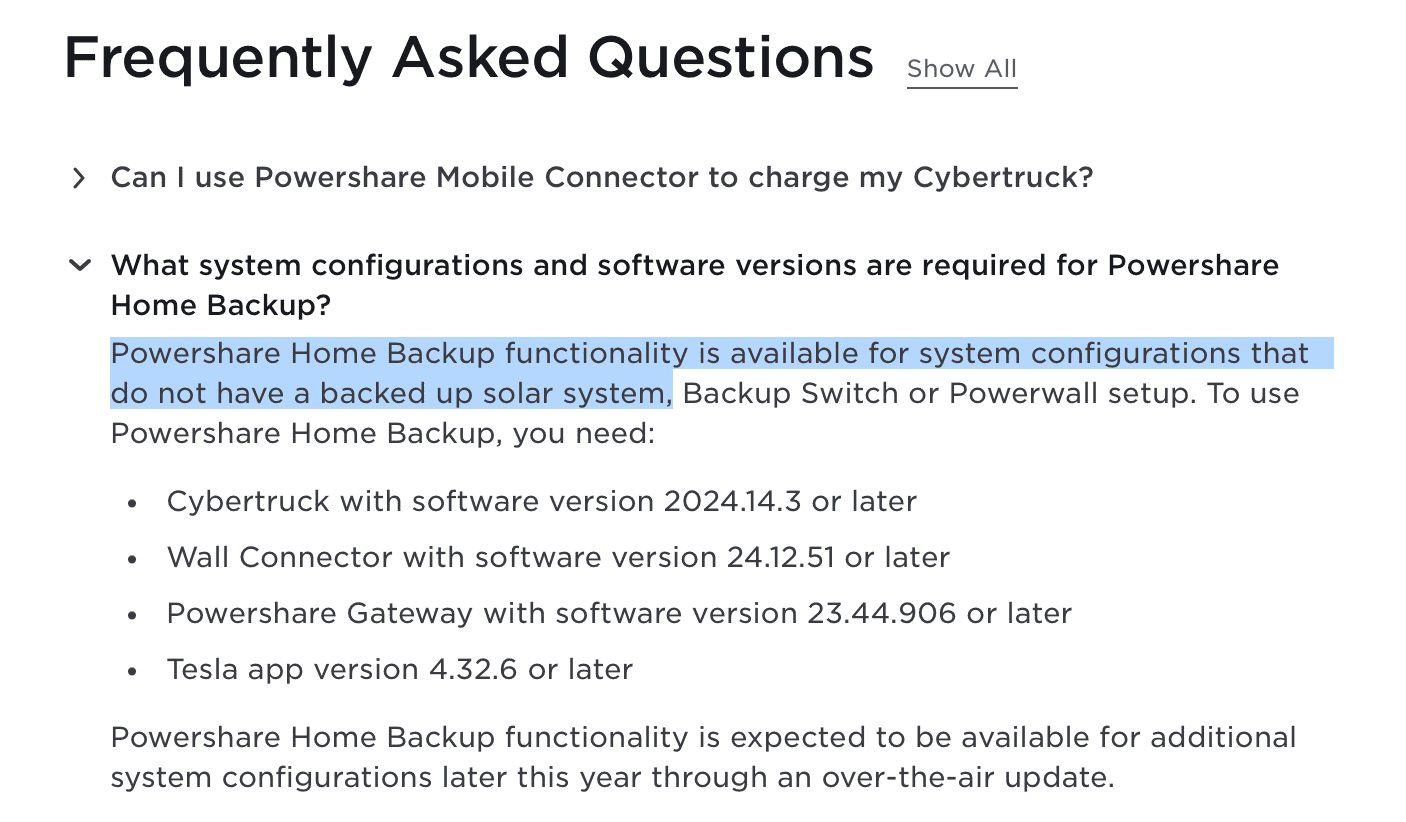
Thanks for the info. I'm also contacting a Tesla support person, so I'll update the thread when I find out more. The confusing thing is that I see the following text in the Tesla FAQ page. The highlighted text makes things confusing.

https://www.tesla.com/support/power...ligibility_dualmotor_batch1#receive-equipment

Tesla Cybertruck Can I get PowerShare when I already have solar panels + Power Walls 1715369114102-h
 

FLABOBBY

Member
First Name
Bob
Joined
Apr 5, 2024
Threads
0
Messages
9
Reaction score
18
Location
Atlantis Florida
Vehicles
Model Y, Model X Plaid
Occupation
Retired site work construction owner
Country flag
I have Tesla solar, (2) powerwall 2, (2) powerwall plus, and a generation 1 wall connector and after the PowerShare survey I am told I have everything I need but the truck and an update. My wall connector is backed up with my whole house with the power walls. Your wall connector needs power for PowerShare to work, which your power walls will do if your wall connector is backed up. The universal wall connector has a seperate power wire to power it from the gen 3 gateway (has a battery) to allow PowerShare to work. The tesla connector will not function if there is no power sensed on the house side.
 
OP
OP

JJ_CT

Member
First Name
Jiwon
Joined
Apr 23, 2024
Threads
2
Messages
18
Reaction score
15
Location
Pennsylvania
Vehicles
Model 3, Cyber Truck
Country flag
I have Tesla solar, (2) powerwall 2, (2) powerwall plus, and a generation 1 wall connector and after the PowerShare survey I am told I have everything I need but the truck and an update. My wall connector is backed up with my whole house with the power walls. Your wall connector needs power for PowerShare to work, which your power walls will do if your wall connector is backed up. The universal wall connector has a seperate power wire to power it from the gen 3 gateway (has a battery) to allow PowerShare to work. The tesla connector will not function if there is no power sensed on the house side.
Thank you very much for this super useful response, I couldn't get a straight answer from anyone, but now I have one thanks to you. Good thing as I can save a bit of money on the wall connector, so I'll put that money towards the CyberTruck Cargo Bed Divider. :)


AlmostHuman

Well-known member
Joined
May 1, 2024
Threads
7
Messages
985
Reaction score
1,349
Location
Earth
Vehicles
Model X, Cybertruck
Occupation
Human
Country flag
Saw some questions on here about Powershare so wanted to give context about the configuration we have and how it impacted our answers to the Powershare surveys and the final outcome of those surveys. We had solar and Powerwalls installed in October of 2018. Installed two Gen 3 Wall Connectors Summer of 2020. Took Delivery of the Model X September of 2020.

I didn’t take screenshots of all the survey questions but with the above info we answered that we have Powerwalls, have solar, that the Wall Connectors are Gen 3 and are also on backup from the Powerwalls which is required for Powershare to work, and that they are wired with 240 volt.

On 2024.01.04 got an email tiled “Power Your Home With Your Cybertruck” that had the following and a link to a survey:

Install Powershare Home Backup

Powershare Home Backup allows you to power your home with the energy stored in your Cybertruck’s battery pack, helping keep the lights on for up to three days when outages occur.*

Your order is eligible for free Powershare Home Backup hardware—you just cover the installation cost. Take our survey to confirm your interest.** We will reach out to you with more information and connect you with a Tesla Certified Installer.

*Based on an average daily home energy usage of 30 kWh per day.
**Eligibility based on installation feasibility at your home.


On 2024.02.02 got an email tiled “Update: Powershare Home Backup Eligibility” with had the following:

Thank you for completing the Powershare Home Backup survey. Your order is eligible for Powershare Home Backup hardware installation. Once your VIN is assigned and your delivery is scheduled, we will match you with a Tesla Certified Installer who will reach out to you to schedule a site visit. You will receive a follow-up email from Tesla once you have been matched with an installer.

On 2024.03.04 got an email tiled “Update on Powershare Home Backup Survey” which had the following with a link to a survey:

Thank you for completing the Powershare Home Backup survey.

Because you already have Powerwall and home charging installed, we need additional information to determine if your home is already configured for Home Backup.

Once you submit the survey, we will reach out to you with more information.


On 2024.03.28 got an email tiled “Update: Powershare Home Backup Survey” with the following:

Thank you for completing the Powershare Home Backup survey.

Since you have Powerwall installed, your home is already on the way to being fully configured for Powershare Home Backup functionality but may require additional home charging equipment to complete your set up.

To finalize your setup, your home charging needs to be backed up by your Powerwall. Home Backup is compatible with any home charging unit, but 240V charging will provide the best experience. Our recommended home charging solutions are Wall Connector or Universal Wall Connector. Home Backup will be available with a software update expected in June. In the meantime, you will still be able to charge your Cybertruck at home.

In place of the Home Backup equipment, we’ll be providing you with a one-time use $700 Tesla Shop voucher. You can use this to purchase home charging to complete your Home Backup setup – or to purchase other charging equipment, apparel, accessories and more. This voucher can only be used once and any unused balance remaining after the transaction will be forfeited. This will be provided to you within two weeks after your Cybertruck delivery.

The Tesla Team
 
OP
OP

JJ_CT

Member
First Name
Jiwon
Joined
Apr 23, 2024
Threads
2
Messages
18
Reaction score
15
Location
Pennsylvania
Vehicles
Model 3, Cyber Truck
Country flag
Saw some questions on here about Powershare so wanted to give context about the configuration we have and how it impacted our answers to the Powershare surveys and the final outcome of those surveys. We had solar and Powerwalls installed in October of 2018. Installed two Gen 3 Wall Connectors Summer of 2020. Took Delivery of the Model X September of 2020.

I didn’t take screenshots of all the survey questions but with the above info we answered that we have Powerwalls, have solar, that the Wall Connectors are Gen 3 and are also on backup from the Powerwalls which is required for Powershare to work, and that they are wired with 240 volt.

On 2024.01.04 got an email tiled “Power Your Home With Your Cybertruck” that had the following and a link to a survey:

Install Powershare Home Backup

Powershare Home Backup allows you to power your home with the energy stored in your Cybertruck’s battery pack, helping keep the lights on for up to three days when outages occur.*

Your order is eligible for free Powershare Home Backup hardware—you just cover the installation cost. Take our survey to confirm your interest.** We will reach out to you with more information and connect you with a Tesla Certified Installer.

*Based on an average daily home energy usage of 30 kWh per day.
**Eligibility based on installation feasibility at your home.


On 2024.02.02 got an email tiled “Update: Powershare Home Backup Eligibility” with had the following:

Thank you for completing the Powershare Home Backup survey. Your order is eligible for Powershare Home Backup hardware installation. Once your VIN is assigned and your delivery is scheduled, we will match you with a Tesla Certified Installer who will reach out to you to schedule a site visit. You will receive a follow-up email from Tesla once you have been matched with an installer.

On 2024.03.04 got an email tiled “Update on Powershare Home Backup Survey” which had the following with a link to a survey:

Thank you for completing the Powershare Home Backup survey.

Because you already have Powerwall and home charging installed, we need additional information to determine if your home is already configured for Home Backup.

Once you submit the survey, we will reach out to you with more information.


On 2024.03.28 got an email tiled “Update: Powershare Home Backup Survey” with the following:

Thank you for completing the Powershare Home Backup survey.

Since you have Powerwall installed, your home is already on the way to being fully configured for Powershare Home Backup functionality but may require additional home charging equipment to complete your set up.

To finalize your setup, your home charging needs to be backed up by your Powerwall. Home Backup is compatible with any home charging unit, but 240V charging will provide the best experience. Our recommended home charging solutions are Wall Connector or Universal Wall Connector. Home Backup will be available with a software update expected in June. In the meantime, you will still be able to charge your Cybertruck at home.

In place of the Home Backup equipment, we’ll be providing you with a one-time use $700 Tesla Shop voucher. You can use this to purchase home charging to complete your Home Backup setup – or to purchase other charging equipment, apparel, accessories and more. This voucher can only be used once and any unused balance remaining after the transaction will be forfeited. This will be provided to you within two weeks after your Cybertruck delivery.

The Tesla Team
This forum is truly great. Another question that I had was if you setup two wall connectors, do you have to do something special so that the two chargers talk to each other and don’t overload the circuit?

And I presume PowerShare is not yet activated?

thank you.
 

AlmostHuman

Well-known member
Joined
May 1, 2024
Threads
7
Messages
985
Reaction score
1,349
Location
Earth
Vehicles
Model X, Cybertruck
Occupation
Human
Country flag
This forum is truly great. Another question that I had was if you setup two wall connectors, do you have to do something special so that the two chargers talk to each other and don’t overload the circuit?

And I presume PowerShare is not yet activated?

thank you.
I does look like PowerShare is not active on the Gen 3 Wall Connectors we have. Our current product versions are:

Powerwall Gateway Version 23.28.2 276626f98
Wall Connector Version 24.12.51-7855f62
Cybertruck Version 2024.14.3

Based on the communication from Tesla in our survey emails the software update for people that have Gen 3 Wall Connectors and Powerwalls is due out in June.
 

akenis

Well-known member
First Name
Andrew
Joined
Apr 18, 2024
Threads
11
Messages
143
Reaction score
74
Location
FL, USA
Vehicles
23 MYLR and (Apr-Jun CT AWD)
Occupation
Pilot
Country flag
This forum is truly great. Another question that I had was if you setup two wall connectors, do you have to do something special so that the two chargers talk to each other and don’t overload the circuit?

And I presume PowerShare is not yet activated?

thank you.

Take a look at the installation manual here:

https://www.tesla.com/sites/default...ng/Gen3_WallConnector_Installation_Manual.pdf

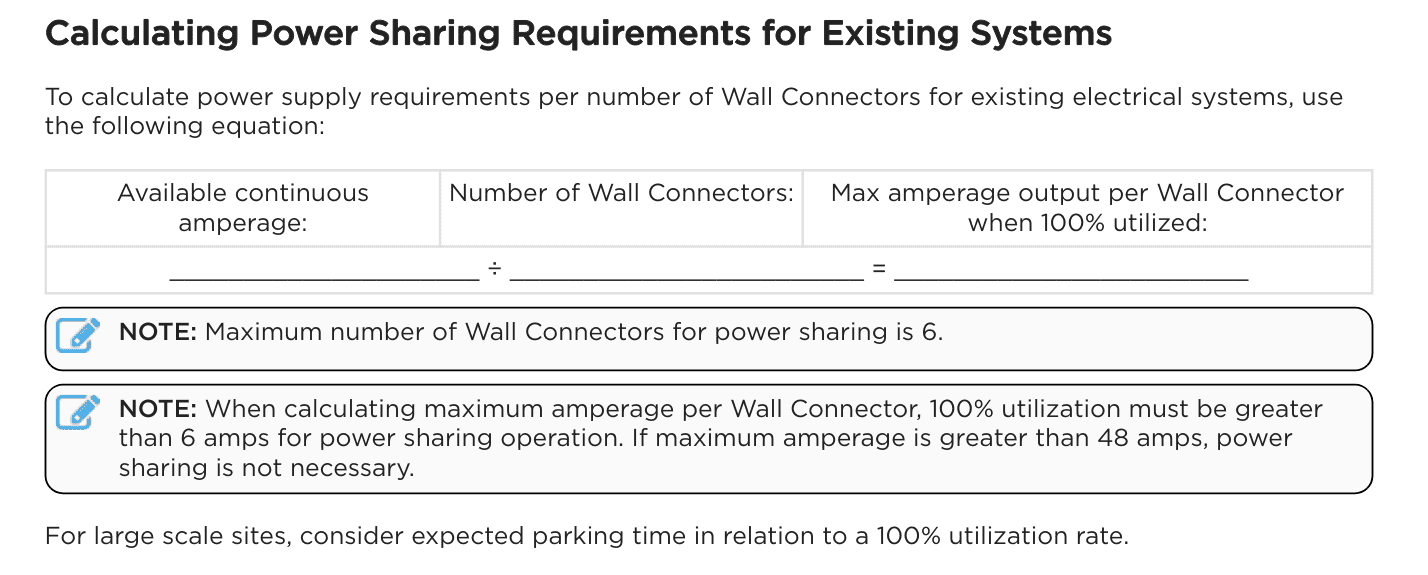
Power sharing (not to be confused with Powershare) is discussed on page 32-35. See attached image with formula. Maths.

I have 200 amp service and will have 2 WC each on separate 60A breaker. So I don't think mine need to talk and could theoretically both be maxed out at 48 amps simultaneously.

If you had 2 chargers on the same 60A breaker, then you would have to network the powersharing so that max simultaneous would be 30A.

Likewise, if you have 100 Amp service and 2 chargers, AC, water heater, pool pump, etc..... probably need to set up power sharing.

Tesla Cybertruck Can I get PowerShare when I already have solar panels + Power Walls 1715448240140-oi
 

Cybertruck 1974

Well-known member
Joined
Dec 15, 2019
Threads
51
Messages
1,193
Reaction score
1,623
Location
Everywhere
Vehicles
Cybertruck, H2, Samurai, Ford Transit, Chevy Silverado EV, Jaguar, Corvette, M38
UWC is limited to what power you can charge truck and power your Walls at. Get the Non Universal model and preferred 2020 version WC as it has adjustable dial for settings up to 100amp output. Breaker from Gateway subpanel to WC is all what's needed in an existing system. I had 100amp installed. My system is done and had existing Tesla solar and 2 powerwalls. Now just waiting for software upgrade for truck. Good luck.


OP
OP

JJ_CT

Member
First Name
Jiwon
Joined
Apr 23, 2024
Threads
2
Messages
18
Reaction score
15
Location
Pennsylvania
Vehicles
Model 3, Cyber Truck
Country flag
Take a look at the installation manual here:

https://www.tesla.com/sites/default...ng/Gen3_WallConnector_Installation_Manual.pdf

Power sharing (not to be confused with Powershare) is discussed on page 32-35. See attached image with formula. Maths.

I have 200 amp service and will have 2 WC each on separate 60A breaker. So I don't think mine need to talk and could theoretically both be maxed out at 48 amps simultaneously.

If you had 2 chargers on the same 60A breaker, then you would have to network the powersharing so that max simultaneous would be 30A.

Likewise, if you have 100 Amp service and 2 chargers, AC, water heater, pool pump, etc..... probably need to set up power sharing.

1715448240140-oi.png
Thanks for the info. I have a 200 amp service too but my breaker box is full (with one 60A breaker power line dedicated for one NEMA 14-50), so perhaps I'll just keep things simple and install one wall charger (currently using the mobile charger). Having two sounds a bit too complex for my taste.
 
OP
OP

JJ_CT

Member
First Name
Jiwon
Joined
Apr 23, 2024
Threads
2
Messages
18
Reaction score
15
Location
Pennsylvania
Vehicles
Model 3, Cyber Truck
Country flag
UWC is limited to what power you can charge truck and power your Walls at. Get the Non Universal model and preferred 2020 version WC as it has adjustable dial for settings up to 100amp output. Breaker from Gateway subpanel to WC is all what's needed in an existing system. I had 100amp installed. My system is done and had existing Tesla solar and 2 powerwalls. Now just waiting for software upgrade for truck. Good luck.
Thanks for the update. Given the various inputs from everyone, I'll go the simple route and just replace my current mobile charger connected to the NEMA 14-50 with a Universal Wall Charger (or just the ordinary Wall Charger).
 

akenis

Well-known member
First Name
Andrew
Joined
Apr 18, 2024
Threads
11
Messages
143
Reaction score
74
Location
FL, USA
Vehicles
23 MYLR and (Apr-Jun CT AWD)
Occupation
Pilot
Country flag
Thanks for the info. I have a 200 amp service too but my breaker box is full (with one 60A breaker power line dedicated for one NEMA 14-50), so perhaps I'll just keep things simple and install one wall charger (currently using the mobile charger). Having two sounds a bit too complex for my taste.

The Gateway 3V has additional breaker positions. My UWC will connect to that and won't need long wire run from main box.
 

deetz

Member
Joined
Apr 27, 2024
Threads
0
Messages
14
Reaction score
17
Location
Houston, TX
Vehicles
2023 Model Y Performance
Country flag
There's so much conflicting information, hard to keep track.

So if I have Powerwall 3s, and a generation 2 backup gateway, Powershare won't work? It appears I'd need a new (upgraded?) version of the Backup Gateway to be installed.

I did try going through the app set up for Powershare, and I can't get past logging into the Gateway. It wants an SSID starting with TeslaGW_XXXXXX (assuming this means Tesla Gateway), but mine doesn't broadcast that network.

With Powerwall 3, you log in via the main Powerwall 3 unit, not the Backup Gateway, so the SSID starts with TeslaPW_XXXXXX (again, assuming here this means Tesla Powerwall).

So the app is forcing me to use an SSID from a gateway, and not a powerwall, which doesn't appear to work if you have Powerwall 3s.
 

txtravwill

Well-known member
First Name
Travis
Joined
Apr 25, 2024
Threads
7
Messages
514
Reaction score
612
Location
Marble Falls, TX
Vehicles
Tesla, BMW, Ford
Country flag
Thanks for the update. Given the various inputs from everyone, I'll go the simple route and just replace my current mobile charger connected to the NEMA 14-50 with a Universal Wall Charger (or just the ordinary Wall Charger).
We did this for PowerShare. On our 200 amp panel that is fully backed up we have a nema 14-50 on 50 amp breaker that safely charges at 40amps.

So hardwired the UWC and r goes into the panel directly for system. So expect to be able to lose the grid, powerwalls kick in as primary, and CT PowerSharing kicks in after when needed but at a max of 40 amps I to the panel for all breakers remaining to share... But of course can't overload it. Plenty for lights/plugs in house, and then one off use of say induction 240v cooktop on that side, small AC that runs at 2.5kw, and pool pump at 1.5kw, etc... just have to watch when things like a water heater kick in at 6kw etc.

We have a whole other 200 amp panel and more powerwalls for another side of the house that will just be backed up by powerwalls... In future that one has a charger into it too so perhaps another Tesla with PowerSharing could be used on that side of system too...
Sponsored


Top