Sponsored

Installer Error: My "Whole Home" Powershare was wired as "Partial Home" – Need Advice on Rework

deftguru

Well-known member
First Name
JackMa
Joined
Mar 31, 2024
Threads
5
Messages
93
Reaction score
151
Location
NC
Vehicles
Pento!
Occupation
Nascar
Country flag
I’m seeking advice on how to handle a major installation error. I finally had my Tesla Powershare system installed (Universal Wall Connector + Gateway) for my Cybertruck after holding the hardware for a year.

The Goal: Whole Home Backup. The Reality: The installer wired the system as a "Partial Home" backup, and they did it incorrectly even for that configuration.

Current (Incorrect) Setup: [Service Meter] —> [Main (200amp) Panel A] —> [Subpanel (200amp) B] —> [Powershare Gateway]

The Issue: The Gateway is at the end of the chain, it only backs up the circuits inside the Gateway itself. If the grid goes out only those brakers inside the gateway are backed up. Tesla Support confirmed my account is provisioned for "Full Home Backup," but the physical wiring contradicts this. Tesla stated the Gateway is suppose to be right after the meter.

My Dilemma: 1. The installers have been paid, but the job is technically incomplete/wrong. 2. I’m worried that if I force them to redo it, they will cut corners to avoid a total loss on the job. 3. Should I trust them to fix this, or cut my losses and hire a new Qmerit-certified pro to rip it out and start over?

Questions for the community:
  • Has anyone successfully forced a "fix" from an installer who clearly didn't read the manual?
  • What is a fair "rework" cost if I hire a new company?
  • Are there specific "gotchas" in moving the Gateway to the Service Entrance that I should watch out for?

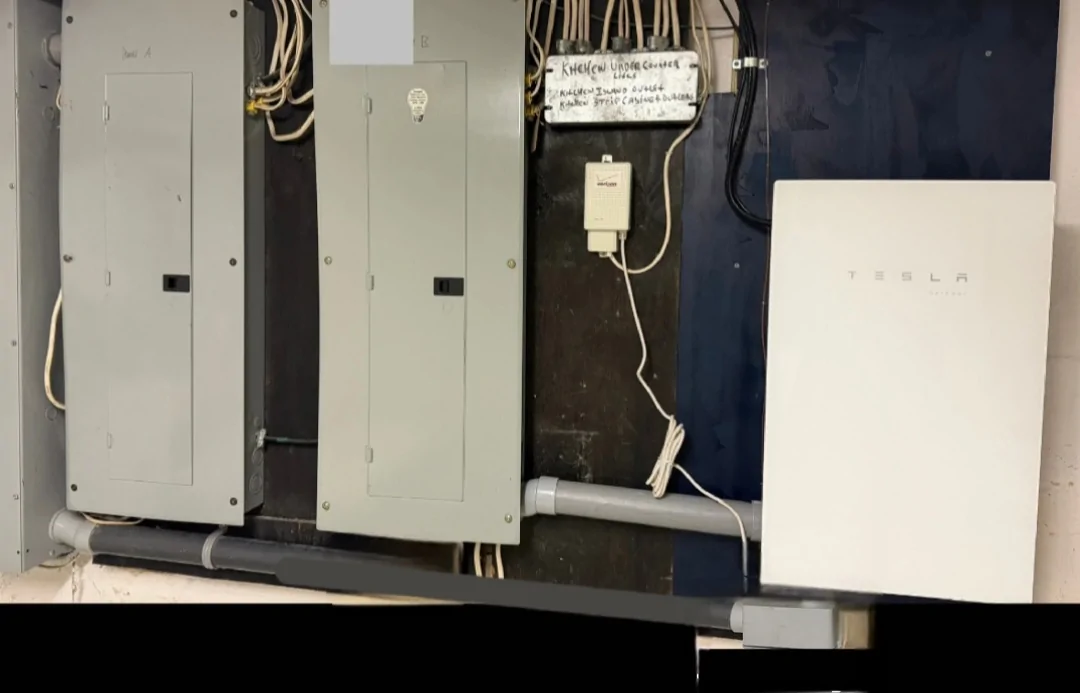
Here is my current setup:
[Service Meter] —> [Panel-A] —> [Panel-B] —> [Powershare Gateway]
Tesla Cybertruck Installer Error: My "Whole Home" Powershare was wired as "Partial Home" – Need Advice on Rework 1773455071992-46


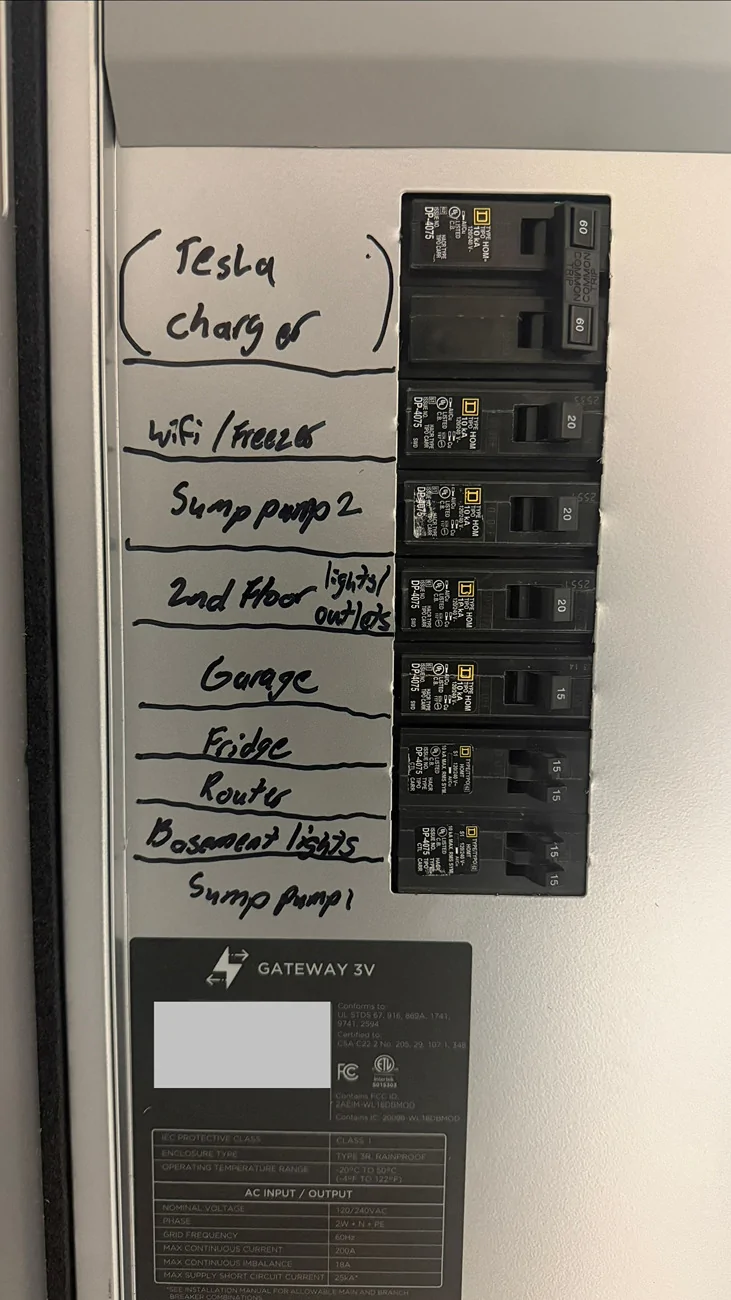
[Powershare Gateway] (Photo)
Tesla Cybertruck Installer Error: My "Whole Home" Powershare was wired as "Partial Home" – Need Advice on Rework 1773455594232-
Sponsored


Schroederhc

Well-known member
First Name
Bud
Joined
Oct 24, 2025
Threads
2
Messages
76
Reaction score
89
Location
WA
Vehicles
R1T, Juniper & Taycan
Occupation
Self Employed
Country flag
We're they Tesla certified installers?
 

Sposborn

Well-known member
Joined
Oct 21, 2025
Threads
3
Messages
145
Reaction score
234
Location
Indiana
Vehicles
2024 Cybertruck AWD; 2025 Model Y Performance
Country flag
I wired mine with a breaker that goes from the powershare box to a shbpanel. This subpanel then has a 60a breaker, and two lines that join my inverter strings with batteries that go to the house’s panel. I can write a brief diagram later today.

I then have a emporia smart clamp that has a sole purpose to know when energy is flowing from the powershare and will automatically ping my house loads to go into “critical mode”. Smart switches, smart outlets, etc turn off shit and works great so far.
 

Schroederhc

Well-known member
First Name
Bud
Joined
Oct 24, 2025
Threads
2
Messages
76
Reaction score
89
Location
WA
Vehicles
R1T, Juniper & Taycan
Occupation
Self Employed
Country flag
I'd be interested in the diagram as well.
 

no%X#XMVk65v#cq

Well-known member
First Name
J
Joined
Sep 11, 2024
Threads
8
Messages
273
Reaction score
628
Location
USA
Vehicles
CT FS AWD
Following. The mixed results from powershare installs interest me. They range from "why would you own a cybertruck without powerhare" to "it only powers one outlet in my kitchen"


REM

Well-known member
Joined
Dec 9, 2023
Threads
14
Messages
3,578
Reaction score
6,646
Location
NC
Vehicles
2020 Model 3 Standard Range++ & Diet Cybertruck, Dual Motor
Occupation
Professional Retard
Country flag
I would call the highest ranking person in that particular company and report the incident, and plainly ask them if it was installed wrong on their own house, would they trust it to be corrected without incident.

If they even slightly hesitate or give you lip service, I would not trust them to touch my house again.

Also, if they give you a hard time over refunding or otherwise making you whole, I would be real quick to file a report with your electric provider. They are serious about metered service being installed incorrectly, as such things get people killed.
 

Ko4sho11

Member
First Name
Ken
Joined
Oct 14, 2024
Threads
1
Messages
5
Reaction score
6
Location
USA
Vehicles
Cybertruck
Country flag
I’m seeking advice on how to handle a major installation error. I finally had my Tesla Powershare system installed (Universal Wall Connector + Gateway) for my Cybertruck after holding the hardware for a year.

The Goal: Whole Home Backup. The Reality: The installer wired the system as a "Partial Home" backup, and they did it incorrectly even for that configuration.

Current (Incorrect) Setup: [Service Meter] —> [Main (200amp) Panel A] —> [Subpanel (200amp) B] —> [Powershare Gateway]

The Issue: The Gateway is at the end of the chain, it only backs up the circuits inside the Gateway itself. If the grid goes out only those brakers inside the gateway are backed up. Tesla Support confirmed my account is provisioned for "Full Home Backup," but the physical wiring contradicts this. Tesla stated the Gateway is suppose to be right after the meter.

My Dilemma: 1. The installers have been paid, but the job is technically incomplete/wrong. 2. I’m worried that if I force them to redo it, they will cut corners to avoid a total loss on the job. 3. Should I trust them to fix this, or cut my losses and hire a new Qmerit-certified pro to rip it out and start over?

Questions for the community:
  • Has anyone successfully forced a "fix" from an installer who clearly didn't read the manual?
  • What is a fair "rework" cost if I hire a new company?
  • Are there specific "gotchas" in moving the Gateway to the Service Entrance that I should watch out for?

Here is my current setup:
[Service Meter] —> [Panel-A] —> [Panel-B] —> [Powershare Gateway]
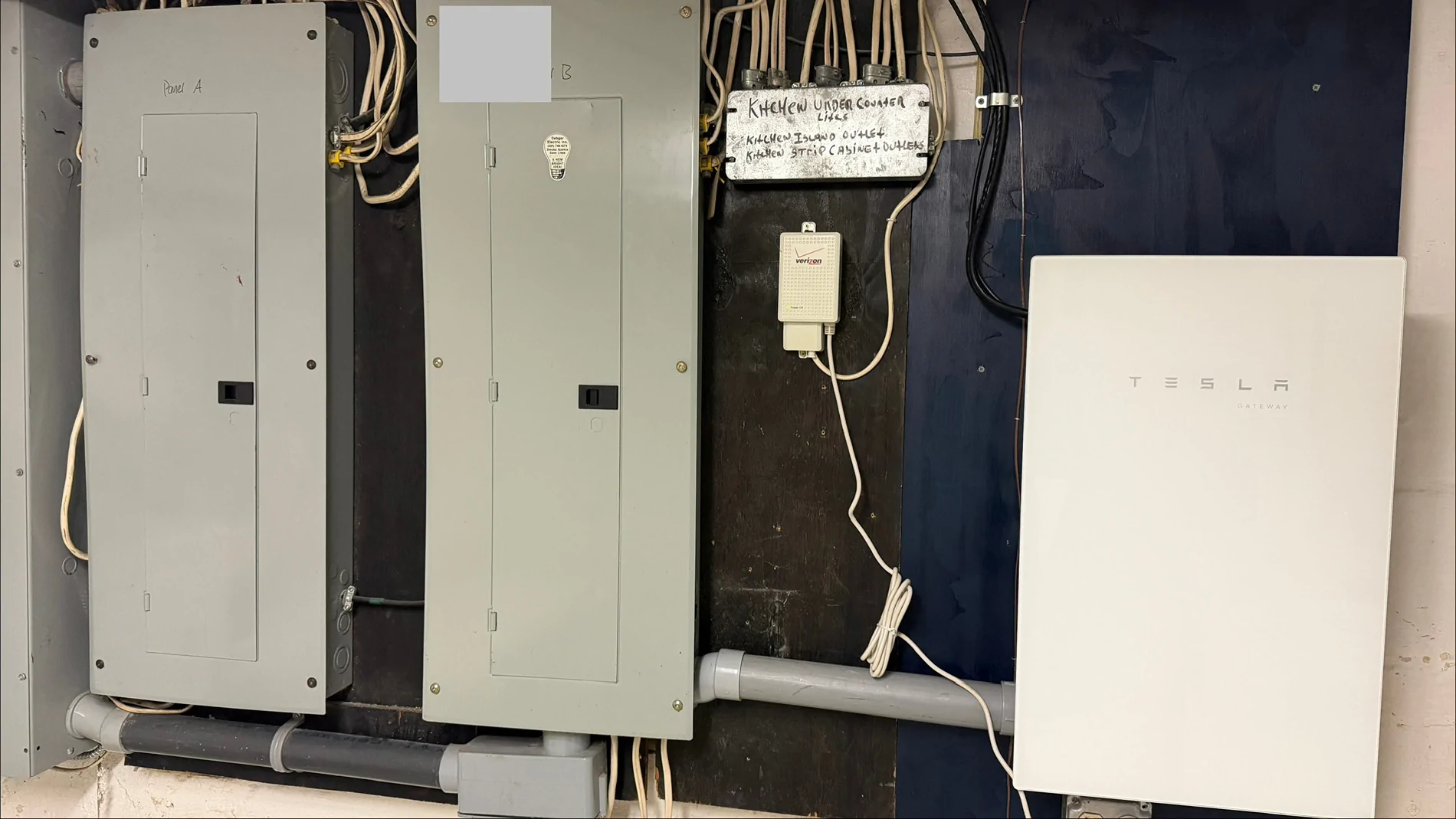
1773455071992-46.webp


[Powershare Gateway] (Photo)
1773455594232-we.webp
It is a sub panel with limited circuits and power. They should have asked you what circuits you wished to have available for backup when you have a power outage.
 

CyberGus

Well-known member
First Name
Gus
Joined
May 22, 2021
Threads
91
Messages
10,245
Reaction score
33,907
Location
Austin, TX
Vehicles
1981 DeLorean, 2024 Cybertruck
Occupation
IT Specialist
Country flag
If they were not going to wire up everything, then there should have been a discussion before work began. Red flag #1.

Of course, documenting the circuits with Sharpie scribble is disqualifying IMHO. Get a LabelMaker FFS
 

shurley1975

Well-known member
First Name
shane
Joined
Jan 27, 2026
Threads
3
Messages
61
Reaction score
90
Location
seattle
Vehicles
7G2CEHED3RA024214
Occupation
fleet manager
Country flag
That's where I lost respect too. $$$$ to install, used $1 sharpie to label everything?!?
 
OP
OP
deftguru

deftguru

Well-known member
First Name
JackMa
Joined
Mar 31, 2024
Threads
5
Messages
93
Reaction score
151
Location
NC
Vehicles
Pento!
Occupation
Nascar
Country flag
I would call the highest ranking person in that particular company ...
I am speaking with the owner of the company. And rather than him simply following Tesla’s guidance and speaking with their installer hotline he is trying to convince me and providing alternatives. I really do not want any back and forth with the electrician. I just want the system installed how Tesla recommends. The installer stated “what needs to happen” after the fact and apparently did not follow the installation guide as a Certified Tesla installer. When he states “reduce the panel from 200amps to 50amps.” it left me feeling empty. Especially when Tesla specifically stated: “The GW3V PowerShare Gateway can support whole home backup, but only if it’s connected to all of your home’s main circuits.”


Response from Owner/Installer:
I looked into connecting one of the main panels to the gateway. Here is what will need to happen to connect an entire panel.

1- You only have 11kw of power available. The connected load to the gateway cannot exceed 11kw or 50amps. I would need to calculate all the loads connected to the panel to determine what you have. One central AC is typically 4 to 5 kw. Once we determined the connected load I would likely need to move several circuits from on panel to the other creating the "Battery back-up panel" and the "non back-up panel". This will essentially reduce the panel from 200amps to 50amps.

2- The gateway will need a 200amp main breaker installed. The S1 and S2 lugs need to be removed and the main breaker connected.
3- The service feeders running from the trough to the panel will need to be removed and a new set of feeders extended to the gateway.
4- A set of feeders will need to be run from the L1 and L2 in the gateway to the "Battery back-up panel". This panel will need all the grounds and neutrals separated and will become a sub panel.

The inspector has not come out yet, but I will share my frustrations with them.

What frustrations does this installer need to share with the inspector? Had I not brought up my concerns would the installer have had any frustrations?

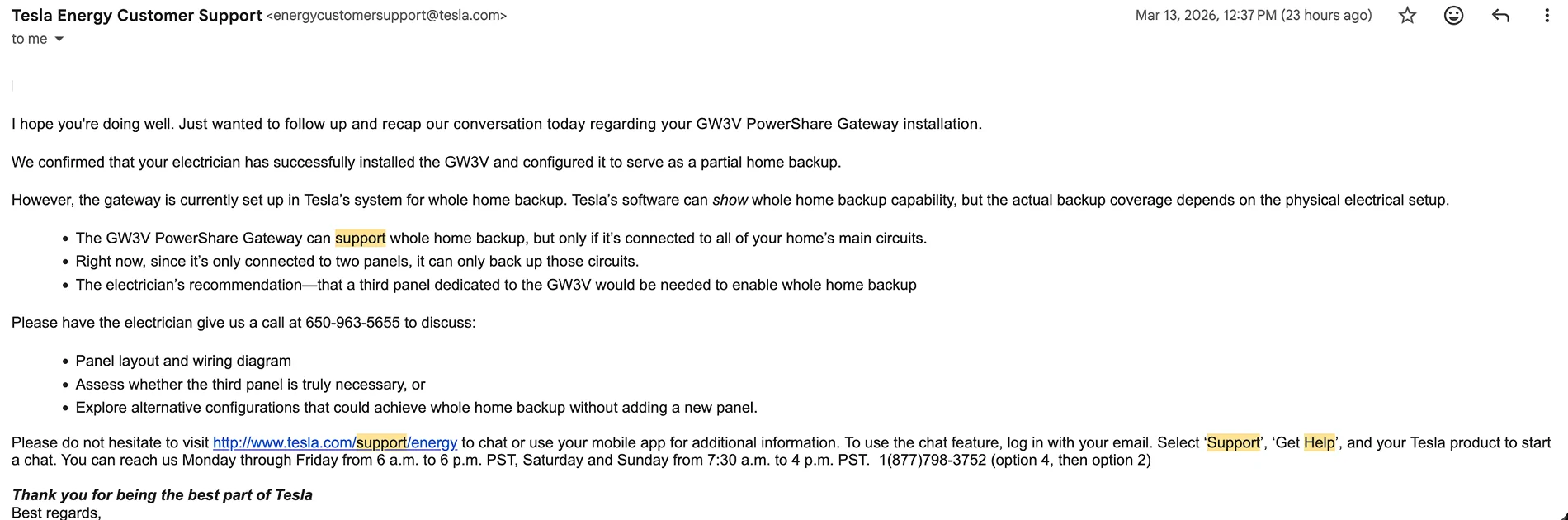
Attached is the response from Tesla --
Tesla Cybertruck Installer Error: My "Whole Home" Powershare was wired as "Partial Home" – Need Advice on Rework 1773506027866-30
 
  • Like
Reactions: REM


CyberGus

Well-known member
First Name
Gus
Joined
May 22, 2021
Threads
91
Messages
10,245
Reaction score
33,907
Location
Austin, TX
Vehicles
1981 DeLorean, 2024 Cybertruck
Occupation
IT Specialist
Country flag
When he states “reduce the panel from 200amps to 50amps.” it left me feeling empty.
I don't feel like he is articulating himself correctly.

A 200A service was never intended to supply all 200A all at once. The subpanel breakers probably add up to more than 200A, but that's because they're intermittent loads.

The issue with the inspector has to do with measuring the actual loads to ensure that you won't exceed the 50A available from PowerShare; the inspector can fail the work if he feels it's overloaded. My Gateway powers the entire main panel, with the understanding that I need to limit load when on battery. I might exceed 11kW when the A/C is running, but that's usually when I'm charging lol. So I can backup the whole house, but probably shouldn't run the A/C and the microwave while doing laundry, for instance.

Calculating the loads and selecting the backed-up circuits makes total sense... if done before work began and in cooperation with the client. You would not have been "surprised" by the result if the installer had been more forthcoming, instead of guessing what you wanted and making choices on your behalf.

If you regularly draw more than 11kW, then excluding some loads from the Gateway is a necessity. I typically pull about 40kWh per day (excluding charging) so staying under 11kW isn't a problem. Heavy loads like pool pumps and hot tubs would almost certainly need to be excluded.
 

HaulingAss

Well-known member
Joined
Oct 3, 2020
Threads
28
Messages
10,319
Reaction score
20,737
Location
Western Washington, USA
Vehicles
Cybertruck DM, 2010 F-150, 2018 Performance Model 3, 2024 Performance Model 3
Country flag
I’m seeking advice on how to handle a major installation error. I finally had my Tesla Powershare system installed (Universal Wall Connector + Gateway) for my Cybertruck after holding the hardware for a year.

The Goal: Whole Home Backup. The Reality: The installer wired the system as a "Partial Home" backup, and they did it incorrectly even for that configuration.

Current (Incorrect) Setup: [Service Meter] —> [Main (200amp) Panel A] —> [Subpanel (200amp) B] —> [Powershare Gateway]

The Issue: The Gateway is at the end of the chain, it only backs up the circuits inside the Gateway itself. If the grid goes out only those brakers inside the gateway are backed up. Tesla Support confirmed my account is provisioned for "Full Home Backup," but the physical wiring contradicts this. Tesla stated the Gateway is suppose to be right after the meter.

My Dilemma: 1. The installers have been paid, but the job is technically incomplete/wrong. 2. I’m worried that if I force them to redo it, they will cut corners to avoid a total loss on the job. 3. Should I trust them to fix this, or cut my losses and hire a new Qmerit-certified pro to rip it out and start over?

Questions for the community:
  • Has anyone successfully forced a "fix" from an installer who clearly didn't read the manual?
  • What is a fair "rework" cost if I hire a new company?
  • Are there specific "gotchas" in moving the Gateway to the Service Entrance that I should watch out for?

Here is my current setup:
[Service Meter] —> [Panel-A] —> [Panel-B] —> [Powershare Gateway]
1773455071992-46.webp


[Powershare Gateway] (Photo)
1773455594232-we.webp
It would add expense to your system but that looks like a good application for a load-shedding panel (SPAN Panel, etc.).

In any case, I would have someone else draw up a correct schematic and have the original contractor install it how it should have been installed to begin with. Education is expensive and it looks like your electrical contractor needs some education.
 
  • Like
Reactions: REM

mongo

Well-known member
Joined
May 27, 2024
Threads
5
Messages
4,524
Reaction score
5,505
Location
SE Michigan
Vehicles
Cyberbeast
Country flag
I’m seeking advice on how to handle a major installation error. I finally had my Tesla Powershare system installed (Universal Wall Connector + Gateway) for my Cybertruck after holding the hardware for a year.

The Goal: Whole Home Backup. The Reality: The installer wired the system as a "Partial Home" backup, and they did it incorrectly even for that configuration.

Current (Incorrect) Setup: [Service Meter] —> [Main (200amp) Panel A] —> [Subpanel (200amp) B] —> [Powershare Gateway]

The Issue: The Gateway is at the end of the chain, it only backs up the circuits inside the Gateway itself. If the grid goes out only those brakers inside the gateway are backed up. Tesla Support confirmed my account is provisioned for "Full Home Backup," but the physical wiring contradicts this. Tesla stated the Gateway is suppose to be right after the meter.

My Dilemma: 1. The installers have been paid, but the job is technically incomplete/wrong. 2. I’m worried that if I force them to redo it, they will cut corners to avoid a total loss on the job. 3. Should I trust them to fix this, or cut my losses and hire a new Qmerit-certified pro to rip it out and start over?

Questions for the community:
  • Has anyone successfully forced a "fix" from an installer who clearly didn't read the manual?
  • What is a fair "rework" cost if I hire a new company?
  • Are there specific "gotchas" in moving the Gateway to the Service Entrance that I should watch out for?

Here is my current setup:
[Service Meter] —> [Panel-A] —> [Panel-B] —> [Powershare Gateway]
1773455071992-46.webp


[Powershare Gateway] (Photo)
1773455594232-we.webp
Hi,

I have a similar setup, 400A service dual panels.
Good news: Powershare can backup one panel
Bad news: Powershare can only backup on panel

Fix:
Add main breaker to Gateway
Run passthrough lugs to panel
Separateand unbond neutral and ground in that panel (if they are currently)
Move circuits (if needed).

Tesla Cybertruck Installer Error: My "Whole Home" Powershare was wired as "Partial Home" – Need Advice on Rework Screenshot_20260314_174553_Gallery

On my setup I original had a manual generator inlet with interlocks on the breakers. I changed it so the smaller panel can be manually fed from the backed up one. I do manually shut off high power optional loads, but 11kW is sufficient to run everything in winter (no air conditioning, gas furnace and water heater). In fact it did so for 12 hours yesterday after the wind knocked out the power.
 

REM

Well-known member
Joined
Dec 9, 2023
Threads
14
Messages
3,578
Reaction score
6,646
Location
NC
Vehicles
2020 Model 3 Standard Range++ & Diet Cybertruck, Dual Motor
Occupation
Professional Retard
Country flag
I am speaking with the owner of the company. And rather than him simply following Tesla’s guidance and speaking with their installer hotline he is trying to convince me and providing alternatives. I really do not want any back and forth with the electrician. I just want the system installed how Tesla recommends. The installer stated “what needs to happen” after the fact and apparently did not follow the installation guide as a Certified Tesla installer. When he states “reduce the panel from 200amps to 50amps.” it left me feeling empty. Especially when Tesla specifically stated: “The GW3V PowerShare Gateway can support whole home backup, but only if it’s connected to all of your home’s main circuits.”


Response from Owner/Installer:
I looked into connecting one of the main panels to the gateway. Here is what will need to happen to connect an entire panel.

1- You only have 11kw of power available. The connected load to the gateway cannot exceed 11kw or 50amps. I would need to calculate all the loads connected to the panel to determine what you have. One central AC is typically 4 to 5 kw. Once we determined the connected load I would likely need to move several circuits from on panel to the other creating the "Battery back-up panel" and the "non back-up panel". This will essentially reduce the panel from 200amps to 50amps.

2- The gateway will need a 200amp main breaker installed. The S1 and S2 lugs need to be removed and the main breaker connected.
3- The service feeders running from the trough to the panel will need to be removed and a new set of feeders extended to the gateway.
4- A set of feeders will need to be run from the L1 and L2 in the gateway to the "Battery back-up panel". This panel will need all the grounds and neutrals separated and will become a sub panel.

The inspector has not come out yet, but I will share my frustrations with them.

What frustrations does this installer need to share with the inspector? Had I not brought up my concerns would the installer have had any frustrations?

Attached is the response from Tesla --
1773506027866-30.webp
with my limited knowledge here, I don't think I would feel comfortable with that project leader or company going forward; especially if you know for a fact he has deviated from Tesla's standards. If you got this service from Tesla's promotion credit to install, I would open a ticket with them and plainly state that their approved installer has deviated from the standards, and ask them how you should proceed.

What a mess 🤦‍♂️. I knew subcontractors would be an absolute thorn in the side of any VTG/VTL programs like Tesla has been trying to piece together the past couple of years.

I'm not an electrician or EE myself, but I feel like at this point I could do better than some of these guys. Deviating from very specific standards like this always sends up red flags with me, but I would consider a few ways out or moving forward if your gut tells you that something isn't right.

Also at this point you should double check to make sure this guy's company is licensed/insured/bonded.
 

Schroederhc

Well-known member
First Name
Bud
Joined
Oct 24, 2025
Threads
2
Messages
76
Reaction score
89
Location
WA
Vehicles
R1T, Juniper & Taycan
Occupation
Self Employed
Country flag
Hard to believe they are a certified Tesla installer. I went through Qmerit, and the outfit that picked up the job has been extremely thorough. The load calculation should have been the first step. He said if they don't follow it and get it signed off by the inspector, they don't get paid. My entire home isn't getting backed up. I had to go through it and figure out what would be a priority, a nice-to-have, and not necessary. I'm moving about 6 circuits around to get everything backed up on one. I have also asked about incorporating the span smart panel.
Sponsored


Top