Sponsored

Does anyone have their Cybertruck connected to their powerwall and confirmed it works?

Kamin

Well-known member
First Name
Walter
Joined
Feb 25, 2020
Threads
9
Messages
67
Reaction score
116
Location
Greeneville, TN
Vehicles
Cybertruck
Occupation
Health Physicist
Country flag
I picked up my AWD Cybertruck a week ago and found to my dismay that my 400 amp service and powershare don't go together. Searching through the posts it appears that Tesla has confirmed you can connect to and power your house through a powerwall. What I wasn't able to find is anyone here connected and confirming that it does indeed power your house through the powerwall.

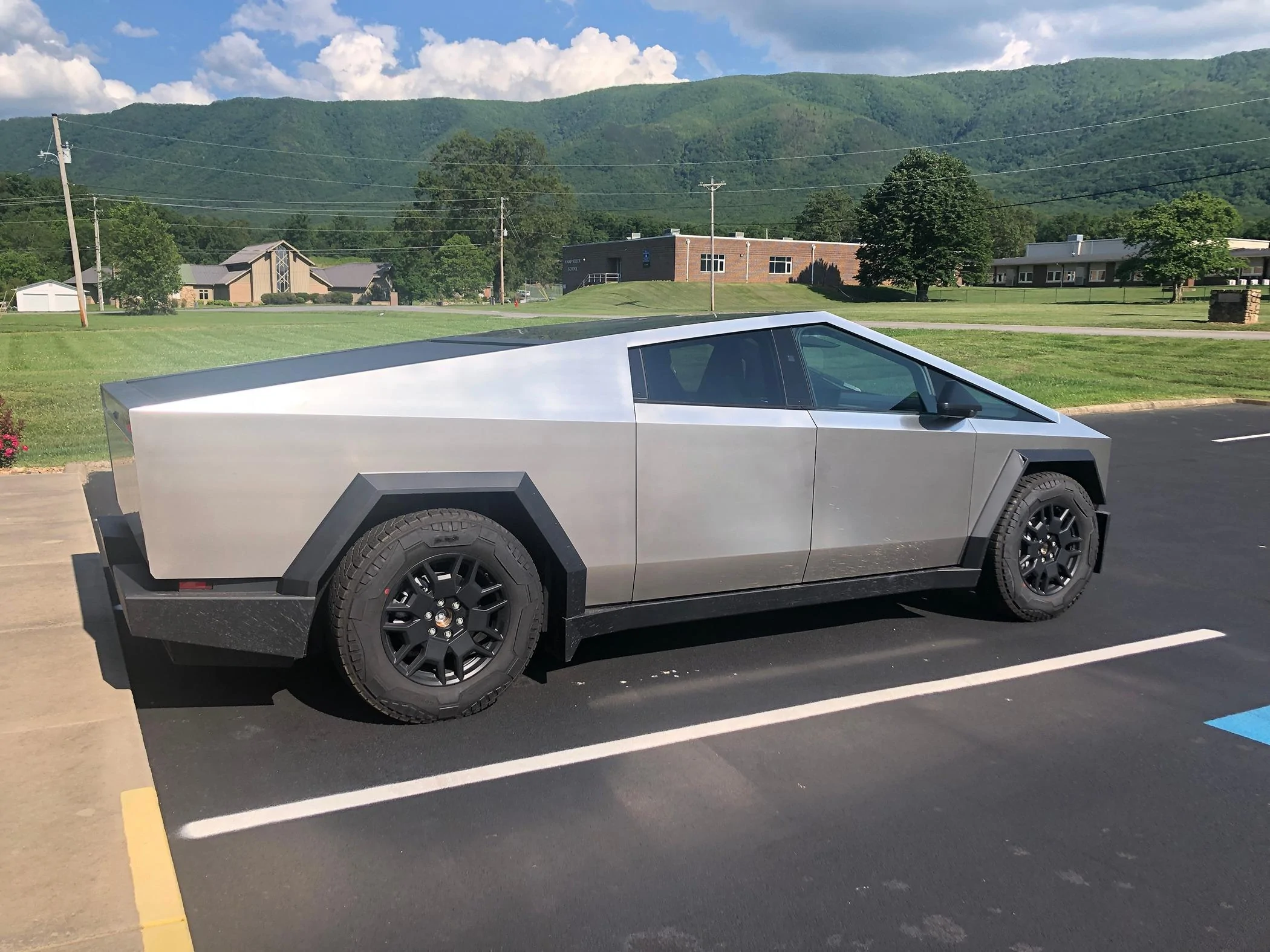
Also what I have seen here seems to confirm that 400 amp service is not a problem for the Powerwall 3 but would like someone to verify they have it working with their 400 amp service. A picture of my truck just for the fun of it.

Tesla Cybertruck Does anyone have their Cybertruck connected to their powerwall and confirmed it works? Cybertruck 1
Sponsored


AlmostHuman

Well-known member
Joined
May 1, 2024
Threads
7
Messages
985
Reaction score
1,349
Location
Earth
Vehicles
Model X, Cybertruck
Occupation
Human
Country flag
My understanding is that if your Wall Connector is powered or backed up by your Powerwall(s) you can use that gear with a software upgrade coming out in June to also use power from your Cybertruck with Powershare.

Pasting my post from a different thread, hope this helps.

****************************************************************************
Saw some questions on here about Powershare so wanted to give context about the configuration we have and how it impacted our answers to the Powershare surveys and the final outcome of those surveys. We had solar and Powerwalls installed in October of 2018. Installed two Gen 3 Wall Connectors Summer of 2020. Took Delivery of the Model X September of 2020.

I didn’t take screenshots of all the survey questions but with the above info we answered that we have Powerwalls, have solar, that the Wall Connectors are Gen 3 and are also on backup from the Powerwalls which is required for Powershare to work, and that they are wired with 240 volt.

On 2024.01.04 got an email tiled “Power Your Home With Your Cybertruck” that had the following and a link to a survey:

Install Powershare Home Backup

Powershare Home Backup allows you to power your home with the energy stored in your Cybertruck’s battery pack, helping keep the lights on for up to three days when outages occur.*

Your order is eligible for free Powershare Home Backup hardware—you just cover the installation cost. Take our survey to confirm your interest.** We will reach out to you with more information and connect you with a Tesla Certified Installer.

*Based on an average daily home energy usage of 30 kWh per day.
**Eligibility based on installation feasibility at your home.


On 2024.02.02 got an email tiled “Update: Powershare Home Backup Eligibility” with had the following:

Thank you for completing the Powershare Home Backup survey. Your order is eligible for Powershare Home Backup hardware installation. Once your VIN is assigned and your delivery is scheduled, we will match you with a Tesla Certified Installer who will reach out to you to schedule a site visit. You will receive a follow-up email from Tesla once you have been matched with an installer.

On 2024.03.04 got an email tiled “Update on Powershare Home Backup Survey” which had the following with a link to a survey:

Thank you for completing the Powershare Home Backup survey.

Because you already have Powerwall and home charging installed, we need additional information to determine if your home is already configured for Home Backup.

Once you submit the survey, we will reach out to you with more information.


On 2024.03.28 got an email tiled “Update: Powershare Home Backup Survey” with the following:

Thank you for completing the Powershare Home Backup survey.

Since you have Powerwall installed, your home is already on the way to being fully configured for Powershare Home Backup functionality but may require additional home charging equipment to complete your set up.

To finalize your setup, your home charging needs to be backed up by your Powerwall. Home Backup is compatible with any home charging unit, but 240V charging will provide the best experience. Our recommended home charging solutions are Wall Connector or Universal Wall Connector. Home Backup will be available with a software update expected in June. In the meantime, you will still be able to charge your Cybertruck at home.

In place of the Home Backup equipment, we’ll be providing you with a one-time use $700 Tesla Shop voucher. You can use this to purchase home charging to complete your Home Backup setup – or to purchase other charging equipment, apparel, accessories and more. This voucher can only be used once and any unused balance remaining after the transaction will be forfeited. This will be provided to you within two weeks after your Cybertruck delivery.

The Tesla Team


Quote Reply
Report Edit Delete
 

tmeyer3

Well-known member
First Name
Trevor
Joined
Jun 27, 2021
Threads
31
Messages
2,036
Reaction score
3,614
Location
CA
Website
www.meyerwine.com
Vehicles
Model 3, '73 GMC truck, Wrangler, Tractors
Occupation
Computer Scientist, Vintner
Country flag
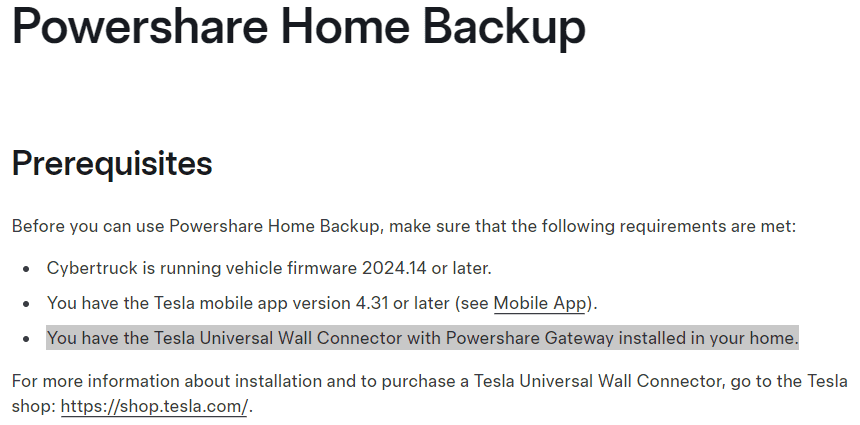
I received the same information with the additional note that really what does the home backup is their smart switch that comes with powerwall. I don't think (unconfirmed) they sell them without at least one powerwall, however.

Edit: yeah, here it is from the manual
Tesla Cybertruck Does anyone have their Cybertruck connected to their powerwall and confirmed it works? 1716769892942-r7
 

AlmostHuman

Well-known member
Joined
May 1, 2024
Threads
7
Messages
985
Reaction score
1,349
Location
Earth
Vehicles
Model X, Cybertruck
Occupation
Human
Country flag
I received the same information with the additional note that really what does the home backup is their smart switch that comes with powerwall. I don't think (unconfirmed) they sell them without at least one powerwall, however.

Edit: yeah, here it is from the manual
1716769892942-r7.png
Based on the information I got back from the surveys if you have Powerwall(s) and a Wall Connector that is backed up by the Powerwall(s) you just have to wait for the software update in June. If that is not correct I’d love for someone to explain what else is needed. My understanding is there is no need to have the Powershare Gateway installed if the above is true, just need to wait for the software update in June. Whenever that software update happens I will be sure to report back.
 

tmeyer3

Well-known member
First Name
Trevor
Joined
Jun 27, 2021
Threads
31
Messages
2,036
Reaction score
3,614
Location
CA
Website
www.meyerwine.com
Vehicles
Model 3, '73 GMC truck, Wrangler, Tractors
Occupation
Computer Scientist, Vintner
Country flag
Based on the information I got back from the surveys if you have Powerwall(s) and a Wall Connector that is backed up by the Powerwall(s) you just have to wait for the software update in June. If that is not correct I’d love for someone to explain what else is needed. My understanding is there is no need to have the Powershare Gateway installed if the above is true, just need to wait for the software update in June. Whenever that software update happens I will be sure to report back.
Yes, you are correct. It's detailed on the Tesla website. The smart gateway that comes with powerwall is sufficient and you're all set. Without powerwall/smart gateway, you need a power share gateway installation for backup without a powerwall installation. They are different configurations. ? You're all set it sounds like, you just need the software update if the website isn't lying to us all!

I'm in the same boat. Was told I'm good to go since I have powerwall and a Tesla wall charger.


mbrockus

Well-known member
First Name
Mark
Joined
Jan 31, 2024
Threads
7
Messages
390
Reaction score
420
Location
Conway, WA
Vehicles
Model 3, Model X, AWD CT
Occupation
President of the Anonymous of the Anonymous Club
Country flag
There are a few who are able to use the Powershare system. They do not have a powerwall or a solar system in their set up. @Eyesore has commented his is working.
 

Balthezor

Well-known member
First Name
Ron
Joined
Jun 21, 2020
Threads
28
Messages
1,023
Reaction score
1,400
Location
PA
Vehicles
Cyberbeast, Range Rover, Model Y
Country flag
Yes, you are correct. It's detailed on the Tesla website. The smart gateway that comes with powerwall is sufficient and you're all set. Without powerwall/smart gateway, you need a power share gateway installation for backup without a powerwall installation. They are different configurations. ? You're all set it sounds like, you just need the software update if the website isn't lying to us all!

I'm in the same boat. Was told I'm good to go since I have powerwall and a Tesla wall charger.
Dumb question. I have a two x 200 amp panels. From what I've read, I'm eligible for power share? But if I get a powerwall set up first, I can still use power share from CT? Any additional installation on that besides losing the included $4000 installation credit for ordering a Beast?
 

Eyesore

Well-known member
First Name
Scott
Joined
Dec 26, 2023
Threads
8
Messages
87
Reaction score
114
Location
Snohomish Wa
Vehicles
2024 FDM, 1990 Ford Ranger, 2005 Tacoma, 2007 Rav4
Occupation
Systems Engineer
Country flag
There are a few who are able to use the Powershare system. They do not have a powerwall or a solar system in their set up. @Eyesore has commented his is working.
yup. I have Gateway 3V, no powerwall, and at the time 2024.14.6. One evening powershare backup feature showed up on my truck and phone. @dandor said this was pushed to my account. I tested back up by turning off the grid breaker in my gateway, and the truck delivered power to my home.

https://www.cybertruckownersclub.co...beta-pushed-to-my-account-on-2024-14-6.17230/
 

Johnboy

Member
First Name
JP
Joined
Jan 30, 2024
Threads
0
Messages
17
Reaction score
31
Location
FL
Vehicles
Vintage Corvette, BMW X5 PHEV, FS Cybertruck AWD
Country flag
Do you even need a Gateway? If you already have a interlock and generator setup for power outages---can't you just run an extension cord directly from your cybertruck to the outlet after shutting down the grid with the interlock. Not automatic but a lot cheaper.
 

edc

Well-known member
First Name
C
Joined
Dec 12, 2023
Threads
15
Messages
242
Reaction score
464
Location
CA
Vehicles
Tesla Model X, Y, Cybertruck
Country flag
Based on the information I got back from the surveys if you have Powerwall(s) and a Wall Connector that is backed up by the Powerwall(s) you just have to wait for the software update in June. If that is not correct I’d love for someone to explain what else is needed. My understanding is there is no need to have the Powershare Gateway installed if the above is true, just need to wait for the software update in June. Whenever that software update happens I will be sure to report back.
You still need a universal wall connector!


AlmostHuman

Well-known member
Joined
May 1, 2024
Threads
7
Messages
985
Reaction score
1,349
Location
Earth
Vehicles
Model X, Cybertruck
Occupation
Human
Country flag
You still need a universal wall connector!
I do not believe that is correct. Base on the surveys I took I am all set. It will work with the normal Wall Connector is my understanding.
 

Stuck4ger

Well-known member
Joined
Dec 6, 2019
Threads
54
Messages
1,372
Reaction score
2,545
Location
Cape Canaveral, FL
Vehicles
Cyberbeast
Occupation
Aerospace
Country flag
Do you even need a Gateway? If you already have a interlock and generator setup for power outages---can't you just run an extension cord directly from your cybertruck to the outlet after shutting down the grid with the interlock. Not automatic but a lot cheaper.
But not as much power.
 

edc

Well-known member
First Name
C
Joined
Dec 12, 2023
Threads
15
Messages
242
Reaction score
464
Location
CA
Vehicles
Tesla Model X, Y, Cybertruck
Country flag
I learned ALOT from the Tesla certified installer recently. I can't post the video yet until I get my powershare update however. And from them, it seems that someone from Tesla manually does it after reviewing the close out form where the installer fills out all this info with photos of the final process.

But crazy thing.. they were able to hook up my solar power to the gateway. So if there is an outage, my solar panels will charge the car.. then my car will power my home.. SOON.. After a software update.

I have a 200 amp breaker and they took pretty much all of my plugs and put it into the gateway. Only thing they didn't do was the laundry.

When charging I now have a double arrow green icon for the car but no "power your home with powershare" icon that I've been seeing on the app. Also nothing on the truck screen.

I'm assuming because the tesla person didn't review it yet.

Also, he told me that you still need a universal wall connector regardless if you have a power wall since a special wire is what is needed for the truck to connect to the gateway
 

Stuck4ger

Well-known member
Joined
Dec 6, 2019
Threads
54
Messages
1,372
Reaction score
2,545
Location
Cape Canaveral, FL
Vehicles
Cyberbeast
Occupation
Aerospace
Country flag
I learned ALOT from the Tesla certified installer recently. I can't post the video yet until I get my powershare update however. And from them, it seems that someone from Tesla manually does it after reviewing the close out form where the installer fills out all this info with photos of the final process.

But crazy thing.. they were able to hook up my solar power to the gateway. So if there is an outage, my solar panels will charge the car.. then my car will power my home.. SOON.. After a software update.

I have a 200 amp breaker and they took pretty much all of my plugs and put it into the gateway. Only thing they didn't do was the laundry.

When charging I now have a double arrow green icon for the car but no "power your home with powershare" icon that I've been seeing on the app. Also nothing on the truck screen.

I'm assuming because the tesla person didn't review it yet.

Also, he told me that you still need a universal wall connector regardless if you have a power wall since a special wire is what is needed for the truck to connect to the gateway
?
 

AlmostHuman

Well-known member
Joined
May 1, 2024
Threads
7
Messages
985
Reaction score
1,349
Location
Earth
Vehicles
Model X, Cybertruck
Occupation
Human
Country flag
I learned ALOT from the Tesla certified installer recently. I can't post the video yet until I get my powershare update however. And from them, it seems that someone from Tesla manually does it after reviewing the close out form where the installer fills out all this info with photos of the final process.

But crazy thing.. they were able to hook up my solar power to the gateway. So if there is an outage, my solar panels will charge the car.. then my car will power my home.. SOON.. After a software update.

I have a 200 amp breaker and they took pretty much all of my plugs and put it into the gateway. Only thing they didn't do was the laundry.

When charging I now have a double arrow green icon for the car but no "power your home with powershare" icon that I've been seeing on the app. Also nothing on the truck screen.

I'm assuming because the tesla person didn't review it yet.

Also, he told me that you still need a universal wall connector regardless if you have a power wall since a special wire is what is needed for the truck to connect to the gateway
I think that person told you wrong. If you have Powerwall(s) and a Gen 3 Wall Connector that is also backed up by the Powerwall(s) all you need is the software update.
Sponsored


Top