Sponsored

Charging issues - Please help

CyberPilot782

Member
First Name
Michael
Joined
Aug 15, 2024
Threads
6
Messages
22
Reaction score
39
Location
St. Simons Island, GA
Vehicles
2023 Ram 1500 Limited, 2022 Dodge Durango RT, CT
Occupation
Event Director/Pilot
Country flag
A friend of mine has my CT and is at a supercharger. The truck will try to charge and then shut itself off. It doesn’t give any information as to why. It charged great the last couple days, but today it charged to 40% and stopped. He is trying to get it to 70% to make it home but won’t. Not sure if 40% has anything to do with it and means something specific.
I’ve checked the charging account.
The charge limit is raised above the 40%
I haven’t done any long trips with the truck and have only ever charged at my home. Any tips would be greatly appreciated.
Sponsored


 

Ddanis60

Well-known member
First Name
David
Joined
Mar 17, 2024
Threads
0
Messages
123
Reaction score
226
Location
Omaha, NE
Vehicles
2019 MXP, 2022 M3P, 2024 Cybertruck awd
Occupation
Retired Military
Country flag
Any emails from Tesla, or any outstanding supercharger balances? Maybe try adding a different card or payment account to your Tesla wallet. Only time I’ve ever had issues charging at a SC is when I had an expired card and supercharging was disabled until I paid, or I had some kind of charge battery limit placed.

Actually, maybe if you have a charging schedule set, and it’s overriding. Try clearing any pre-set charge times or schedules. I think this is the most likely culprit.

Good luck.
 

Stuck4ger

Well-known member
Joined
Dec 6, 2019
Threads
54
Messages
1,372
Reaction score
2,546
Location
Cape Canaveral, FL
Vehicles
Cyberbeast
Occupation
Aerospace
Country flag
I had an issue at a SC where an entire row wasn’t working and the app didn’t reflect that. Worked fine when I moved the truck.
 
  • Like
Reactions: REM

mongo

Well-known member
Joined
May 27, 2024
Threads
5
Messages
4,520
Reaction score
5,497
Location
SE Michigan
Vehicles
Cyberbeast
Country flag
Actually, maybe if you have a charging schedule set, and it’s overriding. Try clearing any pre-set charge times or schedules. I think this is the most likely culprit.
Those settings shouldn't impact Supercharging, but one never knows.


The truck will try to charge and then shut itself off. It doesn’t give any information as to why. It charged great the last couple days, but today it charged to 40% and stopped.
What does "shut itself off" mean? Same with stopped. Are there error codes/ warnings, is the charge port light on, of so what color?
 

getsometom

Well-known member
First Name
Tom
Joined
Mar 31, 2024
Threads
58
Messages
1,593
Reaction score
2,254
Location
Texas
Vehicles
Cybertruck
Country flag
@CyberPilot782 This may be a stupid question but has your friend tried moving to another station at the supercharger or perhaps another supercharger completely? Sometimes various supercharger stations may have issues but not sure why it would only charge to 40%. Also, what was his charging speed/rate?


CyberGus

Well-known member
First Name
Gus
Joined
May 22, 2021
Threads
91
Messages
10,237
Reaction score
33,890
Location
Austin, TX
Vehicles
1981 DeLorean, 2024 Cybertruck
Occupation
IT Specialist
Country flag
After you insert a charge cable into Cybertruck, wait a few seconds and confirm that the charge port light begins blinking green and that your vehicle is charging. If the light is amber or red, troubleshoot the issue before you leave to ensure a successful charging session.


Tesla Cybertruck Charging issues - Please help {filename}
WHITE: The charge port door is open. Cybertruck is ready to charge and the connector is not inserted, or the charge port latch is unlocked and the connector is ready to be removed.


Tesla Cybertruck Charging issues - Please help {filename}
BLUE, BLINKING: Cybertruck is communicating with the charger but has not started charging or providing power yet (such as when your vehicle is preparing to charge, or when your vehicle is preparing to provide power from the high voltage Battery).

Tesla Cybertruck Charging issues - Please help {filename}
BLUE: The charger is connected, but Cybertruck is not charging (such as when scheduled charging is active).

Tesla Cybertruck Charging issues - Please help {filename}
PURPLE, BLINKING: Cybertruck is providing power from the high voltage Battery. The frequency of blinking corresponds to the amount of power that Cybertruck is providing (more frequent blinks correspond to more power being provided). For more information, see Powershare Home Backup.

Tesla Cybertruck Charging issues - Please help {filename}
GREEN, BLINKING: Charging is in progress. As Cybertruck approaches a full charge, the frequency of the blinking slows.

Tesla Cybertruck Charging issues - Please help {filename}
GREEN, SOLID: Charging is complete.

Tesla Cybertruck Charging issues - Please help {filename}
AMBER, BLINKING: Cybertruck is charging at a reduced current because the connector is not fully plugged in.

Tesla Cybertruck Charging issues - Please help {filename}
AMBER, SOLID: Cybertruck is not charging because the connector is not fully plugged in. Realign the connector to the charge port and insert fully.

Tesla Cybertruck Charging issues - Please help {filename}
RED: A fault is detected and charging has stopped. Check the touchscreen for an alert. In some cases, an alert can be easily cleared by unplugging the charge cable, returning it to the charger, then trying again. In other cases (such as a tripped fuse or a faulty charger), you may need to check the power source. If the red light persists, try using a different charger.


https://www.tesla.com/ownersmanual/cybertruck/en_us/GUID-06CC33AC-2D99-4E39-8E8A-B4248FA1FD9C.html
 
OP
OP
CyberPilot782

CyberPilot782

Member
First Name
Michael
Joined
Aug 15, 2024
Threads
6
Messages
22
Reaction score
39
Location
St. Simons Island, GA
Vehicles
2023 Ram 1500 Limited, 2022 Dodge Durango RT, CT
Occupation
Event Director/Pilot
Country flag
@CyberGus @getsometom @mongo
Thanks for the replies.
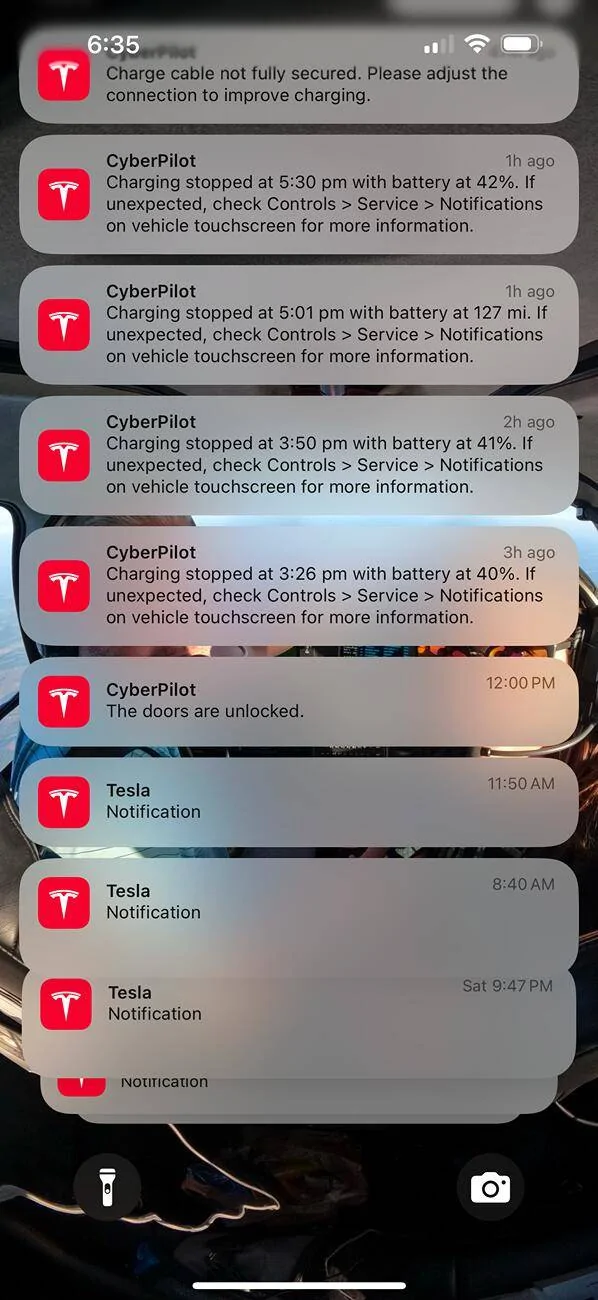
Attached is a screenshot of an alert I received
, and also a video of him plugging it in. He has moved to other spaces, and I believe he also drove down the road to another SC. I’m headed to meet him to get the truck back, but unfortunately he’ll be arriving to the SC at 2%.

Tesla Cybertruck Charging issues - Please help IMG_3596


dalton108

Well-known member
First Name
Dalton
Joined
Oct 17, 2020
Threads
131
Messages
3,954
Reaction score
7,889
Location
USA
Vehicles
‘24 FS/CB; ‘24 MX; ‘23 MS PLAID (Prior: ‘20-MY; ‘21-M3P) (Also: ‘14-FJ; ‘21-C8)
Occupation
Lawyer
Country flag
Unfortunately, looks like this is going to be something for the service center. Maybe something hinky with your high-voltage system?

You said you’ve been charging normally at home, maybe you can find a destination charger instead of a supercharger and see if that works if you can’t get it all the way to your house. Or tow home (or maybe directly to the service center) w/ AAA?
 
Last edited:

mongo

Well-known member
Joined
May 27, 2024
Threads
5
Messages
4,520
Reaction score
5,497
Location
SE Michigan
Vehicles
Cyberbeast
Country flag
@CyberGus @getsometom @mongo
Thanks for the replies.
Attached is a screenshot of an alert I received
, and also a video of him plugging it in. He has moved to other spaces, and I believe he also drove down the road to another SC. I’m headed to meet him to get the truck back, but unfortunately he’ll be arriving to the SC at 2%.

Tesla Cybertruck Charging issues - Please help {filename}


I'm going to go out on a limb and guess there is either a loose connection in the HV charge path, or the internal Supercharging (charger bypass) contactor(s) are bad.
It might charge from AC if they have the mobile connector or there is a J1772 site on the way.
 

CyberGus

Well-known member
First Name
Gus
Joined
May 22, 2021
Threads
91
Messages
10,237
Reaction score
33,890
Location
Austin, TX
Vehicles
1981 DeLorean, 2024 Cybertruck
Occupation
IT Specialist
Country flag
I assume the “charge cable not secured” message is an anomaly from repeated plug/unplug attempts. There were multiple “charging stopped” messages prior, without mention of the cable.

Regardless, this seems like a repair situation if multiple SC stalls produced the same result.

There is better efficiency at lower speeds, so driving at or slightly below the limit should ensure 2% is sufficient headroom.

Good luck.


AlmostHuman

Well-known member
Joined
May 1, 2024
Threads
7
Messages
985
Reaction score
1,349
Location
Earth
Vehicles
Model X, Cybertruck
Occupation
Human
Country flag
I would also try the two button reboot. If that does t help do the full power down (Controls > Safety > Power Off) and let it sit for 5 minutes before powering up.
 

Model3Guy

Well-known member
First Name
G.
Joined
Jul 26, 2021
Threads
0
Messages
61
Reaction score
44
Location
USA
Vehicles
Jeep, M3
Occupation
Retired
Country flag
I have read here and elsewhere that towing (ideally at 18 mph) will give the battery 10 miles for each mile towed. Leave it in drive (gear) with the CT driver being especially alert.
Good luck.
 

Jack27

Well-known member
First Name
Randy
Joined
Aug 13, 2024
Threads
16
Messages
1,283
Reaction score
1,462
Location
Los Angeles
Vehicles
BMX Mongoose/tony hawk skate board/ roller blades
Occupation
None
Country flag
As mentioned I would do a reset pushing both buttons. I would into charging not on the app but inside the truck and change the setting just to see. I would move to a different row of charging maybe one someone just left that it worked for if none of that works I would drive it off a cliff and collect the insurance money
 
OP
OP
CyberPilot782

CyberPilot782

Member
First Name
Michael
Joined
Aug 15, 2024
Threads
6
Messages
22
Reaction score
39
Location
St. Simons Island, GA
Vehicles
2023 Ram 1500 Limited, 2022 Dodge Durango RT, CT
Occupation
Event Director/Pilot
Country flag
@CyberGus @getsometom @mongo
Thanks for the replies.
Attached is a screenshot of an alert I received
, and also a video of him plugging it in. He has moved to other spaces, and I believe he also drove down the road to another SC. I’m headed to meet him to get the truck back, but unfortunately he’ll be arriving to the SC at 2%.

Tesla Cybertruck Charging issues - Please help {filename}


Thanks for your help. I met him at a Jacksonville SC and he arrived with 4%. I plugged it in and charged just fine. He went to 3 different stations and the same thing happened at all 3. There’s a chance that all three were down and not working, but probably unlikely. I charge just enough at the SC to make it home, and it charged to just find at the house. Again, thank you for your replies and help.
 

Mikewg

New member
First Name
Mike
Joined
Dec 8, 2024
Threads
1
Messages
4
Reaction score
4
Location
maryland
Vehicles
cybertruck
Country flag
Thanks for your help. I met him at a Jacksonville SC and he arrived with 4%. I plugged it in and charged just fine. He went to 3 different stations and the same thing happened at all 3. There’s a chance that all three were down and not working, but probably unlikely. I charge just enough at the SC to make it home, and it charged to just find at the house. Again, thank you for your replies and help.
This references Cybertruck charging in general. Received message, AC charging unavailable, schedule service. Plugged in properly, blue light on, no other messages. Had towed to Wilmington, Delaware Service Center. Truck sat there for two days over the weekend. When Monday came, system appeared to reset itself, and the tech charged the truck on a Tesla Wall Charger and SuperCharger. Attempted to blame a third-party charger or the Tesla Wall Charger, both of which were working fine as “logs showed error two week earlier on third party charger.” Got it back. Two days later, when I got it home to my Wall Charger; same error, “AC charging unavailable, schedule service.” Towed to Silver Spring, Maryland Service Center, now waiting for parts. If you have a CT and get this message, there is something wrong with the truck and do not let any SC say it was a fluke or anomaly. Only message to SC: Find the problem, repair the problem.
Sponsored


Top