Sponsored

Powerwall and CT Powershare G-3V default energy prioritizing

scottf200

Well-known member
Joined
Jul 31, 2021
Threads
53
Messages
2,221
Reaction score
3,241
Location
Western NC
Vehicles
X; immed family 3 & Y
Country flag
Topic: Powerwall and CT Powershare G-3V default energy prioritizing

If you have a Powerwall and CT Powershare via Gateway 3V[ehicle]
then in the middle of the night, your power goes out ...
I believe the Powerwall will provide millisecond takeover from your grid
and your CT will provide additional energy in anywhere from 3-45 secs (re: states of awake to deep_sleep).

a) At this point does the Tesla "energy system" prioritize drawing energy from your CT
(~100+ kWh) and *not* drain your Powerwall (~10 kWh) leaving it at the same SOC?


b) Similarly, if you were away from your house and your houses power went out
when you got home and plugged in your CT then would the Tesla "energy system" prioritize
drawing energy from your CT and *not* drain your Powerwall from that point on?


That seems ideal since a CT is the equivalent of ~10 Powerwalls [kWh rounding so simplicity] and you'd want to be able to take your CT to run errands and visit a Supercharger during extended outages.

If the Tesla "energy system" logic draws on them equally or worse prioritizes from the Powerwall then utilizing the CT bed NEMA 14-50 (albeit @ 9.6 kW) to a "generator" transfer switch setup is not much different.

Aside: Been planning for our Western NC house build for a few years [obviously I've refocused on power outages after being without in our rental for 6 days]. The house is almost all electric with 400 (320) amp service. I believe that the normal configuration is two 200 amp panels. I'm thinking my simplest configuration is to have one panel be all the 'Backed-up Home Loads'.
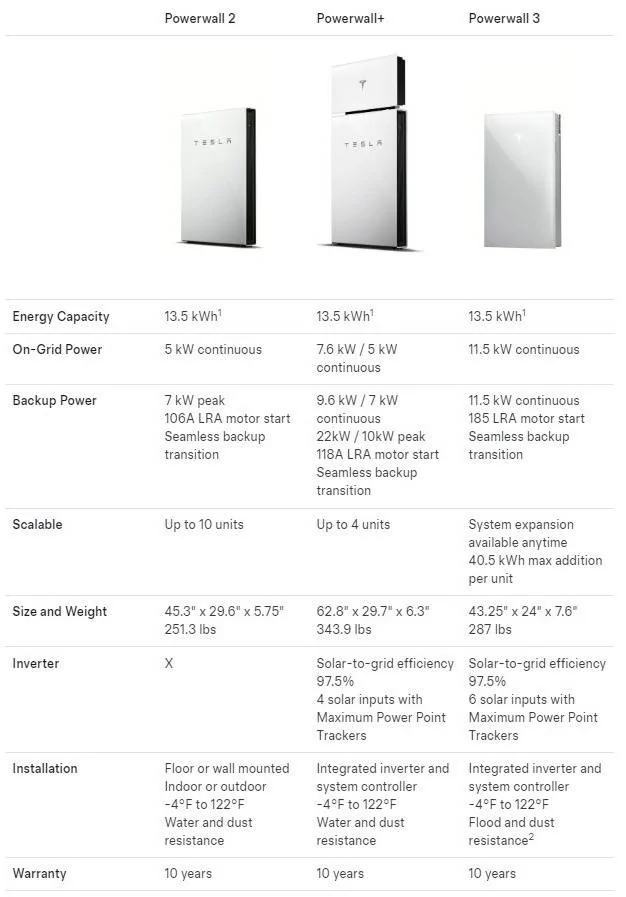
- I would have a Powerwall for millisecond islanding (Powerwall v3 has 185a LRA, LFP batteries, and is supposed to be compatible in future and I could add ~$2K cheaper future powerwall extension units)
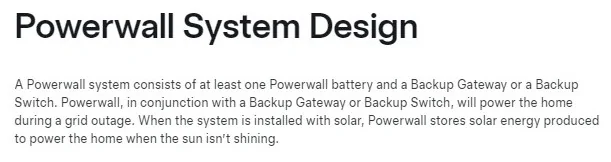
- I could either have a Gateway 3V attached to it and/or a transfer_switch and its generator_plug (ala receptacle from CT bed 14-50, Anker F3800, or gas generator)

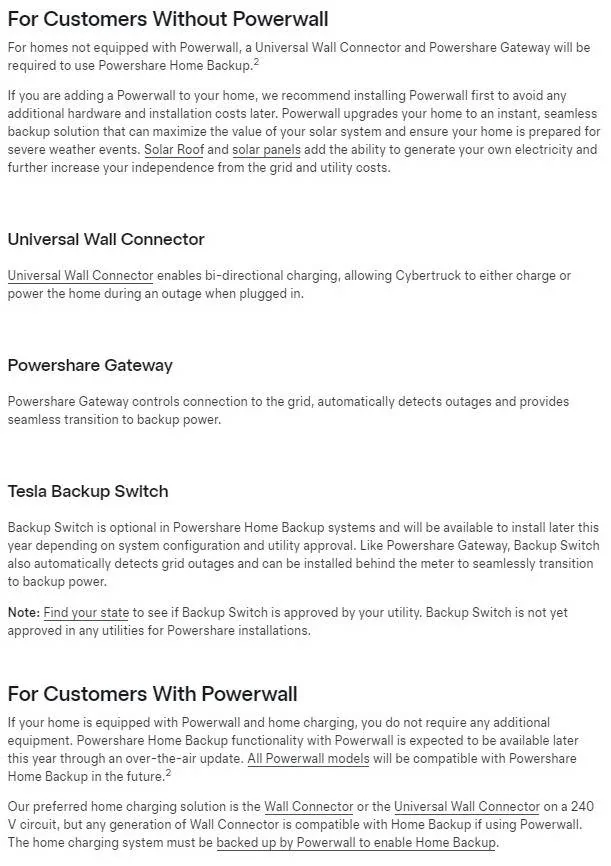
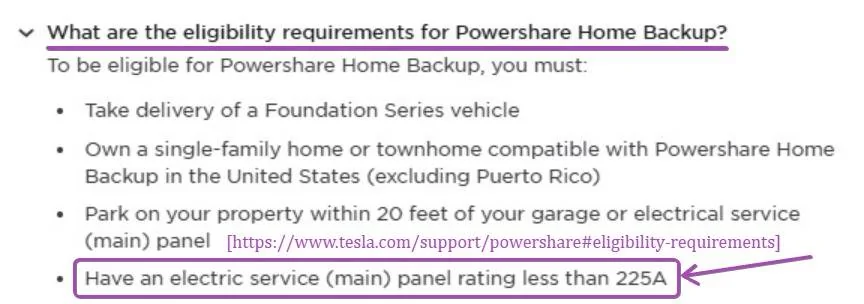
Attached are just related specs, info.

Tesla Cybertruck Powerwall and CT Powershare G-3V default energy prioritizing Powerwall spec and features - tabl


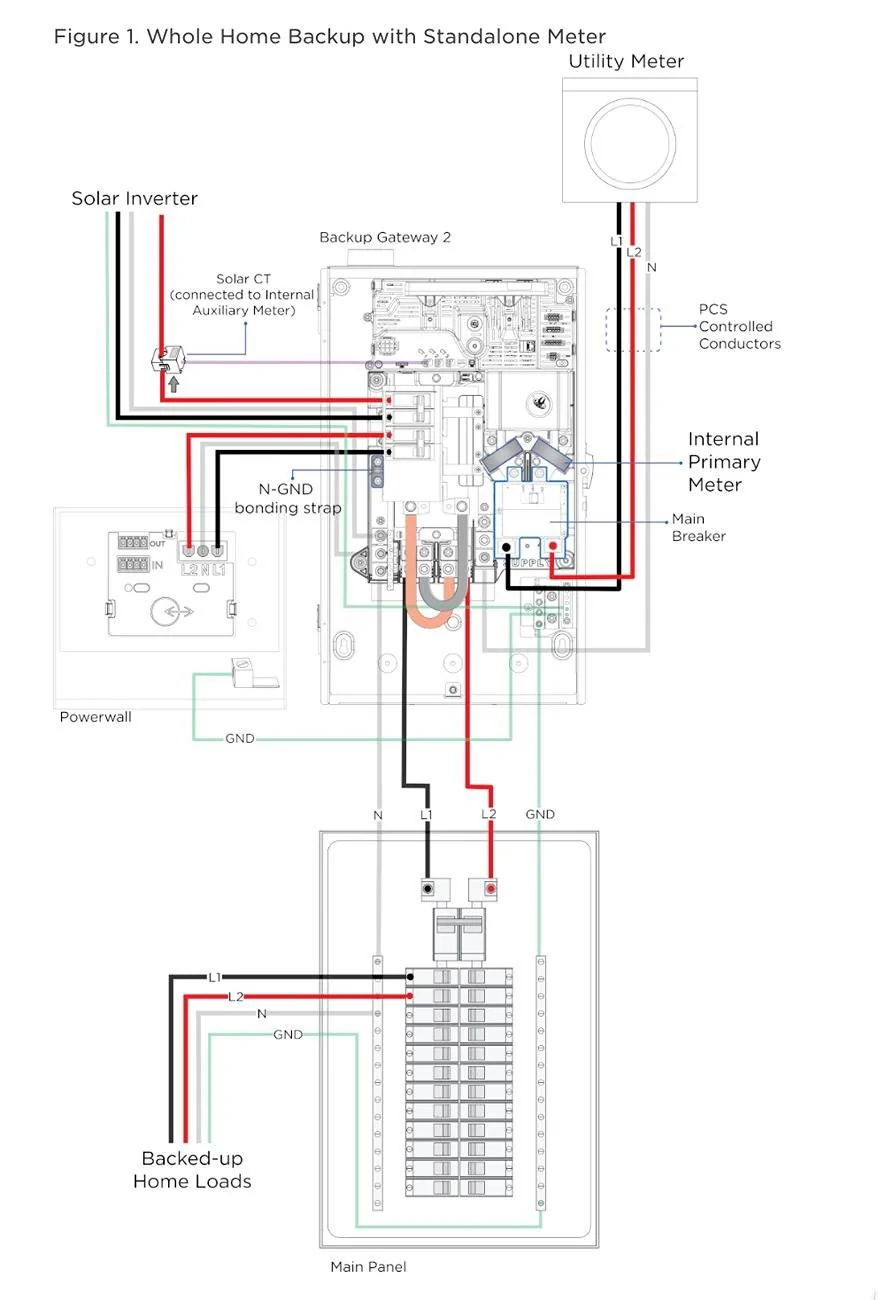
Tesla Cybertruck Powerwall and CT Powershare G-3V default energy prioritizing Powerwall System Design = Battery + Gateway (grid transfer switch)


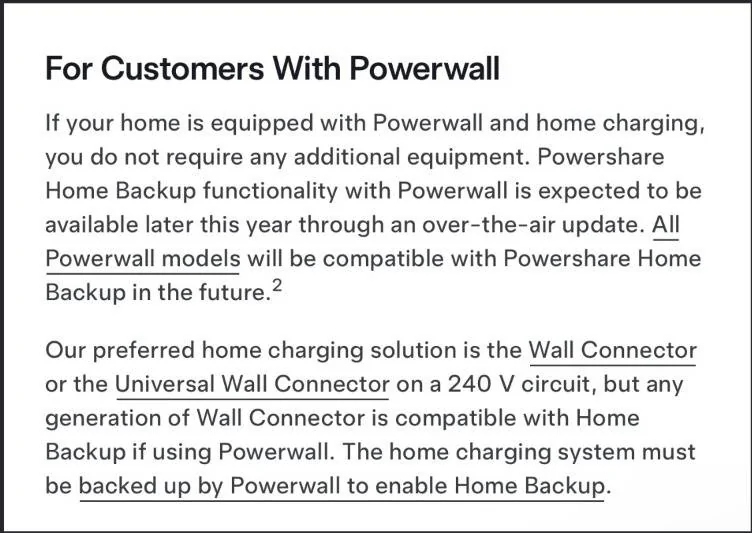
Tesla Cybertruck Powerwall and CT Powershare G-3V default energy prioritizing Powerwall YES or NO requirements for CT backu


Tesla Cybertruck Powerwall and CT Powershare G-3V default energy prioritizing 225 amp or less main panel requirement - FAQ Tesla Powershar


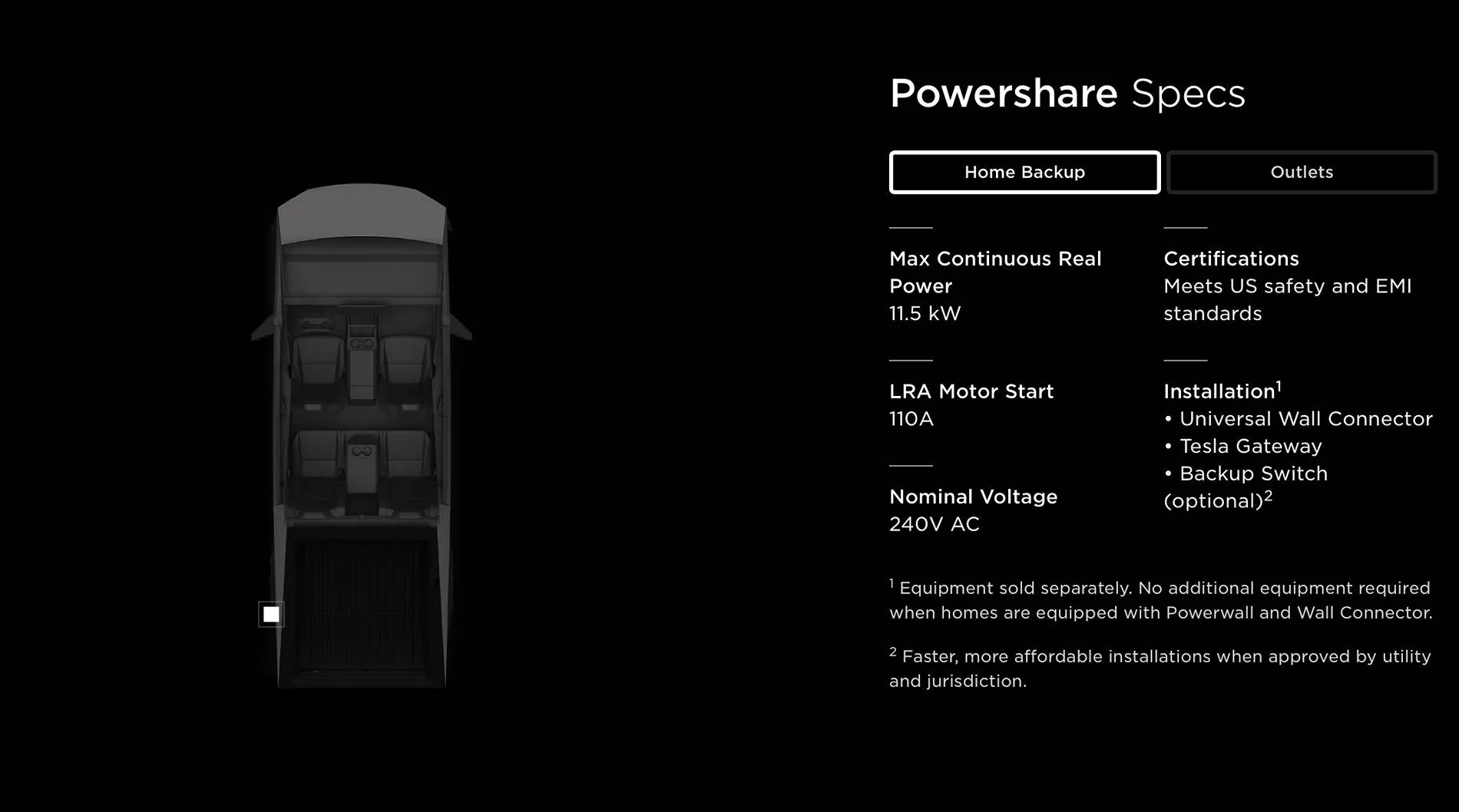
Tesla Cybertruck Powerwall and CT Powershare G-3V default energy prioritizing Powershare specs - home backu


Tesla Cybertruck Powerwall and CT Powershare G-3V default energy prioritizing ! Whole-Home Backup 2024-01-30 09-31-42
Sponsored


mongo

Well-known member
Joined
May 27, 2024
Threads
5
Messages
4,520
Reaction score
5,497
Location
SE Michigan
Vehicles
Cyberbeast
Country flag
Topic: Powerwall and CT Powershare G-3V default energy prioritizing

If you have a Powerwall and CT Powershare via Gateway 3V[ehicle]
then in the middle of the night, your power goes out ...
I believe the Powerwall will provide millisecond takeover from your grid
and your CT will provide additional energy in anywhere from 3-45 secs (re: states of awake to deep_sleep).

a) At this point does the Tesla "energy system" prioritize drawing energy from your CT
(~100+ kWh) and *not* drain your Powerwall (~10 kWh) leaving it at the same SOC?


b) Similarly, if you were away from your house and your houses power went out
when you got home and plugged in your CT then would the Tesla "energy system" prioritize
drawing energy from your CT and *not* drain your Powerwall from that point on?


That seems ideal since a CT is the equivalent of ~10 Powerwalls [kWh rounding so simplicity] and you'd want to be able to take your CT to run errands and visit a Supercharger during extended outages.

If the Tesla "energy system" logic draws on them equally or worse prioritizes from the Powerwall then utilizing the CT bed NEMA 14-50 (albeit @ 9.6 kW) to a "generator" transfer switch setup is not much different.

Aside: Been planning for our Western NC house build for a few years [obviously I've refocused on power outages after being without in our rental for 6 days]. The house is almost all electric with 400 (320) amp service. I believe that the normal configuration is two 200 amp panels. I'm thinking my simplest configuration is to have one panel be all the 'Backed-up Home Loads'.
- I would have a Powerwall for millisecond islanding (Powerwall v3 has 185a LRA, LFP batteries, and is supposed to be compatible in future and I could add ~$2K cheaper future powerwall extension units)
- I could either have a Gateway 3V attached to it and/or a transfer_switch and its generator_plug (ala receptacle from CT bed 14-50, Anker F3800, or gas generator)

Attached are just related specs, info.

Powerwall spec and features - table.jpg


Powerwall System Design = Battery + Gateway (grid transfer switch).jpg


Powerwall YES or NO requirements for CT backup.jpg


225 amp or less main panel requirement - FAQ Tesla Powershare.jpg


Powershare specs - home backup.jpg


! Whole-Home Backup 2024-01-30 09-31-42.jpg
Gateway 3V is not for homes with existing Powerwall/ Gateway installations. On those setups, Cybertruck/ Powershare will backfeed via Wall Connector once Tesla releases the software to enable that (no one has it yet).

For a new build where you plan on having Powerwalls, Tesla recommends doing that installation first as the Gateway 3V has a site controller which becomes redundant once the PW are installed. This complicates PW installation.

If you are doing a generator backup also, the recommended configuration is grid -> Gateway/PW -> Generator ATS -> backed up panel. This kicks the generator on once both the grid and PW are discharged.

Powerwall only kicks in as fast as Gateway switches over and reaction time also depends on previous state (charging vs discharging, solar...). You shouldn't count on signal digit millisecond recovery if you have critical loads.
 
OP
OP
scottf200

scottf200

Well-known member
Joined
Jul 31, 2021
Threads
53
Messages
2,221
Reaction score
3,241
Location
Western NC
Vehicles
X; immed family 3 & Y
Country flag
Gateway 3V is not for homes with existing Powerwall/ Gateway installations. On those setups, Cybertruck/ Powershare will backfeed via Wall Connector once Tesla releases the software to enable that (no one has it yet).

For a new build where you plan on having Powerwalls, Tesla recommends doing that installation first as the Gateway 3V has a site controller which becomes redundant once the PW are installed. This complicates PW installation.

If you are doing a generator backup also, the recommended configuration is grid -> Gateway/PW -> Generator ATS -> backed up panel. This kicks the generator on once both the grid and PW are discharged.

Powerwall only kicks in as fast as Gateway switches over and reaction time also depends on previous state (charging vs discharging, solar...). You shouldn't count on signal digit millisecond recovery if you have critical loads.
Thank you for taking the time to provide those details.

a) So Cybertruck Powershare Home Backup is two flavors
  1. UWC|WC + any Powerwall system (Powerwall battery & gateway [island/site controller])
  2. UWC + Gateway 3V [island/site controller]
b) My overall question/goal is during a power outage and I am islanding ... to have the Cybertruck provide power whenever it is plugged in and leave the Powerwall(s) as full as possible. This seems like an obvious prioritization to me as the CT is ~10x the kWh and you may need to take the CT to do errands or go to the Supercharger to charge up. Am I missing something with this goal / thought process?

I guess we will find out how #2 above works "later this year".

c) The "Generator ATS" example you provided doesn't meet my goal (it doesn't seem).

d) I'm wondering if there is a way to meet my goal using Cybertruck Powershare Outlet? It might not be automatic tho. ie. manual transfer switch (MTS vs ATS).

Tesla Cybertruck Powerwall and CT Powershare G-3V default energy prioritizing uKyKyJI


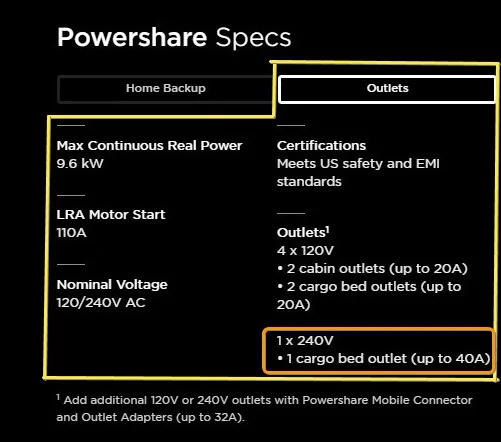
Tesla Cybertruck Powerwall and CT Powershare G-3V default energy prioritizing Powershare specs - outlets only
 

mongo

Well-known member
Joined
May 27, 2024
Threads
5
Messages
4,520
Reaction score
5,497
Location
SE Michigan
Vehicles
Cyberbeast
Country flag
Thank you for taking the time to provide those details.

a) So Cybertruck Powershare Home Backup is two flavors
  1. UWC|WC + any Powerwall system (Powerwall battery & gateway [island/site controller])
  2. UWC + Gateway 3V [island/site controller]
b) My overall question/goal is during a power outage and I am islanding ... to have the Cybertruck provide power whenever it is plugged in and leave the Powerwall(s) as full as possible. This seems like an obvious prioritization to me as the CT is ~10x the kWh and you may need to take the CT to do errands or go to the Supercharger to charge up. Am I missing something with this goal / thought process?

I guess we will find out how #2 above works "later this year".

c) The "Generator ATS" example you provided doesn't meet my goal (it doesn't seem).

d) I'm wondering if there is a way to meet my goal using Cybertruck Powershare Outlet? It might not be automatic tho. ie. manual transfer switch (MTS vs ATS).

uKyKyJI.jpg


Powershare specs - outlets only.jpg
a) yeah
b) #2 yep, to be seen how it works (guessing Cybertruck usage gets prioritized because PW are made for load balancing)
c/d) can use 40A bed outlet with manual transfer switch or *maybe* two gateways in series, one for PW, one for Powershare, but only if b) doesn't meet your needs.
 
OP
OP
scottf200

scottf200

Well-known member
Joined
Jul 31, 2021
Threads
53
Messages
2,221
Reaction score
3,241
Location
Western NC
Vehicles
X; immed family 3 & Y
Country flag
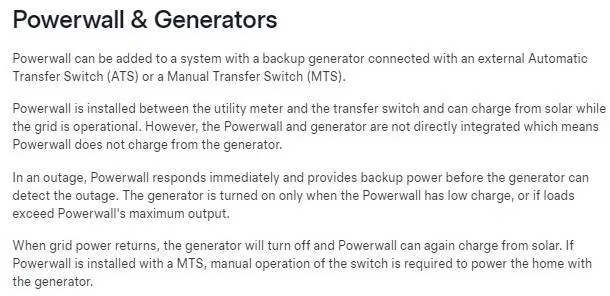
If you are doing a generator backup also, the recommended configuration is
grid -> Gateway/PW -> Generator MTS|ATS[CT,etc] -> backed up panel.
This kicks the generator on once both the grid and PW are discharged.
Heck, I was hoping that I could do this:
grid -> Generator MTS|ATS[CT,etc] -> Gateway/PW -> backed up panel
eg. PW is used when grid or 'Generator' (aka CT or similar 240v power source) is OFF
and PW is charged when grid or 'Generator' is ON. I noted that on the Gateway v2 or v3 it says "overcurrent protection device" range is 100-200 amps.

I see what you said is defined on this Tesla page in the 2nd paragraph as well:

Tesla Cybertruck Powerwall and CT Powershare G-3V default energy prioritizing Generator and Powerwall


mongo

Well-known member
Joined
May 27, 2024
Threads
5
Messages
4,520
Reaction score
5,497
Location
SE Michigan
Vehicles
Cyberbeast
Country flag
Heck, I was hoping that I could do this:
grid -> Generator MTS|ATS[CT,etc] -> Gateway/PW -> backed up panel
eg. PW is used when grid or 'Generator' (aka CT or similar 240v power source) is OFF
and PW is charged when grid or 'Generator' is ON. I noted that on the Gateway v2 or v3 it says "overcurrent protection device" range is 100-200 amps.

I see what you said is defined on this Tesla page in the 2nd paragraph as well:

Generator and Powerwall.jpg
Yeah, I think the root issue is that the generator's voltage and frequency output isn't regulated well enough for Powerwall to happily charge from it.

The overcurrent range is for the optional main breaker in Gateway when used as the service disconnect.
 
OP
OP
scottf200

scottf200

Well-known member
Joined
Jul 31, 2021
Threads
53
Messages
2,221
Reaction score
3,241
Location
Western NC
Vehicles
X; immed family 3 & Y
Country flag
Yeah, I think the root issue is that the generator's voltage and frequency output isn't regulated well enough for Powerwall to happily charge from it.

The overcurrent range is for the optional main breaker in Gateway when used as the service disconnect.
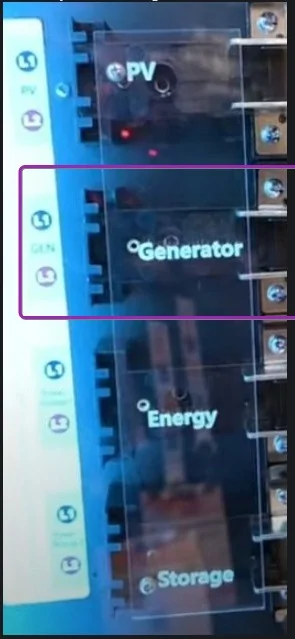
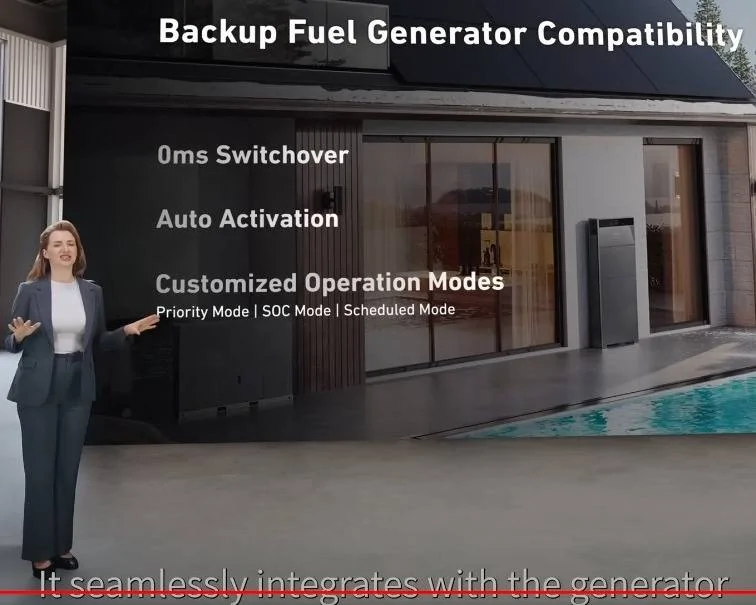
Sounds like Anker Solix X1 will support a dedicated generator input to charge back up their battery and run your house.


Tesla Cybertruck Powerwall and CT Powershare G-3V default energy prioritizing DjgXkp6


Tesla Cybertruck Powerwall and CT Powershare G-3V default energy prioritizing Back up generator ## Anker SOLIX X1 Launch Event - YouTu
Sponsored

 
Last edited:


Top