Sponsored

Truck won’t stay connected to WiFi

OP
OP

Jackson0810

Well-known member
First Name
Derrick
Joined
Dec 27, 2023
Threads
8
Messages
74
Reaction score
41
Location
Georgia
Vehicles
Model Y
Country flag
I hate that this is happening to some of us, but I'm also glad it's not just me. I doubt there is anything they will be able to do about this at my upcoming service appointment, but it least it will be documented.
Sponsored

 

kpett

Active member
First Name
Kirk
Joined
Aug 19, 2020
Threads
8
Messages
35
Reaction score
78
Location
Vancouver, WA
Vehicles
Model Y Performance
Occupation
STEM Teacher
Country flag
I have this same issue. I have Eero Pro 6 and one Outdoor 7 unit. All other devices work fine. The Cybertruck will come into the network and slide off. Wondering about a fix too.
Thank you for putting this out there. I thought this was just me.
 

Platinumsmith

Banned
Well-known member
Banned
First Name
Darrell
Joined
Jan 25, 2024
Threads
2
Messages
58
Reaction score
74
Location
Dallas
Vehicles
Cybertruck
Country flag
I have this same issue. I have Eero Pro 6 and one Outdoor 7 unit. All other devices work fine. The Cybertruck will come into the network and slide off. Wondering about a fix too.
Thank you for putting this out there. I thought this was just me.
I use the eero6 also. It allows a second “guest” network easily with all the same devices. Once I separated the truck to its own network, the beast is happy & my sprinkler system is happy.
 

HaulingAss

Well-known member
Joined
Oct 3, 2020
Threads
28
Messages
10,411
Reaction score
20,931
Location
Western Washington, USA
Vehicles
Cybertruck DM, 2010 F-150, 2018 Performance Model 3, 2024 Performance Model 3
Country flag
Interesting how many of those with unreliable connection have the Eero Pro router. It's owned by Amazon, so maybe this is just Bezos people trying to slow down Tesla people! ?

I've found other instances of Eero Pro not playing nice with Tesla in erratic ways that arent always reproducible:

(12) Wifi incompatibility with Eero Pro? | Tesla Motors Club


On a related note, I found the high level of various attacks blocked that were directed at specifically at Tesla (96%) interesting:


furbyland

Well-known member
First Name
Michael
Joined
Dec 1, 2024
Threads
14
Messages
172
Reaction score
200
Location
Lexington, KY
Vehicles
2023 Model S LR, 2024 CT AWD
Occupation
I.T.
Country flag
What about…

Diagnostics offers more information on your Wi-Fi connection, as well as connection improvement tips. To access, navigate to Wi-Fi > Diagnostics or find it below the progress bar while a software update downloads or installs.


kpett

Active member
First Name
Kirk
Joined
Aug 19, 2020
Threads
8
Messages
35
Reaction score
78
Location
Vancouver, WA
Vehicles
Model Y Performance
Occupation
STEM Teacher
Country flag
I use the eero6 also. It allows a second “guest” network easily with all the same devices. Once I separated the truck to its own network, the beast is happy & my sprinkler system is happy.
I have the Racio. Is that what you have?
 

AbblePC

Well-known member
First Name
Jeffrey
Joined
Mar 12, 2024
Threads
0
Messages
220
Reaction score
197
Location
State College PA
Vehicles
16MS90D - 23MYP - 22MYP - 21MYLR - 23MXPlaid - 24CB AT Tires/White Int
Occupation
IT Managed Service Provider
Country flag

AbblePC

Well-known member
First Name
Jeffrey
Joined
Mar 12, 2024
Threads
0
Messages
220
Reaction score
197
Location
State College PA
Vehicles
16MS90D - 23MYP - 22MYP - 21MYLR - 23MXPlaid - 24CB AT Tires/White Int
Occupation
IT Managed Service Provider
Country flag
I use Netgear Orbi WiFi mesh directly connected to Ethernet in garage where cable modem sits (and all other mesh points in house are wireless mesh) and right outside the garage door is where all 4 Teslas and 2 visiting Teslas sit.

Only the Cybertruck has this issue with constantly dropping WiFi as all of the other cars from Model S 90D 2016 up to 2024 model X Plaid 2024 and Model YP 2024, 2022 & 21 and no matter how many times you attempt to renter password or to connect, it will state that the password is incorrect on the truck (even though it is entered correctly) and until you reboot the Cybertruck will it connect.
I also performed WiFi scan tests to see if any channels were being bombarded by neighboring WiFi channels and all were mostly clear as to db levels to my location on each channel.
As well resorted to adding my Cybertruck MAC address to the router DMZ and static assigned IP address with port forwarding all open.

It did this same thing on my Ubiquiti Alien mesh WiFi routers previously before installing the new Orbi router & mesh points, so essentially I don’t believe it’s specifically a WiFi router owners issue, more likely the WiFi chipset for the NIC in the Cybertruck is timing out and dropping connection.


Have tried IOT separate SSID as well as other channels on both 2.4 & 5Ghz.

The odd thing is the Cybertruck will show WiFi symbol on the display and as well work with all commands issued through the Tesla phone app, but will refuse to show connected under WiFi - until reboot.

I will update once I have time to discern exactly the culprit.
 
Last edited:
OP
OP

Jackson0810

Well-known member
First Name
Derrick
Joined
Dec 27, 2023
Threads
8
Messages
74
Reaction score
41
Location
Georgia
Vehicles
Model Y
Country flag
I wanted to report back what Tesla Serivce told me. I had the CT in for service on 1/28 and here is what was put in the service record

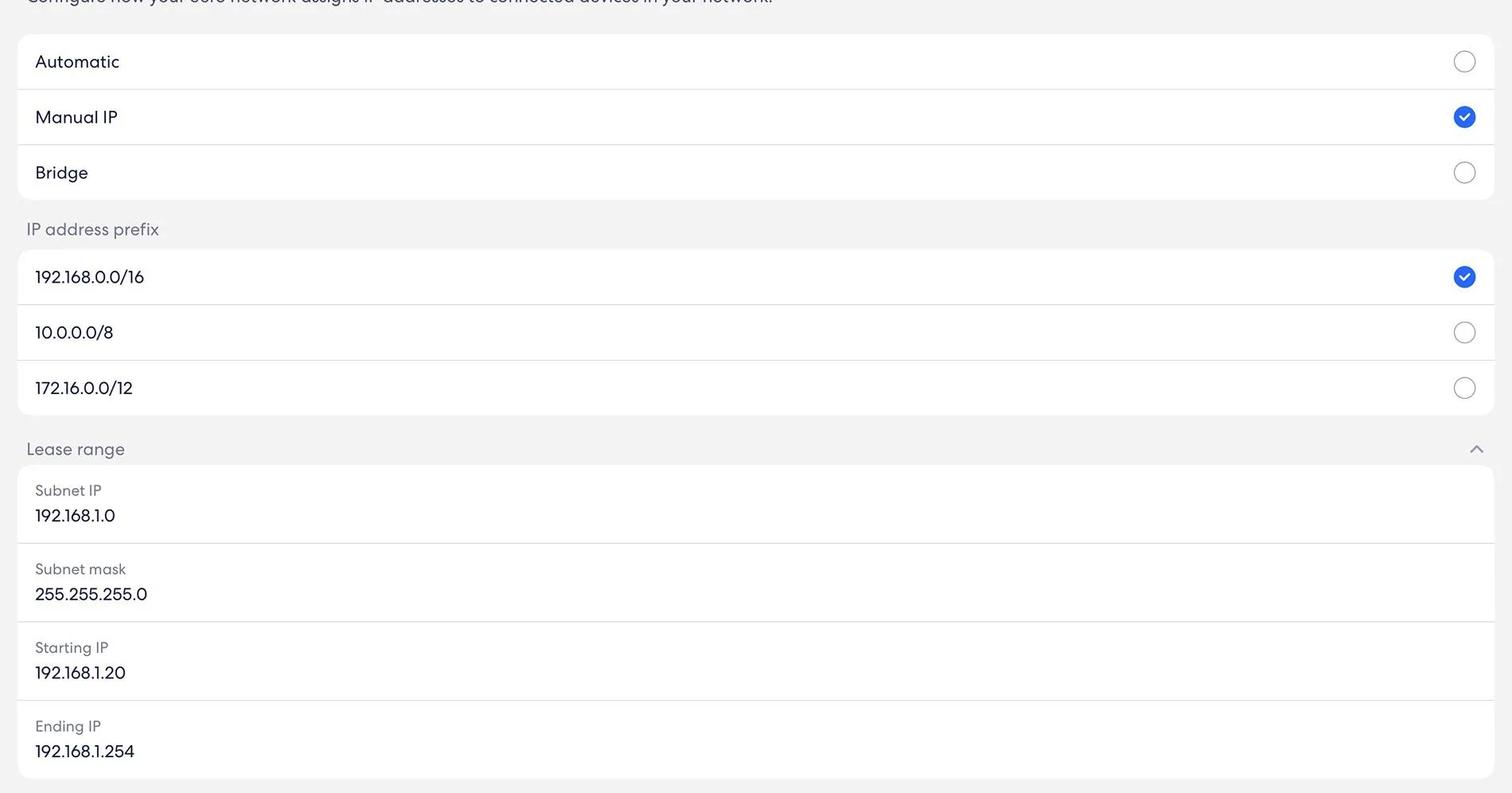
”Verified custom concern through syslog data inspection. Found home wireless point DHCP offering vehicle IP addresses unsupported by vehicle due to internal IP collisions. Recommend changing router DHCP settings and using IP range 192.168.1.x”

I asked what IP addresses they were seeing in the syslog, but they would not share that info. Here are the changes I made to my EERO. Once the reboot was done, the CT connected. I’ll report back in a few days if this truly fixed the problem.


Tesla Cybertruck Truck won’t stay connected to WiFi IMG_0157


OP
OP

Jackson0810

Well-known member
First Name
Derrick
Joined
Dec 27, 2023
Threads
8
Messages
74
Reaction score
41
Location
Georgia
Vehicles
Model Y
Country flag
Update: Starting on Feb 5th, our CT starting maintaining a solid WiFi connection all day long without any rebooting. However, following an EERO firmware update on Feb 24th the CT is back to me having to reboot it in order to connect. After looking at the EERO firmware history, there was an update on Feb 5th. So it would seem to me that there is something going on with EERO firmware updates that the CT does not “like”.

One thing I have noticed is when the CT is not connected to WIfi, the EERO app shows it as connected but with no IP Address. When I reboot the CT it once again obtains an IP address and maintains that connection for about 1-2 hours.
 

Beamerino

Active member
First Name
Donald
Joined
Mar 4, 2021
Threads
0
Messages
36
Reaction score
42
Location
Fort Worth, Tx
Vehicles
Trimotor
Country flag
I have a service appt for this coming up. I have mentioned this 3 times, first they upgraded firmware, then they checked and said everything is fine, now when added the app tells me they are ordering parts so maybe it will get fixed. I have great signal strength and no issues with connection after a restart, but it’s annoying getting the notice all the time to connect to WiFi. It totally seems software but hey we will see. Luckily my SC is top notch and very responsive!
 

carsly

Well-known member
First Name
Vin
Joined
Dec 13, 2023
Threads
95
Messages
1,544
Reaction score
2,930
Location
Princeton, NJ
Vehicles
LR Defender, CT AWD
Country flag
Also on Eero, interested to hear what your SC replaces/figures out. Any time I leave the house the truck refuses to play streaming audio until I change apps, say from Spotify to TuneIn and then back to Spotify.
 

furbyland

Well-known member
First Name
Michael
Joined
Dec 1, 2024
Threads
14
Messages
172
Reaction score
200
Location
Lexington, KY
Vehicles
2023 Model S LR, 2024 CT AWD
Occupation
I.T.
Country flag
Also on Eero, interested to hear what your SC replaces/figures out. Any time I leave the house the truck refuses to play streaming audio until I change apps, say from Spotify to TuneIn and then back to Spotify.
I get the same when leaving my house. Switching apps is the usual fix. That from owning 4 Tesla's is not all that uncommon. Pain yes, but I don't think it's something Tesla can (easily) fix. Routers are a dime a dozen, and many have their quirks with clients. I am in the biz so unfortunately, I see it more often than not.
 

JerseyMike

Well-known member
First Name
Mike
Joined
Oct 24, 2024
Threads
4
Messages
203
Reaction score
256
Location
NJ
Vehicles
2024 Cybertruck AWD with AS tires, 2022 Cadillac Escalade
Occupation
Physician
Country flag
I couldn't get mine to connect last night to my orbi mesh network.

after multiple attempts I enabled an unsecured guest network and it worked, so strange....will try again later or maybe reboot and see if things clear up
Sponsored


Top