Sponsored

Wifi wall charger for the home.

ARMANDO PADILLA

Well-known member
First Name
Armando
Joined
Oct 10, 2024
Threads
45
Messages
488
Reaction score
362
Location
Los Angeles
Vehicles
'24 Foundation S CBeast, '04 Chevy Blazer, '73 Ford Bronco, '90 RangeRover (RIP)
Occupation
Finish carpenter/day trader/entrepreneur
Country flag
I have the 240 v 48A wall charger at home. been using it for a while now It works great.
But I remember something about wifi in the charger?
I installed my charger myself but I did not set up the wifi.
Is this true? is there wifi in the charger if so whats it for ?
how does it work? how do you set it up?
And how can you check and see if its working?
Sponsored

 

yohst

Well-known member
First Name
yohst
Joined
Oct 21, 2024
Threads
7
Messages
143
Reaction score
313
Location
San Diego
Vehicles
Cyberbeast
Country flag
Yes it has WiFi, should have come up during your install. There is a QR code in your paperwork that came with the unit (also on the back of the unit) that lets you login with your specific unit’s password.

Once set
Up you can see the charger in the app and see some charging statistics. If you have two or more units you can set them up to power distribute automatically given the max power from where you draw it. (You will need to set that up with the Tesla One app though)
 

kpanda17

Well-known member
Joined
Jun 8, 2023
Threads
25
Messages
993
Reaction score
1,015
Location
USA
Vehicles
Tesla Model 3RWD, Tesla Model MYP
Country flag
Yes it has WiFi, should have come up during your install. There is a QR code in your paperwork that came with the unit (also on the back of the unit) that lets you login with your specific unit’s password.

Once set
Up you can see the charger in the app and see some charging statistics. If you have two or more units you can set them up to power distribute automatically given the max power from where you draw it. (You will need to set that up with the Tesla One app though)
Further the explaination:
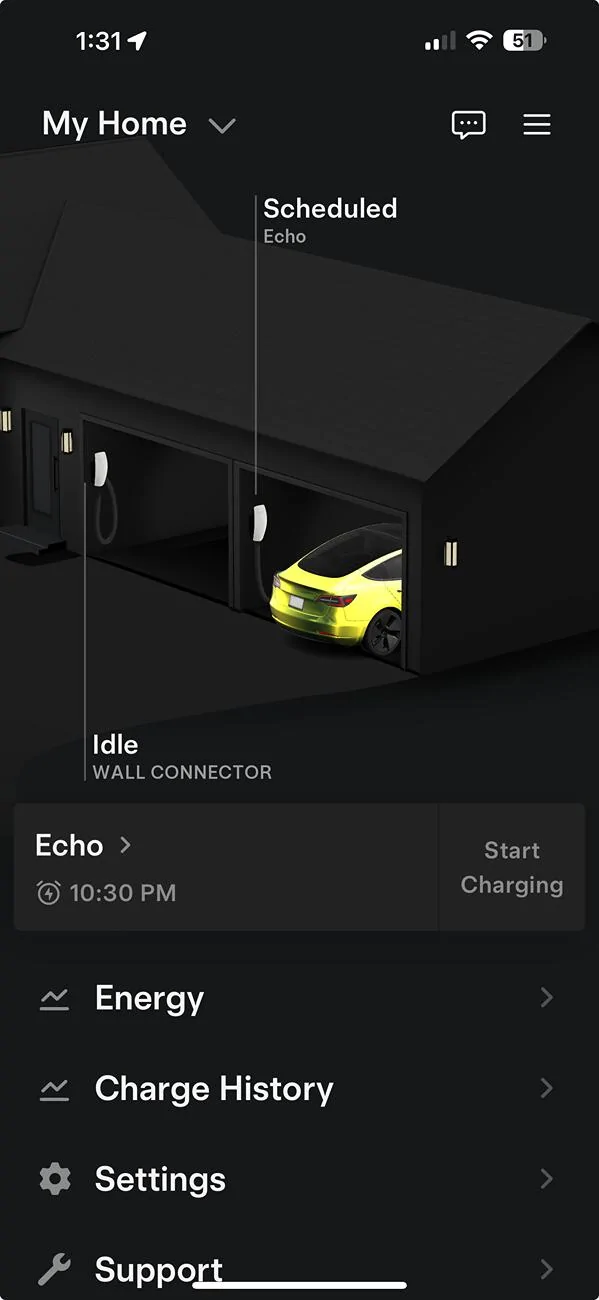
WiFi from the wall connector, aka “charger” is used for app connection shown below:
Tesla Cybertruck Wifi wall charger for the home. 1736447494233-u0

And continuous firmware updating
 

eswimm

Well-known member
Joined
Jun 6, 2024
Threads
3
Messages
557
Reaction score
998
Location
Charlotte, NC
Vehicles
Model Y, Cybertruck
Country flag
I have the 240 v 48A wall charger at home. been using it for a while now It works great.
But I remember something about wifi in the charger?
I installed my charger myself but I did not set up the wifi.
Is this true? is there wifi in the charger if so whats it for ?
how does it work? how do you set it up?
And how can you check and see if its working?
What generation did you install? Older Gen 1 and Gen 2 wall connectors did not have WiFi, configuration for breaker size and load sharing between connectors was configured via dip switches in the unit.

The current generation Wall Connector and Universal Wall Connectors available in the Tesla shop support WiFi, they should have come with a QR code w/ the SSID and password. They don't have physical switches to select the breaker configuration, it's done through the web interface once connected to WiFi. You can add either of them to your home in the Tesla app and get more details about charge usage.
 
OP
OP
ARMANDO PADILLA

ARMANDO PADILLA

Well-known member
First Name
Armando
Joined
Oct 10, 2024
Threads
45
Messages
488
Reaction score
362
Location
Los Angeles
Vehicles
'24 Foundation S CBeast, '04 Chevy Blazer, '73 Ford Bronco, '90 RangeRover (RIP)
Occupation
Finish carpenter/day trader/entrepreneur
Country flag
it's a newer one I remember scanning the QR code and it does have wifi I tried to set it up, but Either I didn't do it right or it only works with apple phones or something like a compatibility issue. but I have never seen that screen in my app. I thought maybe it just runs in the background.


rudedawg78

Well-known member
First Name
Ernie
Joined
Jun 8, 2020
Threads
46
Messages
1,814
Reaction score
3,019
Location
South Carolina
Vehicles
2024 AWD Cybertruck (Foundation Series) "Wraith"
Occupation
Retired USAF, Emergency Manager
Country flag
I have the 240 v 48A wall charger at home. been using it for a while now It works great.
But I remember something about wifi in the charger?
I installed my charger myself but I did not set up the wifi.
Is this true? is there wifi in the charger if so whats it for ?
how does it work? how do you set it up?
And how can you check and see if its working?
Here is a good video that assisted me with linking the wall connector to WiFi via the Tesla app:

 
OP
OP
ARMANDO PADILLA

ARMANDO PADILLA

Well-known member
First Name
Armando
Joined
Oct 10, 2024
Threads
45
Messages
488
Reaction score
362
Location
Los Angeles
Vehicles
'24 Foundation S CBeast, '04 Chevy Blazer, '73 Ford Bronco, '90 RangeRover (RIP)
Occupation
Finish carpenter/day trader/entrepreneur
Country flag
okay everyone who helped. I got my wifi charger (connector whatever it is) 3gen setup now. I think my problem last time i tried was not going to the add product part in the app. I think I was trying to set it up by looking for the new wifi signal name in the list of wifi's from my phone like I would for any other wifi device. with this one that's all automatic you just have to go to ( add product ) and chose wall connector. Thank y'all for the technical help and also for the terminology lesson anyone care to check my spelling and gramar knock yourself out.
 

kpanda17

Well-known member
Joined
Jun 8, 2023
Threads
25
Messages
993
Reaction score
1,015
Location
USA
Vehicles
Tesla Model 3RWD, Tesla Model MYP
Country flag
okay everyone who helped. I got my wifi charger (connector whatever it is) 3gen setup now. I think my problem last time i tried was not going to the add product part in the app. I think I was trying to set it up by looking for the new wifi signal name in the list of wifi's from my phone like I would for any other wifi device. with this one that's all automatic you just have to go to ( add product ) and chose wall connector. Thank y'all for the technical help and also for the terminology lesson anyone care to check my spelling and gramar knock yourself out.
You should not need to add product
It’s discovered through your email authentication
 
OP
OP
ARMANDO PADILLA

ARMANDO PADILLA

Well-known member
First Name
Armando
Joined
Oct 10, 2024
Threads
45
Messages
488
Reaction score
362
Location
Los Angeles
Vehicles
'24 Foundation S CBeast, '04 Chevy Blazer, '73 Ford Bronco, '90 RangeRover (RIP)
Occupation
Finish carpenter/day trader/entrepreneur
Country flag
You should not need to add product
It’s discovered through your email authentication
I don't know what to tell you man It didn't work for me automatically. And I've been using it without the wifi being setup for a few months now until yesterday something I saw here reminded me about it oh that garage scene in the app someone posted an image of the screen, and I realized I have never seen that on my app. So yes, I did have to manually add product and choose wall connector. I did also find the old installation instructions in order to scan the QR code. something I did do the first go around but without add product it didn't get me very far with the setup.
 
Last edited:

AlmostHuman

Well-known member
Joined
May 1, 2024
Threads
7
Messages
985
Reaction score
1,349
Location
Earth
Vehicles
Model X, Cybertruck
Occupation
Human
Country flag
You should not need to add product
It’s discovered through your email authentication
You do have to add product in the app. Have done a number of them.
Sponsored


Top