Sponsored

All Driver Assistance Features Shut Down While Driving On The Highway

Cyberius Wilhelm

New member
First Name
Jamie
Joined
Jan 19, 2026
Threads
1
Messages
3
Reaction score
1
Location
Richmond, VA
Vehicles
2024 Cyberbeast, 2016 Model S P90D
Occupation
Self Employed
Country flag
While driving on the highway, maintaining speed between 80-88mph for a prolonged amount of time, (typically 15 minutes or more), all Driver Assistance features shut down with accompanying fault messages: Cruise control disabled, stability control disabled, traction control disabled, automatic vehicle hold disabled, automatic emergency braking is unavailable, lane departure avoidance features unavailable, adaptive ride control degraded, and vehicle hold feature unavailable.

And most noticeable, regenerative braking is disabled for the remainder of the drive.

Initially this only happened not using FSD, but recently trying to avoid it from occurring while using FSD it also happened, (Hurry & Mad Max). Below 80mph it has not occurred, but the flow of traffic is commonly 80+ mph and nearly every prolonged drive this happens.

Pulling off, parking, and doing a reboot has not worked to restore the features. It takes parking and the vehicle sitting for a prolonged time to restore them.

The local Tesla Service Center has no known remedy. Has anyone else had this happen and had it successfully fixed?
Sponsored

 

UberNoob

Well-known member
Joined
Jun 5, 2024
Threads
6
Messages
1,161
Reaction score
1,779
Location
Florida
Vehicles
CyberBeast & M3P
Occupation
Desktop Security Engineer
Country flag
FSD is only going to work up to 85, forcing it over will disable it and earn you a strike. Takes a full week to loose/ forgive a strike, get 5 strikes and your in FSD jail for a week.

When your issue happen and you pull over to reset it, first go into service mode and view all the alerts, you can click each alert and view what condition triggered said alert. One of them will point to the underlying cause. Your issue could be a plethora of things ranging from overheat, lack of can buss communication, or AI computer beginning to fail.

My issue not exact but on the way back from Michigan 600 miles or so, FSD would randomly cut off, red hands saying take over immediately. There would be an error on the screen pop up briefly saying self driving disabled due to system error. A few miles later I could re enable it. Fast forward a week and I goto my kids ball game leaving the game started the truck and message on screen says. AI computer requires service self driving disabled. Went into service mode and alert said permanently disabled. Took it to service and they had to replace the whole computer.
 

steveB

New member
First Name
Steve
Joined
Jun 11, 2026
Threads
0
Messages
4
Reaction score
0
Location
Rhode Island
Vehicles
Cybertruck Foundation
Country flag
Your issue happened to me. I was driving with FSD engaged and the navigation took me down a declining offramp. All the alerts lit up and said degraded and to use manual breaking. I made an appoint with service when I got home. It cleared after a restart, then a week later it happened again, while FSD engaged and driving down the highway. I had to manually break. Then it happened a 3rd time. My appointment was 2 days after the 3rd time. Tesla disconnected the parking break wires and some other stuff, reconnected and cleaned them. They didn't see any problems. They did see the alerts which occurred but couldn't find anything wrong. They charged me $250 for diagnosing as they found nothing wrong so warranty didn't cover. That said, since they did the work 3 weeks ago, the problem hasn't reoccured.
 
OP
OP

Cyberius Wilhelm

New member
First Name
Jamie
Joined
Jan 19, 2026
Threads
1
Messages
3
Reaction score
1
Location
Richmond, VA
Vehicles
2024 Cyberbeast, 2016 Model S P90D
Occupation
Self Employed
Country flag
Glad to hear that your problem hasn't reoccurred.

My issue has been resolved as well. The error messages occurred as a result of the speed sensors not matching the wheel speed. To correct the issue I installed four new matching tires and reset the tire service to new and selected the type of tire that was installed. After several trips of driving above 80 for prolonged periods of time, the issue has not happened again.
 

Alpine

Well-known member
Joined
Mar 24, 2022
Threads
70
Messages
193
Reaction score
484
Location
Where the West Begins
Vehicles
AWD
Country flag
If that's what's causing the issue, then all trucks driving on a different diameter tire should have this problem since there will be discrepancy between wheel speed and sensors. There's people running 37 inch tires without issue


mongo

Well-known member
Joined
May 27, 2024
Threads
6
Messages
4,696
Reaction score
5,710
Location
SE Michigan
Vehicles
Cyberbeast
Country flag
If that's what's causing the issue, then all trucks driving on a different diameter tire should have this problem since there will be discrepancy between wheel speed and sensors. There's people running 37 inch tires without issue
I think it would have to be the four wheel speeds not agreeing with each other. Unless there is a tight check between GPS or accelerometer and wheel speed, the truck can't tell if the tire size has changed.
 
OP
OP

Cyberius Wilhelm

New member
First Name
Jamie
Joined
Jan 19, 2026
Threads
1
Messages
3
Reaction score
1
Location
Richmond, VA
Vehicles
2024 Cyberbeast, 2016 Model S P90D
Occupation
Self Employed
Country flag
It was the discrepancy in the diameter of the tires. I had 2 relatively new Goodyears on the rear and had two new Bridgestones on the front. The difference in the diameters caused the different speed sensor readings. There's a small tolerance for different readings between the speed sensors and I'm guessing that at 80+ mph that threshold was met and caused the faults.
 

Bill_CT_AZ

Member
Joined
Mar 23, 2024
Threads
0
Messages
18
Reaction score
19
Location
Arizona
Vehicles
Cybertruck
Country flag
While driving on the highway, maintaining speed between 80-88mph for a prolonged amount of time, (typically 15 minutes or more), all Driver Assistance features shut down with accompanying fault messages: Cruise control disabled, stability control disabled, traction control disabled, automatic vehicle hold disabled, automatic emergency braking is unavailable, lane departure avoidance features unavailable, adaptive ride control degraded, and vehicle hold feature unavailable.

And most noticeable, regenerative braking is disabled for the remainder of the drive.

Initially this only happened not using FSD, but recently trying to avoid it from occurring while using FSD it also happened, (Hurry & Mad Max). Below 80mph it has not occurred, but the flow of traffic is commonly 80+ mph and nearly every prolonged drive this happens.

Pulling off, parking, and doing a reboot has not worked to restore the features. It takes parking and the vehicle sitting for a prolonged time to restore them.

The local Tesla Service Center has no known remedy. Has anyone else had this happen and had it successfully fixed?
Just happened to me this week. No park assist etc. Finally took a longer non commute drive today to see if was a calibration error. No luck check the cameras and saw I was getting no feed from windshield cam. Was preparing to do a remove and clean then got a software update from Tesla. Now everthing works. I just wish it fixed before the loss of parking assist resulted in a damaged driver side mirror.
 

Ironalley

Well-known member
First Name
Mark
Joined
Jan 26, 2024
Threads
6
Messages
73
Reaction score
78
Location
Washington
Vehicles
Tesla Y performance
Occupation
Farmer
Country flag
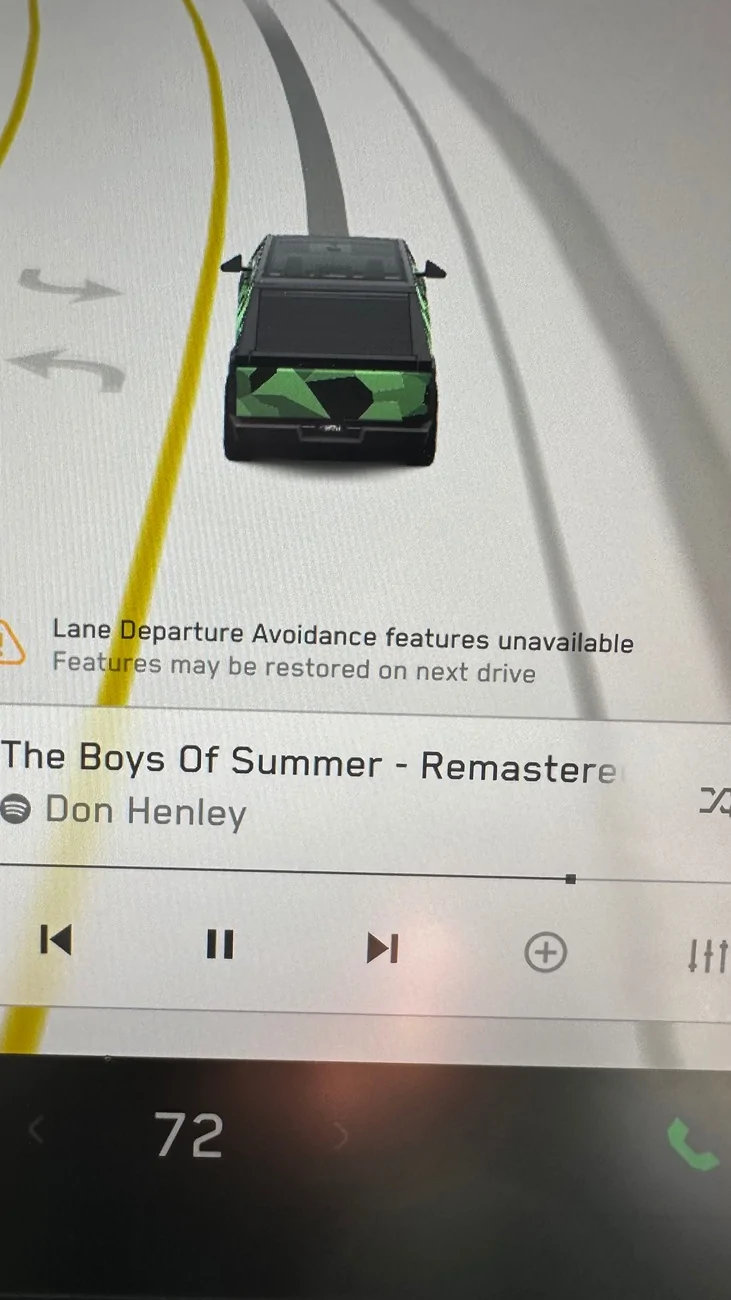
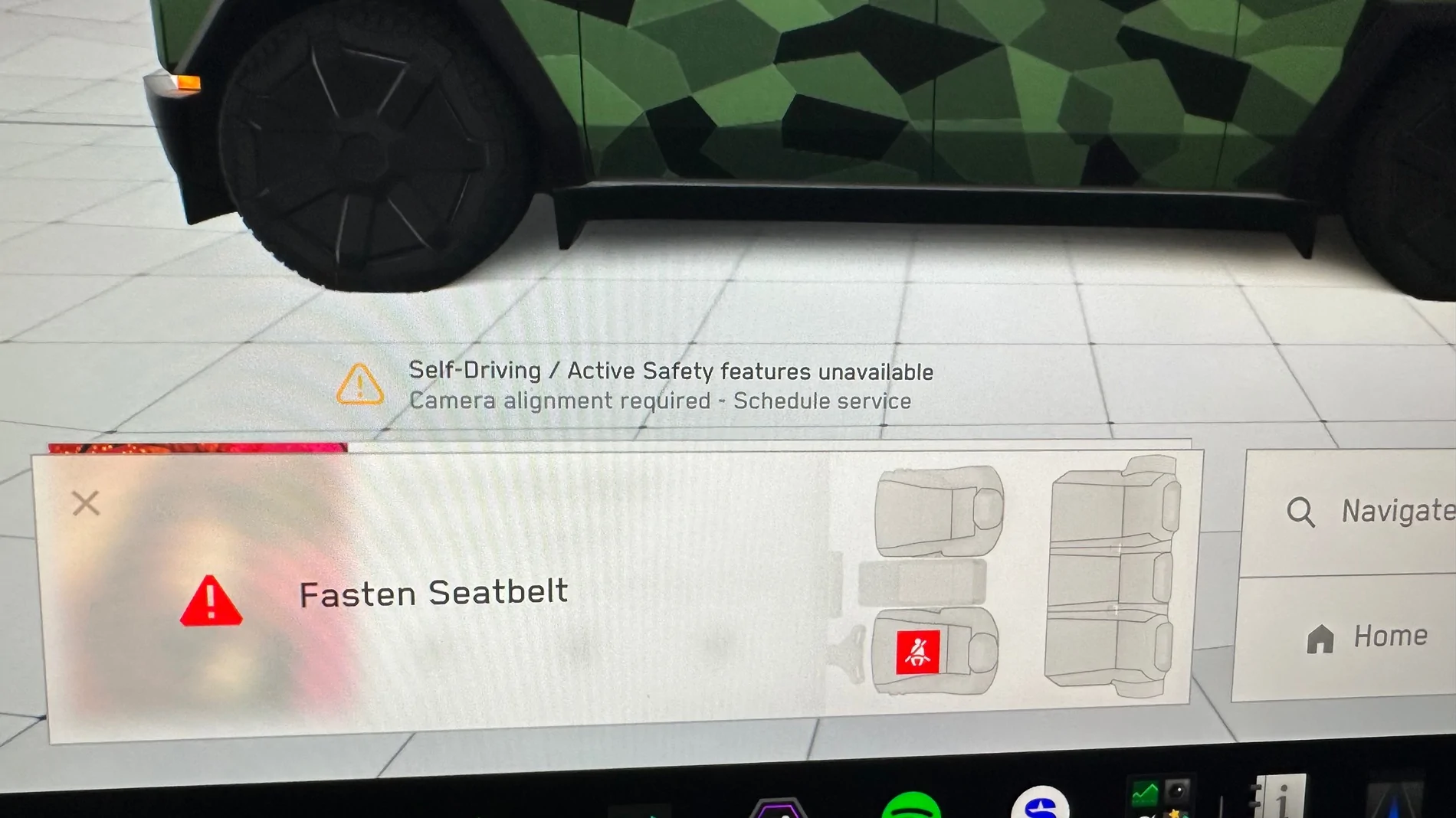
It happened to me 2 weeks ago cleared cameras 3 time, and das this is my screen. Sti no luck.

Tesla Cybertruck All Driver Assistance Features Shut Down While Driving On The Highway IMG_2954


Tesla Cybertruck All Driver Assistance Features Shut Down While Driving On The Highway IMG_2977
 

mongo

Well-known member
Joined
May 27, 2024
Threads
6
Messages
4,696
Reaction score
5,710
Location
SE Michigan
Vehicles
Cyberbeast
Country flag
It happened to me 2 weeks ago cleared cameras 3 time, and das this is my screen. Sti no luck.

IMG_2954.webp


IMG_2977.webp
Camera previews all look ok?
Fronts aren't showing an unusual amount of glare sheild?
By DAS you meant the service mode DAS reset?
 

Ironalley

Well-known member
First Name
Mark
Joined
Jan 26, 2024
Threads
6
Messages
73
Reaction score
78
Location
Washington
Vehicles
Tesla Y performance
Occupation
Farmer
Country flag
Yes, it all happened when I was sandwiched in by 2 lifted pickup trucks. The screen went red and emergency flashers came on. Like it freaked out!
Sponsored


Top