
Sponsored

ModelAZ

Well-known member
First Name
Joe
Joined
Nov 15, 2019
Threads
335
Messages
650
Reaction score
4,836
Location
Marin County
Vehicles
Cybertruck Ordered
Country flag
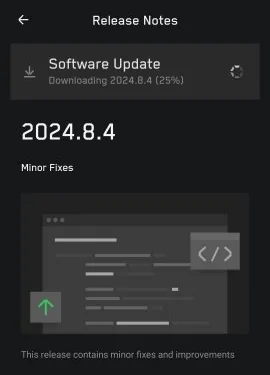
Software update 2024.8.4 features:

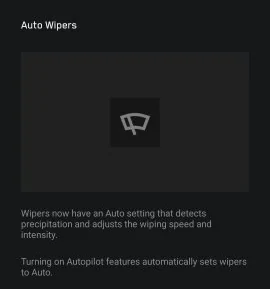
• Auto Wipers
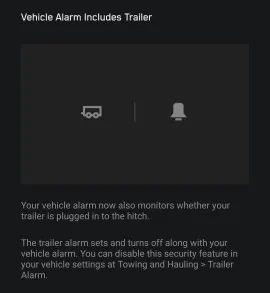
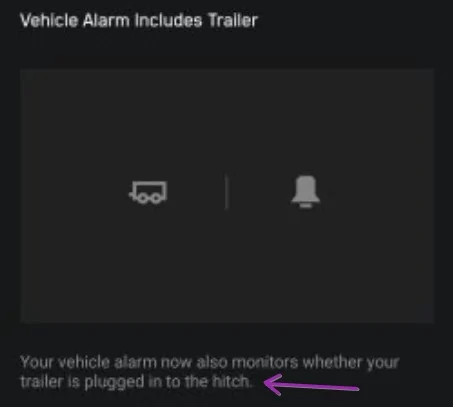
• Vehicle alarm includes trailer (cool)
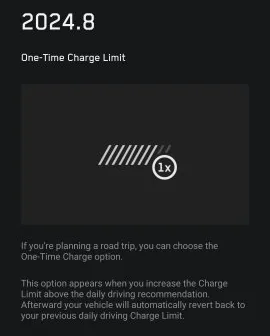
• One-Time Charge Limit
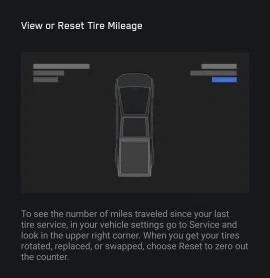
• Tire Service Mileage
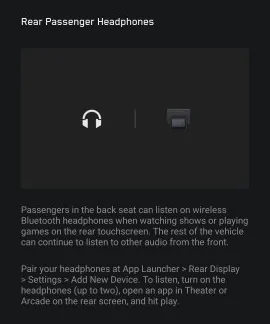
• Rear Passenger Headphones

Release Notes:

Tesla Cybertruck Cybertruck Software Update 2024.8.4  (Auto Wipers • Vehicle alarm includes trailer • One-Time Charge Limit • Tire Service Mileage • Rear Headphones) GI_LCL0XQAA83Ou


Tesla Cybertruck Cybertruck Software Update 2024.8.4  (Auto Wipers • Vehicle alarm includes trailer • One-Time Charge Limit • Tire Service Mileage • Rear Headphones) GI_LCL0XQAA83Ou copy


Tesla Cybertruck Cybertruck Software Update 2024.8.4  (Auto Wipers • Vehicle alarm includes trailer • One-Time Charge Limit • Tire Service Mileage • Rear Headphones) GI_LCL0XQAA83Ou copy 2


Tesla Cybertruck Cybertruck Software Update 2024.8.4  (Auto Wipers • Vehicle alarm includes trailer • One-Time Charge Limit • Tire Service Mileage • Rear Headphones) GI_LCL0XQAA83Ou copy 3


Tesla Cybertruck Cybertruck Software Update 2024.8.4  (Auto Wipers • Vehicle alarm includes trailer • One-Time Charge Limit • Tire Service Mileage • Rear Headphones) GI_LCL0XQAA83Ou copy 4


Tesla Cybertruck Cybertruck Software Update 2024.8.4  (Auto Wipers • Vehicle alarm includes trailer • One-Time Charge Limit • Tire Service Mileage • Rear Headphones) GI_LCL0XQAA83Ou copy 5
Sponsored


eousphoros

Well-known member
First Name
Patrick
Joined
Jan 10, 2024
Threads
3
Messages
150
Reaction score
200
Location
California
Vehicles
Model 3, CyberTruck
Country flag
Wow, this update was actually huge. On my truck it updates 44 subsystems and brought in the initial differential stuff and autopilot stuff. It also looks like it fixed the issue I had with vcleft efuse state mismatch, will be interesting to see if this also fixes the over current for the non hv stuff I was seeing.
 

Cybertruck 1974

Well-known member
Joined
Dec 15, 2019
Threads
51
Messages
1,196
Reaction score
1,626
Location
Everywhere
Vehicles
Cybertruck, H2, Samurai, Ford Transit, Chevy Silverado EV, Jaguar, Corvette, M38
hmm, not seeing it.......Also, i already have ability to use headphones in back and my wiper system has always detected rain. when I push the button once it will keep going if in rain and don't have to select 1, 2 or 3. thought this was in all cases???
 

scottf200

Well-known member
Joined
Jul 31, 2021
Threads
53
Messages
2,221
Reaction score
3,241
Location
Western NC
Vehicles
X; immed family 3 & Y
Country flag
hmm, not seeing it.......Also, i already have ability to use headphones in back and my wiper system has always detected rain. when I push the button once it will keep going if in rain and don't have to select 1, 2 or 3. thought this was in all cases???
Manual:

You can access wiper settings by touching the wiper button on the steering wheel or by touching Controls > Wiper.

Press and quickly release the wiper button on the steering wheel to wipe the windshield.

Press and hold the wiper button to spray washer fluid onto the windshield. After releasing the button, the wipers perform two additional wipes then, depending on vehicle and environmental conditions, a third wipe a few seconds later. You can also press and hold the wiper button for a continuous spray of washer fluid—the wipers perform the wipes after you release.

Whenever you press the wiper button, the touchscreen displays the wiper menu, allowing you to adjust wiper settings. Push the left scroll button on the steering wheel to the left or right to choose your desired setting.
• Turn the wiper off.​
• Choose how you want the wiper to operate:​
◦ I - Intermittent, slow.​
◦ II - Intermittent, fast.​
◦ III - Continuous, slow.​
◦ IIII - Continuous, fast.​
◦ Auto - Cybertruck detects precipitation and adjusts the wiping speed and intensity.

NOTE: Turning on Autopilot features automatically sets wipers to Auto.

NOTE: Note The Auto setting is currently in BETA. If uncertain about using the Auto setting while in the BETA phase, Tesla recommends operating the wipers manually, as necessary.

While driving in the rain, the wiper blade may pause in the horizontal position for approximately 30 seconds before continuing to wipe the windshield. The blade may also move slightly based on vehicle speed to make Cybertruck more aerodynamic.

Periodically check and clean the edge of the wiper blade. If a blade is damaged, replace it immediately. For details on checking and replacing the wiper blade, see Windshield Wiper Blade, Jets, and Fluid on page 197.

NOTE: If you choose Auto and the ability to detect liquid on the windshield becomes unavailable, the wiper setting reverts to the most recently used manual setting. If a manual setting cannot be determined, the wiper turns off.
 
Last edited:

scottf200

Well-known member
Joined
Jul 31, 2021
Threads
53
Messages
2,221
Reaction score
3,241
Location
Western NC
Vehicles
X; immed family 3 & Y
Country flag


Cybertruck 1974

Well-known member
Joined
Dec 15, 2019
Threads
51
Messages
1,196
Reaction score
1,626
Location
Everywhere
Vehicles
Cybertruck, H2, Samurai, Ford Transit, Chevy Silverado EV, Jaguar, Corvette, M38
Manual:

You can access wiper settings by touching the wiper
button on the steering wheel or by touching Controls >
Wiper.

Press and quickly release the wiper button on the
steering wheel to wipe the windshield.

Press and hold the wiper button to spray washer fl uid
onto the windshield. After releasing the button, the
wipers perform two additional wipes then, depending on
vehicle and environmental conditions, a third wipe a few
seconds later. You can also press and hold the wiper
button for a continuous spray of washer fl uid—the
wipers perform the wipes after you release.

Whenever you press the wiper button, the touchscreen
displays the wiper menu, allowing you to adjust wiper
settings. Push the left scroll button on the steering
wheel to the left or right to choose your desired setting.
• Turn the wiper off.​
• Choose how you want the wiper to operate:​
◦ I - Intermittent, slow.​
◦ II - Intermittent, fast.​
◦ III - Continuous, slow.​
◦ IIII - Continuous, fast.​
◦ Auto - Cybertruck detects precipitation and adjusts the wiping speed and intensity.​

NOTE: Turning on Autopilot features automatically
sets wipers to Auto.

NOTE: Note The Auto setting is currently in BETA.
If uncertain about using the Auto setting while in
the BETA phase, Tesla recommends operating the
wipers manually, as necessary.

While driving in the rain, the wiper blade may pause in
the horizontal position for approximately 30 seconds
before continuing to wipe the windshield. The blade may
also move slightly based on vehicle speed to make
Cybertruck more aerodynamic.

Periodically check and clean the edge of the wiper
blade. If a blade is damaged, replace it immediately. For
details on checking and replacing the wiper blade, see
Windshield Wiper Blade, Jets and Fluid on page 197.

NOTE: If you choose Auto and the ability to detect liquid
on the windshield becomes unavailable
, the wiper
setting reverts to the most recently used manual setting.
If a manual setting cannot be determined, the wiper
turns off.
um, im an owner and have a manual. thank you
 

Nurkbonis

Well-known member
Joined
Feb 18, 2020
Threads
3
Messages
122
Reaction score
170
Location
Oregon
Vehicles
Cybertruck
Country flag
It's too early to tell due to only one short drive in very light rain but Auto Wiper seems to be working ok - it detected rain accurately and appears to used appropriate frequency and speed for the wiper for given rain level - I like it so far. But again, only one short drive

Parasitic drain when plugged-in is fixed. CT used to discharge even when plugged-in after reaching desired charge level - not anymore.

WiFi and Bluetooth gained dedicated tabs each in the Settings
looking forward to no more parasitic drain. Need this update asap.
 

scottf200

Well-known member
Joined
Jul 31, 2021
Threads
53
Messages
2,221
Reaction score
3,241
Location
Western NC
Vehicles
X; immed family 3 & Y
Country flag
um, im an owner and have a manual. thank you
Sorry. Have been seeing a lot of questions where people are not reading the manual.
Thought the answer may be in there.
As well thought others with similar questions would find that section interesting related to 'new features' discussed. HTH explain.
 

Dmayo305

Well-known member
First Name
Doug
Joined
Dec 25, 2023
Threads
8
Messages
292
Reaction score
313
Location
Las Vegas
Vehicles
Previous: 2014 MS, 2016 MX, 2017.5 MS. Current: 2023 MX, 2024 CT
Occupation
Pilot
Country flag
Wow, this update was actually huge. On my truck it updates 44 subsystems and brought in the initial differential stuff and autopilot stuff. It also looks like it fixed the issue I had with vcleft efuse state mismatch, will be interesting to see if this also fixes the over current for the non hv stuff I was seeing.
Can you explain "autopilot stuff" in this update? I'm taking delivery tomorrow and I'm really anxious for AP at a minimum (TACC plus lane keeping is good enough for now).
 

eousphoros

Well-known member
First Name
Patrick
Joined
Jan 10, 2024
Threads
3
Messages
150
Reaction score
200
Location
California
Vehicles
Model 3, CyberTruck
Country flag
Can you explain "autopilot stuff" in this update? I'm taking delivery tomorrow and I'm really anxious for AP at a minimum (TACC plus lane keeping is good enough for now).
Tacc is there but I doubt lane tracking is turned on. What I mean at the high level I looked at it is that I now see the traffic computer turned on and error messages about differential not calibrated
Sponsored


Top