Sponsored

Let's talk about phantom drain

rrolsbe

Well-known member
First Name
Ron
Joined
Aug 10, 2023
Threads
3
Messages
46
Reaction score
32
Location
Reno, NV
Vehicles
2023 Model 3 RWD
Country flag
Why turn the charger off and on, just leave it plugged in.


From the manual:


Storage
If you leave Cybertruck parked for an extended period of time, plug the vehicle into a charger to prevent normal range loss and to keep the Battery at an optimal temperature. Your vehicle is safe to stay plugged in for any length of time.
When not in use, Cybertruck enters a sleep mode to conserve energy. Reduce the number of times you check your vehicle’s status on the mobile app, as this automatically wakes up your vehicle and starts normal energy consumption.
Unless something has changed with Tesla vehicles, the vehicle should not wake up to keep the traction battery at an optimal temperature plugged in or not. It is not even clear if the vehicle would cool/warm the battery if the ambient/battery temps were above 120F or below -20F. Maintaining the traction battery at an optimal temp (whatever that exactly means) while parked, could use a considerable amount of energy and deplete the charge level fairly quickly if not plugged into shore power.
Sponsored


rrolsbe

Well-known member
First Name
Ron
Joined
Aug 10, 2023
Threads
3
Messages
46
Reaction score
32
Location
Reno, NV
Vehicles
2023 Model 3 RWD
Country flag
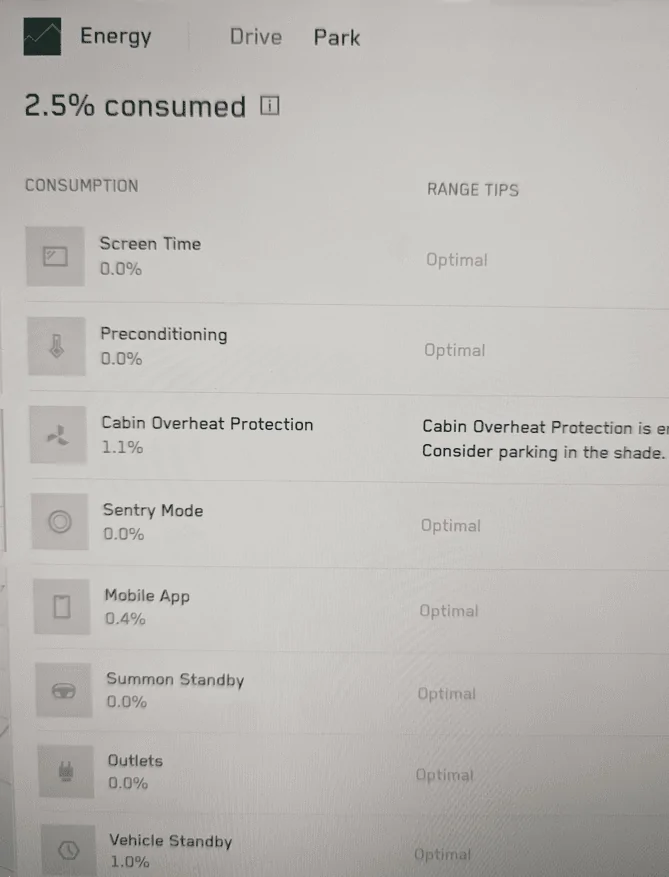
Look in the Energy monitor
1714045309265-jn.png
Tesla should add another entry to the power usage screen that estimates the energy used while parked AND communicating with the Tesla mother ship. I assume Tesla is gathering video in the background while Cybertruck owners are driving for FSD purposes? It is my understanding that video data sets can get quite large and could take a fairly long time to upload especially if your Wifi connection is marginal or slow. An owner could delete their Wifi configuration or tell the vehicle to not share data with Tesla to help debug standby/vehicle not sleeping power usage issues. Even without any Wifi configured you get notified on screen that a firmware update is available it just won't automatically download. When you connect to Wifi it will download the firmware.
 
OP
OP

Nobelcat

Member
First Name
Nicholas
Joined
Mar 19, 2024
Threads
1
Messages
16
Reaction score
12
Location
San Diego, CA
Vehicles
2024 Cybertruck AWD
Country flag
Tesla Cybertruck Let's talk about phantom drain IMG_8660


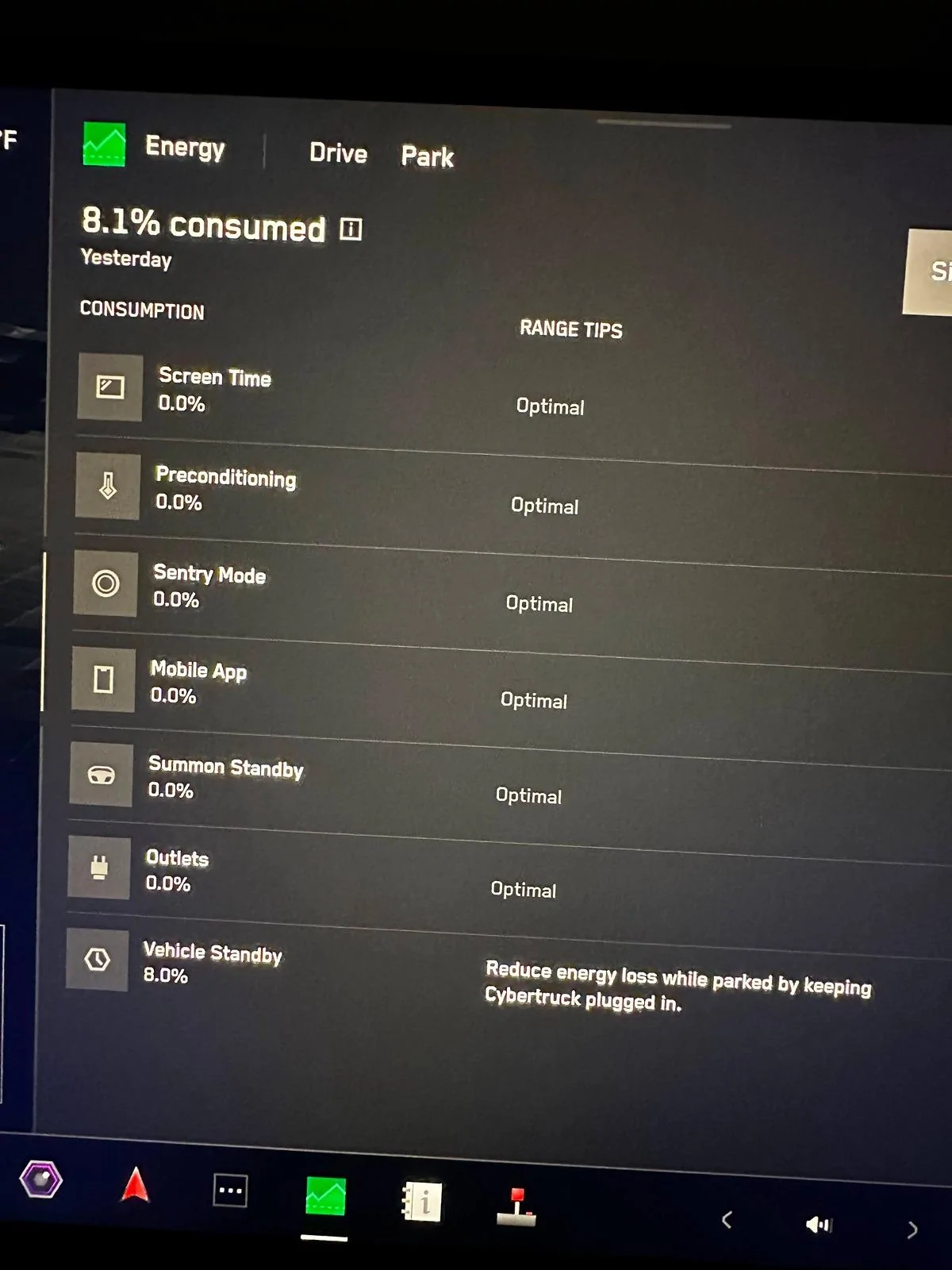
Just to provide an update, Tesla service will be working on my CT on Wednesday (May 8th) and they said I'll have the truck back on Friday. Based on that, I assume they already know what's wrong and it must be a simple fix. I do wish the Energy screen offered a bit more detail, but oh well. Will update this thread with whatever they fixed. I really hope they actually give me the car back before the weekend as I'm packing up to move and need the truck.
 

Muns01

Member
Joined
May 29, 2024
Threads
2
Messages
15
Reaction score
9
Country flag
Nobelcat, any updates on this and your service visit? How did they fix this? I have the same issue as you where truck wakes up every few mins and the contactors click. Would appreciate an update as I also have this issue. Thxs
 
OP
OP

Nobelcat

Member
First Name
Nicholas
Joined
Mar 19, 2024
Threads
1
Messages
16
Reaction score
12
Location
San Diego, CA
Vehicles
2024 Cybertruck AWD
Country flag
I'm a bit surprised I didn't update the thread. So the service was finished a few hours later and everything was labeled as "Unable to reproduce" which is super funny due to the phantom drain being something that one needs to monitor over a long period of time. They did do a software update since the car had been stuck on an old version. Tech said that the software upgrade was expected to fix the issue. Anyways, got my car back, still had the issue, and somewhat demanded that I have the opportunity to talk to the tech and not a service person. Tech called me back, gave me his cell number, and I texted him images of the issue continuing to exist. He said he talked to the engineers at Tesla and that 2024.20.X would specifically address the issue with the drain. So I've been eagerly awaiting that build which is currently in EAP (employees only).

So above is what I'm surprised I didn't update this thread about. Now for additional information which I can give a partial update on. My service ticket from that May 8th service also included a whole bunch of other minor issues with my car (panel alignment, etc). But one issue was a speaker issue where the speakers would start crackling (happened only once), or all speakers in the car would fail except the most forward two speakers at the bottom two corners of the front windshield. I don't even think the speakers touching the A pillar were working, though hard to know. Anyways, it was marked as Unable to Reproduce, and was fine when I got the car back.

Fast forward to a week ago and the speaker issue had been happening for more than a week and I had some free time. So without an appointment, I went to a Tesla service center and asked to speak to the one tech that was allowed to work on Cybertrucks (turns out they added a 2nd person). After a shorter than expected delay, the tech came out and sat in the car to listen to the audio issue. He told me to come in on the following business day (Monday, June 3rd) even without an appointment (they created an appointment for me on that Monday). And while it's just a very silly speaker issue, they've had the truck all week and I think their current estimate is that I'll get the car back on Monday or Tuesday. They said they have two engineers at Tesla working on the speaker issue and that it seems to be a first-of-its-kind issue (but I have my doubts). They've ordered 4 "modules" and a new wiring harness.

Modules are interesting in the CT because there's supposed to be a "door" module that controls everything that the door needs. So a speaker issue wouldn't typically be related to a module if everything else about the door is working correctly, but maybe there's an amplifier module. Wiring harness is also interesting choice as it's basically an ethernet cable and one should be easily able to verify if the cable is good or bad. But anyways, I somewhat suspect that my massive phantom drain is related to the speaker issue (also other issues like GPS getting stuck for more than an hour even after a reboot, and ACC once in a very rare while not wanting to turn on even after a reboot and washing all the cameras).

So crossing my fingers that I get my truck back early next week, and with some luck the current speaker issue will end up being something that fixed the phantom drain and I'll have more to share.

-- someone else with the audio problems


Muns01

Member
Joined
May 29, 2024
Threads
2
Messages
15
Reaction score
9
Country flag
Thxs for the update Nobelcat and I can feel your main on the other issues. Hope you get to the bottom of it! About the drain, yes, I had the tech do a remote log in and they claim all the HW is ok and that I am having a firmware issue. They are supposed to push something to my truck. I assume it is 2024.20.1. Lets see if this nails it. Will report back...
 
OP
OP

Nobelcat

Member
First Name
Nicholas
Joined
Mar 19, 2024
Threads
1
Messages
16
Reaction score
12
Location
San Diego, CA
Vehicles
2024 Cybertruck AWD
Country flag
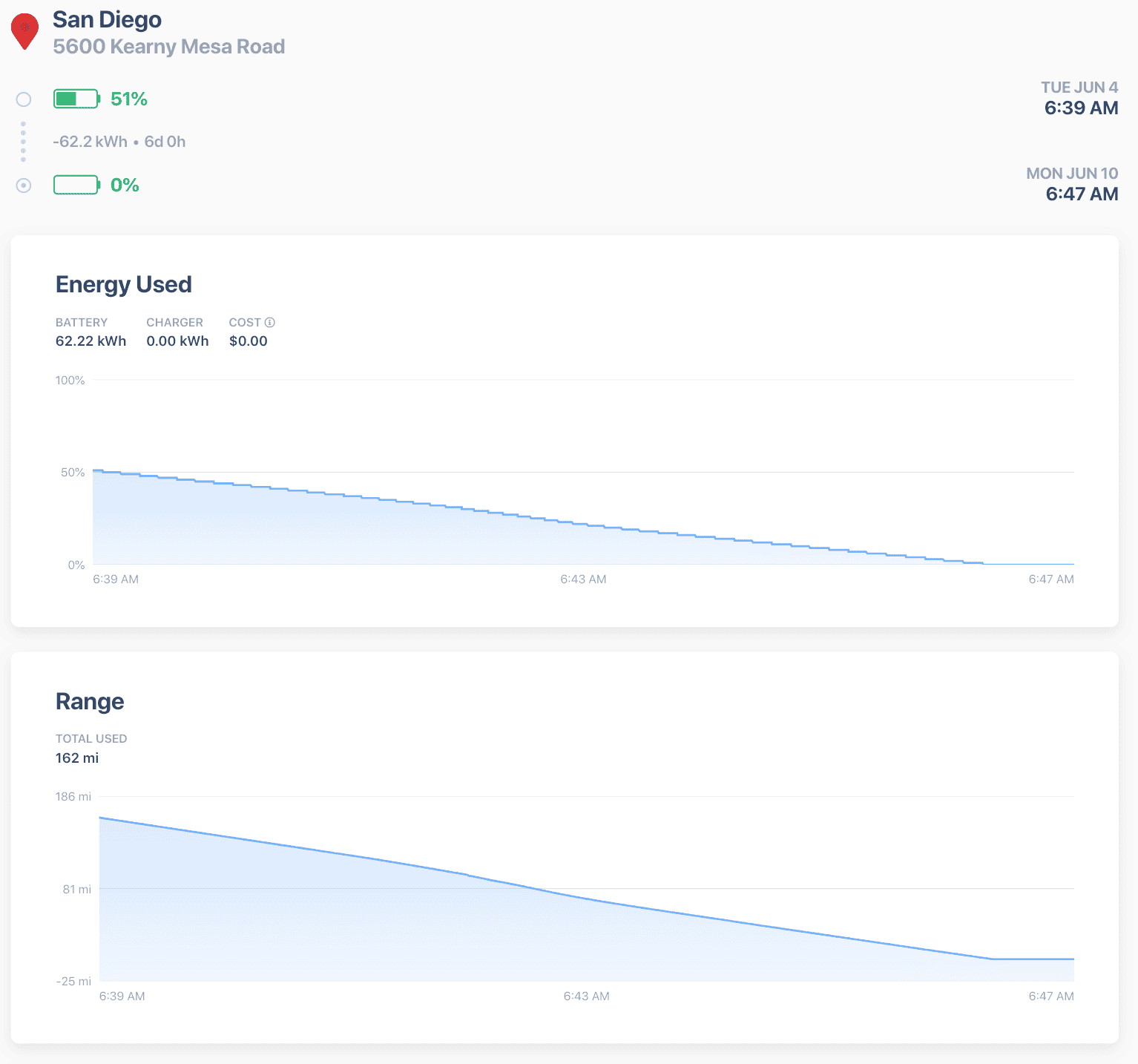
Update from Tesla today (June 11th) is that my car will stay in the shop for longer than 2 weeks because of the phantom drain. My car isn't even in the shop for the drain, but now I'm not allowed to drive the car as the phantom drain is now considered a safety issue. For some reason it wasn't a safety issue the last time I brought it to the shop for the issue, and this time that I brought it in for a different issue, it's now all of a sudden an emergency issue where I'm not allowed to drive the vehicle.

So I guess for anyone else with ~10kWh/day drain, it's a major issue and expect them to keep the vehicle for an extended period of time. And feel free to reach out to me if you need any additional help getting Tesla to take the issue seriously (though I do kinda wish I wasn't the guinea pig here and someone else was first).

Tesla Cybertruck Let's talk about phantom drain Screenshot 2024-06-11 at 1.58.59 PM
 
OP
OP

Nobelcat

Member
First Name
Nicholas
Joined
Mar 19, 2024
Threads
1
Messages
16
Reaction score
12
Location
San Diego, CA
Vehicles
2024 Cybertruck AWD
Country flag
Dropping 60 kWh in 8 minutes is not "phantom drain" That's a serious electrical issue. Thats just twice as fast as the 250kW charger can charge!

Something is getting nearly red hot to do that.
6 days, 0 hours, 8 minutes. You missed the 6 day part :)
 
OP
OP

Nobelcat

Member
First Name
Nicholas
Joined
Mar 19, 2024
Threads
1
Messages
16
Reaction score
12
Location
San Diego, CA
Vehicles
2024 Cybertruck AWD
Country flag
Are you pushing for a vehicle exchange at this point?
Not pushing yet. From what I can tell, I need to give them at least 2 opportunities to fix the issue and we're currently in the 2nd opportunity. And even then, they can request another opportunity to fix it. The only other part would be more than 30 days in the shop, which I also haven't hit (it's been 9 days). So for the moment, I think I'm stuck with the vehicle (and personally I want to keep the vehicle more than I want to go through the hassle of exchanging it).

But ask me in 2 weeks when I get back from a road trip with the courtesy vehicle (Model X). They just approved me to take it outside the 250 mile range (though I still need to bring it back a day or two after they tell me to).

California if it matters to anyone.


Ward L

Well-known member
First Name
Ward
Joined
Dec 17, 2023
Threads
9
Messages
407
Reaction score
569
Location
Camarillo, CA
Vehicles
Model 3, FS CT AWD
Country flag
I parked the CT in the garage yesterday afternoon around 3 PM and inadvertently left the garage door open all night. I closed the Tesla app and turned off my Bluetooth to avoid waking the CT when I walk by while it sits in the garage. It got down to 60 F outside last night. This morning, I noticed I had a notification on my phone at 12:26 AM: "The climate has been on for an extended period of time". Another notification at 1:26 AM: "Climate has turned off because it has been on for 2 hours". I'm not sure, but think it lost about 2% battery overnight, or 6 miles.

I had to get some stuff out of the CT this morning. The fan started running when I opened the door as it aways does. As I reached over to turn it off, I noticed the temperature was set to 76 F. I have never had the interior temperature set at 76F. The high ambient temp yesterday was about 70F.

I have it set to not lock the doors when it is parked in my garage. I'm on software version 2024.20.1. I usually turn off the interior HVAC after parking in the garage because I don't want the fan starting up every time I open the door. Just an FYI of an example of unnecessary power use when the CT should be asleep. I'm sure they will fix this in a future OTA. It is another example of how much more Tesla needs to fix. Most auto manufacturers fix this stuff before selling the vehicle. Not Tesla!
 
OP
OP

Nobelcat

Member
First Name
Nicholas
Joined
Mar 19, 2024
Threads
1
Messages
16
Reaction score
12
Location
San Diego, CA
Vehicles
2024 Cybertruck AWD
Country flag
Just an FYI of an example of unnecessary power use when the CT should be asleep. I'm sure they will fix this in a future OTA. It is another example of how much more Tesla needs to fix. Most auto manufacturers fix this stuff before selling the vehicle. Not Tesla!
Yeah, there's always a lot of software tweaks that are needed. But for many of your examples, if you were to load the Energy app, it would show that the Energy was used for climate or for talking to the mother-ship. In my case, the Energy app in the truck says that my energy usage is 100% "Idle" (at least when I put the truck somewhere with no wifi or cell service). Tessie uses a reasonable amount of battery when the car is able to communicate.

So the latest for me from Tesla is that they've had the vehicle for 2 weeks now and they want to continue to keep it. Tessie is showing better battery performance in the last 2 days, but can't quite tell if they fixed anything since it's still draining a good amount.
 
OP
OP

Nobelcat

Member
First Name
Nicholas
Joined
Mar 19, 2024
Threads
1
Messages
16
Reaction score
12
Location
San Diego, CA
Vehicles
2024 Cybertruck AWD
Country flag
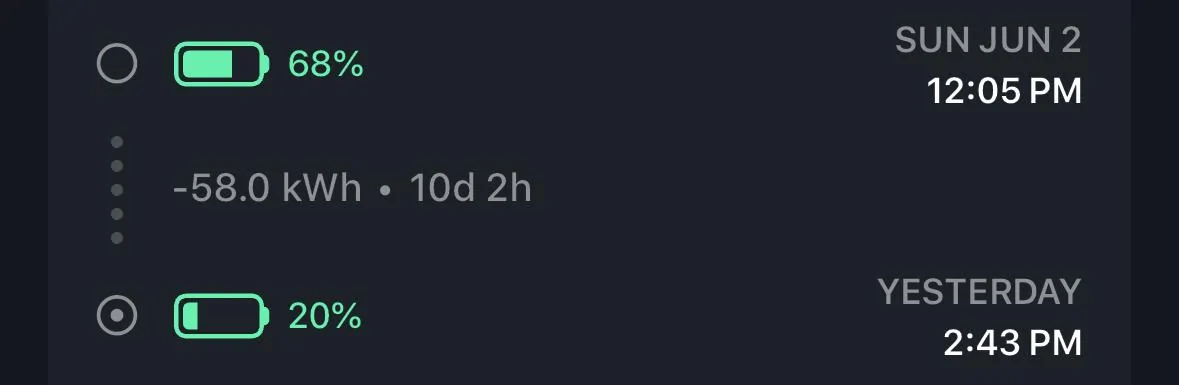
I was away for 10 days, no Sentry, no driving or charging, and lost 58kWh. Ouch!
You might also want to grab a screen shot of the Energy app. It will help make clear where the drain is coming from. Just set it to "Idle" and "Since Last Charge" or something like that. 5kWh per day may or may not be considered normal. I have zero idea what "normal" is.
Sponsored


Top