Sponsored

My buddy's truck bricked. Need advice

electricAK

Well-known member
Joined
Mar 5, 2020
Threads
13
Messages
321
Reaction score
944
Location
Haines, Alaska
Vehicles
Cybertruck dual-motor
Country flag
Friend of mine (only other Cybertruck in town) bought a new Cyberbeast a few months ago. Only has 5,000 miles on it.

Last weekend, he left it plugged in to his Tesla home charger, left for the day, and when he got home that evening he had a black screen and unresponsive truck.

I went and took a look at it today.

- The doors work, wiper works on button press, cabin lights are on, orange lights and hazards work.
- Steer by wire works
- Screen is totally black/off.
- Scroll wheel reset doesn't do anything.
- The gear shift lights by mirror light up on brake press, but it will NOT shift out of park.
- There is a fan noise coming from the dash...not the HVAC, could be a computer fan running hard. This fan will not stop, even after he walks away from the truck.
- He had to manually release the charge wand, which would not unlock. He used the pull strap in the bed to release it.
- Now when you plug in the charger, nothing happens. Totally dead.
- His tesla app says battery is near 75%, but it hasn't connected in 6 days.
- He tried connecting a 12V charger to make sure the 48V battery is charged, not sure if that is even how it works, but at any rate I'm guessing the 48V battery is ok since the lights and doors are still working.

Poor guy is 82 years old, and we live 760 miles from the nearest service center in Anchorage. Tesla want him to put it on the barge and ship it to Anchorage, but won't pay for all of the cost.

I'm hoping someone has some advice... is there anything else we can try before he has it shipped to Anchorage? Is it possible that a new 48V battery or something else we can fix locally will solve it?
Sponsored


 

CyberGus

Well-known member
First Name
Gus
Joined
May 22, 2021
Threads
91
Messages
10,247
Reaction score
33,923
Location
Austin, TX
Vehicles
1981 DeLorean, 2024 Cybertruck
Occupation
IT Specialist
Country flag
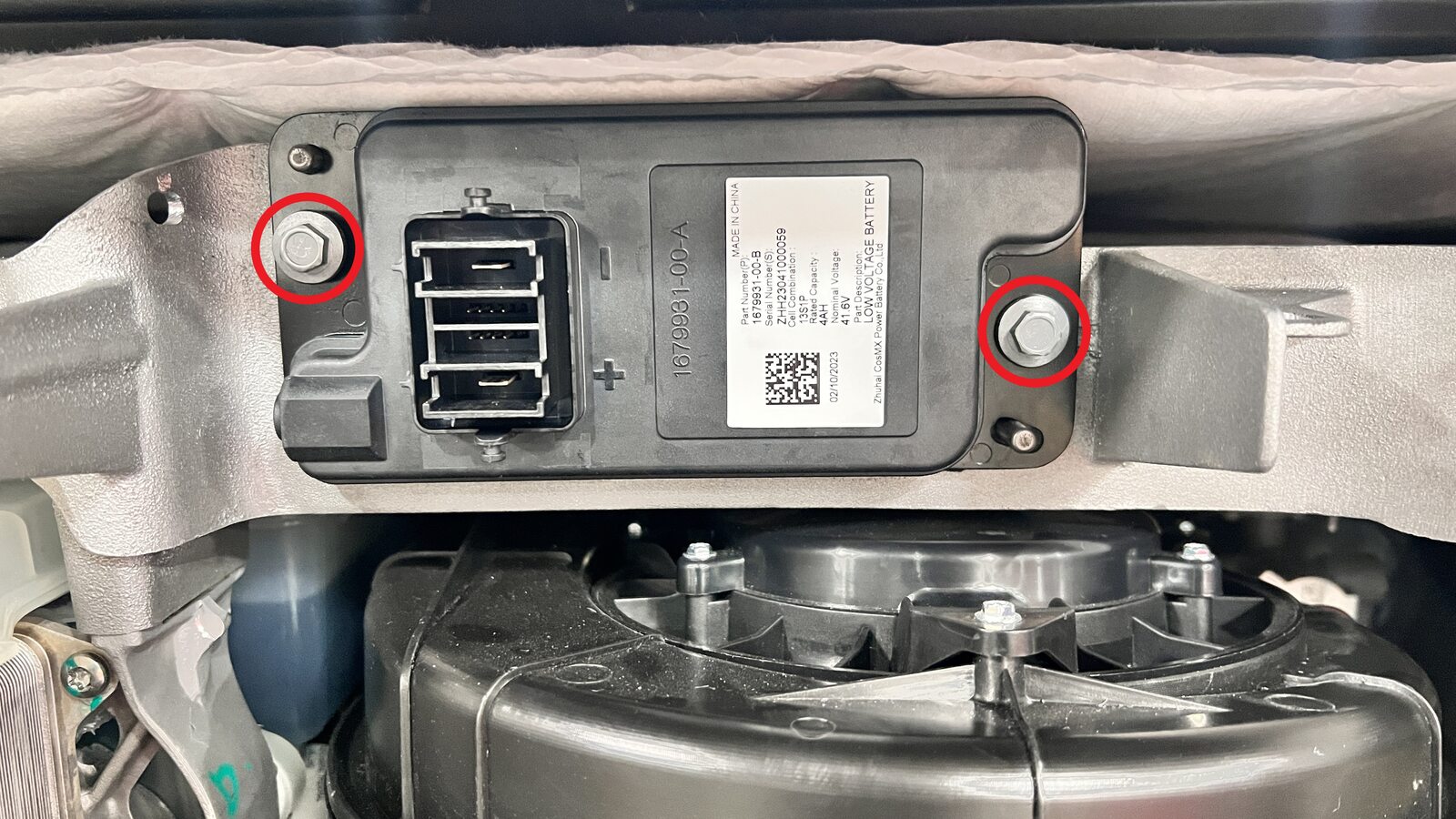
There is a service procedure for disconnecting the MV battery for a true “power off”:

https://service.tesla.com/docs/Cybe...UID-A399E8AE-5DCF-4095-91FA-AF0148503F3B.html

I’ve done it myself before, not too hard.

However, I suppose there’s a chance that the truck may not even startup afterward, but you’ll only be slightly worse off than you are now. Just perform this in a place where it will be easy to flatbed if it all goes sideways.
 

65SoYoLO

Well-known member
First Name
Keith
Joined
Feb 9, 2021
Threads
51
Messages
1,979
Reaction score
2,578
Location
Long Island NY
Vehicles
2024 CyberTruck
Occupation
Retired truck driver
Country flag
Good luck. Wish there was something I could do to help.

🤞
 
  • Like
Reactions: REM

dw321

Well-known member
Joined
Jun 10, 2023
Threads
4
Messages
73
Reaction score
97
Location
Arizona
Vehicles
Ram 2500, Toytota 4 Runner, Bikonit Ebike
Country flag
Friend of mine (only other Cybertruck in town) bought a new Cyberbeast a few months ago. Only has 5,000 miles on it.

Last weekend, he left it plugged in to his Tesla home charger, left for the day, and when he got home that evening he had a black screen and unresponsive truck.

I went and took a look at it today.

- The doors work, wiper works on button press, cabin lights are on, orange lights and hazards work.
- Steer by wire works
- Screen is totally black/off.
- Scroll wheel reset doesn't do anything.
- The gear shift lights by mirror light up on brake press, but it will NOT shift out of park.
- There is a fan noise coming from the dash...not the HVAC, could be a computer fan running hard. This fan will not stop, even after he walks away from the truck.
- He had to manually release the charge wand, which would not unlock. He used the pull strap in the bed to release it.
- Now when you plug in the charger, nothing happens. Totally dead.
- His tesla app says battery is near 75%, but it hasn't connected in 6 days.
- He tried connecting a 12V charger to make sure the 48V battery is charged, not sure if that is even how it works, but at any rate I'm guessing the 48V battery is ok since the lights and doors are still working.

Poor guy is 82 years old, and we live 760 miles from the nearest service center in Anchorage. Tesla want him to put it on the barge and ship it to Anchorage, but won't pay for all of the cost.

I'm hoping someone has some advice... is there anything else we can try before he has it shipped to Anchorage? Is it possible that a new 48V battery or something else we can fix locally will solve it?
Might be dumb of me but since it has power did he try a hard reset? Push both scroll wheels down.
 

Schroederhc

Well-known member
First Name
Bud
Joined
Oct 24, 2025
Threads
2
Messages
76
Reaction score
89
Location
WA
Vehicles
R1T, Juniper & Taycan
Occupation
Self Employed
Country flag
Keep us posted


mkdphx

Member
First Name
Michael
Joined
Feb 17, 2026
Threads
1
Messages
22
Reaction score
27
Location
Phoenix
Vehicles
FS Cybertruck dual motor
Country flag
Here is what Grok suggests, similar to other posts:
“
This sounds like a classic Cybertruck “bricked” or low-voltage system fault (the 48V/MV auxiliary battery and related power distribution/computers). The constant dash fan (likely a computer/module cooling fan running hard in a boot loop or fault state), partial functionality (doors, lights, wipers, hazards, steer-by-wire), black/unresponsive screen, no shifting (even though brake lights trigger the gear indicators), manual charge-port release needed, and now-no-response to the charger all match known reports. The truck was plugged in when it happened, and the app’s last-known 75% battery (disconnected 6 days) suggests the high-voltage traction battery is probably fine—the issue is downstream in the 48V low-voltage architecture that powers the computers, screens, charging logic, and shifting.


Your 12V charger attempt was a good instinct but likely not connected to the right spots or sustained long enough—the Cybertruck’s 48V system has specific jump posts and circuitry (it can accept/step-up 12V, but there are dedicated procedures).


Quick things already tried/ruled out


• Scroll-wheel reset (both steering-wheel knobs held) doesn’t work here (normal soft reboot for screen-only issues).


• Normal touchscreen power-off (Controls > Safety > Power Off, wait 2+ minutes) isn’t possible with a black screen.


What you can still try locally (before shipping)


These are the standard owner/service steps for exactly this symptom set. Many owners have recovered “dead” Cybertrucks this way without service. Do this with the truck in a safe spot (flat, not blocking anything). The 82-year-old owner shouldn’t do the physical parts alone—get a mechanically inclined friend or local shop. Tools needed: 12V portable jump pack (or another vehicle with jumper cables), basic hand tools.


1. Open the frunk with no power (external 12V terminals)


• Locate the access cover under the front-left wheel well, behind the headlight. Pull/loosen the cover to expose the red (+) and black (-) terminals.


• Connect your 12V jump pack or running vehicle’s cables (9–16.5V or 30–50V works; a standard 12V jump box is fine). The frunk latches should release immediately.


• Do not leave it connected longer than ~30 seconds—these terminals are mainly for popping the frunk, not full charging. Manually lift the frunk open.
(Owner’s manual has diagrams for this exact “Opening the Powered Frunk with No Power” procedure.)


2. Connect power to the internal low-voltage jump posts (this is the real jump/charge step)


• Inside the frunk, remove the maintenance panel (pull upward on the trim clips near the brake fluid reservoir).


• Connect your 12V (or better, 48V if you have one) power source: red (+) to the horizontal jump post next to the brake fluid reservoir, black (-) to the vertical jump post.


• Leave it connected for 2–5+ minutes (or longer) while someone sits in the truck and tries the brake + scroll-wheel reset again. The system should boot, the screen may come back, and it may start accepting the charger or allow shifting.


• Cybertruck’s circuitry is designed to step up 12V here and wake the 48V system/HV contactors.


3. Full MV (48V) power disconnect/reconnect — the “hard reset” (most likely to fix a stuck computer/fault state)
This is what Tesla service does for these bricked cases and what one owner recommended in the exact forum thread matching your description. It fully cuts 48V power to force a complete reboot of the computers.


• With frunk open (from step 1), follow the Tesla service procedure (publicly viewable): Disconnect the first responder cut loop (slide red tab, press blue tab), then the main MV battery connector (red tab + black lever). Wait 2+ minutes (or 5–10 for good measure). Reconnect in reverse order.


• Full steps are here: https://service.tesla.com/docs/Cybe...UID-A399E8AE-5DCF-4095-91FA-AF0148503F3B.html


• There are YouTube videos like “How to Power-up a Dead (but charged) Cybertruck” that show the exact connectors visually (light blue first-responder loop + red MV connector in the frunk).


• Prep note: The official procedure wants windows lowered and rear doors propped open first (shop towel trick in the strikers) to avoid lockouts if it fully powers down. Since doors currently work, you may be able to lower windows manually first.


After any of the above, immediately plug in the home charger and try the app/scroll reset again. If it wakes up, drive it gently and schedule a service appointment ASAP (they can pull logs remotely once online).


Other notes / realities


• Not a simple local 48V battery swap: The Li-ion 48V aux battery is behind the frunk and requires the above access anyway. Even if it’s dead/low, the jump/reset usually revives it (the HV battery should keep it charged when healthy). Replacing the whole unit is a service-level job.


• Fan noise: Classic sign of a module (infotainment/gateway/computer) powered but in a fault/boot-loop state—exactly what the MV disconnect fixes.


• Tesla support: Call roadside assistance (1-877-79TESLA) right now and explain the exact symptoms + location. They may walk you through the above over the phone or send guidance. Mobile service isn’t in Alaska, but remote diagnostics/logs can sometimes unlock OTA fixes or authorize a local tow/shop. Document everything for warranty/shipping-cost disputes.


• This matches a fresh post on the Cybertruck Owners Club forum (identical symptoms)—still no resolution there yet, but the MV disconnect is the consensus next step.


If none of this revives it, unfortunately the barge to Anchorage may be the only path (Tesla has been strict on some early Cybertruck warranty towing). These trucks are warrantied, so fight for coverage on the transport—mention the age of the owner and remote location. Keep us updated if you try the steps; a lot of us are following these early Cybertruck electrical gremlins closely.


Sorry this happened to your friend—hope one of these brings it back to life locally!”
 

mkdphx

Member
First Name
Michael
Joined
Feb 17, 2026
Threads
1
Messages
22
Reaction score
27
Location
Phoenix
Vehicles
FS Cybertruck dual motor
Country flag
If he has the pin to start option enabled, try using the app to put it in valet mode to bypass the pin and see if you can get it out of park and drive
 
OP
OP
electricAK

electricAK

Well-known member
Joined
Mar 5, 2020
Threads
13
Messages
321
Reaction score
944
Location
Haines, Alaska
Vehicles
Cybertruck dual-motor
Country flag
Thanks for the suggestions, all! I think there are some good things to try here and I'll see if I can try some of them this weekend. Will report back!


JCERRN

Well-known member
First Name
J
Joined
May 3, 2021
Threads
33
Messages
1,243
Reaction score
1,422
Location
Around
Vehicles
Yeah
Country flag
Friend of mine (only other Cybertruck in town) bought a new Cyberbeast a few months ago. Only has 5,000 miles on it.

Last weekend, he left it plugged in to his Tesla home charger, left for the day, and when he got home that evening he had a black screen and unresponsive truck.

I went and took a look at it today.

- The doors work, wiper works on button press, cabin lights are on, orange lights and hazards work.
- Steer by wire works
- Screen is totally black/off.
- Scroll wheel reset doesn't do anything.
- The gear shift lights by mirror light up on brake press, but it will NOT shift out of park.
- There is a fan noise coming from the dash...not the HVAC, could be a computer fan running hard. This fan will not stop, even after he walks away from the truck.
- He had to manually release the charge wand, which would not unlock. He used the pull strap in the bed to release it.
- Now when you plug in the charger, nothing happens. Totally dead.
- His tesla app says battery is near 75%, but it hasn't connected in 6 days.
- He tried connecting a 12V charger to make sure the 48V battery is charged, not sure if that is even how it works, but at any rate I'm guessing the 48V battery is ok since the lights and doors are still working.

Poor guy is 82 years old, and we live 760 miles from the nearest service center in Anchorage. Tesla want him to put it on the barge and ship it to Anchorage, but won't pay for all of the cost.

I'm hoping someone has some advice... is there anything else we can try before he has it shipped to Anchorage? Is it possible that a new 48V battery or something else we can fix locally will solve it?
Make a roadside claim- tesla is obligated to pay for transport to nearest SC.
 
OP
OP
electricAK

electricAK

Well-known member
Joined
Mar 5, 2020
Threads
13
Messages
321
Reaction score
944
Location
Haines, Alaska
Vehicles
Cybertruck dual-motor
Country flag
Well, no luck with my friend's truck. He tried the 48V battery disconnect / reset, checked the voltage of the 48V battery and it was fine. Wasn't able to get the truck to come back to life. It appears that getting it to the service center is the only option left.
 

REM

Well-known member
Joined
Dec 9, 2023
Threads
14
Messages
3,582
Reaction score
6,653
Location
NC
Vehicles
2020 Model 3 Standard Range++ & Diet Cybertruck, Dual Motor
Occupation
Professional Retard
Country flag
Well, no luck with my friend's truck. He tried the 48V battery disconnect / reset, checked the voltage of the 48V battery and it was fine. Wasn't able to get the truck to come back to life. It appears that getting it to the service center is the only option left.
Bummer! This has to be the most unlucky situation so far away from a SC. I would beg them to walk you through some advanced diagnostics.

May even be cheaper to fly some out to the truck 🤦

How long did you keep the mid voltage battery disconnected? I'd say leave it unhooked for 10 mins.
 
OP
OP
electricAK

electricAK

Well-known member
Joined
Mar 5, 2020
Threads
13
Messages
321
Reaction score
944
Location
Haines, Alaska
Vehicles
Cybertruck dual-motor
Country flag
He said he left it disconnected for close to 10 minutes. I'm still a little unclear about what the actual voltage of the 48V battery read when he checked it. He didn't say that it was low.

But then I talked to him yesterday and he said it's on the truck to Anchorage now, and that the 48V battery finally died. So maybe that was the issue after all? Or maybe 10 days of sitting in a bricked state with the computer fan running was enough to drain all the juice. Will be interested to hear the diagnosis from Tesla and whether they can give us further steps we can take on our own.
Sponsored


Top