Sponsored

Kroton

Active member
First Name
Gary
Joined
Apr 5, 2024
Threads
1
Messages
27
Reaction score
31
Location
North Texas
Vehicles
Cybertruck
Occupation
IT
Country flag
IMG_8543.jpeg
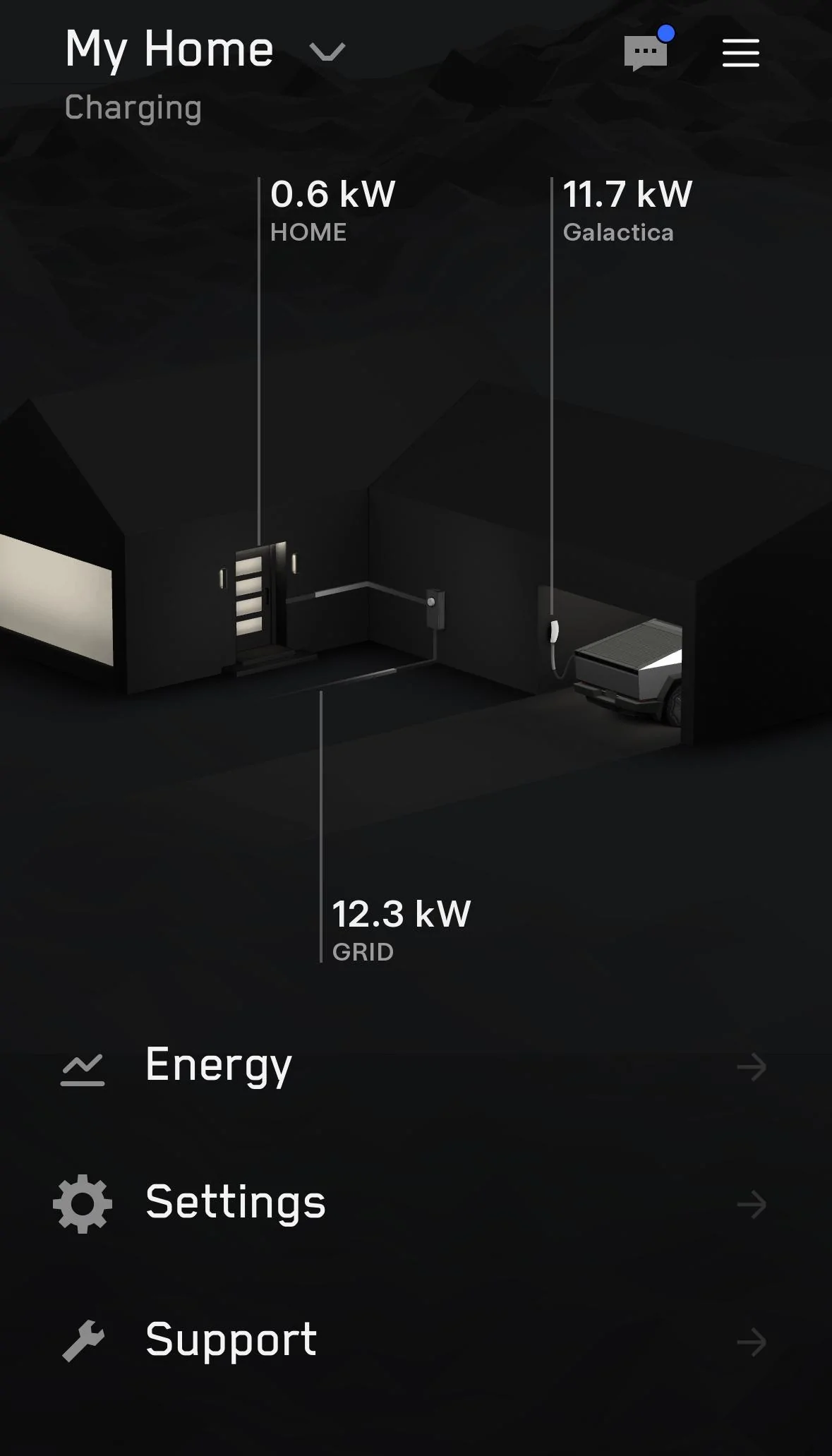
Looks like this in the app…
When you click on energy view, do you see the breakout for how much power of going to the truck versus the home? I'm my app, it's all being allocated to the home, Even when the truck is charging.
Sponsored


Crissa

Well-known member
First Name
Crissa
Joined
Jul 8, 2020
Threads
138
Messages
19,571
Reaction score
31,475
Location
Santa Cruz
Vehicles
2014 Zero S, 2013 Mazda 3
Country flag
Outages are rare in my neighborhood so I opted against adding a Powerwall.
Powerwalls can also be used against the time-of-use rates required in California, and they can also get you access to the virtual-power-plants to offset power consumption.

-Crissa
 
OP
OP
schmo

schmo

Well-known member
First Name
Doug
Joined
Jan 18, 2024
Threads
2
Messages
106
Reaction score
179
Location
Austin, TX
Vehicles
Tesla Model S, Cybertruck AWD
Country flag
When you click on energy view, do you see the breakout for how much power of going to the truck versus the home? I'm my app, it's all being allocated to the home, Even when the truck is charging.
I am seeing the same. I opened a ticket with Tesla and was told this is the expected behavior until the update in June.
 

Kroton

Active member
First Name
Gary
Joined
Apr 5, 2024
Threads
1
Messages
27
Reaction score
31
Location
North Texas
Vehicles
Cybertruck
Occupation
IT
Country flag
Thanks! That's what I was suspecting, and glad to get some confirmation.
 
OP
OP
schmo

schmo

Well-known member
First Name
Doug
Joined
Jan 18, 2024
Threads
2
Messages
106
Reaction score
179
Location
Austin, TX
Vehicles
Tesla Model S, Cybertruck AWD
Country flag
Another thing I noticed in the app is now I have “bi-directional” arrows coming out of the lightning bolt while charging. This only appears for the Cybertruck. Other Teslas on the same UWC just have a lightning bolt. (Sorry, no screenshot)

Then I noticed here in another thread a guy received an email from Tesla with this:

Home Backup functionality is currently live for system configurations that do not have a backed up solar system, Backup Switch or Powerwall.”​

Is Powershare already live at my house? Next week, I will flip my breaker and find out. I will report back here!


Ward L

Well-known member
First Name
Ward
Joined
Dec 17, 2023
Threads
9
Messages
407
Reaction score
569
Location
Camarillo, CA
Vehicles
Model 3, FS CT AWD
Country flag
This is a biit off topic. This is a great thread discussion here. I’m getting an estimate from a Tesla approved installer 400 miles away. I knew the company would get a sub-contractor to do the work. The sub came to the house and said he was not technically a Tesla approved installer. I’m sure he is a qualified electrician, just not Tesla approved. I have a second Tesla approved installer 10 miles away and have asked him to give me a quote. He came to evaluate the install and said he had never installed a PowerShare or had any training on it, but he was a Tesla approved installer. I want to get two proposals to compare. I’m a little leary of using the company 400 miles away and would love to use the local approved installer. Another problem is these guys are all super busy installing EV electrical support equipment. It is rush-hour for electricians everywhere across the country. I’ll be surprised if the local guy will even give me a bid as he has been very slow to respond.

My hope is to install two UWC, a PowerShare panel and a PowerWall to function with my existing vintage (10 year old) Enphase solar panels. We lose power 3-4 times a year for grid maintenance and SCE has said we will be subject to outages when the wind blows to prevent wildfires.

Yeah, so what is my question? What do you think of using a non-approved sub vs an approved contractor that has not installed or had training on a PowerShare panel? Maybe look for a 3rd installer that is appoved by Tesla? I’ll throw in another question: Any of you installing whole house surge protection with your install?
 

Kroton

Active member
First Name
Gary
Joined
Apr 5, 2024
Threads
1
Messages
27
Reaction score
31
Location
North Texas
Vehicles
Cybertruck
Occupation
IT
Country flag
Another thing I noticed in the app is now I have “bi-directional” arrows coming out of the lightning bolt while charging. This only appears for the Cybertruck. Other Teslas on the same UWC just have a lightning bolt. (Sorry, no screenshot)

Then I noticed here in another thread a guy received an email from Tesla with this:

Home Backup functionality is currently live for system configurations that do not have a backed up solar system, Backup Switch or Powerwall.”​

Is Powershare already live at my house? Next week, I will flip my breaker and find out. I will report back here!
Definitely not functional for me yet. I just flipped the emergency disconnect between the meter and my gateway and everything lost power.
 
OP
OP
schmo

schmo

Well-known member
First Name
Doug
Joined
Jan 18, 2024
Threads
2
Messages
106
Reaction score
179
Location
Austin, TX
Vehicles
Tesla Model S, Cybertruck AWD
Country flag
Yeah, so what is my question? What do you think of using a non-approved sub vs an approved contractor that has not installed or had training on a PowerShare panel? Maybe look for a 3rd installer that is appoved by Tesla? I’ll throw in another question: Any of you installing whole house surge protection with your install?
Well, Tesla controls who gets the hardware so it is really up to them. My installer used special software available only to approved installers to commission and download firmware to both the gateway and UWC while having Tesla on the phone to monitor from their back end.

As for whole house surge protection, I'm thinking, but can't confirm, that the Tesla gateway includes a surge protector. How do I know? I have a couple devices that use power lines for internet access. The one device going through the Tesla gateway is dropping packets like it would when a surge protector is in the way.
 
OP
OP
schmo

schmo

Well-known member
First Name
Doug
Joined
Jan 18, 2024
Threads
2
Messages
106
Reaction score
179
Location
Austin, TX
Vehicles
Tesla Model S, Cybertruck AWD
Country flag
Definitely not functional for me yet. I just flipped the emergency disconnect between the meter and my gateway and everything lost power.
Darn. Do you have the "arrows" around the lightning bolt when charging the Cybertruck like I do?
 

Kroton

Active member
First Name
Gary
Joined
Apr 5, 2024
Threads
1
Messages
27
Reaction score
31
Location
North Texas
Vehicles
Cybertruck
Occupation
IT
Country flag
Darn. Do you have the "arrows" around the lightning bolt when charging the Cybertruck like I do?
Yes, but I traded my Y when I bought the truck. While it looked different, I didn't have anything to compare it to for validation.


Ward L

Well-known member
First Name
Ward
Joined
Dec 17, 2023
Threads
9
Messages
407
Reaction score
569
Location
Camarillo, CA
Vehicles
Model 3, FS CT AWD
Country flag
Well, Tesla controls who gets the hardware so it is really up to them. My installer used special software available only to approved installers to commission and download firmware to both the gateway and UWC while having Tesla on the phone to monitor from their back end.

As for whole house surge protection, I'm thinking, but can't confirm, that the Tesla gateway includes a surge protector. How do I know? I have a couple devices that use power lines for internet access. The one device going through the Tesla gateway is dropping packets like it would when a surge protector is in the way.
Right, the primary contractor 400 miles away is approved. His sub is not. Tesla could ship the hardware to the approved contractor and they would ship to their sub. I doubt that is how Tesla wants it to work. Wondering if I should accept that. Maybe what you are saying is I should not accept that. I’m going to look for another Tesla approved installer in my area. Thanks.
 
OP
OP
schmo

schmo

Well-known member
First Name
Doug
Joined
Jan 18, 2024
Threads
2
Messages
106
Reaction score
179
Location
Austin, TX
Vehicles
Tesla Model S, Cybertruck AWD
Country flag
Right, the primary contractor 400 miles away is approved. His sub is not. Tesla could ship the hardware to the approved contractor and they would ship to their sub. I doubt that is how Tesla wants it to work. Wondering if I should accept that. Maybe what you are saying is I should not accept that. I’m going to look for another Tesla approved installer in my area. Thanks.
The hardware install is pretty straightforward. My installer had an electrician handle connecting the wiring inside and between the power panels. Then he came in later to handle the software setup. Your contractor will probably do the same.

Now, your Tesla app can handle adding the gateway and UWC to your account. You just scan a QR on both the gateway and the UWC.
 

Kroton

Active member
First Name
Gary
Joined
Apr 5, 2024
Threads
1
Messages
27
Reaction score
31
Location
North Texas
Vehicles
Cybertruck
Occupation
IT
Country flag
A Tesla-badged electrician did our install. It was a pretty great experience overall. There was a miscommunication by the design team that he identified right away. The gateway was to be connected to the sub-panel on which the wall connector was wired. This would have resulted in PowerShare backup only for the garage. That would have been effectively useless. He made a call, waited half an hour for some additional parts to accommodate the new design, then got to work.

The end result is that the whole house will be backed up except for the dryer circuit. I suspect I'll need a soft-start for the AC but the electrician didn't think so. The LRA is above what the truck can support on paper so we'll see.
 

Mtnrunner

Well-known member
First Name
Peter
Joined
Dec 7, 2023
Threads
8
Messages
50
Reaction score
93
Location
Colorado
Vehicles
Tesla x, y
Occupation
Retired
Country flag
Late to the party but I’m undecided about taking advantage of PowerShare now that I took delivery of my Beast

Pros are:
  1. I have backup power during an outage
  2. I get the new universal wall connector
  3. Installer moves my Wall connector closer to my Cybertruck
Cons are:
  1. I’m out ~$700, (install quote came in that much above the $4k credit)
  2. I add many more points of failure and PowerShare equipment is mounted in my garage ‘on the wall’ vs ‘in the wall’ creating an obstacle
  3. I have to trust a “Tesla approved installer” who could be an idiot
  4. I discharge my Beast during an outage stranding me if it’s a situation where I need to GTFO of the area
  5. So far, we don’t have long outages here in the Colorado mountains.
  6. I complicate adding a Powerwall to my solar installation in the future which would better accomplish the task of backup power during an outage.
It’s clear the cons outweigh the pros unless I’m missing something. I don’t think PowerShare will add value to my home either.

I’d prefer using the $4k installation cost and $2500 equipment credit to offset the cost of simply adding a Powerwall to my setup. Something I’ll ask Tesla about but asking Tesla anything is typically an exercise in futility ?‍♂?

Additionally, where’s my light bar and wheel covers and universal wall connector?!! It’s been three weeks and I’ve heard nada and nobody at the Tesla service centers can tell anything ?

But, yes, I love this freaking Beast ?
 

mongo

Well-known member
Joined
May 27, 2024
Threads
5
Messages
4,520
Reaction score
5,495
Location
SE Michigan
Vehicles
Cyberbeast
Country flag
Late to the party but I’m undecided about taking advantage of PowerShare now that I took delivery of my Beast

Pros are:
  1. I have backup power during an outage
  2. I get the new universal wall connector
  3. Installer moves my Wall connector closer to my Cybertruck
Cons are:
  1. I’m out ~$700, (install quote came in that much above the $4k credit)
  2. I add many more points of failure and PowerShare equipment is mounted in my garage ‘on the wall’ vs ‘in the wall’ creating an obstacle
  3. I have to trust a “Tesla approved installer” who could be an idiot
  4. I discharge my Beast during an outage stranding me if it’s a situation where I need to GTFO of the area
  5. So far, we don’t have long outages here in the Colorado mountains.
  6. I complicate adding a Powerwall to my solar installation in the future which would better accomplish the task of backup power during an outage.
It’s clear the cons outweigh the pros unless I’m missing something. I don’t think PowerShare will add value to my home either.

I’d prefer using the $4k installation cost and $2500 equipment credit to offset the cost of simply adding a Powerwall to my setup. Something I’ll ask Tesla about but asking Tesla anything is typically an exercise in futility ?‍♂?

Additionally, where’s my light bar and wheel covers and universal wall connector?!! It’s been three weeks and I’ve heard nada and nobody at the Tesla service centers can tell anything ?

But, yes, I love this freaking Beast ?
Cons 1,2,3, and 5 apply to getting Powerwall just as much as they do to Powershare.

6 is mostly incorrect, having Powershare installed should reduce the cost and complexity of a future Powerwall installation since the Gateway and its installation are a portion of the cost. Adding a Powerwall would then just require an additional breaker in the Gateway, plus mounting and configuration (this will take a little extra work).

Your Wall Connector is purchased with the $2,500 credit, it doesn't come separately.
Sponsored


Top