Sponsored

My Cybertruck went blind - lost all visualizations on my screen

Jay123

Member
First Name
Jay
Joined
Apr 4, 2024
Threads
7
Messages
20
Reaction score
16
Location
1Jmnjmn1
Vehicles
Cybertruck
Occupation
Service
Country flag
My Cybertruck went blind last week
Meaning that I have lost all visualizations on my screen. No cruise control, speed limit or blind spot light. Also drives different… have to use brake more
I did reset to no avail. First day I erased camera calibration and it visualization came back but with no lanes for a day
But next day back to nada
If I go to service menu then to camera preview all are black
Cameras work for me when I’m driving
But computer can’t see them
Gone blind..
Taking it in on friday
Sponsored
 
OP
OP

Jay123

Member
First Name
Jay
Joined
Apr 4, 2024
Threads
7
Messages
20
Reaction score
16
Location
1Jmnjmn1
Vehicles
Cybertruck
Occupation
Service
Country flag
Also headlights are set to auto but are always on even in the day.
 

cybrtrk88

Well-known member
Joined
Feb 20, 2020
Threads
6
Messages
200
Reaction score
359
Location
San Diego
Vehicles
P3D
Country flag
Yo! Im having tons of software issues including the headlights being on in auto mode. I did camera calibration reset and it wont do anything, which affects sentry mode and auto light cancel etc..

I have a service ticket in and the rep on chat said hopefully the next software update will fix, im getting a ton of battery app draining on the car when im not even going into the app.
 

SARC

Active member
First Name
Scott
Joined
Jan 17, 2024
Threads
2
Messages
25
Reaction score
119
Location
Morgan Hill, CA
Vehicles
AWD CT FS, 2023 Model S Long Range
Country flag
Also headlights are set to auto but are always on even in the day.
Do you have any warnings on the dash / any error codes?

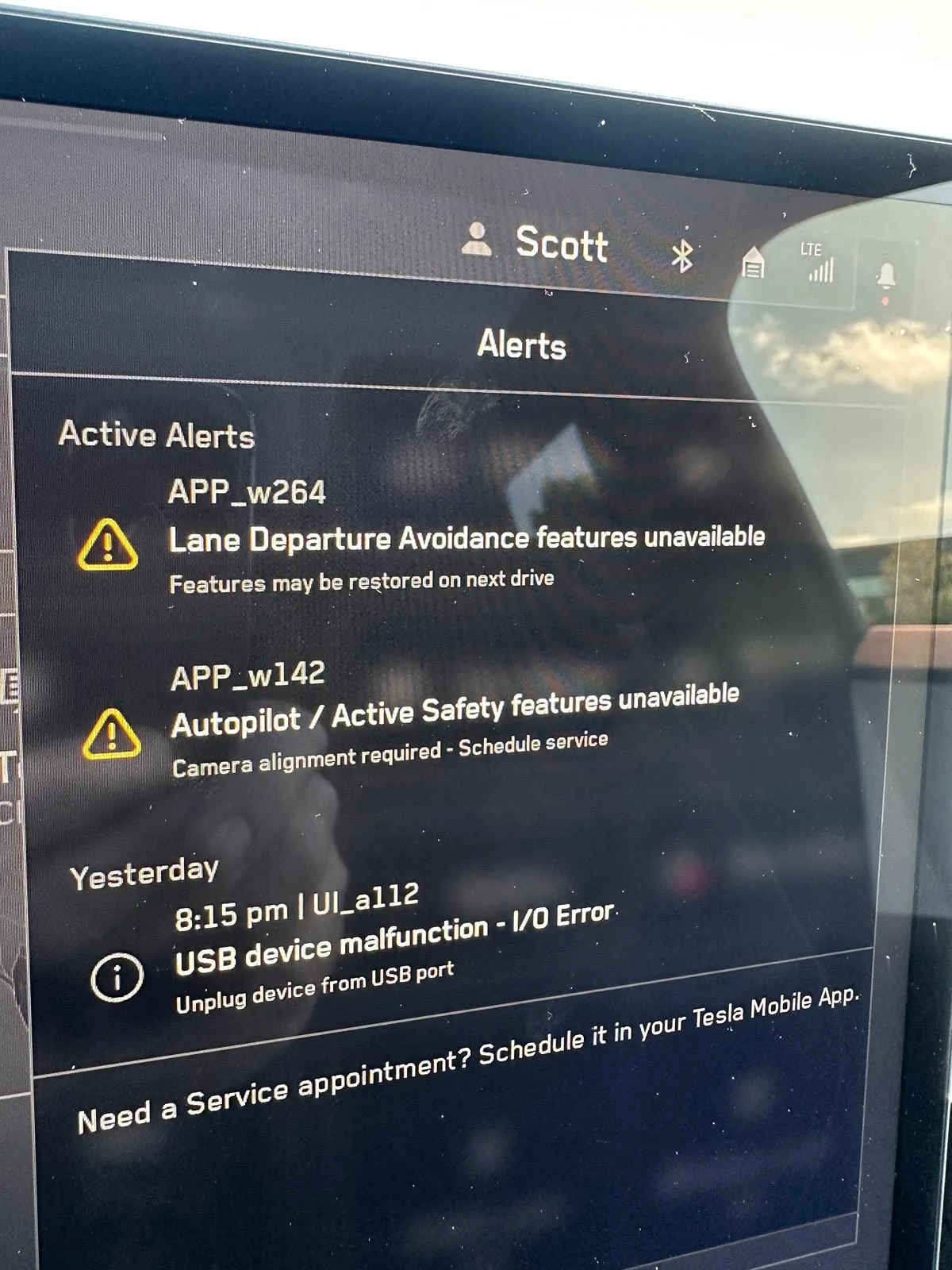
We are having a similar issue, although this hasn’t changed the way the truck drives for us. I have two warnings - APP_w264 and APP_w142

When I do a camera calibration, for about the first 50 miles I have nothing. Then slowly a few things start to come back, ie traffic light bongs, auto lights (the were just “on” previously, seems like the safest safety state for them), turn signal auto cancel.

in the visualizer I see lane lines only, no cars, but I do see traffic lights after 50 or so miles.

Logically, I “think” the system has downgraded itself to what a Tesla with only front facing cameras can do? - which means I have something wrong with one of my side cameras? All my camera views show up in the truck and on the app in Sentry Mode, so they are not dead-dead. (But then I also don’t even have TACC working, which you would think would only need the front cameras?)

Anyway, looks like it will require a trip to a service center. I’ll update if / when it gets fixed.

Tesla Cybertruck My Cybertruck went blind -  lost all visualizations on my screen IMG_2864
 
Last edited:

cybrtrk88

Well-known member
Joined
Feb 20, 2020
Threads
6
Messages
200
Reaction score
359
Location
San Diego
Vehicles
P3D
Country flag
Do you have any warnings on the dash / any error codes?

We are having a similar issue. I have two warnings - APP_w264 and APP_w142

When I do a camera calibration, for about the first 50 miles I have nothing. Then slowly a few things start to come back, ie traffic light bongs, auto lights (the were just “on” previously, seems like the safest safety state for them), turn signal auto cancel.

in the visualizer I see lane lines only, no cars, but I do see traffic lights after 50 or so miles.

Logically, I “think” the system has downgraded itself to what a Tesla with only front facing cameras can do? - which means I have something wrong with one of my side cameras? All my camera views show up in the truck and on the app in Sentry Mode, so they are not dead-dead. (But then I also don’t even have TACC working, which you would think would only need the front cameras?)

Anyway, looks like it will require a trip to a service center. I’ll update if / when it gets fixed.

IMG_2864.jpeg
No errors here at all, but i keep setting headlights to off and it keeps resetting itself to auto/on during the day


Kengineer

Well-known member
First Name
Kiwan
Joined
Jan 3, 2024
Threads
22
Messages
152
Reaction score
290
Location
Huntsville al
Vehicles
Foundation cybertruck
Occupation
Engineer
Country flag
I had the camera calibration warning since I got it. I thought it was because of FSD. Anyways got the calibration done at Tesla and now I can see visualization like my FSD model S.
 

SARC

Active member
First Name
Scott
Joined
Jan 17, 2024
Threads
2
Messages
25
Reaction score
119
Location
Morgan Hill, CA
Vehicles
AWD CT FS, 2023 Model S Long Range
Country flag
Yo! Im having tons of software issues including the headlights being on in auto mode. I did camera calibration reset and it wont do anything, which affects sentry mode and auto light cancel etc..

I have a service ticket in and the rep on chat said hopefully the next software update will fix, im getting a ton of battery app draining on the car when im not even going into the app.
I went through both 2024.14.3 and 2024.14.5 upgrades with these errors and they still persist.

(I don’t have any battery drain issues though)
 

SARC

Active member
First Name
Scott
Joined
Jan 17, 2024
Threads
2
Messages
25
Reaction score
119
Location
Morgan Hill, CA
Vehicles
AWD CT FS, 2023 Model S Long Range
Country flag
I had the camera calibration warning since I got it. I thought it was because of FSD. Anyways got the calibration done at Tesla and now I can see visualization like my FSD model S.
Interesting. We did around 2k miles before it showed up. How long did the camera calibration take? It’s a sit and wait job or leave it a few days job? (I also need the accelerator pedal done but from what I’ve seen, that shouldn’t take long)


Sandybayes1

Active member
First Name
Sandra
Joined
Jun 1, 2020
Threads
1
Messages
38
Reaction score
42
Location
Tucson, AZ 85704
Vehicles
Subaru Crosstrek
Occupation
Retired
Country flag
Also headlights are set to auto but are always on even in the day.
That’s true for most autos, i think . My gas car have the lights on during the day when set to auto as long as the car is on. It the lights are on when the ignition is off then something is wrong.
 

stevegshi

Well-known member
First Name
Steve
Joined
Dec 5, 2021
Threads
0
Messages
108
Reaction score
113
Location
Virginia
Vehicles
RAM1500, Model 3
Occupation
Contractor, Electrical Engr, Master Electrician
Country flag
Yo! Im having tons of software issues including the headlights being on in auto mode. I did camera calibration reset and it wont do anything, which affects sentry mode and auto light cancel etc..

I have a service ticket in and the rep on chat said hopefully the next software update will fix, im getting a ton of battery app draining on the car when im not even going into the app.
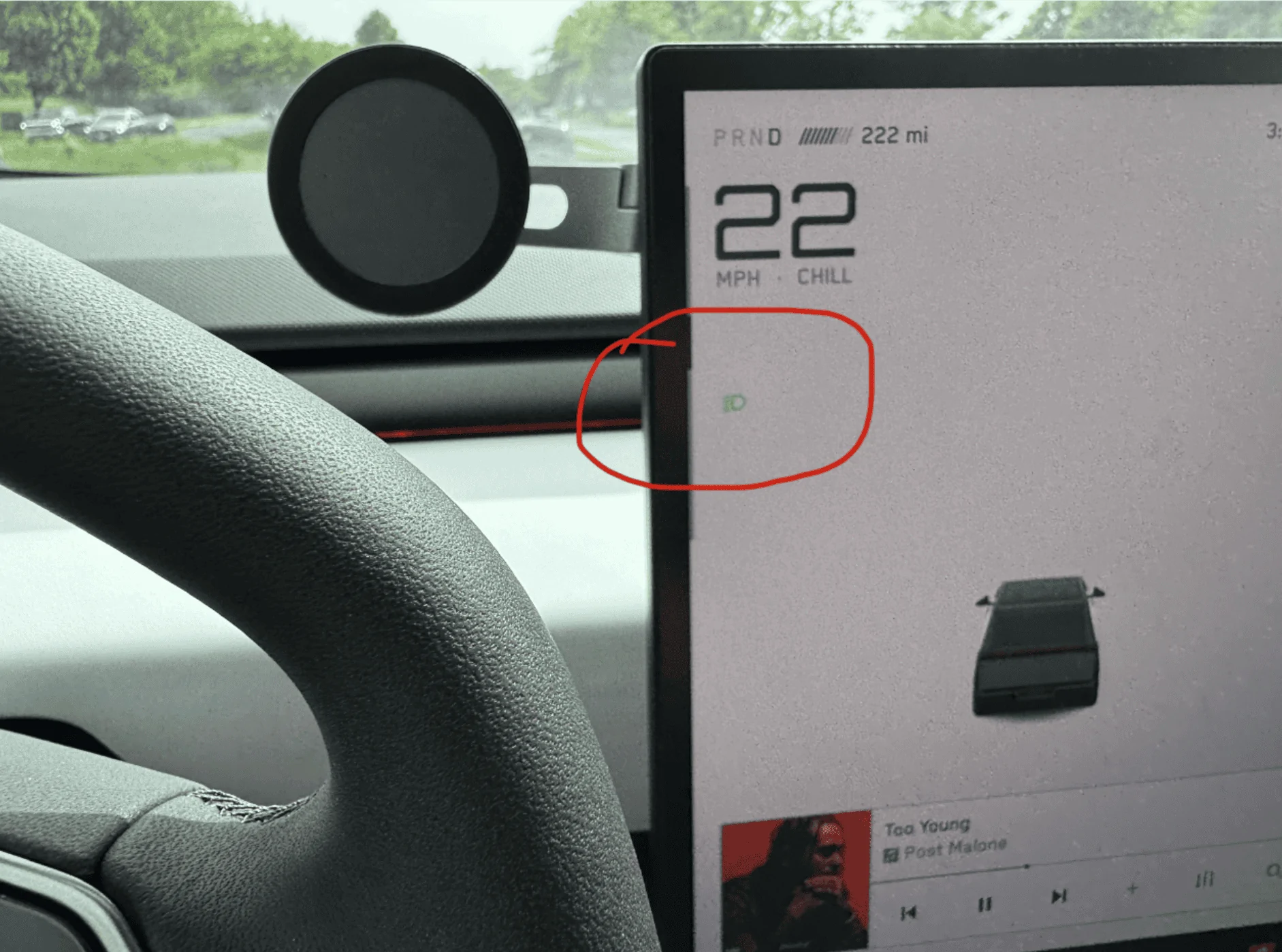
I had the exact same issue before (headlight stayed ON all the same time despite of being set to 'AUTO'), in conjunction with no visualization, unstable sentry mode and rear-view camera feed. But something fixed it in the last couple of days. It was either the driving miles or last two software updates (currently on 2024.14.5).

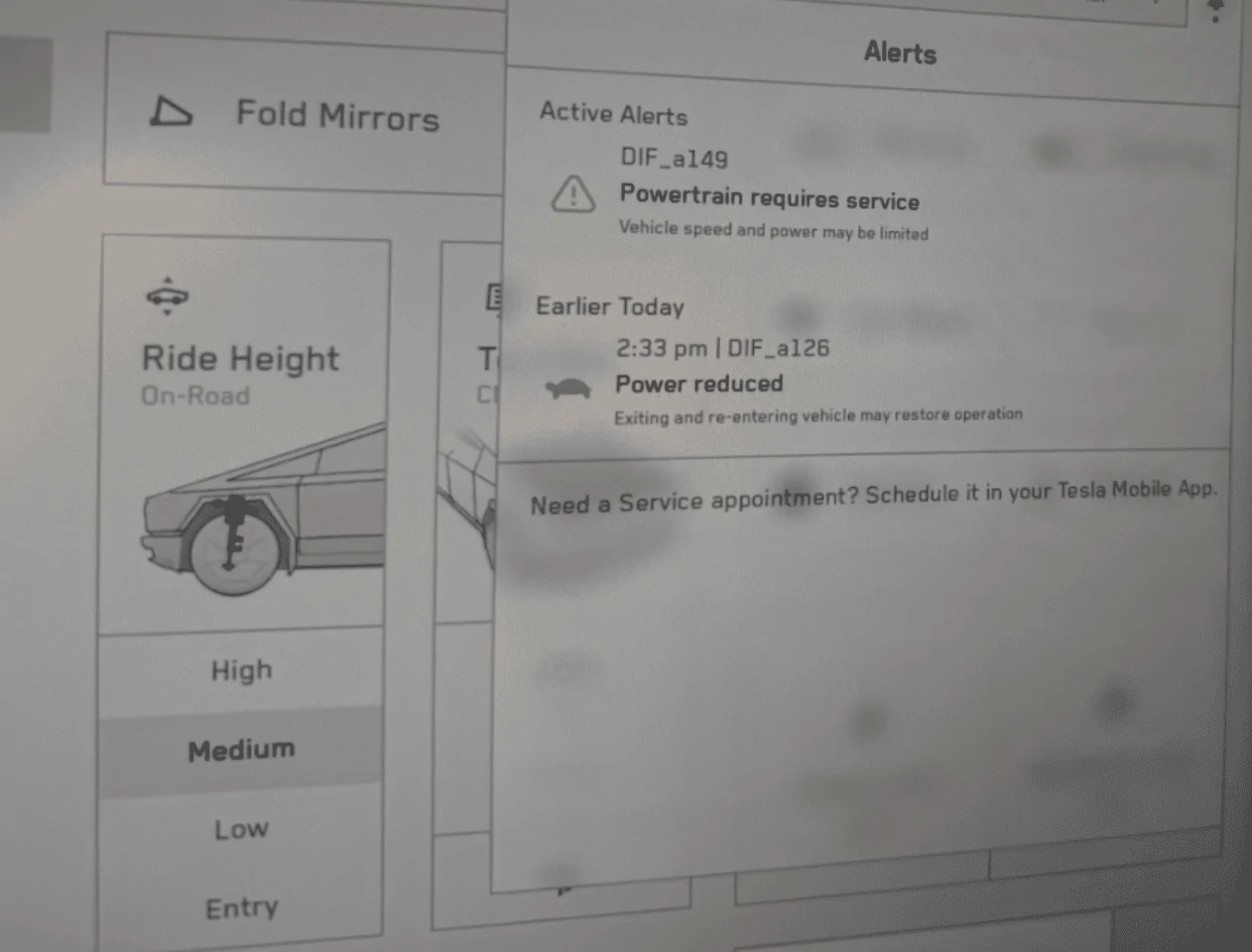
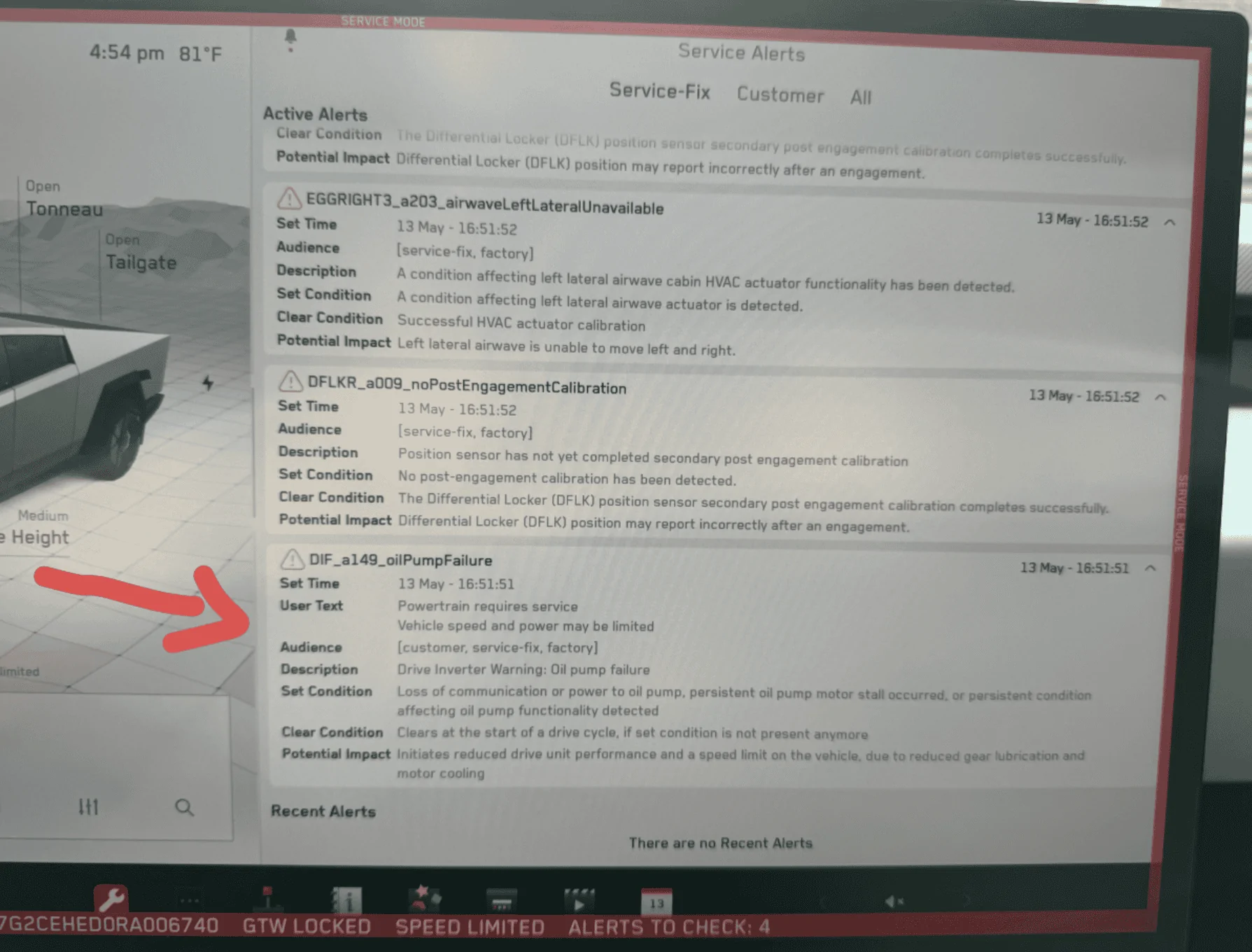
My new issue popped up today, and it is more concerning than everything else: DIF_a149: oil pump failure. :(
Tesla Cybertruck My Cybertruck went blind -  lost all visualizations on my screen 1715648052834-pa
Tesla Cybertruck My Cybertruck went blind -  lost all visualizations on my screen 1715648016392-o
 
OP
OP

Jay123

Member
First Name
Jay
Joined
Apr 4, 2024
Threads
7
Messages
20
Reaction score
16
Location
1Jmnjmn1
Vehicles
Cybertruck
Occupation
Service
Country flag
That’s not good
 

stevegshi

Well-known member
First Name
Steve
Joined
Dec 5, 2021
Threads
0
Messages
108
Reaction score
113
Location
Virginia
Vehicles
RAM1500, Model 3
Occupation
Contractor, Electrical Engr, Master Electrician
Country flag
Another thing I learned within my limited ownership experience: an incompatible aftermarket USB/SSD drive will cause problems with autopilot calibration, thus visualization and sentry mode. Better leave the 128GB Tesla-branded USB drive in its place at the delivery. Wait till the calibration completes then replace it with larger drive.

Here's what happened to me after taking delivery:

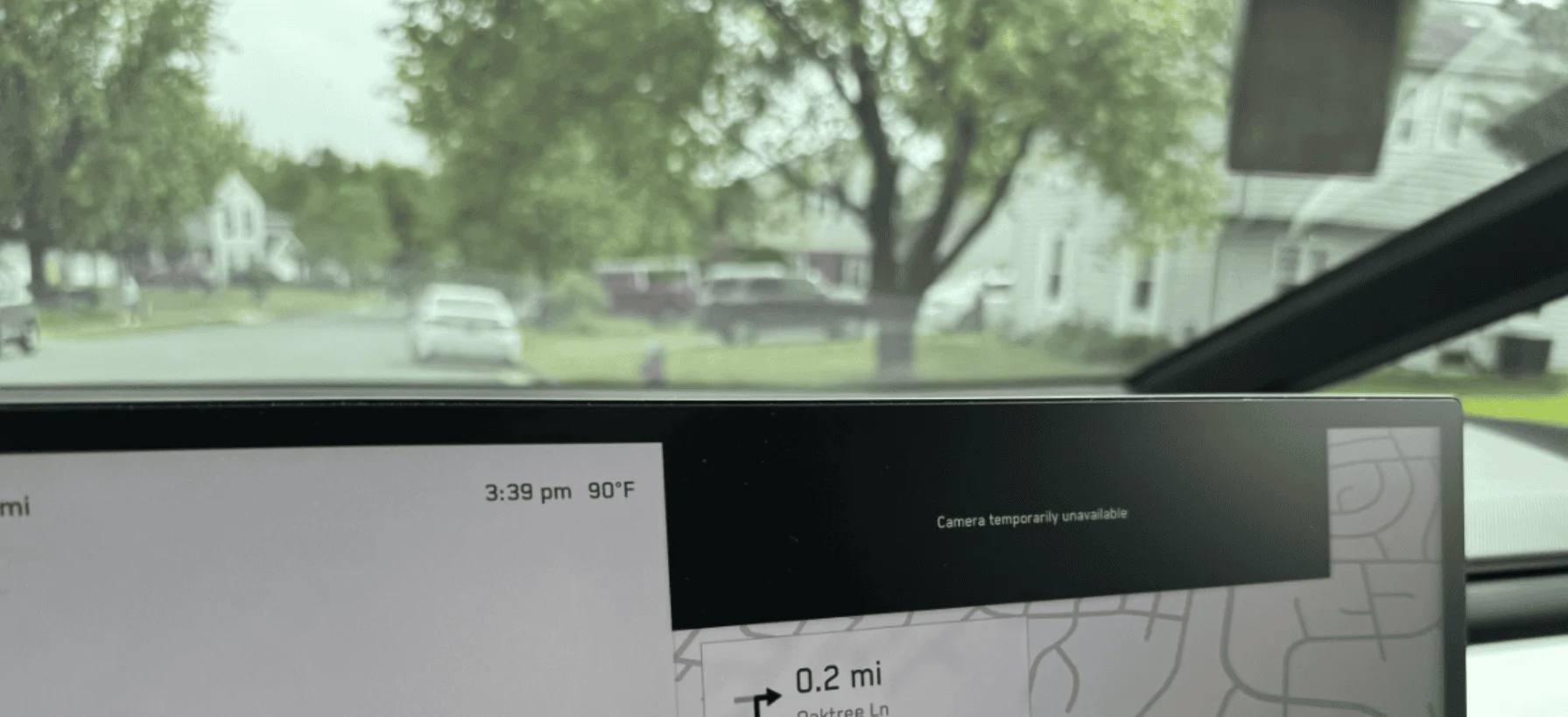
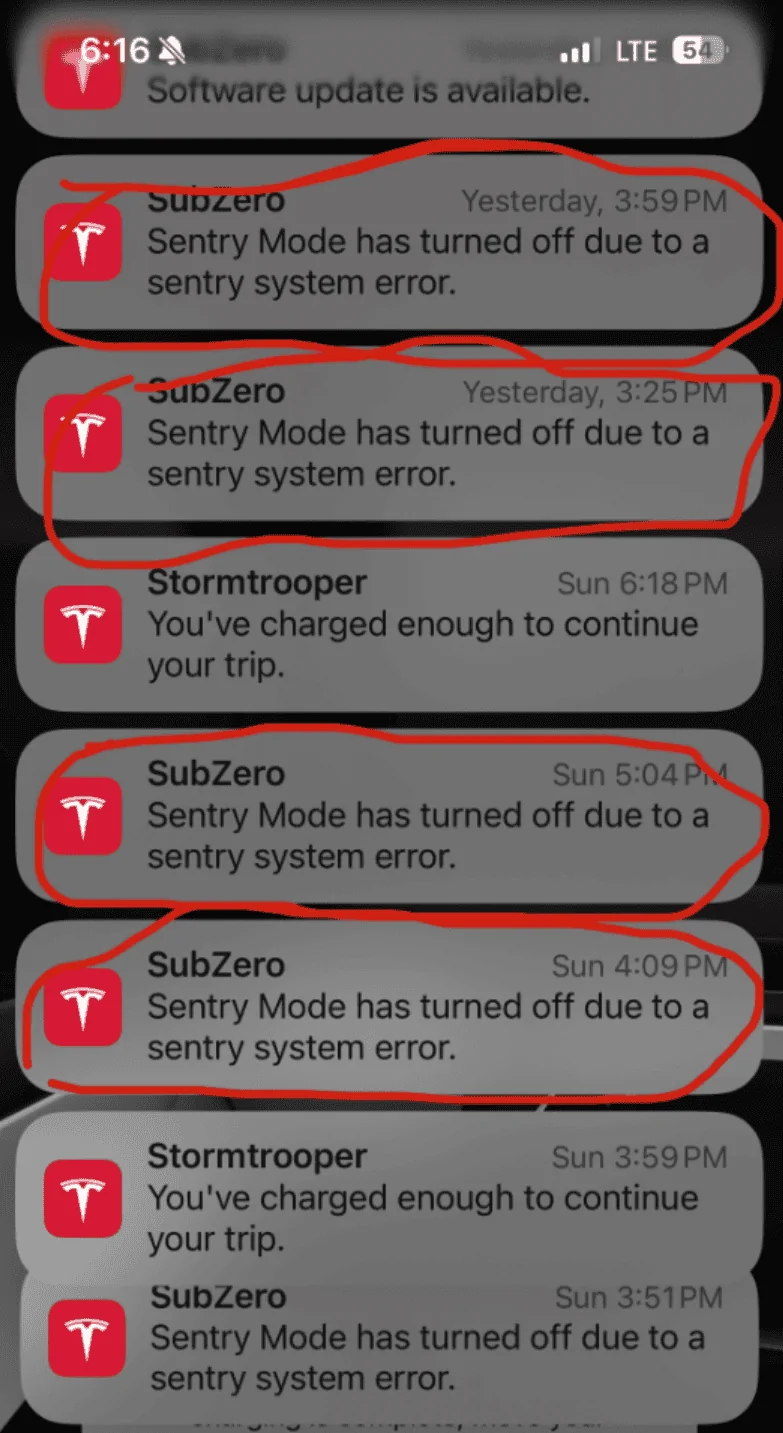
I replaced the OEM USB drive with a 1TB Samsung T9 SSD immediately after delivery. The Cybertruck did not show any issue at the beginning. Everything seemed to function normally, including dash cam and sentry mode. Days after delivery I noticed that the autopilot camera calibration did not progress at all, sentry mode turned off due to 'system error' every other hour or so, and my rear-view camera frequently lost image feed every time I started driving.

After 200 miles of driving without calibration or any visualization, I put the original USB drive back. Almost immediately the calibration started to work, and it completed itself within the same day. Soon after, visualization started to be shown on the screen (although comparing with my 2018 Model 3 with HW3 and FSD, the visualization on CT appeared to lack of some details in the first couple of days, such as lane marks, objects, traffic signs and lights, etc). My sentry mode stabilized such that it could stay on all night with no issue. Rear camera still has issue occasionally, but far less frequent than before. Automatic headlight no longer stayed ON during the daytime too.

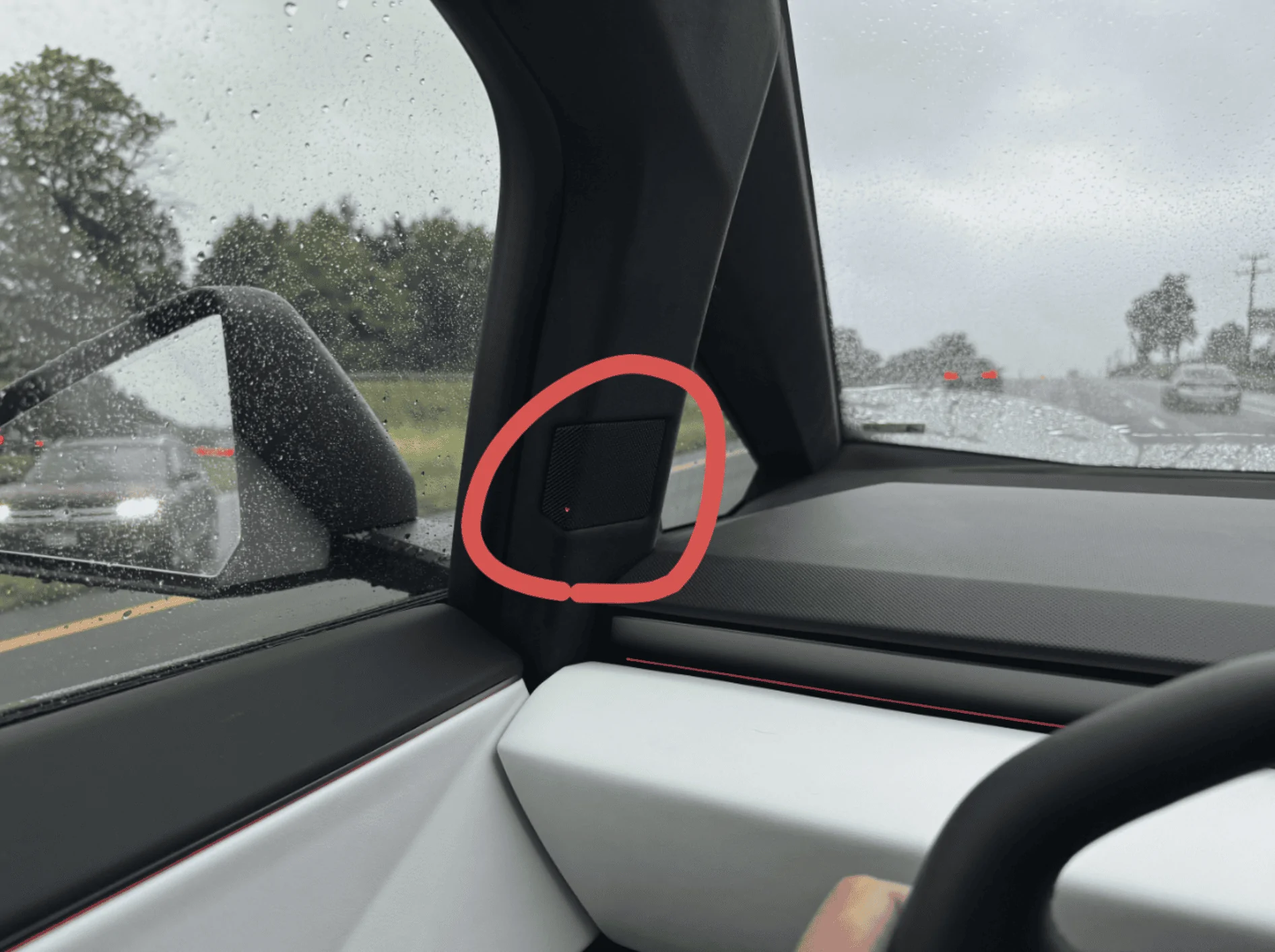
I am still using that 128GB OEM USB driver. The storage seems to be filled up quickly, but I'm not running out of space yet. Meanwhile visualization is much better than before (with exception of the lane marks still incorrect sometimes). Again, sentry mode and rear-view camera works too. The added bonus is that I finally got the red blind-spot indicator lights working within the speaker grills on the a-pillar.

So, be careful of messing with the USB drive. If you ever experience persistent issues related to camera and you happened to replace the USB drive on your CT, try to put the OEM one back! It might fix all the issues right away.
Tesla Cybertruck My Cybertruck went blind -  lost all visualizations on my screen 1715653873442-n
Tesla Cybertruck My Cybertruck went blind -  lost all visualizations on my screen 1715653917961-ct
Tesla Cybertruck My Cybertruck went blind -  lost all visualizations on my screen 1715654021968-ev
Tesla Cybertruck My Cybertruck went blind -  lost all visualizations on my screen 1715654055826-9
 

SARC

Active member
First Name
Scott
Joined
Jan 17, 2024
Threads
2
Messages
25
Reaction score
119
Location
Morgan Hill, CA
Vehicles
AWD CT FS, 2023 Model S Long Range
Country flag
Another thing I learned within my limited ownership experience: an incompatible aftermarket USB/SSD drive will cause problems with autopilot calibration, thus visualization and sentry mode. Better leave the 128GB Tesla-branded USB drive in its place at the delivery. Wait till the calibration completes then replace it with larger drive.

Here's what happened to me after taking delivery:

I replaced the OEM USB drive with a 1TB Samsung T9 SSD immediately after delivery. The Cybertruck did not show any issue at the beginning. Everything seemed to function normally, including dash cam and sentry mode. Days after delivery I noticed that the autopilot camera calibration did not progress at all, sentry mode turned off due to 'system error' every other hour or so, and my rear-view camera frequently lost image feed every time I started driving.

After 200 miles of driving without calibration or any visualization, I put the original USB drive back. Almost immediately the calibration started to work, and it completed itself within the same day. Soon after, visualization started to be shown on the screen (although comparing with my 2018 Model 3 with HW3 and FSD, the visualization on CT appeared to lack of some details in the first couple of days, such as lane marks, objects, traffic signs and lights, etc). My sentry mode stabilized such that it could stay on all night with no issue. Rear camera still has issue occasionally, but far less frequent than before. Automatic headlight no longer stayed ON during the daytime too.

I am still using that 128GB OEM USB driver. The storage seems to be filled up quickly, but I'm not running out of space yet. Meanwhile visualization is much better than before (with exception of the lane marks still incorrect sometimes). Again, sentry mode and rear-view camera works too. The added bonus is that I finally got the red blind-spot indicator lights working within the speaker grills on the a-pillar.

So, be careful of messing with the USB drive. If you ever experience persistent issues related to camera and you happened to replace the USB drive on your CT, try to put the OEM one back! It might fix all the issues right away.
1715653873442-nb.webp
1715653917961-ct.webp
1715654021968-ev.webp
1715654055826-9e.webp
Good advice. “Sadly” I am using the original USB drive. I booked it in for service.
Sponsored


Top