Sponsored

Woodrick

Well-known member
First Name
Ed
Joined
Dec 30, 2023
Threads
6
Messages
4,786
Reaction score
4,762
Location
Gainesville Ga
Vehicles
Model 3, Model Y, Cybertruck AWD
Occupation
Consultant
Country flag
My problem is using 14-50 adaptor come with the truck only gives me 6A on a 50A outlet. Use my friend’s gen 2 MC with gen 2 14-50 adaptor can go up to 32A, but as soon as I used my own 14-50 adapter on his gen 2 MC, the charge back to 6A again. Then we tested use my gen 3 MC with his gen 2 14-50 adapter, it works up to 32A again. Is there something wrong on the adapter itself? Very strange.
It indeed appears as if there is an issue with the adapter. I've heard of a couple over the years, but they are generally reliable, as the voltage/current selection mechanism is a passive one.
Sponsored


ggogins

Active member
First Name
Greg
Joined
Mar 29, 2024
Threads
0
Messages
29
Reaction score
40
Location
Texas
Vehicles
Grand Wagoneer, ordered Cybertruck
Occupation
Programmer
Country flag
Want to start a stand-alone thread related to the PowerShare Mobile Connector (Gen3) and some issues I have been having. I cant imagine I am the only one, but maybe I am doing it wrong...OP will be a copy/paste of a couple posts I have made elsewhere, but since those posts are now buried by days and days of others, here we go:

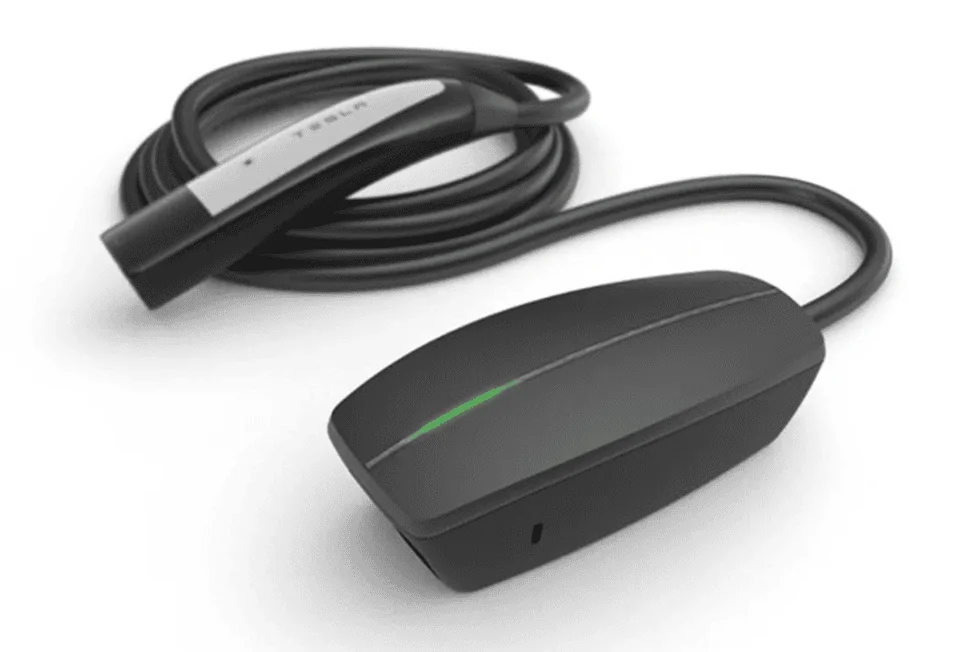
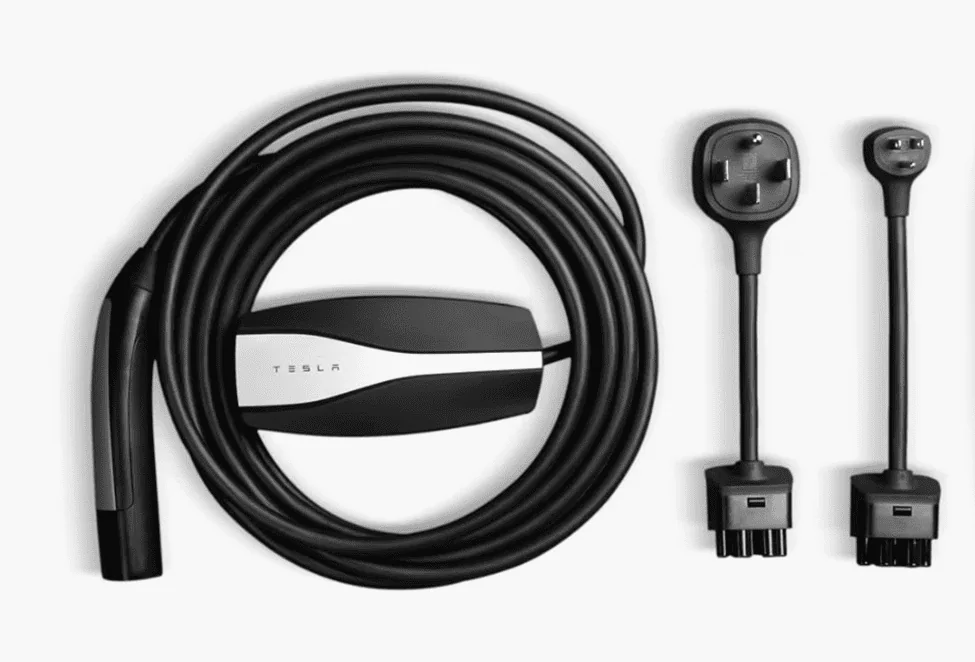
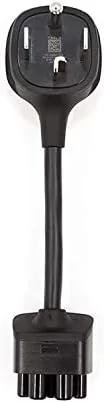
Gen 3 PowerShare Mobile Connector (PSMC) is the unit included with the FS series charging equipment. This is supposed to allow for charging other EVs (Mobile PowerSharing) from the vault outlets. The Gen 3 connector functions the same as the Gen 2 Mobile Connector in the Tesla Shop to charge while you're at a location without a Universal/Standard Wall Connector, or without a charge station nearby. The Gen 3 that comes with the CTFS includes (1) 5-15 adapter, and (1) 14-50 adapter. However, Gen 3 is a different unit than the Gen 2 in the Tesla Shop:
Gen 3 PSMC received with CT FS:
1718642216351-fa.png

Gen 2 Mobile Connector (Tesla Shop):
1718642274729-st.png


Additionally, for those of us that are finally joining the Tesla club with the CT purchase, I do not yet have an ideal setup for charging in my garage. I declined the PowerShare Home Backup system, and have not confirmed the PSMC actually charges other EVs from the vault outlets, but that is what I understand to be the case surrounding the CT PowerShare capabilities at this time. In order to get by until the PowerShare voucher comes through to purchase the UWC, I have tried a number of different methods/workarounds to charge as close to Level 2/equivalent as possible.

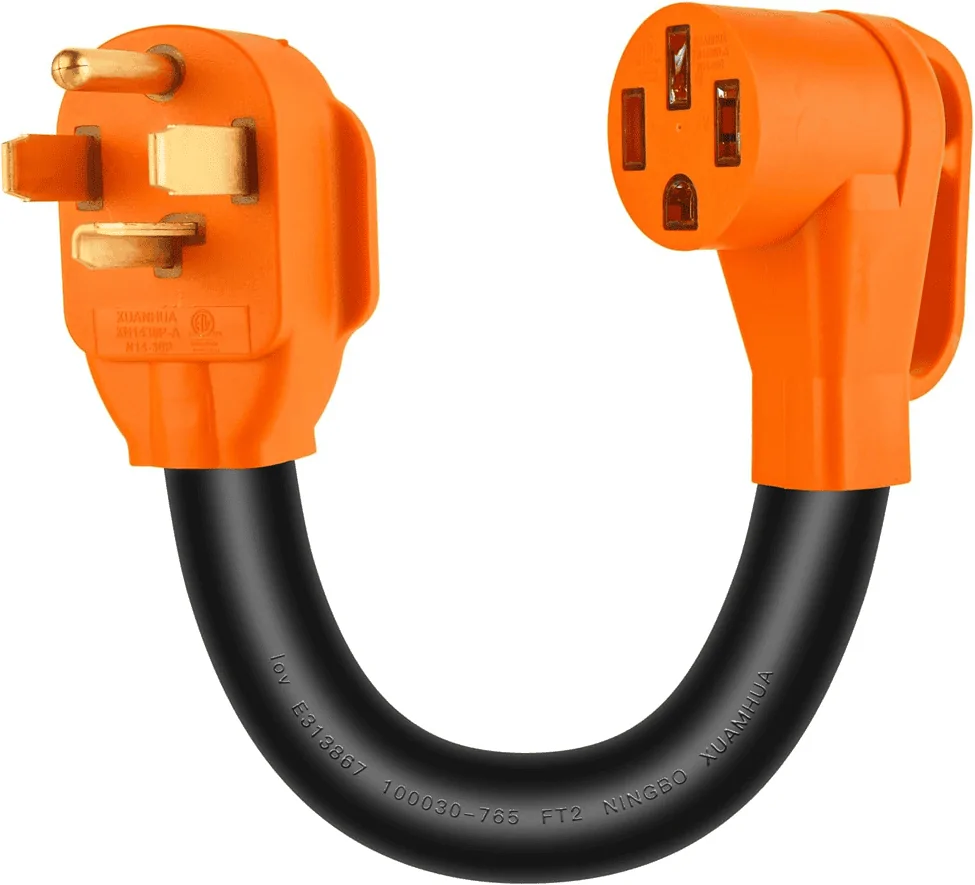
My current options include an unused 40A circuit previously supplying a water heater, and an unused 30A circuit previously feeding a dryer. The 30A was closer to where the UWC will be installed, so I extended the circuit over a couple stud bays and left a chunk of cable to connect to the UWC when that time comes. Since I am waiting, and had a couple adapters to use with the PSMC, I initially started with the 30A dryer receptacle, and purchased a generic NEMA 14-30 male to 14-50 female "dogbone" cable/adapter for the 14-50 adapter included with the PSMC included with FS. The Amazon special I purchased is shown below, and had multiple reviews confirming it worked with the Tesla Mobile Connector (assuming Gen 2):
1718642564411-4p.png


This dogbone DOES NOT WORK with the Gen3 PSMC you receive with the CT with the 14-50 adapter attached.

Next, since I would be going backwards as far as amperage, paired with the ability to adjust amperage output from the PSMC in the Tesla App, I tried to beat the system and installed a 50A receptacle on the 30A circuit. In theory, this should work just fine with the 14-50 adapter on the PSMC, with load amperage automatically adjusted by the App based on what was detected by the PSMC once energized. Doing this resulted in a “No Power Detected” message in the App, even after manually adjusting the amperage out to 26A.

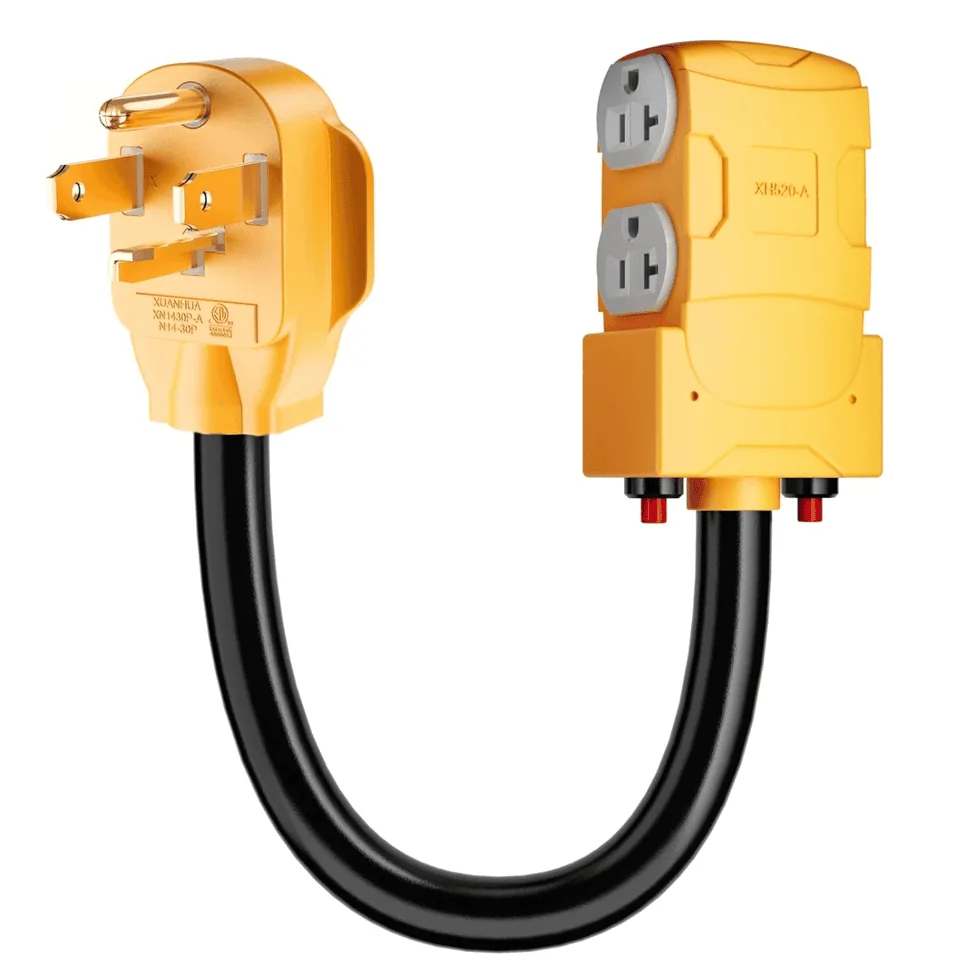
To triple check everything, I swapped the 50A receptacle out, reinstalled the 30A receptacle, and plugged in a 14-30 x (4) 110v standard receptacle adapter/dogbone that I had from a few years back, which I knew worked for 110v, similar to this unit:
1718642758551-lu.png

Then I used the 5-15 Tesla adapter included with the PSMC, and was reading 240-250v line side from the App. The App auto-adjusted amperage to 12A, which I assume was a function of the unit recognizing the 5-15 adapter that was attached once it was energized.

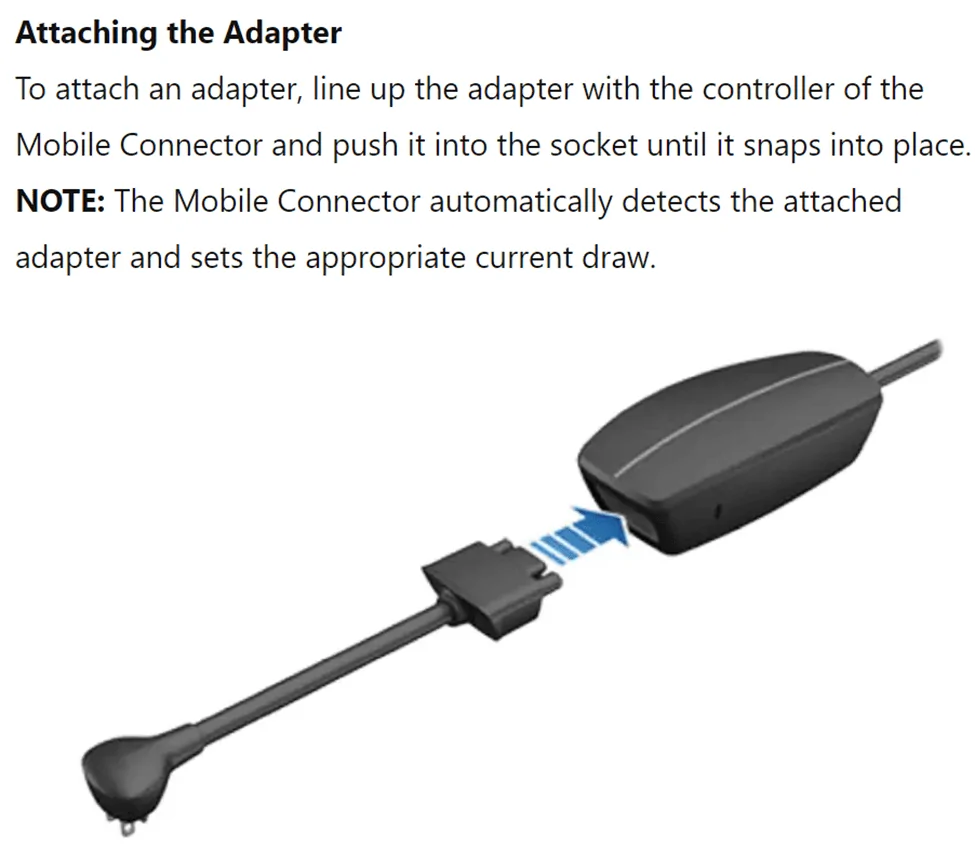
After wracking my brain and hammering the Google Machine to figure out WTF was going on, I stumbled across the PSMC manual on the interwebz, which seems to be the only place it lives since you cant buy the PSMC in the Tesla Shop yet. Either way, the Adapters section states the connector detects the attached adapter and sets the appropriate current draw:
1718642943139-ol.png


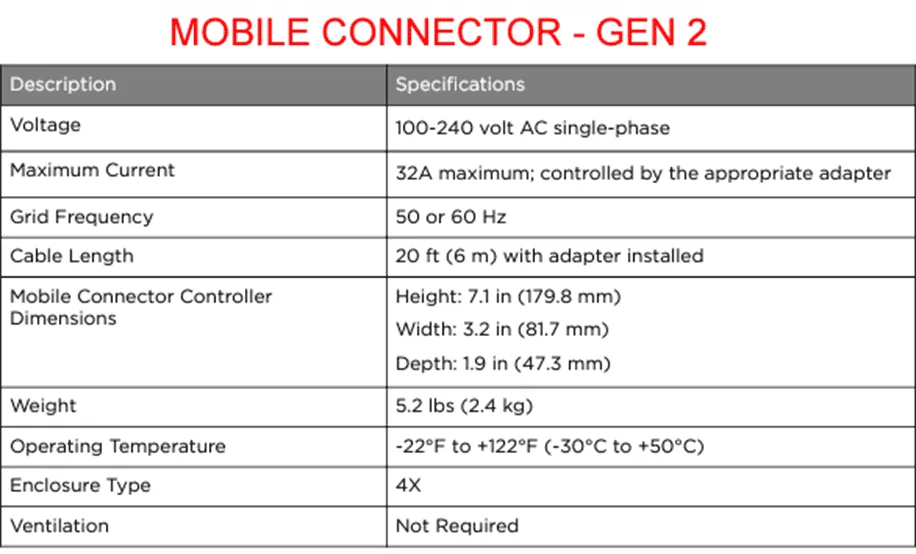
The Gen 2 manual also says the same thing, so I am still puzzled as to why the dogbone I purchased and explained above works with Gen 2 MC but doesn't with the PSMC.

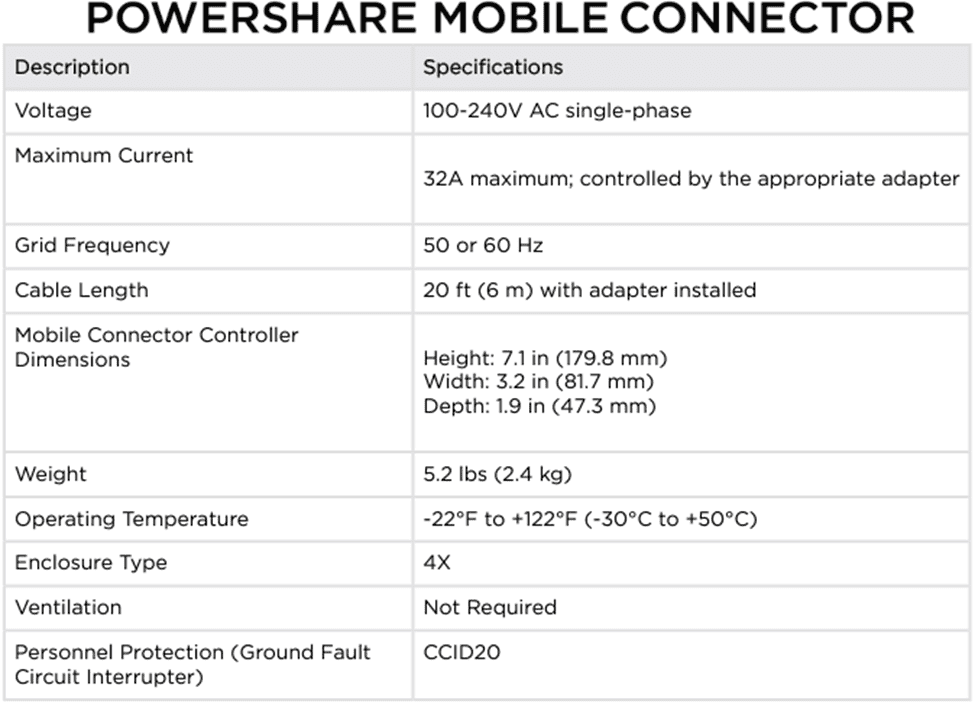
The only difference between specs in the two manuals is an added spec line for GFCI CCID20 protection:
1718643004959-do.png

1718643027868-4i.png


I finally caved and purchased (1) 14-30 adapter from the Tesla Shop, since these are the only adapters available for purchase at this time. Unfortunately, upon receipt and testing, my excitement was immediately deflated when the PSMC did not work with the 14-30 adapter direct from Tesla. I had hoped it was a programming thing with the generic brand 14-30/14-50 adapter I purchased from Amazon not talking to the PSMC, but the Tesla 14-30 direct to PSMC didn't work either.

If any others out there have played with the Gen 3 PSMC at all, with anything other than the 14-50 adapter, please chime in. Or if you have any idea what the unit actually does, or if theyre potentially faulty like the HomeBackup systems have been reported as of late or can direct me what to purchase to make the thing charge at a rate faster than the GD trickle from the 110v 5-15, PLEASE feel free to join the conversation.
Did you double check that your receptacle has a good ground? Keep in mind, Tesla does not use the neutral for these connectors. Only need 2 hots and a ground.
I installed a Nema 6-50 receptacle and used a 14-50 adapter. Worked flawlessly.
 

Kuiper__Belt

Well-known member
First Name
Michael
Joined
Mar 18, 2024
Threads
13
Messages
402
Reaction score
315
Location
Madison, MS
Vehicles
Cybertruck - Cyberbeast
Occupation
Telehealth Solutions Architect
Country flag
My problem is using 14-50 adaptor come with the truck only gives me 6A on a 50A outlet. Use my friend’s gen 2 MC with gen 2 14-50 adaptor can go up to 32A, but as soon as I used my own 14-50 adapter on his gen 2 MC, the charge back to 6A again. Then we tested use my gen 3 MC with his gen 2 14-50 adapter, it works up to 32A again. Is there something wrong on the adapter itself? Very strange.
Tesla Cybertruck PowerShare Mobile Connector (Gen 3) -- Discussion IMG_2325

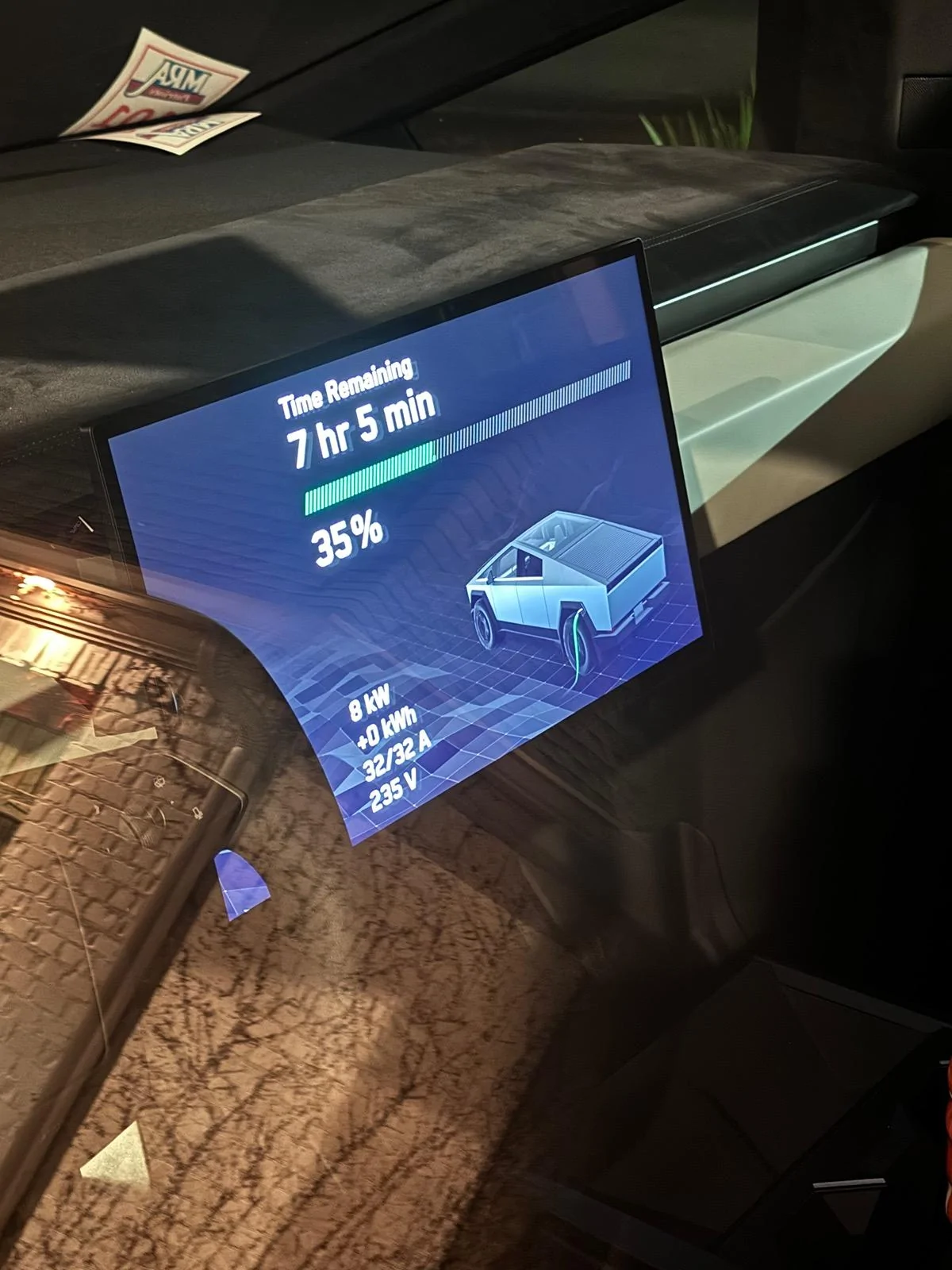
that is odd. This is what I get when using my 14-50 adapter that came with the truck when using a 14–30 to 14–50 Y adapter connected to my dryer plug (14-30) in my house. I would definitely ask Tesla to replace yours.
 

mongo

Well-known member
Joined
May 27, 2024
Threads
5
Messages
4,521
Reaction score
5,499
Location
SE Michigan
Vehicles
Cyberbeast
Country flag
IMG_2325.jpeg

that is odd. This is what I get when using my 14-50 adapter that came with the truck when using a 14–30 to 14–50 Y adapter connected to my dryer plug (14-30) in my house. I would definitely ask Tesla to replace yours.
Pulling 32A from a 30A outlet is a bad idea. You should set your charge current to 24A or less.
 

Kuiper__Belt

Well-known member
First Name
Michael
Joined
Mar 18, 2024
Threads
13
Messages
402
Reaction score
315
Location
Madison, MS
Vehicles
Cybertruck - Cyberbeast
Occupation
Telehealth Solutions Architect
Country flag
Pulling 32A from a 30A outlet is a bad idea. You should set your charge current to 24A or less.
Huh, yeah that's no good and strange. That's when I was using the 14-50 adaptor. I have since changed it to the 14-30 adaptor using all 14-30 cables and it now defaults to 24A. I figured it was all automatic and would pull whatever is available (and safe) but I guess not. I'm still very new to this. ?


mongo

Well-known member
Joined
May 27, 2024
Threads
5
Messages
4,521
Reaction score
5,499
Location
SE Michigan
Vehicles
Cyberbeast
Country flag
Huh, yeah that's no good and strange. That's when I was using the 14-50 adaptor. I have since changed it to the 14-30 adaptor using all 14-30 cables and it now defaults to 24A. I figured it was all automatic and would pull whatever is available (and safe) but I guess not. I'm still very new to this. ?
It is automatic in that the MC sets the maximum charge current based on the connected adapter. In this case it had a 14-50 which can handle 50A*80%=40A, but the MC itself is limited to 32A max.
The 14-30 adapter sets the unit to 30A*80%=24A.

The vehicle will reduce charge current if it detects abnormal voltage drop and the MC monitors temperature, but they can't reliably detect items in the power path that are underrated.
 

tripzero

Well-known member
Joined
Mar 28, 2024
Threads
5
Messages
77
Reaction score
85
Location
Oregon
Vehicles
Cybertruck
Country flag
Want to start a stand-alone thread related to the PowerShare Mobile Connector (Gen3) and some issues I have been having. I cant imagine I am the only one, but maybe I am doing it wrong...OP will be a copy/paste of a couple posts I have made elsewhere, but since those posts are now buried by days and days of others, here we go:

Gen 3 PowerShare Mobile Connector (PSMC) is the unit included with the FS series charging equipment. This is supposed to allow for charging other EVs (Mobile PowerSharing) from the vault outlets. The Gen 3 connector functions the same as the Gen 2 Mobile Connector in the Tesla Shop to charge while you're at a location without a Universal/Standard Wall Connector, or without a charge station nearby. The Gen 3 that comes with the CTFS includes (1) 5-15 adapter, and (1) 14-50 adapter. However, Gen 3 is a different unit than the Gen 2 in the Tesla Shop:
Gen 3 PSMC received with CT FS:
1718642216351-fa.png

Gen 2 Mobile Connector (Tesla Shop):
1718642274729-st.png


Additionally, for those of us that are finally joining the Tesla club with the CT purchase, I do not yet have an ideal setup for charging in my garage. I declined the PowerShare Home Backup system, and have not confirmed the PSMC actually charges other EVs from the vault outlets, but that is what I understand to be the case surrounding the CT PowerShare capabilities at this time. In order to get by until the PowerShare voucher comes through to purchase the UWC, I have tried a number of different methods/workarounds to charge as close to Level 2/equivalent as possible.

My current options include an unused 40A circuit previously supplying a water heater, and an unused 30A circuit previously feeding a dryer. The 30A was closer to where the UWC will be installed, so I extended the circuit over a couple stud bays and left a chunk of cable to connect to the UWC when that time comes. Since I am waiting, and had a couple adapters to use with the PSMC, I initially started with the 30A dryer receptacle, and purchased a generic NEMA 14-30 male to 14-50 female "dogbone" cable/adapter for the 14-50 adapter included with the PSMC included with FS. The Amazon special I purchased is shown below, and had multiple reviews confirming it worked with the Tesla Mobile Connector (assuming Gen 2):
1718642564411-4p.png


This dogbone DOES NOT WORK with the Gen3 PSMC you receive with the CT with the 14-50 adapter attached.

Next, since I would be going backwards as far as amperage, paired with the ability to adjust amperage output from the PSMC in the Tesla App, I tried to beat the system and installed a 50A receptacle on the 30A circuit. In theory, this should work just fine with the 14-50 adapter on the PSMC, with load amperage automatically adjusted by the App based on what was detected by the PSMC once energized. Doing this resulted in a “No Power Detected” message in the App, even after manually adjusting the amperage out to 26A.

To triple check everything, I swapped the 50A receptacle out, reinstalled the 30A receptacle, and plugged in a 14-30 x (4) 110v standard receptacle adapter/dogbone that I had from a few years back, which I knew worked for 110v, similar to this unit:
1718642758551-lu.png

Then I used the 5-15 Tesla adapter included with the PSMC, and was reading 240-250v line side from the App. The App auto-adjusted amperage to 12A, which I assume was a function of the unit recognizing the 5-15 adapter that was attached once it was energized.

After wracking my brain and hammering the Google Machine to figure out WTF was going on, I stumbled across the PSMC manual on the interwebz, which seems to be the only place it lives since you cant buy the PSMC in the Tesla Shop yet. Either way, the Adapters section states the connector detects the attached adapter and sets the appropriate current draw:
1718642943139-ol.png


The Gen 2 manual also says the same thing, so I am still puzzled as to why the dogbone I purchased and explained above works with Gen 2 MC but doesn't with the PSMC.

The only difference between specs in the two manuals is an added spec line for GFCI CCID20 protection:
1718643004959-do.png

1718643027868-4i.png


I finally caved and purchased (1) 14-30 adapter from the Tesla Shop, since these are the only adapters available for purchase at this time. Unfortunately, upon receipt and testing, my excitement was immediately deflated when the PSMC did not work with the 14-30 adapter direct from Tesla. I had hoped it was a programming thing with the generic brand 14-30/14-50 adapter I purchased from Amazon not talking to the PSMC, but the Tesla 14-30 direct to PSMC didn't work either.

If any others out there have played with the Gen 3 PSMC at all, with anything other than the 14-50 adapter, please chime in. Or if you have any idea what the unit actually does, or if theyre potentially faulty like the HomeBackup systems have been reported as of late or can direct me what to purchase to make the thing charge at a rate faster than the GD trickle from the 110v 5-15, PLEASE feel free to join the conversation.
I have used it with a TT-30 30A 120V gen2 adapter. Can get 3KW out of it.
 

Jacob

Well-known member
First Name
Jacob
Joined
Jan 11, 2020
Threads
19
Messages
265
Reaction score
456
Location
Michigan
Vehicles
69 BB Vette, 83 Cutlass
Country flag
I've been having a problem charging with said mobile charger. I've only ever charged my truck with this mobile charger on a 20A 110v outlet in my garage. Whenever I park my truck and get out and plug in the charger, the icon turns blue and that's it. NO CHARGING.

I try to turn on charging in the mobile app or on the truck itself and the option isn't available. The charge plug itself is fully seated and locked but the icon remains blue and charger is locked. I try turning off bluetooth so the truck thinks I'm not around and I get the same thing.

Now if I walk away and ignore the truck for a few minutes, and then go back out and turn on bluetooth and wake the truck and THEN plug in the mobile charger, it MIGHT start charging. This isn't consistent however as I might have to do this a couple times. It's getting frustrating having to go through this rigamarole every time I want to charge it.

Things I've considered:

1) I don't have a schedule set or a departure time set. I don't have it set to charge only on off peak hours.

2) Maybe I missed something in the instructions. Nope. Read them about 20 times.

3) I cannot find a repeatable method to get it to work consistently. Eventually it does seem to start charging, but it's not without several attempts and usually involves leaving the truck sit for a few minutes.
 

mongo

Well-known member
Joined
May 27, 2024
Threads
5
Messages
4,521
Reaction score
5,499
Location
SE Michigan
Vehicles
Cyberbeast
Country flag
I've been having a problem charging with said mobile charger. I've only ever charged my truck with this mobile charger on a 20A 110v outlet in my garage. Whenever I park my truck and get out and plug in the charger, the icon turns blue and that's it. NO CHARGING.

I try to turn on charging in the mobile app or on the truck itself and the option isn't available. The charge plug itself is fully seated and locked but the icon remains blue and charger is locked. I try turning off bluetooth so the truck thinks I'm not around and I get the same thing.

Now if I walk away and ignore the truck for a few minutes, and then go back out and turn on bluetooth and wake the truck and THEN plug in the mobile charger, it MIGHT start charging. This isn't consistent however as I might have to do this a couple times. It's getting frustrating having to go through this rigamarole every time I want to charge it.

Things I've considered:

1) I don't have a schedule set or a departure time set. I don't have it set to charge only on off peak hours.

2) Maybe I missed something in the instructions. Nope. Read them about 20 times.

3) I cannot find a repeatable method to get it to work consistently. Eventually it does seem to start charging, but it's not without several attempts and usually involves leaving the truck sit for a few minutes.
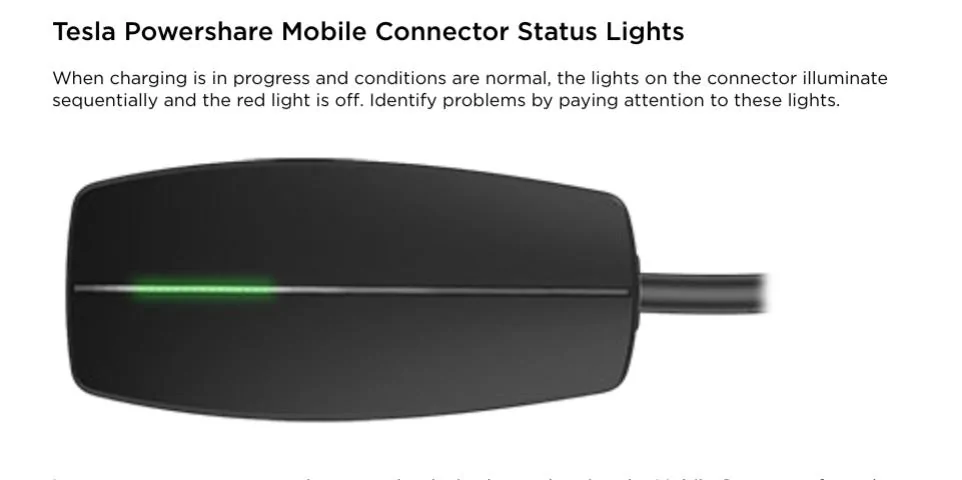
What pattern of lights do you get on the Mobile Connector?
 

Jacob

Well-known member
First Name
Jacob
Joined
Jan 11, 2020
Threads
19
Messages
265
Reaction score
456
Location
Michigan
Vehicles
69 BB Vette, 83 Cutlass
Country flag
What pattern of lights do you get on the Mobile Connector?
When I get out and plug in, "solid blue". That's all I get unless I turn off bluetooth, leave the garage, wait some time, stand on my head, try again, stand on my head some more, go pee, grab a beer, swear some more, try again and MAYBE it might start flashing green.


wtibbit

Well-known member
First Name
Wayne
Joined
Aug 27, 2020
Threads
12
Messages
819
Reaction score
1,617
Location
DFW
Vehicles
Cybertruck AWD FS, Mercedes sedan, Corvette coupe, 1968 Cougar XR-7
Occupation
Retired Engineering Program Director
Country flag
Since my house is for sale I'm not going to spend $2000-$4000 for the wall mounted solution/powershare so this is the solution I'm using for now.

1 Nema 14-30 splitter connected to my dryer plug in laundry room:
81CfGg7PGZL._AC_SL1500_.jpg

https://a.co/d/0DtoG0o


1 25' Nema 14-30 extension cord:
81UTJ2FZ5YL._AC_SL1500_.jpg

https://a.co/d/hCqmv0k

1 Tesla Gen II 14-30 adaptor (as seen in other post)
31UGXLxrgbL._AC_.webp

https://a.co/d/hCqmv0k

1 hole in laundry room wall... ?

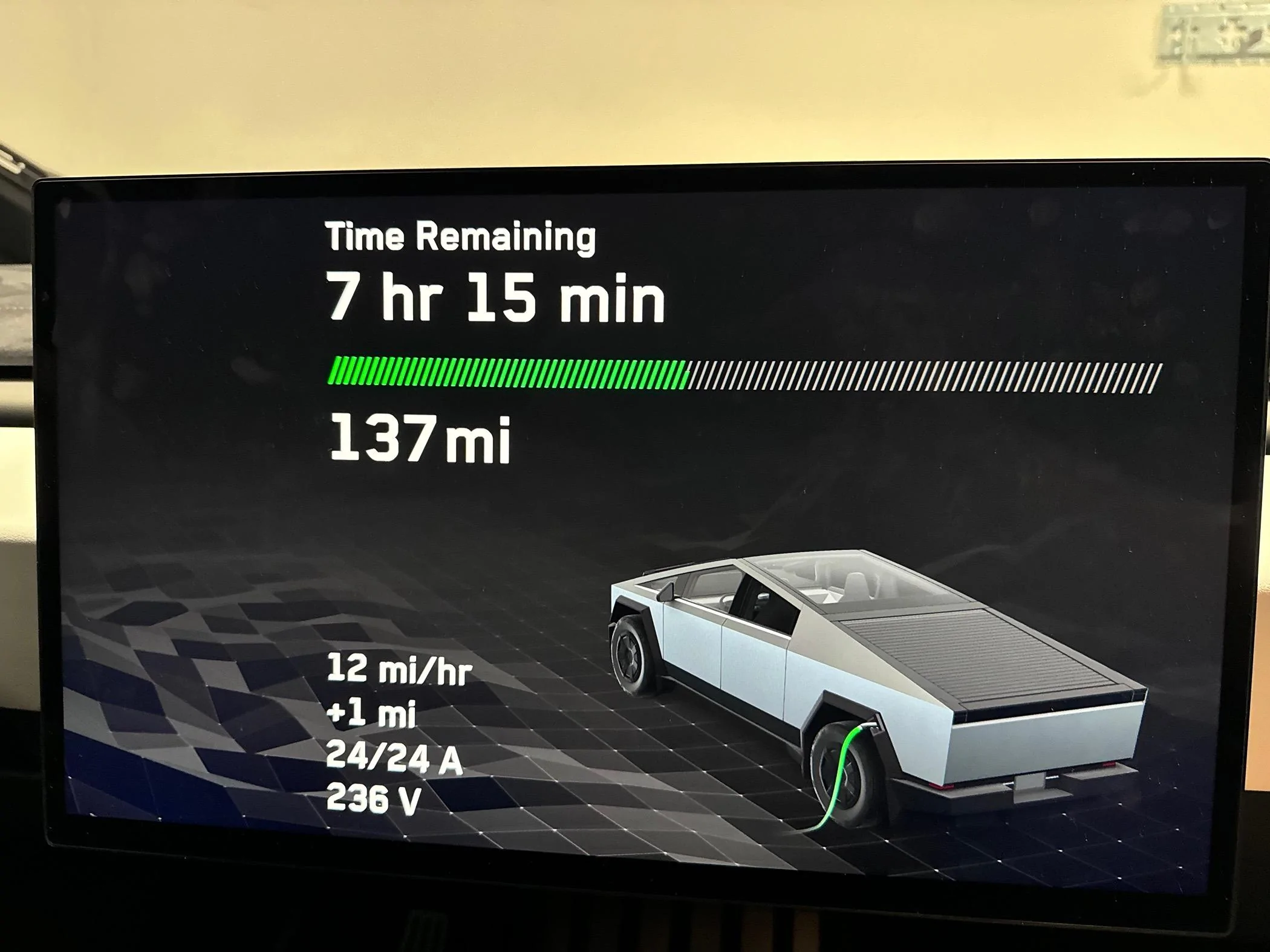
Entire setup was only $200 and charges at 24 amp, 12/13 mi/hr, 236v

IMG_2470.webp
This is exactly my setup as I wait for the PowerShare and wall charger equipment to be installed in my garage. I rigged a cover plate that I flip over the dryer when the mobile charger is plugged into the truck, preventing anyone from running the dryer when the truck is being charged.
 
Last edited:

cybercoffee

Well-known member
Joined
Nov 6, 2023
Threads
11
Messages
400
Reaction score
400
Location
Los Angeles
Vehicles
MYLR
Country flag
agreed the Y splitters can be problematic but fortunately everyone in this thread is aware of the limitations. for people who aren't so handy or aware, a dryer buddy is a decent option. worst case scenario is someone who doesn't know any better plugs in a Y splitter and thinks they can run everything at once lol
 

mongo

Well-known member
Joined
May 27, 2024
Threads
5
Messages
4,521
Reaction score
5,499
Location
SE Michigan
Vehicles
Cyberbeast
Country flag

aeroguy

Well-known member
Joined
Sep 29, 2023
Threads
3
Messages
143
Reaction score
340
Location
VA
Vehicles
2013 Model S 90kWh, 2024 CT 6xxx, 2024 CT 6xxx
My problem is using 14-50 adaptor come with the truck only gives me 6A on a 50A outlet. Use my friend’s gen 2 MC with gen 2 14-50 adaptor can go up to 32A, but as soon as I used my own 14-50 adapter on his gen 2 MC, the charge back to 6A again. Then we tested use my gen 3 MC with his gen 2 14-50 adapter, it works up to 32A again. Is there something wrong on the adapter itself? Very strange.
For issues specifically with the NEMA 14-50 adapter, I’d recommend checking the service bulletin from 6/11. Mentions certain adapter serial numbers maybe have been programmed wrong and limit/prevent charging when using the 14-50 adapter.

https://service.tesla.com/docs/Serv...pect_NEMA_14-50_2nd_Gen_Charging_Adapter.docx
 

Kuiper__Belt

Well-known member
First Name
Michael
Joined
Mar 18, 2024
Threads
13
Messages
402
Reaction score
315
Location
Madison, MS
Vehicles
Cybertruck - Cyberbeast
Occupation
Telehealth Solutions Architect
Country flag
agreed the Y splitters can be problematic but fortunately everyone in this thread is aware of the limitations. for people who aren't so handy or aware, a dryer buddy is a decent option. worst case scenario is someone who doesn't know any better plugs in a Y splitter and thinks they can run everything at once lol
Yup, I would definitely use the dryer buddy if my soon to be ex-wife still lived at home but since its just my 2 & 4 year old's and I, I don't have to worry about someone starting the dryer without looking to see if my truck is plugged in... I think ? lol. They haven't started to play with the dryer yet but that's always a possibility lol.

My house is being listed Friday. In my neighborhood they tend to go under contract within the first 30-45 days. Hopefully that will be the same for mine. Then I'll have to figure out what to do next.
Sponsored


Top