Sponsored

REM

Well-known member
Joined
Dec 9, 2023
Threads
14
Messages
3,573
Reaction score
6,635
Location
NC
Vehicles
2020 Model 3 Standard Range++ & Diet Cybertruck, Dual Motor
Occupation
Professional Retard
Country flag
I'd be hesitant to give much credence to any degradation figure that is computed before 10K miles. Simply not enough data for an accurate picture.
 

Tinker71

Well-known member
First Name
Ray
Joined
Aug 8, 2020
Threads
93
Messages
1,610
Reaction score
2,102
Location
Utah
Vehicles
1976 VW EV bus, 2007 Sienna, Tesla M3, Cancelled CT2 rez - holding for $65k
Occupation
Project Manager
Country flag
More reason to push for a future battery swap. 400whrs/Kg and <$70 per kWhr. and 400,000 units out there in 3 years. It will be worth it if they can turn the old battery into stationary storage.
 

scottf200

Well-known member
Joined
Jul 31, 2021
Threads
53
Messages
2,221
Reaction score
3,241
Location
Western NC
Vehicles
X; immed family 3 & Y
Country flag
I have seen reports of a similar "report" from TeslaFi, but I haven't been able to find how to view it. Does anyone here know?
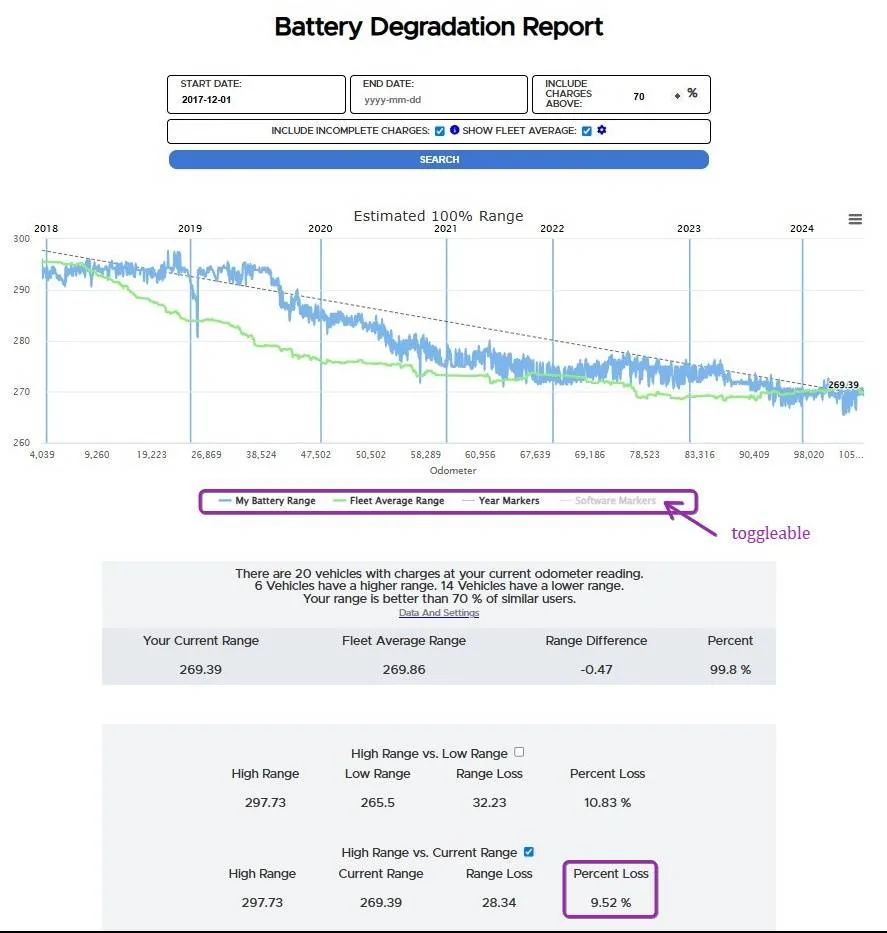
Yes, it is under menu option: Charges -> Battery Report
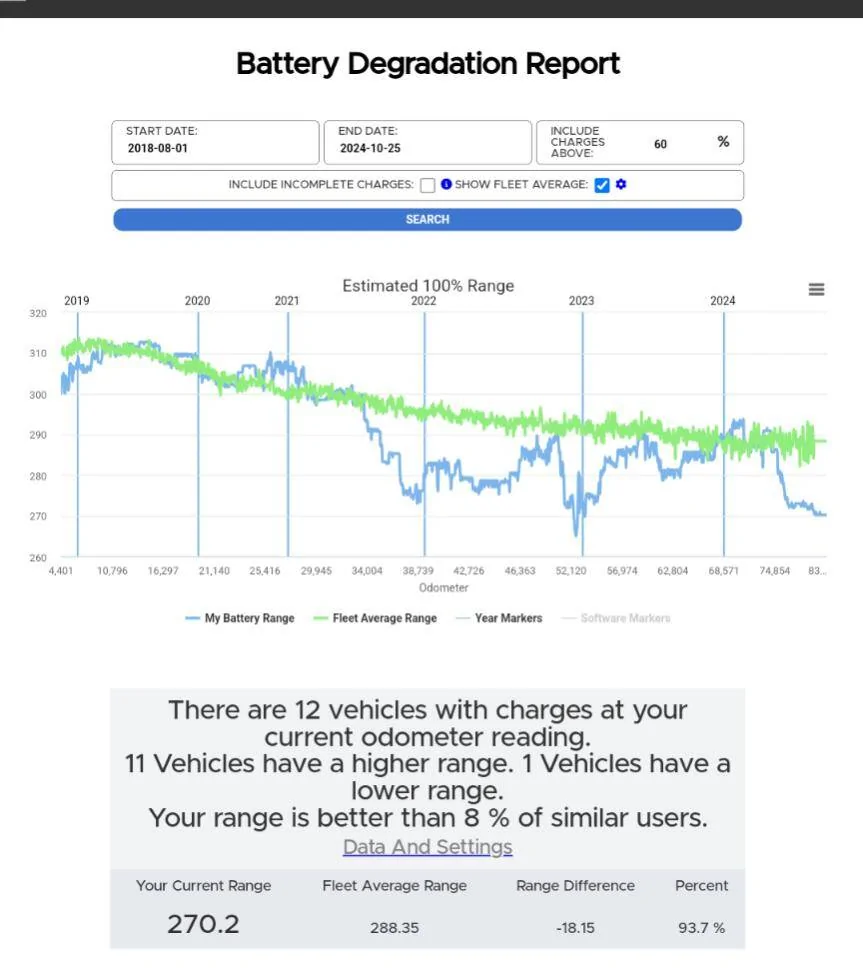
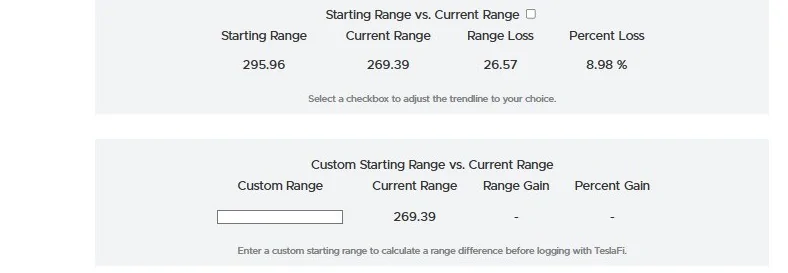
Here is my 2017 Model X. There are 3 ways to view the degradation. You can see I'm highlighting the 2nd one. Green line is TeslaFI "fleet".

Tesla Cybertruck Battery degradation 3.49% after 10k miles... what's yours so far? lAkdtnZ

Tesla Cybertruck Battery degradation 3.49% after 10k miles... what's yours so far? HimoXxc
 
Last edited:


luminary

New member
First Name
Joe
Joined
Sep 30, 2024
Threads
0
Messages
3
Reaction score
0
Location
united states
Vehicles
model Y
Country flag
Livestream it on youtube!!!
 

wtibbit

Well-known member
First Name
Wayne
Joined
Aug 27, 2020
Threads
12
Messages
819
Reaction score
1,617
Location
DFW
Vehicles
Cybertruck AWD FS, Mercedes sedan, Corvette coupe, 1968 Cougar XR-7
Occupation
Retired Engineering Program Director
Country flag
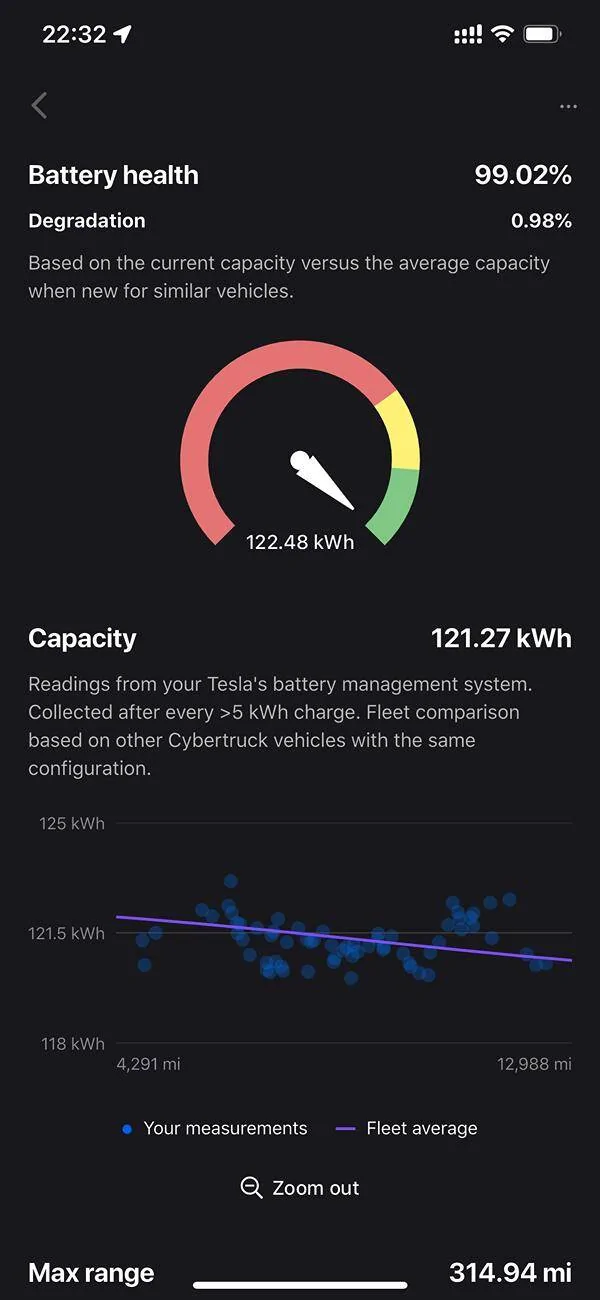
Tessie says my battery has degraded by 3.49%. Is this just a reading error or some of you also have similar readings?
After 4,500 miles, my battery's degradation is 0.1%.

From Tessie's help center:
If degradation or capacity looks unusually high or low
It's possible that the BMS calibration has drifted and its calculations are inaccurate. You can help it learn how much energy is in the battery by calibrating it.​
Tessie help center's guidance on BMS calibration:
How to calibrate the Battery Management System
You can recalibrate BMS accuracy and rebalance the battery cells by doing the following:​
  1. Let the battery fall below 10%.
    1. Leave it there for at least an hour.
    2. Charge the battery to 100% and keep charging until the vehicle is no longer adding any energy from the charger. This may take an hour or longer after reaching 100%.
After this process is finished, BMS calculations will be more accurate, and as a result, battery level, range, capacity and max range will become more accurate.​

I'd calibrate my truck's BMS then wait until my truck has undergone at least 10 charges of more than 5 kWh (the BMS uses the last 30 to calculate capacity).


Balthezor

Well-known member
First Name
Ron
Joined
Jun 21, 2020
Threads
28
Messages
1,023
Reaction score
1,400
Location
PA
Vehicles
Cyberbeast, Range Rover, Model Y
Country flag
Is Tessie worth it over Teslafi?
 

Balthezor

Well-known member
First Name
Ron
Joined
Jun 21, 2020
Threads
28
Messages
1,023
Reaction score
1,400
Location
PA
Vehicles
Cyberbeast, Range Rover, Model Y
Country flag
Yes, it is under menu option: Charges -> Battery Report

Here is my 2017 Model X. There are 3 ways to view the degradation. You can see I'm highlighting the 2nd one. Green line is TeslaFI "fleet".

lAkdtnZ.jpg

HimoXxc.jpg
Thank you. Dumb question. How do I connect two accounts together? For some reason, I can never find this.
 

Woodrick

Well-known member
First Name
Ed
Joined
Dec 30, 2023
Threads
6
Messages
4,786
Reaction score
4,762
Location
Gainesville Ga
Vehicles
Model 3, Model Y, Cybertruck AWD
Occupation
Consultant
Country flag
Tessie says my battery has degraded by 3.49%. Is this just a reading error or some of you also have similar readings?
FYI, it reports information from the vehicle. That information can change.

So basically, it lies.

And it really doesn't mean anything anyway.
 

scottf200

Well-known member
Joined
Jul 31, 2021
Threads
53
Messages
2,221
Reaction score
3,241
Location
Western NC
Vehicles
X; immed family 3 & Y
Country flag
Thanks! Not sure how i missed that. Here is mine, which seems more sporadic:
1000023597.jpg
You're welcome. Is that a Cybertruck?

Depending on where you live the winters may lower it temporarily OR sometimes an OTA will rest the BMS info and it will then lower and rise again. The 'Software Markers' (OTA versions) is toggleable in the horizontal legend area to see this. I normally have it off because there are so many of them.

Also you can change the dates at the top to "zoom' in on a particular length of time.

How do the 3 areas below what you posted show what degradation look?
Sponsored


Top