Sponsored

Significant battery vampire drainage in storage

eswimm

Well-known member
Joined
Jun 6, 2024
Threads
3
Messages
556
Reaction score
995
Location
Charlotte, NC
Vehicles
Model Y, Cybertruck
Country flag
The only way that would make sense is if the battery had so much thermal capacity that it took TWO days to cool down to its lowest possible temp.
I was making stuff up based on your numbers, it's obviously not taking 2 days to cool down. What you're describing isn't normal, so let us know what it is once you figure it out.
Sponsored


Jager

Well-known member
First Name
Jeff
Joined
May 25, 2020
Threads
25
Messages
339
Reaction score
1,092
Location
Virginia
Vehicles
2024 Cybertruck AWD, 2022 Model 3 LR AWD
Country flag
The SOC displayed by the CT, on the truck's display and within the app, is not the actual SOC of the battery. It is the SOC that you have available at the present pack temperature.

So the first thing when discussing "phantom drain" is understanding the actual pack temp. If you haven't done that, it's just throwing darts.
 
First Name
Trevor
Joined
Dec 9, 2024
Threads
0
Messages
21
Reaction score
9
Location
michigan
Vehicles
Cybertruck Founders edition
Country flag
Such a condescending thread for no reason. His % loss per day is more than he expected. He is asking for help and answers. Mine loses 10% in 30-40 degree weather parked outside in 24 hours. I had same question but obviously won’t get any answers here. Posting for solidarity. My model 3 friend has way less loss but the pack is smaller and the car is lower to the ground (better insulation even outside than a truck high up, think hammock versus sleeping on the ground).

Many threads are supportive and helpful and that comes from people taking the time to put themselves in others shoes. The goal is to help and educate, not criticize and try to look smart. It comes across as rude.
 

mongo

Well-known member
Joined
May 27, 2024
Threads
5
Messages
4,523
Reaction score
5,504
Location
SE Michigan
Vehicles
Cyberbeast
Country flag
I just went to drive it. 53% SOC (!!!!!) Temp outside is 49F. No indication of battery being cold. 10mi round trip, parked with 51%. I guess will check in 24 hours again and see what it does.
Sounds like it isn't sleeping
If you haven't already:
Press both scroll wheels until display resets
Wait for it to restart
Touch Controls > Safety > Power Off
Wait a few minutes without touching anything fir vehicle to shut down
Then press brake to wake it back up
 

bosshog

Well-known member
First Name
roardog
Joined
Dec 7, 2024
Threads
2
Messages
346
Reaction score
200
Location
canada
Vehicles
Cyber truck , Maserati ,Mercedes
Country flag
I also lose about 4-6 % per day . I still don’t understand this drain despite doing all the things mentioned in multiple threads that potentially drain the battery . There is just no definitive answer and concerning as I am reluctant to leave my CT at the airport for a 10 day period while on Holliday …


AlmostHuman

Well-known member
Joined
May 1, 2024
Threads
7
Messages
985
Reaction score
1,349
Location
Earth
Vehicles
Model X, Cybertruck
Occupation
Human
Country flag
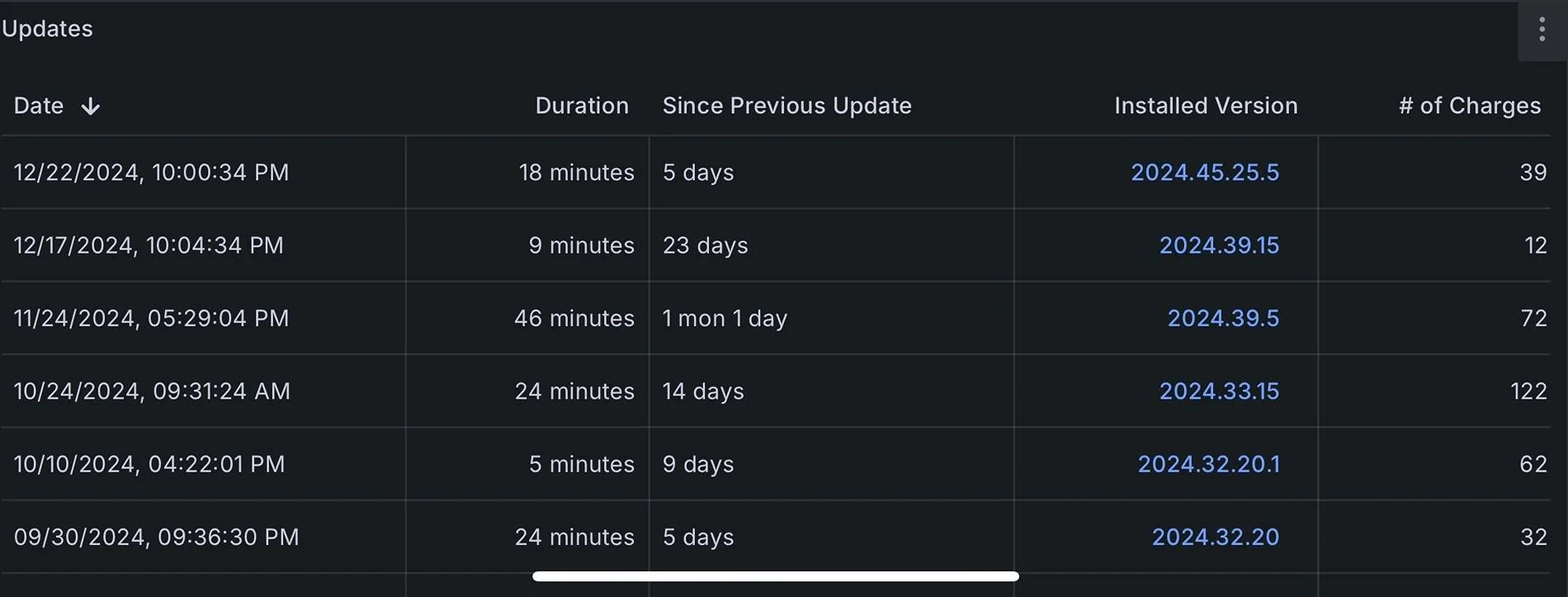
The latest update has increased the vampire drain again on my AWD. The three or four versions prior had resolved the drain issues making about the 1%-2% range for 24 hours. On 2024.45.25.5 it is crazy again, I’d guess 4-5% in 24 hours. Give them time, it will get better over time. Our 2022 X will sit asleep for 4-5 days and drop as little as 1% up to 3%

I do think one thing that makes our truck use more juice is our phones wake it up when we go in the garage. We keep the fobs for the X on the other side of the house allowing it to sleep for days.

I will post some vampire drain stats later, lazy right now.

Last couple firmware version on the truck. For sure 2024.39.15 and 2024.39.5 had less vampire drain.
Tesla Cybertruck Significant battery vampire drainage in storage IMG_0779


Edit: Actually looking to be around 2-3% vampire drain per 24 hours right now. Haven’t driven the truck in three days and looked again.
 
Last edited:

mbrockus

Well-known member
First Name
Mark
Joined
Jan 31, 2024
Threads
7
Messages
390
Reaction score
421
Location
Conway, WA
Vehicles
Model 3, Model X, AWD CT
Occupation
President of the Anonymous of the Anonymous Club
Country flag
I had my truck parked for 4 days with Sentry off and my loss was pretty minimal. I have the latest widely released software version. I wonder if when you toggled off Sentry mode there was a software snafu that didn't complete the process. When you turned it off were you in the truck or was it via the app?
 

CyberGus

Well-known member
First Name
Gus
Joined
May 22, 2021
Threads
91
Messages
10,242
Reaction score
33,905
Location
Austin, TX
Vehicles
1981 DeLorean, 2024 Cybertruck
Occupation
IT Specialist
Country flag
Sleeping is the lowest power mode. It should show in the app:

Tesla Cybertruck Significant battery vampire drainage in storage IMG_0647


Of course, it will wake if you interact with it, but should go back to sleep in minutes (I’ve not timed this).


OP
OP

cybercricket

Well-known member
Joined
Oct 31, 2024
Threads
13
Messages
657
Reaction score
798
Location
Oregon
Vehicles
Cybertruck
Country flag
The SOC displayed by the CT, on the truck's display and within the app, is not the actual SOC of the battery. It is the SOC that you have available at the present pack temperature.

So the first thing when discussing "phantom drain" is understanding the actual pack temp. If you haven't done that, it's just throwing darts.
I made the observation that the truck is losing let's say 10% of SoC per day just being parked. I have clarified that the temps have been pretty constant, so once the pack cooled down to the ambient temp say in the first 24 hours, the drop in displayed SoC should have ended, yet it continued in the following 24 hours. If this progression were to continue, then after a week there will be 0% SoC on the display, even if per your theory the pack hasn't discharged much, it just would be reporting like it's empty and possibly refuse to run. So that makes total sense to you, and I am the dumb person here, correct ? :)
 
OP
OP

cybercricket

Well-known member
Joined
Oct 31, 2024
Threads
13
Messages
657
Reaction score
798
Location
Oregon
Vehicles
Cybertruck
Country flag
I had my truck parked for 4 days with Sentry off and my loss was pretty minimal. I have the latest widely released software version. I wonder if when you toggled off Sentry mode there was a software snafu that didn't complete the process. When you turned it off were you in the truck or was it via the app?
The truck is parked at Home, and I have Sentry specifically disabled for this location. I did a walk around (without my phone) to see if the screen will wake up due to Sentry, and to listen if the HVAC is running a couple of times, and didn't notice any activity. When I opened the app yesterday and the day before it did say it was asleep for X hours before the app woke it up and updated the SoC report.
 

Cyber Man

Well-known member
Joined
Dec 30, 2023
Threads
11
Messages
1,049
Reaction score
2,259
Location
California
Vehicles
BMW X1, Porsche Cayenne, R1T Perf max, Cyberbeast
Country flag
Do another test but this time don’t access the app for the entire duration. I have noticed that if I constantly check the app, I wake up the Beast, who is always hungry. I see 5% drain with sentry mode per day. If I check constantly in my app in non-sentry mode, I sometimes drain 3%-4% per day, otherwise it’s hardly 1%.
 

Cyber Man

Well-known member
Joined
Dec 30, 2023
Threads
11
Messages
1,049
Reaction score
2,259
Location
California
Vehicles
BMW X1, Porsche Cayenne, R1T Perf max, Cyberbeast
Country flag
Do another test but this time don’t access the app for the entire duration. I have noticed that if I constantly check the app, I wake up the Beast, who is always hungry. I see 5% drain with sentry mode per day. If I check constantly in my app in non-sentry mode, I sometimes drain 3%-4% per day, otherwise it’s hardly 1%.
Sorry I reread your post. You mentioned you opened the App only once a day. If you don’t open the App and sentry mode is disabled, you shouldn’t see 5% drain per day. I’m not sure how much cold temperature affects. Probably best to book a service appointment and get it checked. All of this should be covered under warranty. Don’t worry about it. If there is a real issue, Tesla SC will take care of it.
 

Jager

Well-known member
First Name
Jeff
Joined
May 25, 2020
Threads
25
Messages
339
Reaction score
1,092
Location
Virginia
Vehicles
2024 Cybertruck AWD, 2022 Model 3 LR AWD
Country flag
I made the observation that the truck is losing let's say 10% of SoC per day just being parked. I have clarified that the temps have been pretty constant, so once the pack cooled down to the ambient temp say in the first 24 hours, the drop in displayed SoC should have ended, yet it continued in the following 24 hours. If this progression were to continue, then after a week there will be 0% SoC on the display, even if per your theory the pack hasn't discharged much, it just would be reporting like it's empty and possibly refuse to run. So that makes total sense to you, and I am the dumb person here, correct ? :)
You're exactly correct. Once the pack has cold-soaked to whatever the ambient floor is, you're not going to see any more "loss" from that corner. Continued reduction in SOC/range would have to be coming from something else.

If you see "Asleep for xx hours" when you open the app - and that time asleep roughly corresponds with how long since your CT was being driven or charged, that would largely eliminate not-sleeping as the problem.

If that "Asleep for xx hours" is something less than what you expected, then you need to find out what is awakening your CT.

The easy way to address it if you've ever used 3rd-party apps in the past... change your Tesla account password.
Sponsored


Top