Sponsored
First Name
Alejandro
Joined
Feb 26, 2024
Threads
2
Messages
23
Reaction score
18
Location
Miami
Vehicles
Tesla Model X
Country flag
Long time lurker of the internet. I rarely post because of opsec. I had to make an account on this forum because of this post. This last “minor” update, someone needs to do a hotfix and rollback the update. This update made my cybertruck a brick. I had a low voltage issue. The truck could not go into drive mode, neutral, reverse or even go to tow mode. The slipper things sleds or skates. The drive by wire was not operating either. Tow truck guy wanted me to “steer” the truck. He had to unhook and realign the flatbed truck to the cybertruck. The interface was operational. I wanted to just get the word out there. He put it on skates and dragged the brick onto the flat bed. This also damaged the floor of my garage but what can you do with the situation at hand. I do have to applaud the tow truck driver, he was able to do his job. There needs to be a complete retrospective of how they rolled out this code and see are the developers as well as the approvers that committed the lines of code in this update.
Exact same scenario here!
Sponsored


AlmostHuman

Well-known member
Joined
May 1, 2024
Threads
7
Messages
987
Reaction score
1,350
Location
Earth
Vehicles
Model X, Cybertruck
Occupation
Human
Country flag
Truck updated last night. Hard to tell if the AC is quieter, was hot out today. Seems like it may have been a little less crazy with the fan. ?
 

CactusPilot

Well-known member
Joined
Apr 27, 2022
Threads
15
Messages
297
Reaction score
549
Location
Arizona
Vehicles
Tesla Model 3 Performance, and Tesla Model Y
Occupation
Airline Pilot
Country flag
Ok let's go back to "Autopilot"...lol, just kidding.

I find it confusing that Lane Departure Avoidance is not greyed out and selectable. However, no audible warning or steering wheel shake as of yet.

I'm on 2024.20.1
 

MajorVictory

Well-known member
Joined
Jan 18, 2024
Threads
18
Messages
251
Reaction score
397
Location
USA
Vehicles
Tesla Model 3
Country flag
Updated and no issue or differences noted.

I have noted the annoying windshield wiper streak directly in the driver line of sight but not due to the update, rather first rain here in Florida.
 

Muns01

Member
Joined
May 29, 2024
Threads
2
Messages
15
Reaction score
9
Country flag
24.11 still. Slept like a baby!

1718029160868-bc.png
24.11 for me did sleep (after a reinstall of same version). However, I confidently took 2024.20 and the phantom drain is back!!! Truck wakes up very 20 - 30 mins like clockwork. I am convinced that after a SW install, something is happening and its a hit or miss if you will get the phantom drain resolved. Service guys are also a bit clueless and I told them to remote login, but not sure if they have done that yet ....


cybrtrk88

Well-known member
Joined
Feb 20, 2020
Threads
6
Messages
200
Reaction score
359
Location
San Diego
Vehicles
P3D
Country flag
14.11* for me did sleep (after a reinstall of same version). However, I confidently took 2024.20 and the phantom drain is back!!! Truck wakes up very 20 - 30 mins like clockwork. I am convinced that after a SW install, something is happening and its a hit or miss if you will get the phantom drain resolved. Service guys are also a bit clueless and I told them to remote login, but not sure if they have done that yet ....
14.11* stopped sleeping after that one day, then I updated to 20.1 and both are the same. Think it's something on Tesla side.
 

Muns01

Member
Joined
May 29, 2024
Threads
2
Messages
15
Reaction score
9
Country flag
24.11 stopped sleeping after that one day, then I updated to 20.1 and both are the same. Think it's something on Tesla side.
Agreed. I don't think it is the FW version as some have reported it fixed on 24.11 and others on 2024.20. My experience is that my 24.11 was showing the issue and then service did a new push of same version and 24.11 worked fine. Then, I did an update to 2024.20 and it is back. Service did another push of 2024.20 and still no luck. Getting frustrating .. argh!
 

Woodrick

Well-known member
First Name
Ed
Joined
Dec 30, 2023
Threads
6
Messages
4,786
Reaction score
4,762
Location
Gainesville Ga
Vehicles
Model 3, Model Y, Cybertruck AWD
Occupation
Consultant
Country flag
24.11 for me did sleep (after a reinstall of same version). However, I confidently took 2024.20 and the phantom drain is back!!! Truck wakes up very 20 - 30 mins like clockwork. I am convinced that after a SW install, something is happening and its a hit or miss if you will get the phantom drain resolved. Service guys are also a bit clueless and I told them to remote login, but not sure if they have done that yet ....
That's two hints!

Whatever you have that it monitoring the vehicle is what is waking it up!!!
 

Muns01

Member
Joined
May 29, 2024
Threads
2
Messages
15
Reaction score
9
Country flag
That's two hints!

Whatever you have that it monitoring the vehicle is what is waking it up!!!
Wrong Answer!! I am using a network sniffer on my WIFI router only. It is only monitoring. I also don't have any 3rd party apps.

And another point. I have a Model 3 right next to this CT in the garage on same WIFI network etc and it is sleeping like a baby all night and very reliably.
 

Don Draper

Well-known member
Joined
May 22, 2024
Threads
1
Messages
74
Reaction score
96
Location
Phoenix, Az
Vehicles
Cybertruck, Model S
Country flag
Can you force it to do an update? I already have it set to advanced but I am on
2024.14.100.2


WenssCT88

Well-known member
Joined
Jun 23, 2023
Threads
1
Messages
65
Reaction score
123
Location
USA
Vehicles
CT
Country flag
I'm still on 14.11 but my vampire drain has dropped considerably today. The Tessie app is reading it at 0%. That's a big deal. I was usually in the 3-6% range prior to today.
Outstanding news.
 

TeslaKen

Well-known member
First Name
Ken
Joined
Apr 26, 2024
Threads
110
Messages
1,261
Reaction score
1,715
Location
Overland Park
Website
www.halocybertruck.com
Vehicles
Cyberbeast, M3PD+, GT4, XK140OTS
Occupation
Currently Occupied
Country flag
Wrong Answer!! I am using a network sniffer on my WIFI router only. It is only monitoring. I also don't have any 3rd party apps.

And another point. I have a Model 3 right next to this CT in the garage on same WIFI network etc and it is sleeping like a baby all night and very reliably.
I have the same, the Model 3 sleeps like a baby and at times the CT wakes up.

Last week after this update the CT went to sleep for many hours at a time as I posted pics of last weekend. I was pleased, seemingly problem solved. :)

Then a few days later the truck started waking up every 30 minutes again and chewing up battery while sitting in the garage.

Then a couple of days ago it went back to sleeping long term and no drain again.

I have not changed any settings in the truck or on my phone so I suspect that Tesla is doing something that is causing this to happen and eventually Tesla will complete whatever task is causing this behavior and the CT will go back to sleeping normally again.
 

Muns01

Member
Joined
May 29, 2024
Threads
2
Messages
15
Reaction score
9
Country flag
I have the same, the Model 3 sleeps like a baby and at times the CT wakes up.

Last week after this update the CT went to sleep for many hours at a time as I posted pics of last weekend. I was pleased, seemingly problem solved. :)

Then a few days later the truck started waking up every 30 minutes again and chewing up battery while sitting in the garage.

Then a couple of days ago it went back to sleeping long term and no drain again.

I have not changed any settings in the truck or on my phone so I suspect that Tesla is doing something that is causing this to happen and eventually Tesla will complete whatever task is causing this behavior and the CT will go back to sleeping normally again.
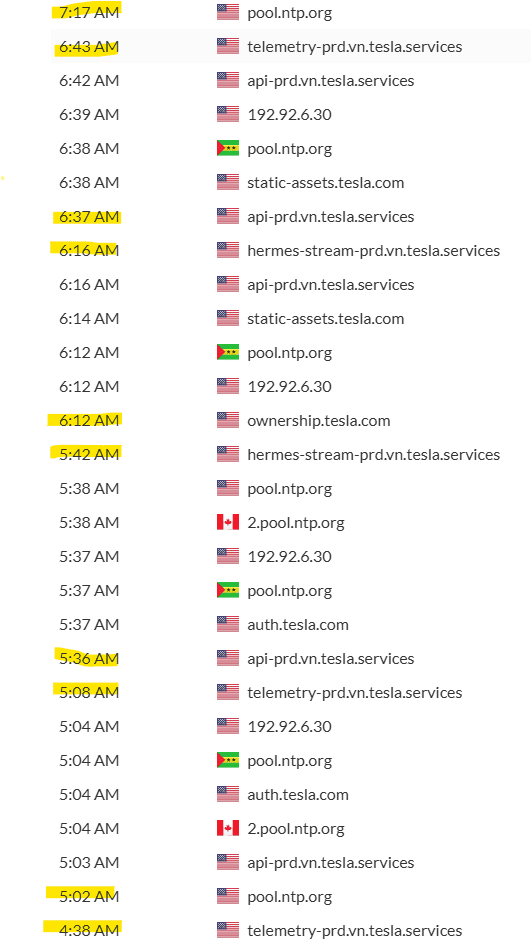
Totally agreed with your observation. It is not a FW issue between 24.11 and 2024.20.1. Currently at 2024.20.1 and for the last 12 hrs, my range has NOT dropped. It is in line with my Model 3, but, when you launch the App, the Model 3 shows sleeping for XX hours and my CT shows Parked. My WIFI activity shows nothing for Model 3 and for the CT, it is active every 30 mins and transmitting for 5 mins max. I have noticed that during these 30 mins bursts, the HV contactors are not clicking on and off, which is good, and probably explains why my range is still intact. Maybe with the 48V system, the WIFI is supposed to be more active compared to the Model 3's 12 V system where they just turn it off, don't know. I am not messing with any settings anymore and if my range holds and is between 1% -2%, I am happy for now. Let's see.....

Tesla Cybertruck Software update 2024.20.1 -- AUTO HVAC improvements for hot weather. The A/C cools down the cabin faster, and maintains comfort at lower noise levels. Activity
Sponsored


Top