Sponsored

Charge on Solar now enabled for Cybertruck

AlmostHuman

Well-known member
Joined
May 1, 2024
Threads
7
Messages
985
Reaction score
1,349
Location
Earth
Vehicles
Model X, Cybertruck
Occupation
Human
Country flag

JBee

Well-known member
First Name
JB
Joined
Nov 22, 2019
Threads
18
Messages
4,913
Reaction score
6,362
Location
Australia
Vehicles
Cybertruck
Occupation
. Professional Hobbyist
Country flag
Don’t get me wrong I’m all about sexy builds and nerd projects. I’m just not willing to do it on my truck just yet :)

Will stick with my EcoFlow Delta Pro and some solar panels for now if I really need some off grid charging. They have a nice adapter that tricks the unit in to thinking it has a real ground.

https://us.ecoflow.com/collections/accessories/products/portable-power-station-grounding-adapter
I'm remote and on offgrid solar with M3P seeing CT is a while out here still, but the problems are the same.

I always take a +30kW elastic Dyneema charge rope with me in case the sparse coverage of chargers are down, like on our last trip for Christmas. :cool:
 

AlmostHuman

Well-known member
Joined
May 1, 2024
Threads
7
Messages
985
Reaction score
1,349
Location
Earth
Vehicles
Model X, Cybertruck
Occupation
Human
Country flag
I'm remote and on offgrid solar with M3P seeing CT is a while out here still, but the problems are the same.

I always take a +30kW elastic Dyneema charge rope with me in case the sparse coverage of chargers are down, like on our last trip for Christmas. :cool:
How do you use the Dyneema charge rope?
 

JBee

Well-known member
First Name
JB
Joined
Nov 22, 2019
Threads
18
Messages
4,913
Reaction score
6,362
Location
Australia
Vehicles
Cybertruck
Occupation
. Professional Hobbyist
Country flag
You hook it between any old ICE and an EV and hit the regen just hard enough stuff doesn't overheat, and typically stay under 60kmh, although faster is possible, regen at higher speed can be uncomfortable with close distance (30ft) towing at speed. Only really advisable on fairly clean sealed roads though as stuff flicks up off the tow vehicle sometimes.


AlmostHuman

Well-known member
Joined
May 1, 2024
Threads
7
Messages
985
Reaction score
1,349
Location
Earth
Vehicles
Model X, Cybertruck
Occupation
Human
Country flag
That would be an unenforceable term of service.

Law and case law say they have to prove any repair or modification was the source of the damage. Those little 'no user serviceable parts inside' void stickers aren't valid, either.

https://www.ifixit.com/News/74736/warranty-void-stickers-are-illegal-in-the-us-what-about-elsewhere

Know your rights. Claim your rights. Defend your rights.

-Crissa
Well look at this!

https://www.notateslaapp.com/news/2...arts-online-supports-consumer-right-to-repair
 

chaosmarine92

Well-known member
First Name
David
Joined
Feb 27, 2024
Threads
10
Messages
212
Reaction score
313
Location
Knoxville, TN
Vehicles
cybertruck
Country flag
Does anyone know how long it takes for the charge on solar option to appear? I just got my new panels and powerwall turned on and don't have the option in my app yet.
 

scottf200

Well-known member
Joined
Jul 31, 2021
Threads
53
Messages
2,221
Reaction score
3,241
Location
Western NC
Vehicles
X; immed family 3 & Y
Country flag
Don’t get me wrong I’m all about sexy builds and nerd projects. I’m just not willing to do it on my truck just yet :)

Will stick with my EcoFlow Delta Pro and some solar panels for now if I really need some off grid charging. They have a nice adapter that tricks the unit in to thinking it has a real ground.

https://us.ecoflow.com/collections/accessories/products/portable-power-station-grounding-adapter
Looks like it is built in in some way with the Anker Solix F3800
The Anker Solix F3800 supports direct EV charging via the 14-50 port with a maximum power of 6000W [240v*25a]. Before charging your EV, make sure to set the charge current to 25A (or less) on your EV settings or EV charger.​
https://support.anker.com/s/article...s-via-the-240V-ports-on-the-Anker-Solix-F3800
 

sTv0

Active member
First Name
Robert
Joined
Feb 9, 2023
Threads
0
Messages
28
Reaction score
13
Location
Georgia, USA
Vehicles
2024 Tesla Cybertruck AWD
Occupation
Scientist
Country flag
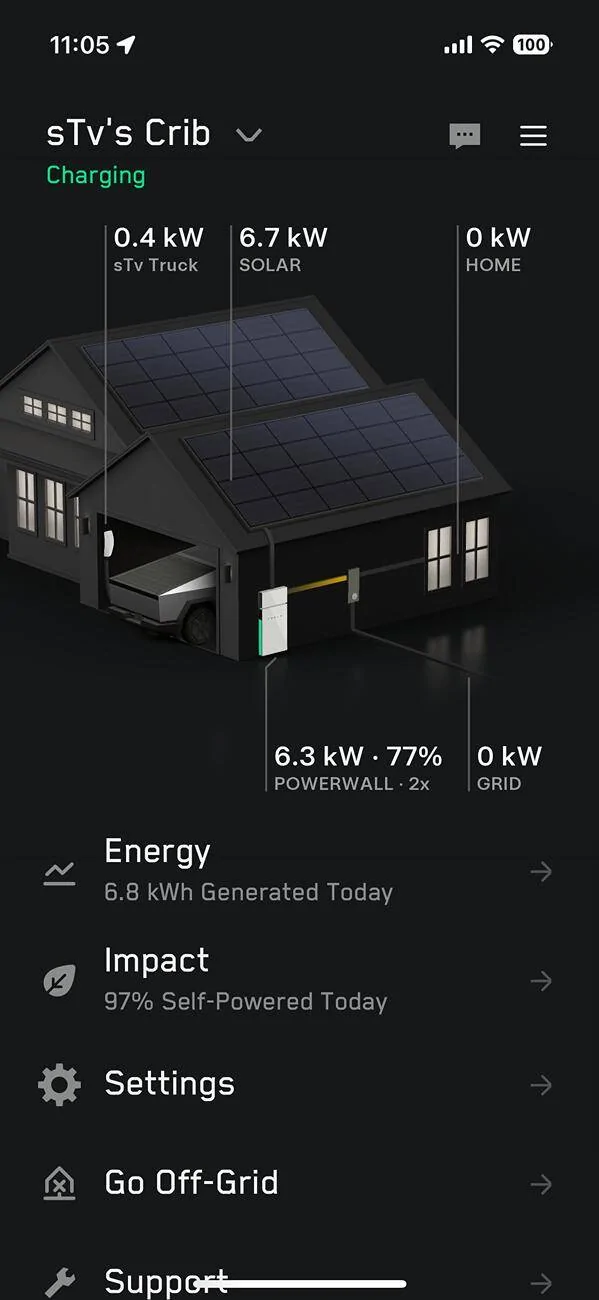
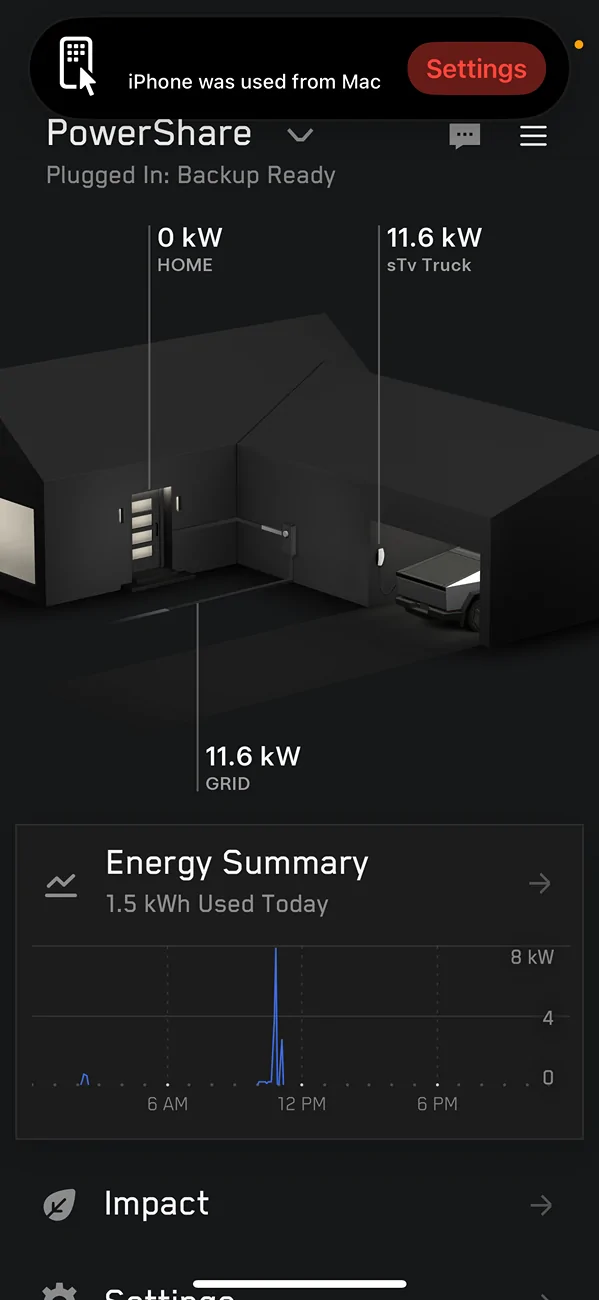
I have Tesla solar + Powerwalls + Cybertruck + Powershare. Charge-On-Solar was available a few months ago, and it works using my old EVSE that is backed up by my Tesla Energy system (whole house backup). However, when Powershare was installed, the UWC was (correctly, AFAIK) placed outside of my Tesla Energy system, along with its Gateway. IOW, they are upstream of my "old" Tesla Energy system.

Powershare was activated a few weeks ago, but my truck was in the shop for warranty repairs. Got it back a few days ago. It's even more awesome than before (new DUs!!).

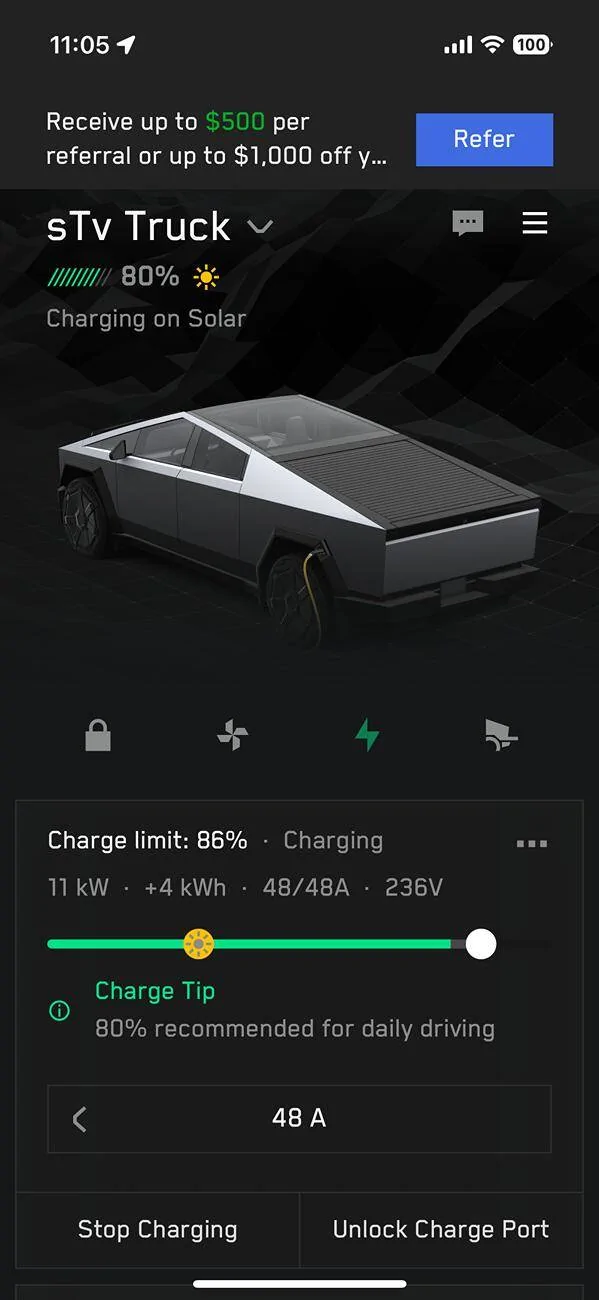
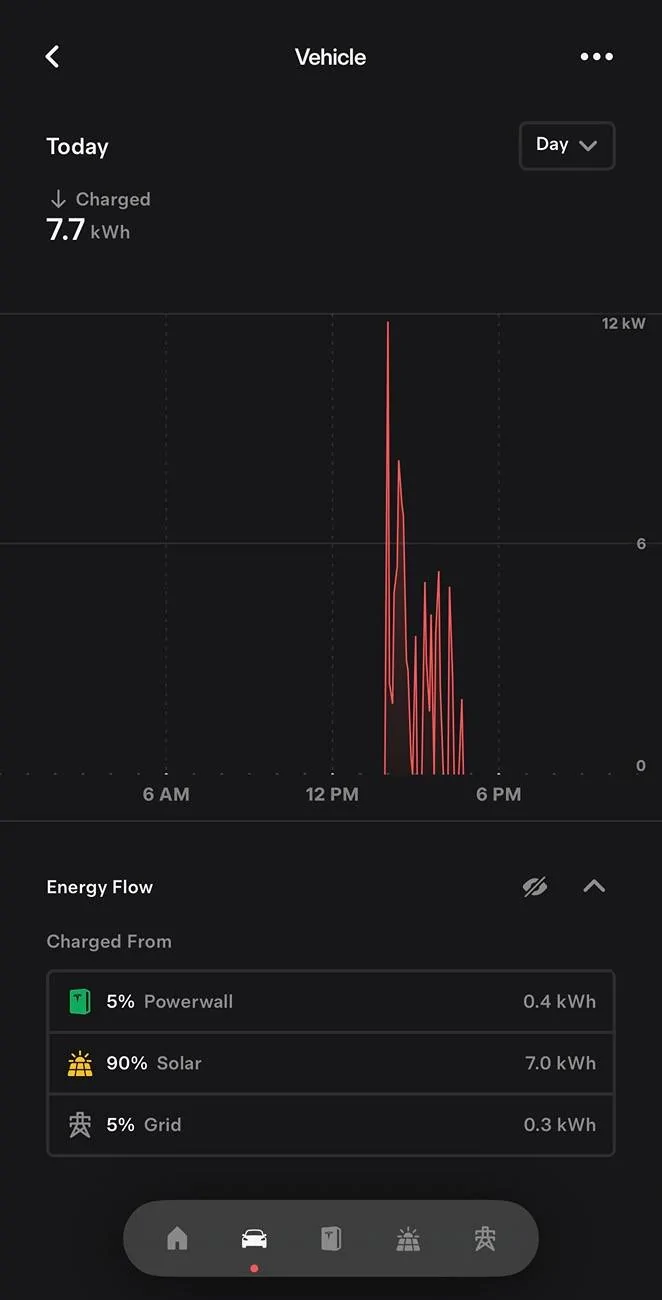
Last night, I activated Charge-On-Solar to test it, and this morning it drew energy directly from the grid, not from my Tesla solar system. It *did* wait until there was sufficient solar, although that's not the entire picture, as it started charging @ 0956 hrs, which is about when my solar panels are producing sufficient energy to run my house *and* charge my Powerwalls, which were @ 56%. The original Tesla Energy page in the Tesla app did *not* show energy being drawn from the grid, but the Powershare page did. See attached screenshots.

This leads me to conclude that, at least in my installation, Powershare and Charge-On-Solar do not know about each other. I have followed-up with Tesla, but wanted to share my experience on this thread and ask if anyone else has seen this.

Tesla Cybertruck Charge on Solar now enabled for Cybertruck IMG_6057
Tesla Cybertruck Charge on Solar now enabled for Cybertruck IMG_6056
Tesla Cybertruck Charge on Solar now enabled for Cybertruck IMG_6055
 

AlmostHuman

Well-known member
Joined
May 1, 2024
Threads
7
Messages
985
Reaction score
1,349
Location
Earth
Vehicles
Model X, Cybertruck
Occupation
Human
Country flag
I have Tesla solar + Powerwalls + Cybertruck + Powershare. Charge-On-Solar was available a few months ago, and it works using my old EVSE that is backed up by my Tesla Energy system (whole house backup). However, when Powershare was installed, the UWC was (correctly, AFAIK) placed outside of my Tesla Energy system, along with its Gateway. IOW, they are upstream of my "old" Tesla Energy system.

Powershare was activated a few weeks ago, but my truck was in the shop for warranty repairs. Got it back a few days ago. It's even more awesome than before (new DUs!!).

Last night, I activated Charge-On-Solar to test it, and this morning it drew energy directly from the grid, not from my Tesla solar system. It *did* wait until there was sufficient solar, although that's not the entire picture, as it started charging @ 0956 hrs, which is about when my solar panels are producing sufficient energy to run my house *and* charge my Powerwalls, which were @ 56%. The original Tesla Energy page in the Tesla app did *not* show energy being drawn from the grid, but the Powershare page did. See attached screenshots.

This leads me to conclude that, at least in my installation, Powershare and Charge-On-Solar do not know about each other. I have followed-up with Tesla, but wanted to share my experience on this thread and ask if anyone else has seen this.

IMG_6057.jpg
IMG_6056.jpg
IMG_6055.png
Odd, I also have Solar + Powerwall + Gen 3 Wall Connector + Powershare showing enabled under Controls. It still only charges when there is enough “extra” solar production. Not a ton of solar today but it did a little.
Tesla Cybertruck Charge on Solar now enabled for Cybertruck IMG_1588


rtfitch

Well-known member
First Name
Santa R.T.
Joined
Jan 17, 2020
Threads
22
Messages
544
Reaction score
1,050
Location
North Pole, Magnolia, TX in Summer
Website
www.rtfitchauthor.com
Vehicles
Blitzen the Beast, Sleigh
Occupation
Gift Giver
Country flag
If you had Tesla energy and the $25 plan for unlimited charging, would it be better to sell the solar during the day and just charge at night for free? The plan comes to be around $0.83 a night for charging.
I have the “All You Can Eat Plan” for $15.00 a month from Midnight to 6 AM so I compute it to be $0.50 a day…can’t beat it plus the day rate is very reasonable from Tesla.
 

sTv0

Active member
First Name
Robert
Joined
Feb 9, 2023
Threads
0
Messages
28
Reaction score
13
Location
Georgia, USA
Vehicles
2024 Tesla Cybertruck AWD
Occupation
Scientist
Country flag
Odd, I also have Solar + Powerwall + Gen 3 Wall Connector + Powershare showing enabled under Controls. It still only charges when there is enough “extra” solar production. Not a ton of solar today but it did a little.
IMG_1588.webp
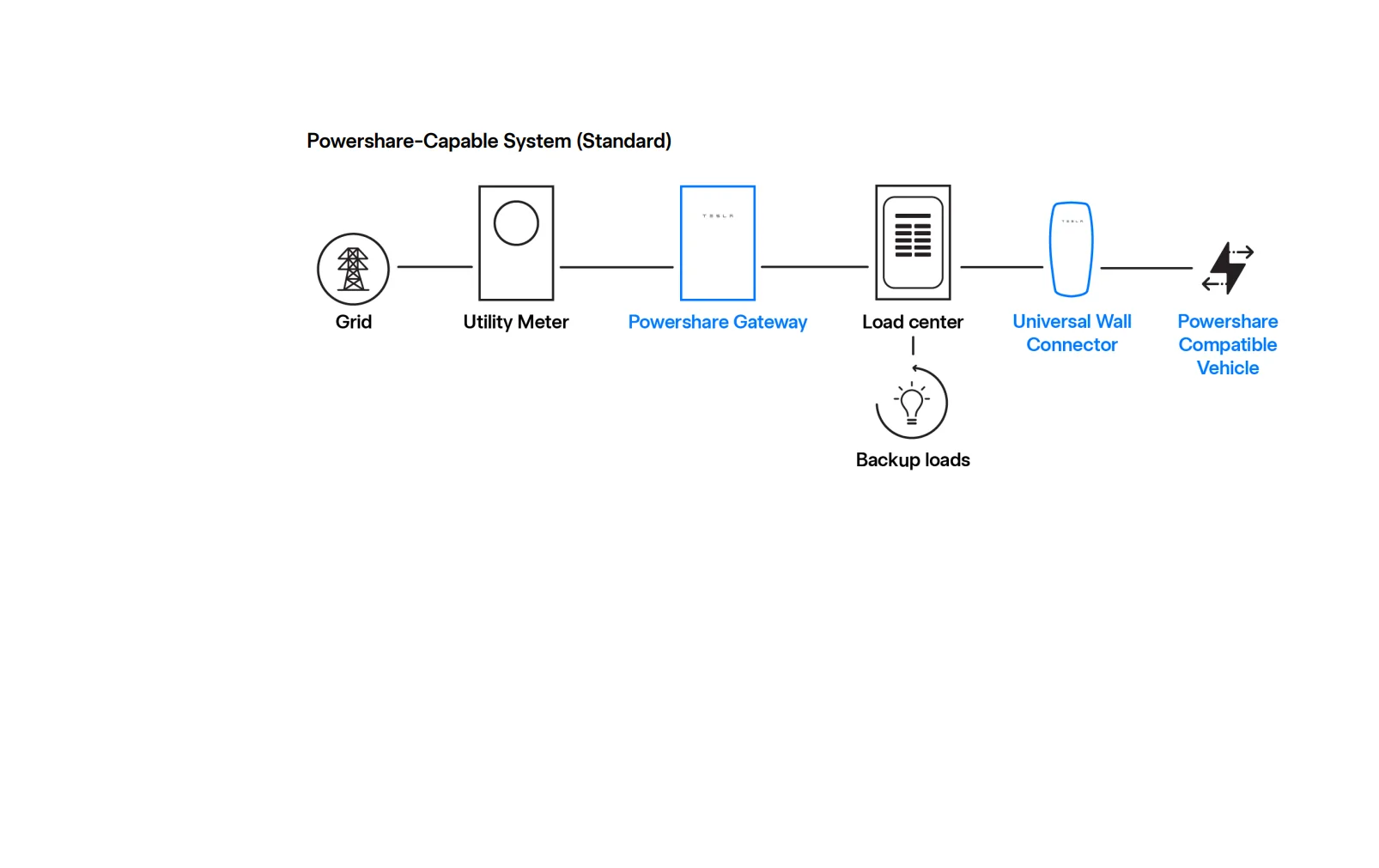
Interesting. Is your UWC is installed per Tesla config?:
Tesla Cybertruck Charge on Solar now enabled for Cybertruck 1743612036448-cd


[/QUOTE
 

mongo

Well-known member
Joined
May 27, 2024
Threads
5
Messages
4,526
Reaction score
5,505
Location
SE Michigan
Vehicles
Cyberbeast
Country flag
I have Tesla solar + Powerwalls + Cybertruck + Powershare. Charge-On-Solar was available a few months ago, and it works using my old EVSE that is backed up by my Tesla Energy system (whole house backup). However, when Powershare was installed, the UWC was (correctly, AFAIK) placed outside of my Tesla Energy system, along with its Gateway. IOW, they are upstream of my "old" Tesla Energy system.

Powershare was activated a few weeks ago, but my truck was in the shop for warranty repairs. Got it back a few days ago. It's even more awesome than before (new DUs!!).

Last night, I activated Charge-On-Solar to test it, and this morning it drew energy directly from the grid, not from my Tesla solar system. It *did* wait until there was sufficient solar, although that's not the entire picture, as it started charging @ 0956 hrs, which is about when my solar panels are producing sufficient energy to run my house *and* charge my Powerwalls, which were @ 56%. The original Tesla Energy page in the Tesla app did *not* show energy being drawn from the grid, but the Powershare page did. See attached screenshots.

This leads me to conclude that, at least in my installation, Powershare and Charge-On-Solar do not know about each other. I have followed-up with Tesla, but wanted to share my experience on this thread and ask if anyone else has seen this.

IMG_6057.jpg
IMG_6056.jpg
IMG_6055.png
So...
Your setup is not what what was supposed to happen.
If you already have Powerwall, all that is needed for Powershare is a Wall Connector on the backed up side of the Gateway and the software Tesla hasn't released yet.
It sounds like what you got was a completely separate Powershare installation which isn't going to back up your house nor coordinate with the existing Solar/ Powerwalls.
Photos?
 

sTv0

Active member
First Name
Robert
Joined
Feb 9, 2023
Threads
0
Messages
28
Reaction score
13
Location
Georgia, USA
Vehicles
2024 Tesla Cybertruck AWD
Occupation
Scientist
Country flag
So...
Your setup is not what what was supposed to happen.
If you already have Powerwall, all that is needed for Powershare is a Wall Connector on the backed up side of the Gateway and the software Tesla hasn't released yet.
It sounds like what you got was a completely separate Powershare installation which isn't going to back up your house nor coordinate with the existing Solar/ Powerwalls.
Photos?
I'd argue with you if I had the brain capacity to do so. I followed the instructions from Tesla/3rd party Powershare installers. Tesla sent me an email 03/01/2025:
"Congratulations on the installation of your Powershare equipment. You can now use your Powershare Home Backup system. To get started, download the Tesla app and review the Powershare Home Backup tutorials to learn how to activate your system and enable it using your vehicle’s control settings.

If your system is paired with a solar backup circuit, turn your solar inverter breaker(s) OFF before manually testing your Powershare functionality. Failing to do so may cause damage to your system.

If you have any questions, contact your Tesla Advisor.

The Tesla Team"

I figured that Tesla knows that I have Powerwalls + Solar.

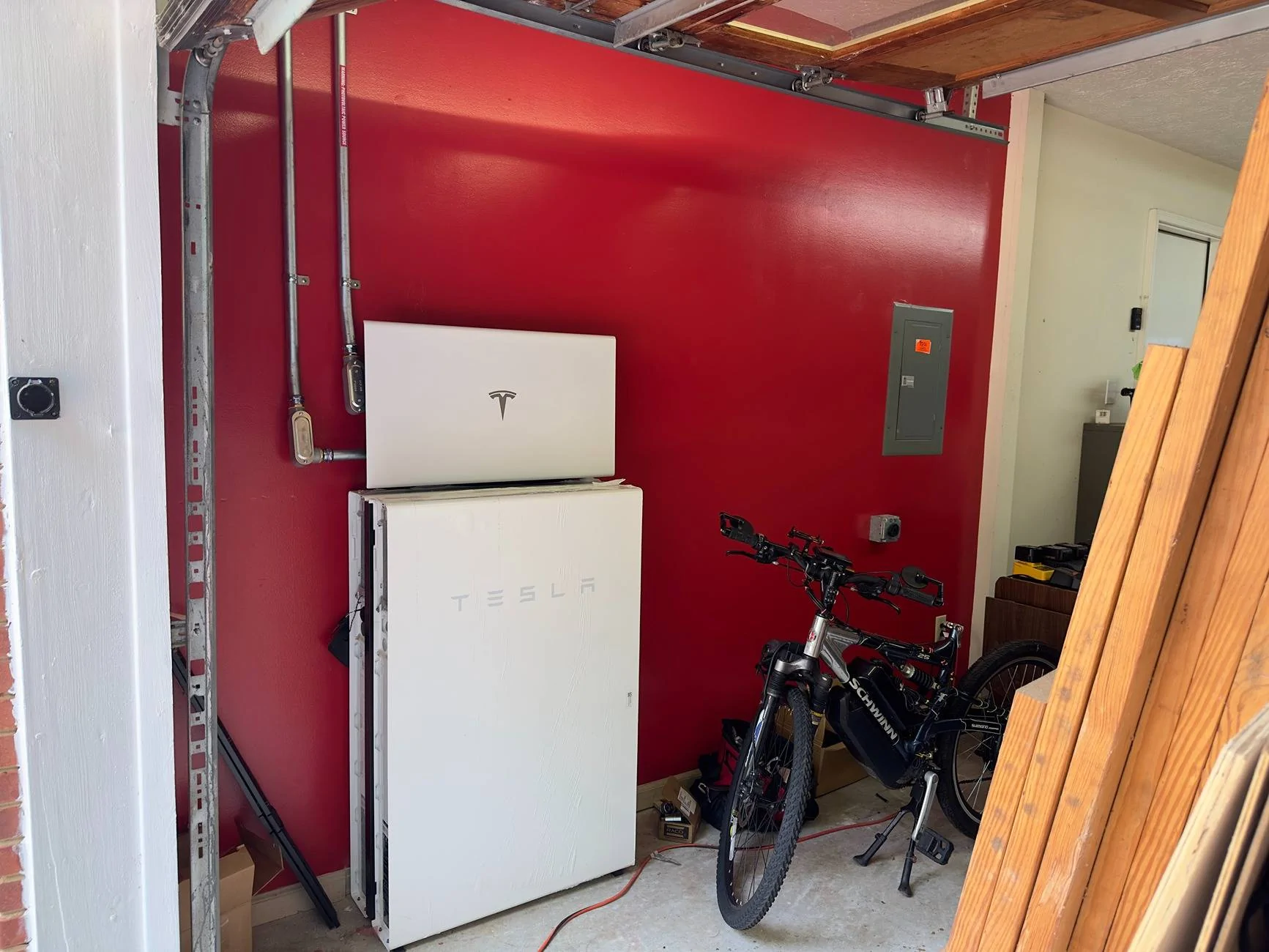
Powerwalls (the UWC was installed to the right of the Powerwalls - no pic):
Tesla Cybertruck Charge on Solar now enabled for Cybertruck IMG_4684


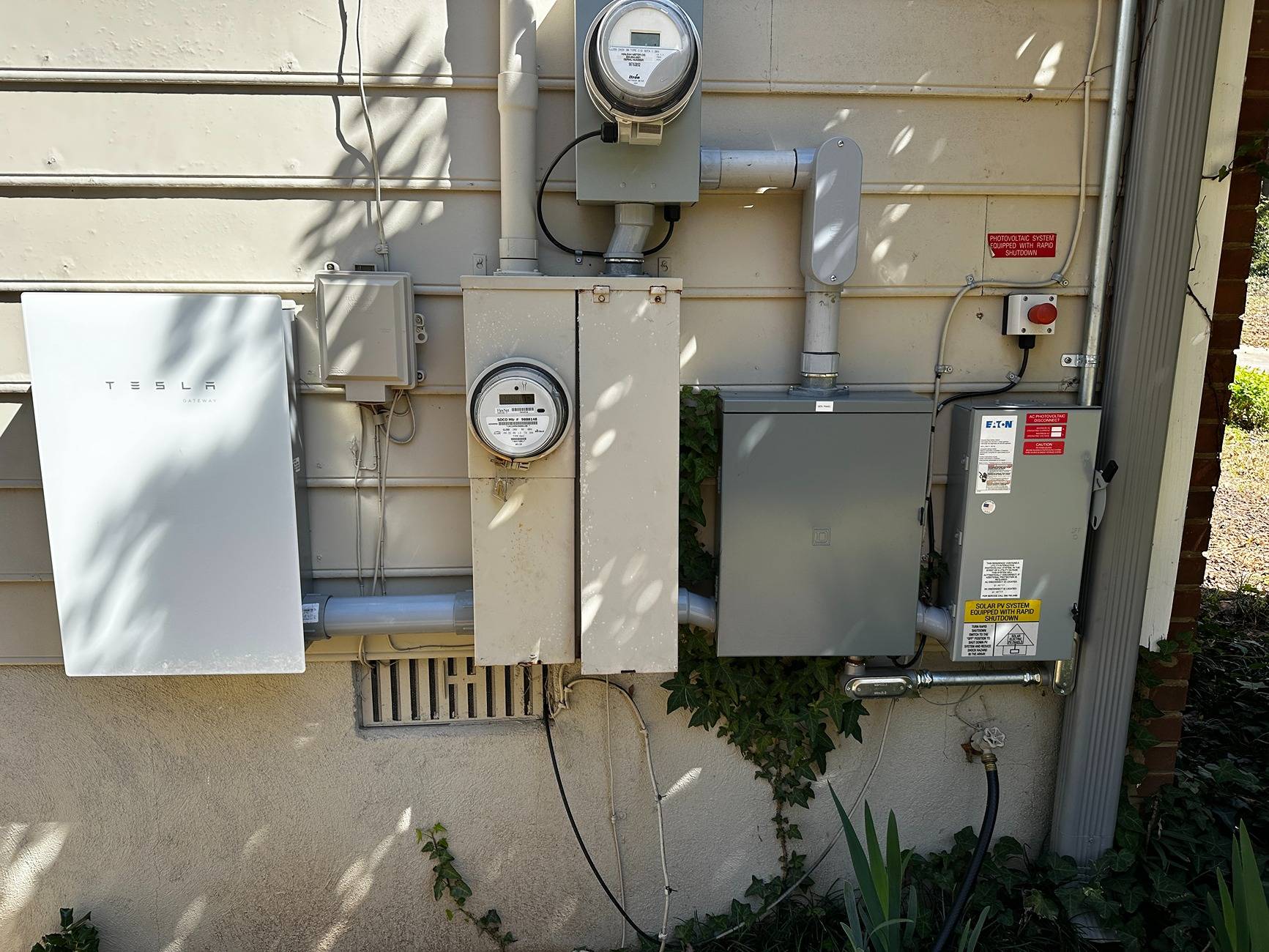
Powershare:
Tesla Cybertruck Charge on Solar now enabled for Cybertruck IMG_6037 2.JPG


I have contracted w/Tesla to add more solar + another inverter. When they came to look at my system, the electrician said "we didn't know you had Powershare", so they asked for the wiring diagrams from the 3rd patry installers and I am waiting to reschedule. Tesla has not said that the Powershare install is "wrong"; they just wanted to make sure they understood how the installation was done. Hence, I do not know if it is incorrectly installed or not.
 

mongo

Well-known member
Joined
May 27, 2024
Threads
5
Messages
4,526
Reaction score
5,505
Location
SE Michigan
Vehicles
Cyberbeast
Country flag
I'd argue with you if I had the brain capacity to do so. I followed the instructions from Tesla/3rd party Powershare installers. Tesla sent me an email 03/01/2025:
"Congratulations on the installation of your Powershare equipment. You can now use your Powershare Home Backup system. To get started, download the Tesla app and review the Powershare Home Backup tutorials to learn how to activate your system and enable it using your vehicle’s control settings.

If your system is paired with a solar backup circuit, turn your solar inverter breaker(s) OFF before manually testing your Powershare functionality. Failing to do so may cause damage to your system.

If you have any questions, contact your Tesla Advisor.

The Tesla Team"

I figured that Tesla knows that I have Powerwalls + Solar.

Powerwalls (the UWC was installed to the right of the Powerwalls - no pic):
IMG_4684.jpeg


Powershare:
IMG_6037 2.JPG


I have contracted w/Tesla to add more solar + another inverter. When they came to look at my system, the electrician said "we didn't know you had Powershare", so they asked for the wiring diagrams from the 3rd patry installers and I am waiting to reschedule. Tesla has not said that the Powershare install is "wrong"; they just wanted to make sure they understood how the installation was done. Hence, I do not know if it is incorrectly installed or not.
Yeah, that was just stock wording because solar and Powershare don't (didn't?) play nice, yet.
The Powerwall setup and solar sit behind the Backup Switch on your solar (bidirectional?) meter.

The Powershare Gateway looks to be fed off the main meter. They might have gone grid-meter-gateway-existing_setup, but based on your energy screenshots, Powershare lives on it's own.

Those images are both current? The truck shows up in both views simultaneously?
Sponsored


Top