Sponsored

Powershare is Activated / Enabled

bkandy3

Well-known member
First Name
Andy
Joined
Apr 30, 2024
Threads
1
Messages
72
Reaction score
32
Location
Thousand Oaks, CA
Vehicles
AWD Cybertruck
Country flag
Yeah, at this point, that setup would only let the Cybertruck power ... nothing...
Gateway isolates the internal panel board and external lugs from the source feed, so the 60A breaker to the UWC will end up on its own.
Thanks for confirming. I’ll get them back out here.
Sponsored


sTv0

Active member
First Name
Robert
Joined
Feb 9, 2023
Threads
0
Messages
28
Reaction score
13
Location
Georgia, USA
Vehicles
2024 Tesla Cybertruck AWD
Occupation
Scientist
Country flag
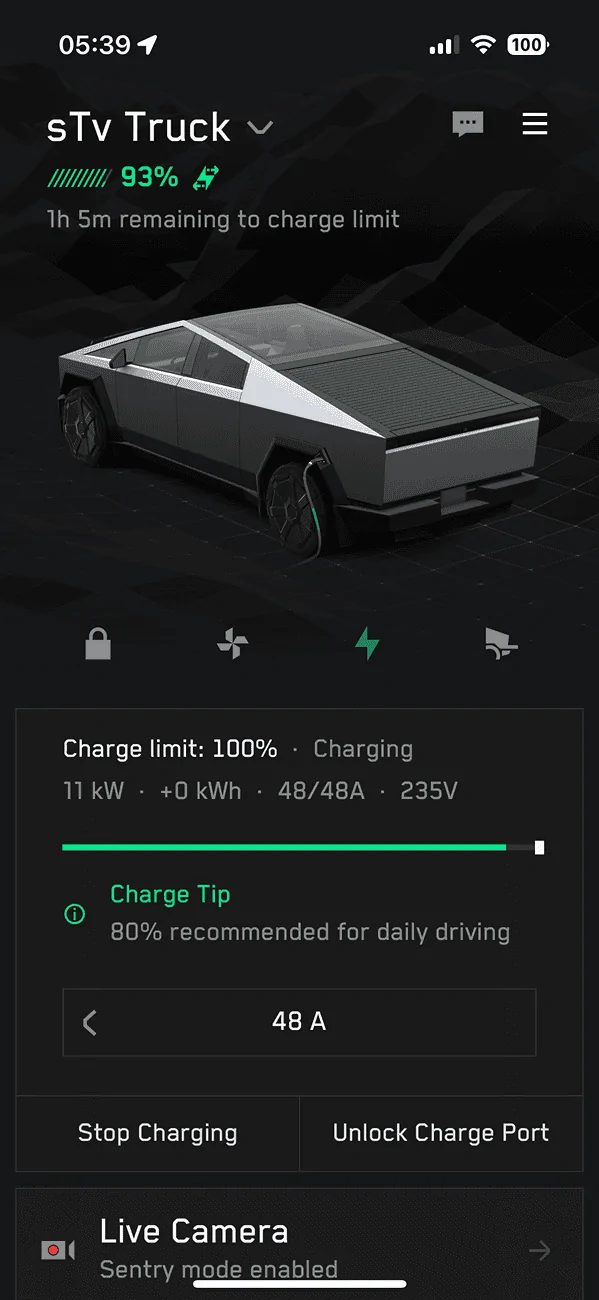
Tues 07/02 I was prepping for a road trip and noticed the Poweshare icon on my app. Nothing else, just that little icon. Nothing in the truck, nothing in the app. Didn't have time to play with it. Funny Tesla. Funny Rainman...


IMG_5692.png

Well, the Powershare icon has disappeared from the app. And Charge On Solar is also nowhere to be found (I've signed out of the app a few times because that seemed to bring back CoS, but not this time). No Powershare options in the truck. I'll just assume that this is what we have to go through, because that's how it worked for me for my Model 3.

So, we wait...
 

bkandy3

Well-known member
First Name
Andy
Joined
Apr 30, 2024
Threads
1
Messages
72
Reaction score
32
Location
Thousand Oaks, CA
Vehicles
AWD Cybertruck
Country flag
What circuits are you moving to the Gateway?

Electrician is asking what I want to move.

If I understand this, I can have up to 11.3kw, right? It’s not that I can only pick 60amps of circuit breakers.

- I assume refrigerator
- Various lights
- Outlet for modem/router
- AC? Looks like 3-4 kw/hr?
- Microwave?
- I assume not pool pump

Or, are you using the external circuit breaker line out the bottom and will just turn on/off breakers at the old breaker box? (If that’s what that is for).

Thanks!
 

mongo

Well-known member
Joined
May 27, 2024
Threads
5
Messages
4,520
Reaction score
5,496
Location
SE Michigan
Vehicles
Cyberbeast
Country flag
What circuits are you moving to the Gateway?

Electrician is asking what I want to move.

If I understand this, I can have up to 11.3kw, right? It’s not that I can only pick 60amps of circuit breakers.

- I assume refrigerator
- Various lights
- Outlet for modem/router
- AC? Looks like 3-4 kw/hr?
- Microwave?
- I assume not pool pump

Or, are you using the external circuit breaker line out the bottom and will just turn on/off breakers at the old breaker box? (If that’s what that is for).

Thanks!
Motors are the worst due to start up inrush. I'd leave off pool pump for sure and probably the AC.
 

bkandy3

Well-known member
First Name
Andy
Joined
Apr 30, 2024
Threads
1
Messages
72
Reaction score
32
Location
Thousand Oaks, CA
Vehicles
AWD Cybertruck
Country flag
Thanks!

Any big cons of forcing them to move the main feed to the gateway and then backing up the entire old box via the “External Backup Circuits” feed? Of course I’d need to flip off what I don’t want before turning on PowerShare to ensure it’s under 11.5kw.

As I posted on another thread, currently they feed my gateway via a dual 60 amp from the old breaker box, which seems wrong.


mongo

Well-known member
Joined
May 27, 2024
Threads
5
Messages
4,520
Reaction score
5,496
Location
SE Michigan
Vehicles
Cyberbeast
Country flag
Thanks!

Any big cons of forcing them to move the main feed to the gateway and then backing up the entire old box via the “External Backup Circuits” feed? Of course I’d need to flip off what I don’t want before turning on PowerShare to ensure it’s under 11.5kw.

As I posted on another thread, currently they feed my gateway via a dual 60 amp from the old breaker box, which seems wrong.
Full panel backup with manual load shedding makes it not as automatic.
For full backup, the Gateway would need a main breaker added (or new upstream main panel) and the power company might get involved due to changing the feed from the meter.
60A feed is definitely not what is wanted.
 

bkandy3

Well-known member
First Name
Andy
Joined
Apr 30, 2024
Threads
1
Messages
72
Reaction score
32
Location
Thousand Oaks, CA
Vehicles
AWD Cybertruck
Country flag
60A feed is definitely not what is wanted.
Thank you!

They have agreed the 60A isn’t appropriate and have proposed to use a 125A to feed the gateway. Then select circuits to move over to the gateway to have backup capability.
 

Cold.Truth

Well-known member
First Name
Big A
Joined
Feb 19, 2020
Threads
6
Messages
170
Reaction score
287
Location
Albuquerque, NM
Vehicles
2024 CT AWD, 1987 Carerra, 2016 Triumph Thruxton R
Occupation
I.T. Project Management
Country flag
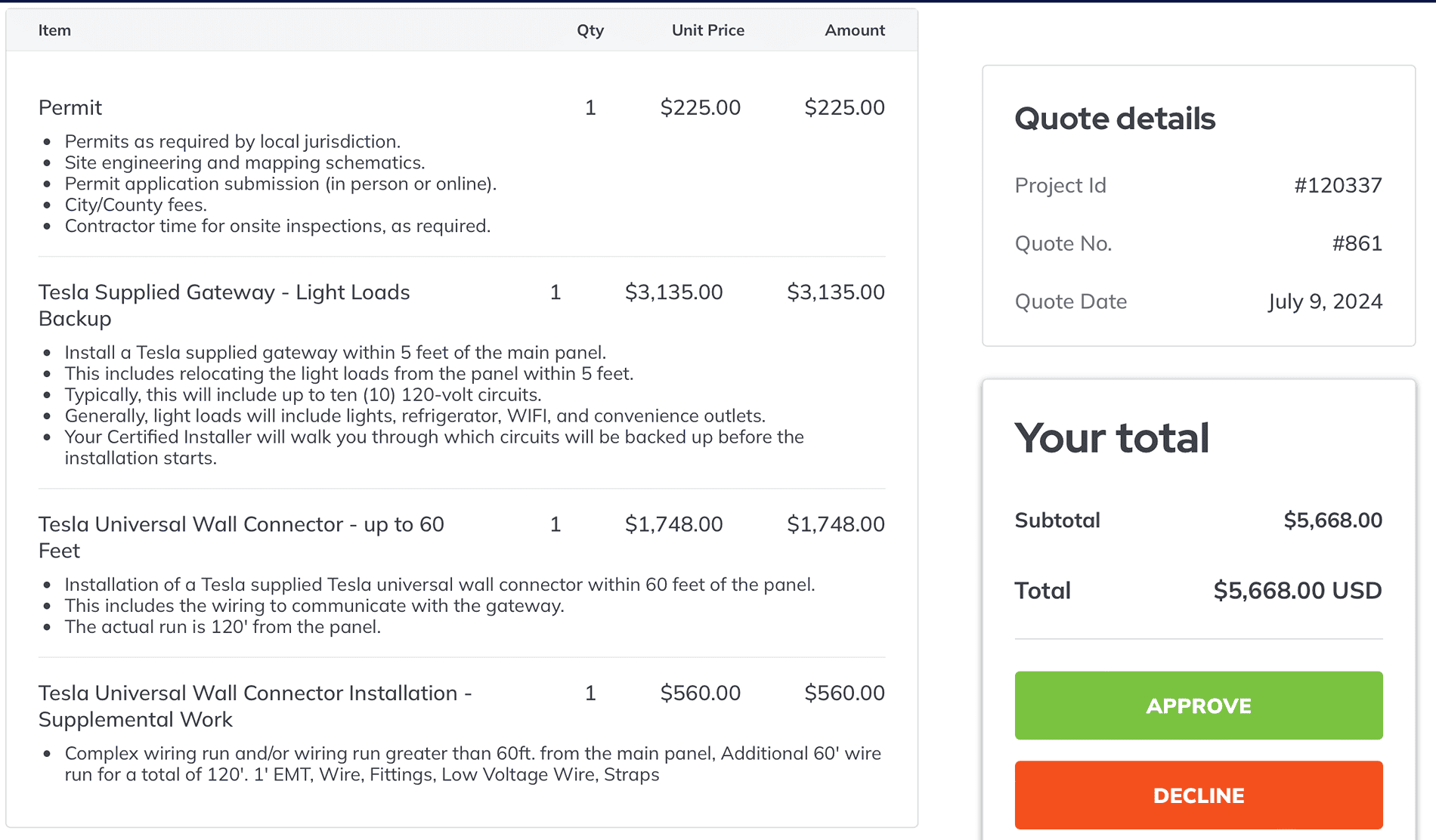
I just got my Powershare install estimate here in Albuquerque. I am #4 of 11 customers currently lined up for it. Their estimate is $5668 labor & permits. The equipment would ship to my home via the Tesla coupon use. So total hardware coupon and labor = $8168

I will say that my home layout probably presents some minor challenges not seen in a smaller home or a home where most of the equipment can be co-located. My fuse panel box is inside my home, about 60’ ( 120 feet of wire ) from the wall charger. So there’s that expense, either running Nomex in the crawl space or conduit along the garage ceiling.
Sorry, but while I think the system is interesting, this $8k expense is not worth it to me. Back East in Philly or Charlotte, where I lost power more frequently and for longer durations, then maybe I might consider it (my parents once lost power during Winter in Charlotte for two weeks after ice storms many years ago - that was bad but even that was not frequent. Everything was electric in their home, including the heat, so when the sun went down, the house got COLD). But here in ABQ, we lose power 1-3 times a year for 60 seconds. That’s been my own personal experience anyway over 3.5 years. YMMV.
Tesla Cybertruck Powershare is Activated / Enabled Screenshot 2024-07-09 at 5.07.33 PM
 
Last edited:

Thu Le

New member
First Name
Thu
Joined
May 9, 2024
Threads
0
Messages
1
Reaction score
0
Location
Virginia
Vehicles
Cybertruck
Occupation
Engineer
Country flag
Hi, does anybody here know how I can test to see if the cybertruck backup kicks in to power my house after the gateway/universal wall charger install w/o waiting for a power outage? After the installer left, I tried turning off the main circuit breaker to the house and plugged in the cybertruck to the wall connector but nothing happens...power to the selected backup circuit not providing power.
 

sgmorton

Well-known member
First Name
Sam
Joined
Aug 10, 2023
Threads
9
Messages
146
Reaction score
248
Location
Texas
Vehicles
MS P100DL+. M3P, CT
Occupation
Programmer
Country flag
Hi, does anybody here know how I can test to see if the cybertruck backup kicks in to power my house after the gateway/universal wall charger install w/o waiting for a power outage? After the installer left, I tried turning off the main circuit breaker to the house and plugged in the cybertruck to the wall connector but nothing happens...power to the selected backup circuit not providing power.
Do you have the option enabled on your truck or in the app yet? Open the controls on the app and scroll to the bottom to make sure the option is there and enabled. If it's not there you have not been enabled yet. It took weeks after my install to get enabled.


scottf200

Well-known member
Joined
Jul 31, 2021
Threads
53
Messages
2,221
Reaction score
3,241
Location
Western NC
Vehicles
X; immed family 3 & Y
Country flag
Just had mine installed today. What a cluster. The company had never done it and I don’t think they did it right.

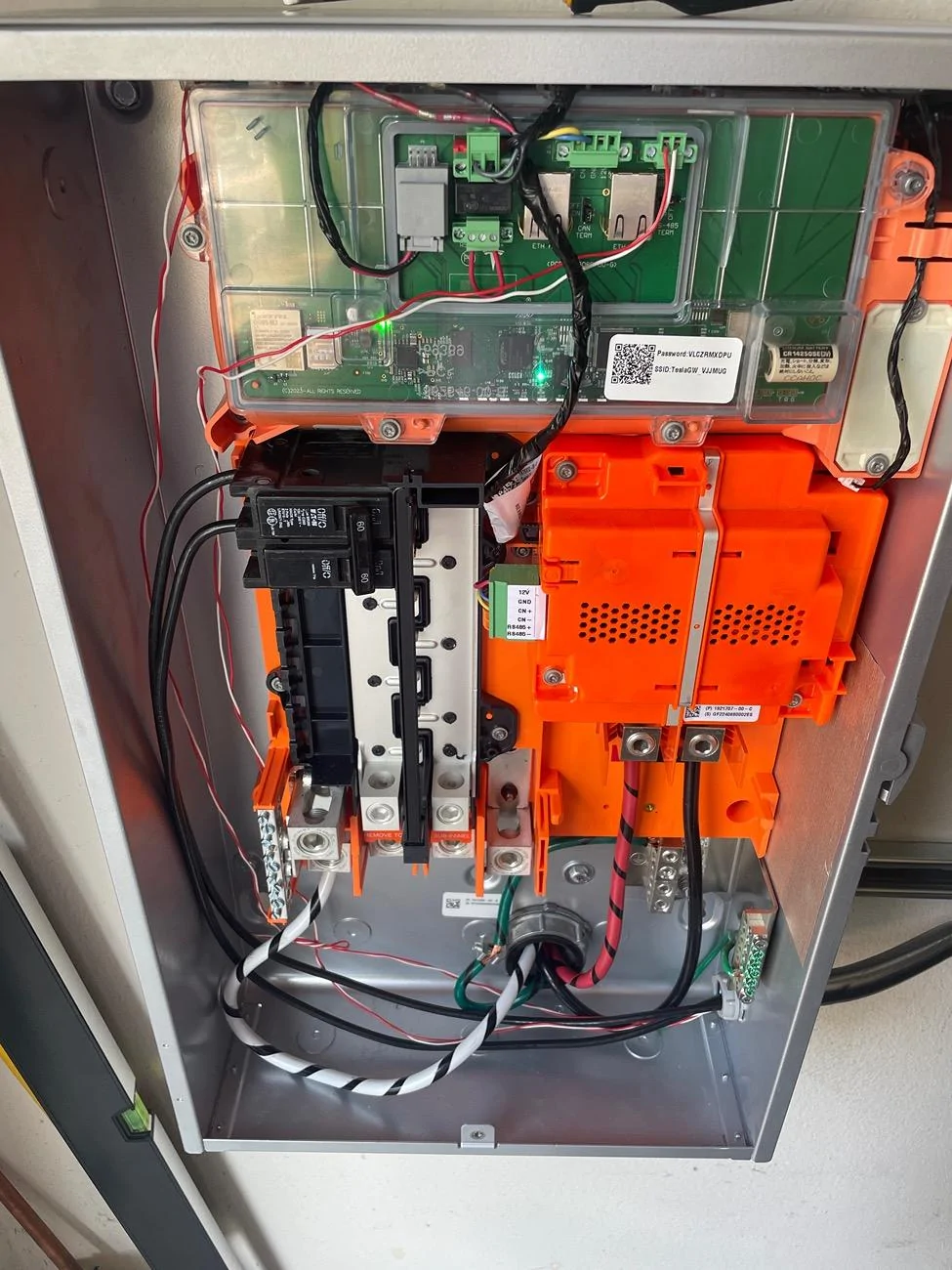
1. Did they move your circuits to the gateway from your existing breaker box, or have wires out the bottom of the gateway to the “External Circuit Backups?” Mine did neither. I don’t think they wired any backup.

2. I think they tried to install the charger first. When I went to add the gateway to the software, it made me create a new location. I couldn’t add to existing. Any way to combine these?

3. I don’t have the backup option in my controls.

IMG_1885.webp
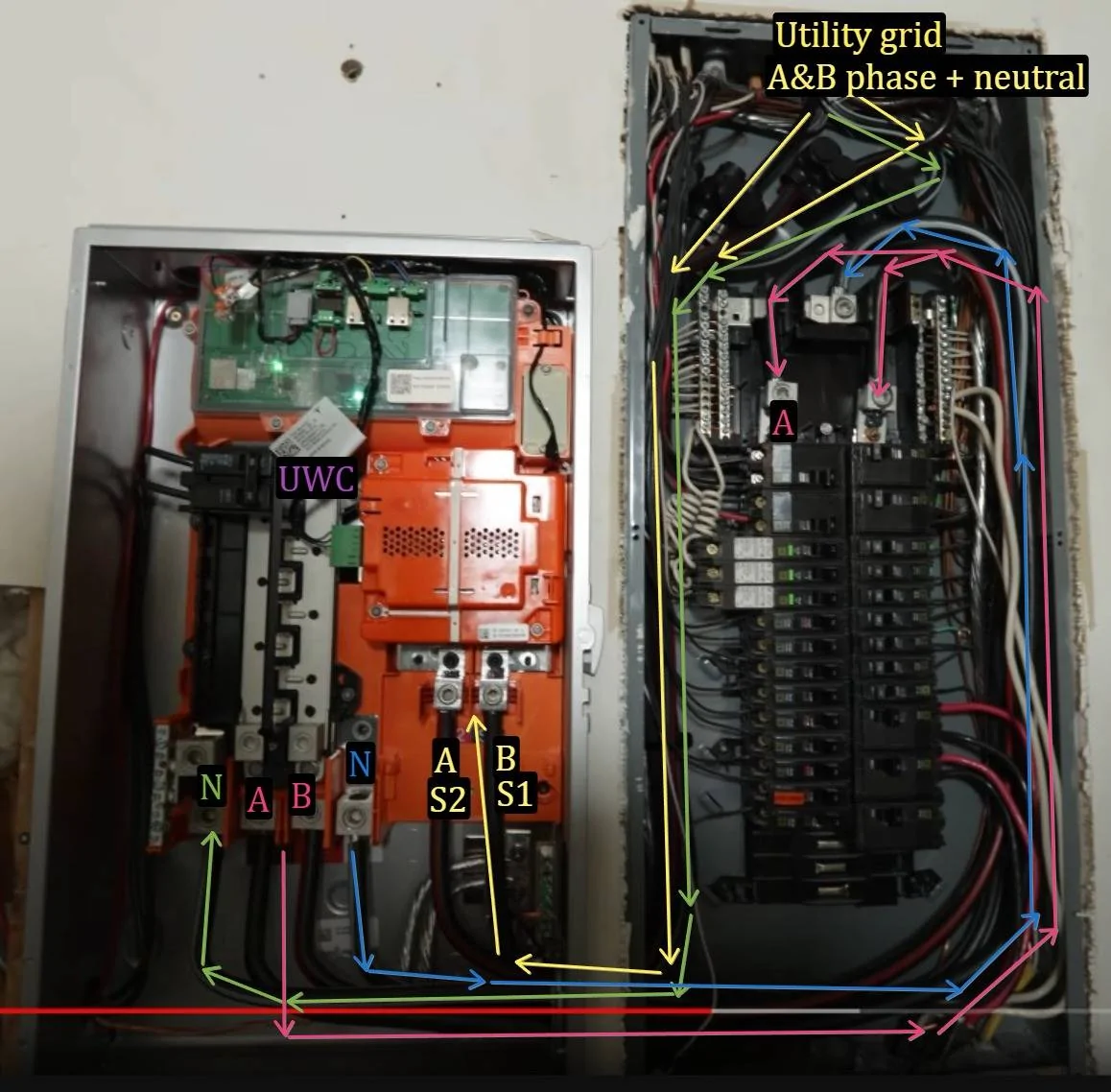
An example picture I did from some YTer that did a retrofit to a whole house setup.
Helped me understand the flow within the Cybertruck Gateway 3V (vehicle) "PowerShare" (G3V).
Note how the utility now feeds G3V. G3V now controls whether power comes from the utility grid or Cybertruck via UWC.
Tesla Cybertruck Powershare is Activated / Enabled Powershare Installation for Home Backup - YouTu

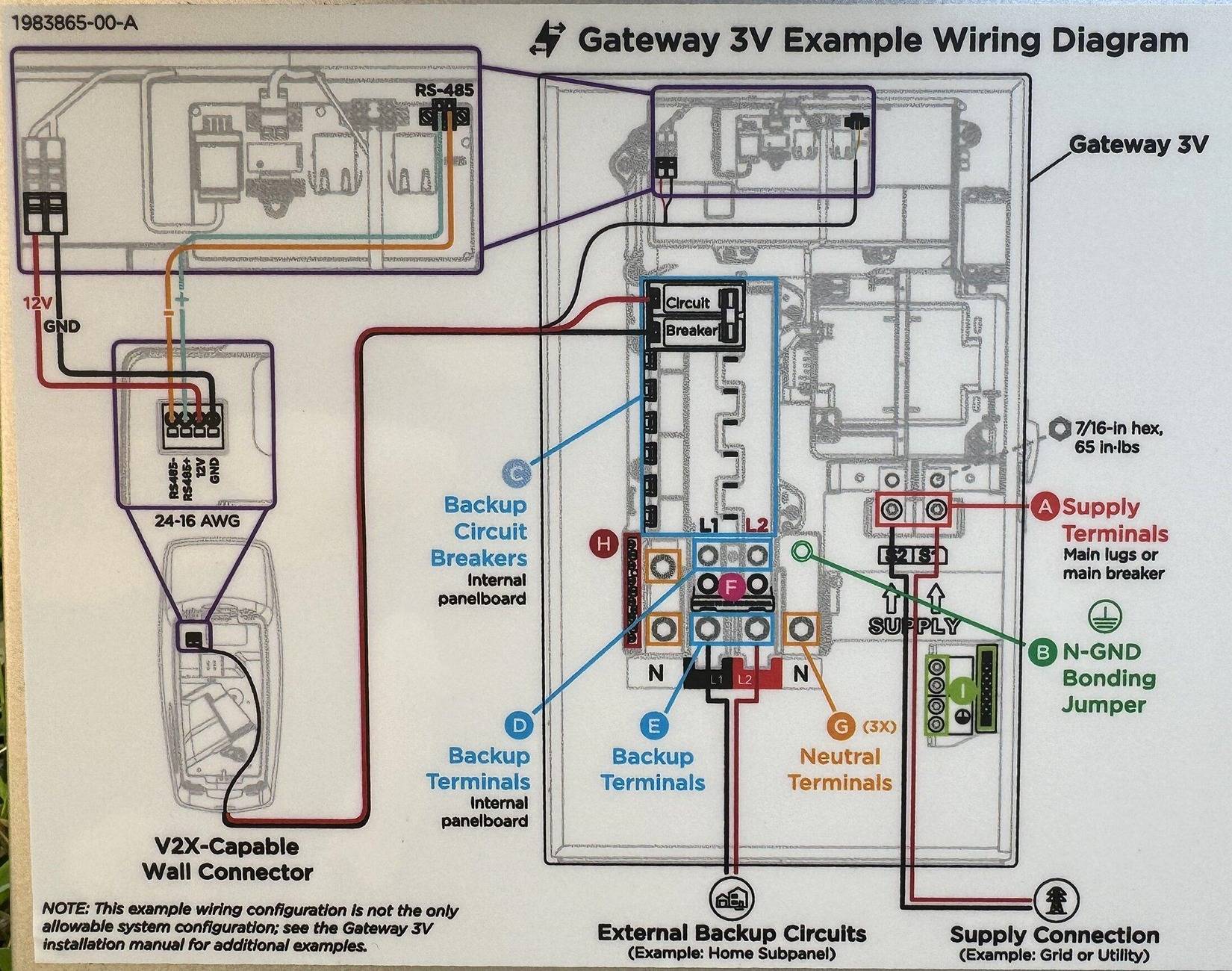
Update from another thread:
Tesla Cybertruck Powershare is Activated / Enabled Gateway 3V-vehicle Powershare labelin
 
Last edited:

mongo

Well-known member
Joined
May 27, 2024
Threads
5
Messages
4,520
Reaction score
5,496
Location
SE Michigan
Vehicles
Cyberbeast
Country flag
An example picture I did from some YTer that did a retrofit to a whole house setup.
Helped me understand the flow within the Cybertruck PowerShare.
Powershare Installation for Home Backup - YouTube.jpg
Gateway is a disconnect switch and site controller.
When power goes out, Cybertruck powers the UWC which then powers the Gateway via the communication cable 12V/GND. Gateway opens the switch, disconnecting its panelboard and downstream connections from the utility.
After telling UWC/Cybertruck that the switch is open, Cybertruck backfeeds the UWC which backfeeds the panel through the 60A breaker
Sponsored


Top