Sponsored

Jhodgesatmb

Well-known member
First Name
Jack
Joined
Dec 1, 2019
Threads
89
Messages
6,487
Reaction score
9,025
Location
San Francisco Bay area
Website
www.arbor-studios.com
Vehicles
Tesla Cybertruck FS AWD, Tesla Model Y LR
Occupation
Retired AI researcher
Country flag
Wow! Okay thanks! I will tell our electrician when he gets here! But I think he said the same thing that you just said, but he wants to get our Power Share working for us now. So that's why he wants to install the other Gateway. This is crazy. IF this is going to cause a problem or make my system work differently than just using the Powerwall3 for Power Share, I would like to know exactly how, so I can decide whether to wait or to go ahead with this.

I guess I need to contact Tesla to get to the bottom of this. They don't make it easy!
What we were led to believe is that you can use Powershare with a Powerwall but not with solar, and that solar support would be added later this year. Then there was an announcement that it would work with the Gateway V3, solar, and other generation devices, but it doesn't work with mine, yet. Since that announcement that it would came from Tesla, and the statement that it wouldn't came from Tesla Energy (and it doesn't), I guess it works for some but not all. If it were me and I had both solar, a Gateway V3, and Powerwalls, I would wait.
Sponsored


FlyShacker

Well-known member
Joined
Dec 13, 2024
Threads
3
Messages
47
Reaction score
84
Location
Coeur d’Alene, Idaho
Vehicles
AWD Cybertruck “JazzCat” wrapped in 3M Satin Thundercloud
Country flag
Thank you. I guess I want to understand exactly how PowerShare works (or will work) in each configuration - with and without the gateway, etc. Too many unknowns.
 

Jhodgesatmb

Well-known member
First Name
Jack
Joined
Dec 1, 2019
Threads
89
Messages
6,487
Reaction score
9,025
Location
San Francisco Bay area
Website
www.arbor-studios.com
Vehicles
Tesla Cybertruck FS AWD, Tesla Model Y LR
Occupation
Retired AI researcher
Country flag
Thank you. I guess I want to understand exactly how PowerShare works (or will work) in each configuration - with and without the gateway, etc. Too many unknowns.
I doubt there is anyone that could provide a complete and definitive answer to that. Regional differences. Regional grid regulations. Maybe even supplier level differences. If Tesla and their integrators don’t agree then no one knows.
 

mongo

Well-known member
Joined
May 27, 2024
Threads
5
Messages
4,520
Reaction score
5,496
Location
SE Michigan
Vehicles
Cyberbeast
Country flag
So I need to chime in here. I have had my CT since last November. But we are JUST NOW getting a solar system installed by a third party using all Tesla components with Powerwall3, AND I already bought a Gateway3D(?) directly from Tesla at the time I bought my CT and Universal Wall Connector.

More background... In my previous residence, we had a Tesla solar system installed back in 2020 with Powerwall2 before we moved here. At that time, we didn't have an EV. So I have been through installing and living with a Tesla solar power system long before we ever decided to get a solar system installed now in our new house.

So, my next-door neighbor at my previous residence had a legacy solar system that would not (could not) operate if the grid went down. But my newer Tesla solar system, WITH a Powerwall2, COULD and DID operate when the grid went down!! The difference was having a battery. However, I also understand there are different restrictions state by state according to laws, and Tesla supports the laws in each state.

Now during the work for today's install we ran into an interesting problem. The electrician/installer could not get the Powerwall3 to talk to the Gateway3D that I bought from Tesla last November. He called Tesla. They told him that THE MODEL OF GATEWAY I BOUGHT FROM TESLA (from their CT order page!) ONLY WORKS WHEN THERE IS NO POWERWALL!! Seriously?? A different model of Gateway is needed if a Powerwall is part of the system. Thanks, Tesla, for NOT explaining this when I bought the Gateway!

Fortunately, the installer didn't know that I already had my own Gateway, so he brought one with him, and his gateway is the RIGHT KIND of Gateway to work with the Powerwall3. The only downside is that he already installed my Gateway that I bought! So, after speaking with Tesla, he decided it would be easier to replace the guts of my Gateway with the components from the Gateway he brought! That's where we are now! Next time he comes back, he will start the job of replacing the components in the Gateway he already installed. (Removing the installed gateway is not an option because he already drilled customizations into the case to accommodate our unique wiring, etc.)

MY QUESTION IS.... Do any of you have any knowledge about all this? Does my story fit with your experience? My goal is to have my panels and SOME Gateway and Powerwall3 and my CT all working together, so that the CT can provide power to the house if the grid goes down, and I can charge the CT from the solar panels WHETHER OR NOT the grid goes down, etc. My installer says that the whole system will be completely configurable! I hope that is true. He says I will be able to charge the Powerwall3 from the solar panels or from the grid and charge my CT from any of the above! So does that mean, if the grid goes down, the house could draw from the solar panels FIRST, then if the solar is not sufficient to power the house as the sun sets, start drawing from the Powerwall3, and then if the Powerwall3 gets low on juice, start drawing power from my CT? My installer says YES! "All of this will be configurable," he says. IS THAT TRUE? I hope, I hope!

It's crazy that Tesla sells multiple versions of their Gateway but doesn't make clear what system configurations the different versions are designed for and what they can do!

Your knowledgeable comments are most welcome, and WILD GUESSES are also welcome!

I look forward to reading your replies! Thank you!
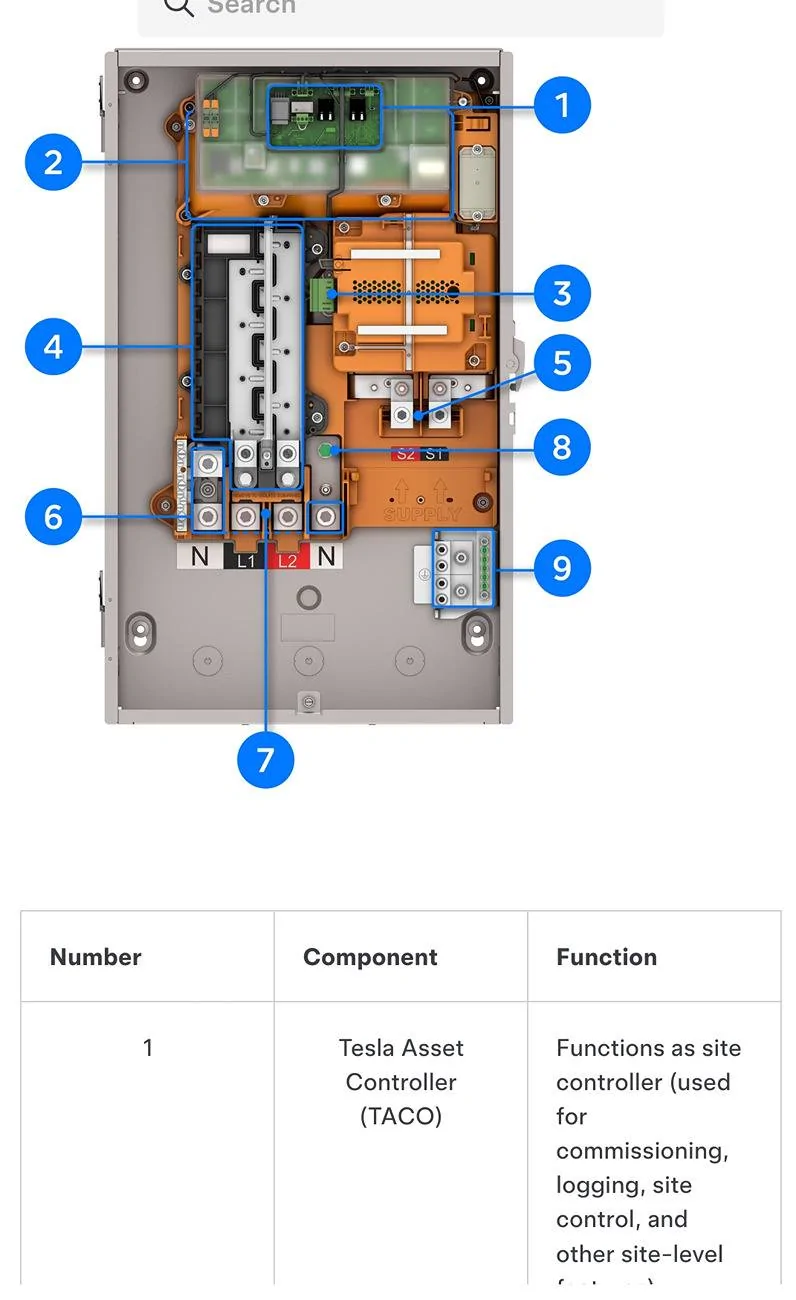
Powershare uses Gateway 3V, V for vehicle (probably). It is a Gateway 3 + neutral forming transformer + site controller.
I believe the installer can disable the site controller/ TACO to allow the Powerwall to serve that function (which is the normal Powerwall setup). No need to pull parts from another Gateway.
Note that while Powershare recently started working with solar, it still doesn't work with Powerwall, yet. But when it does, it should work like you mention.
Gateway 3V
https://energylibrary.tesla.com/doc...UID-BB39FEDC-C4D3-4AB1-9858-96C82563FADD.html
Tesla Cybertruck Powershare update: Home Backup enabled for Solar + Backup Switch SmartSelect_20250330_074947_Firefox

Gateway 3:
https://energylibrary.tesla.com/doc...UID-C2CF965B-EE68-42E6-BAFD-166E72C5B967.html
Tesla Cybertruck Powershare update: Home Backup enabled for Solar + Backup Switch SmartSelect_20250330_074858_Firefox

https://www.tesla.com/support/powershare
If you are adding a Powerwall to your home, we recommend installing Powerwall first to avoid any additional hardware and installation costs later. Powerwall upgrades your home to an instant, seamless backup solution that can maximize the value of your solar system and ensure your home is prepared for severe weather events. Solar Roof and solar panels add the ability to generate your own electricity and further increase your independence from the grid and utility costs.
 

FlyShacker

Well-known member
Joined
Dec 13, 2024
Threads
3
Messages
47
Reaction score
84
Location
Coeur d’Alene, Idaho
Vehicles
AWD Cybertruck “JazzCat” wrapped in 3M Satin Thundercloud
Country flag
Okay, here is what I found just now as a Note on this page: “Powershare System Overview”
https://energylibrary.tesla.com/doc...UID-6777B265-4081-41AC-BDAB-D4B9FCE3C49A.html

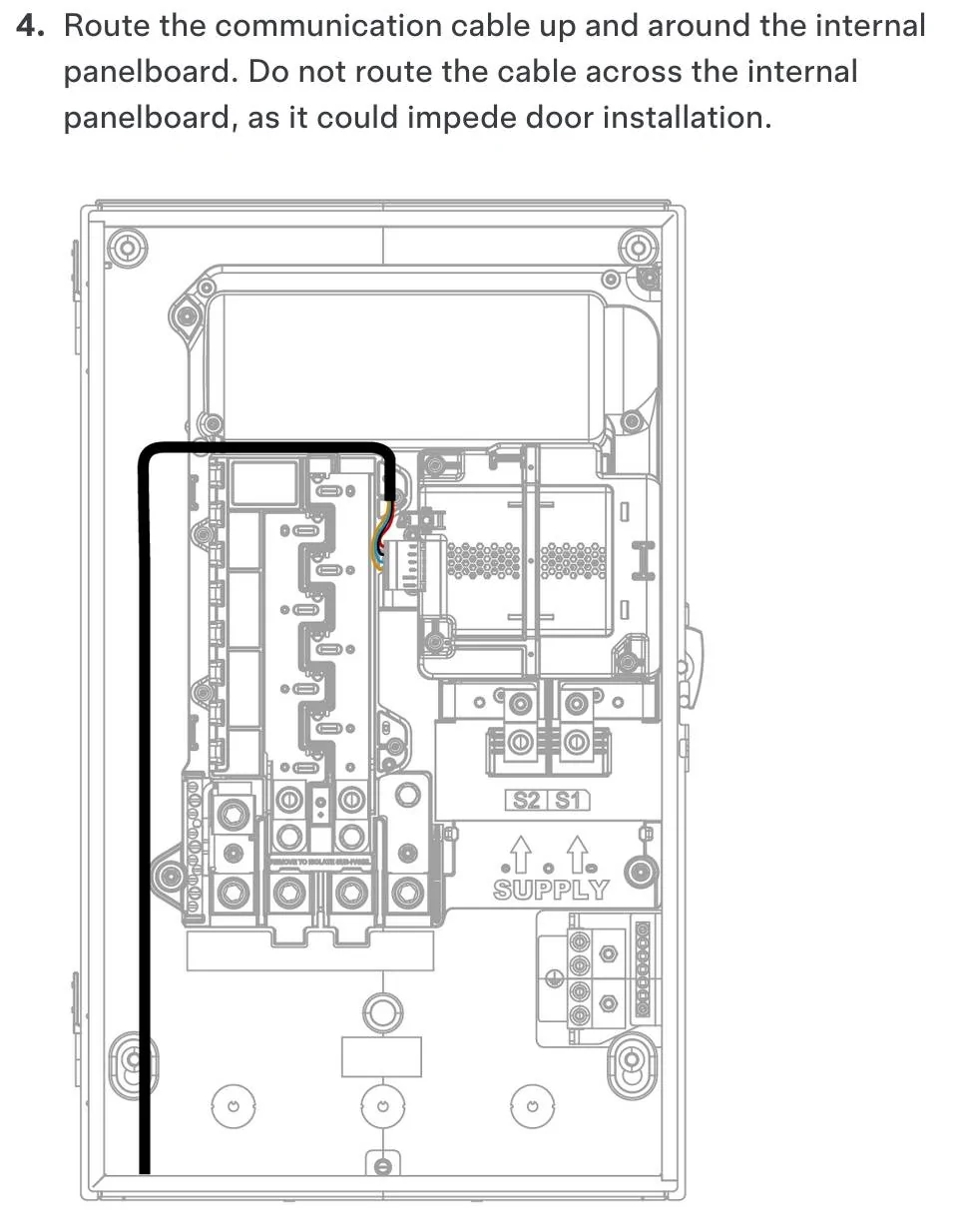
“NOTE: A Powerwall system with Wall Connector does not require any additional equipment or installation steps; Powershare functionality will be enabled with a software update. Do not install Powershare Gateway with a Powerwall system. Do not attempt to run communication wiring between the Wall Connector and the Powerwall or Backup Gateway.” [!!]

I have no idea what that last sentence means. But I have 2 gateways too many! I need to get rid of them both. But I guess I should be able to have the Powerwall and solar panels working before the software update. And I already have the Wall Connector working. The only part of the system that requires the software update is the PowerShare functionality. Yikes, but I already have a huge hole in the wall where the gateway has been installed and massive wiring is going to the gateway. All of that needs to be pulled out. I have lots to discuss with the installer electrician. :((

But at least the cloudy picture is starting to come into focus!


mongo

Well-known member
Joined
May 27, 2024
Threads
5
Messages
4,520
Reaction score
5,496
Location
SE Michigan
Vehicles
Cyberbeast
Country flag
I have no idea what that last sentence means. But I have 2 gateways too many! I need to get rid of them both.
You need A Gateway.
For Powerwall, you need Gateway 3 (or Backup Switch, but you said installer was using a Gateway) connected to the Powerwall(s).
For Powershare only, you would need Gateway 3V connected to the UWC.

Do not attempt to run communication wiring between the Wall Connector and the Powerwall or Backup Gateway.”
In no case is a communication cable run from UWC to Powerwall nor Gateway 3. (Only a GW 3V in a non-Powerwall Powershare system).
 

FlyShacker

Well-known member
Joined
Dec 13, 2024
Threads
3
Messages
47
Reaction score
84
Location
Coeur d’Alene, Idaho
Vehicles
AWD Cybertruck “JazzCat” wrapped in 3M Satin Thundercloud
Country flag
Dang it. You’re right! Thanks for clearing that up! The Tesla note says no PowerShare Gateway with the Powerwall3, but it doesn’t say “no Gateway”! Thanks for hammering that into my brain! We do need a Gateway! Dead on! (y)
 

hemiarch

Well-known member
First Name
Ace
Joined
Jan 22, 2025
Threads
116
Messages
8,361
Reaction score
9,595
Location
Arizona
Vehicles
2024 foundation AWD, 2024 model x
Occupation
Trauma Surgeon
Country flag
So wait. To be clear…I have solar at home and it uses 2x power 3. It’s all self isolated from the grid using Tesla’s collar which I assume is what the backup switch is.
I also have a universal wall connector. I’ve been led to believe I won’t need any kind of gateway for this once software updates. Is this not true?
 

FlyShacker

Well-known member
Joined
Dec 13, 2024
Threads
3
Messages
47
Reaction score
84
Location
Coeur d’Alene, Idaho
Vehicles
AWD Cybertruck “JazzCat” wrapped in 3M Satin Thundercloud
Country flag
So wait. To be clear…I have solar at home and it uses 2x power 3. It’s all self isolated from the grid using Tesla’s collar which I assume is what the backup switch is.
I also have a universal wall connector. I’ve been led to believe I won’t need any kind of gateway for this once software updates. Is this not true?
What do you want to do with it? I think it depends on your use case. Everyone seems to have a different setup and a different goal with it. Who told you that you don't need a gateway?
 

hemiarch

Well-known member
First Name
Ace
Joined
Jan 22, 2025
Threads
116
Messages
8,361
Reaction score
9,595
Location
Arizona
Vehicles
2024 foundation AWD, 2024 model x
Occupation
Trauma Surgeon
Country flag
All fair questions. I want to charge my truck and run my house while buying a minimal amount of energy for my power company, which I do now.
I also want to be able to run my house from the truck when I hit “go off grid” on the Tesla app or when there is a true power outage.
The powerwalls mostly negate me having to ever buy power during peak hours but having the Cybertruck as an additional battery would all but guarantee I would never have to.
As far as who told me, it was explained to me by the people who installed my solar and powerwall system.
They referenced some of the above text and I understood that I was essentially waiting on a software update for the above stated goals to be achievable


FlyShacker

Well-known member
Joined
Dec 13, 2024
Threads
3
Messages
47
Reaction score
84
Location
Coeur d’Alene, Idaho
Vehicles
AWD Cybertruck “JazzCat” wrapped in 3M Satin Thundercloud
Country flag
Maybe your installers misunderstood that you wanted to power your house from your Cybertruck. But not needing any kind of gateway doesn't sound right to me, now that I am learning the situation. But I am no expert. I'm quite convinced that we do need the basic gateway if we have one or more Powerwall3. But even then, we still have to wait for the Powerwall software update in 3rd quarter of 2025 to enable Power Share.

I will post an update here in a few days after my installer gets all his part done. I should have a fully operational and configurable system within the next week. But probably no Power Share until the software update gets here in a few months. Up here in North Idaho I am mostly concerned about power outages in the dead of winter. The next few months should be safe without my CT as backup power.
 

mongo

Well-known member
Joined
May 27, 2024
Threads
5
Messages
4,520
Reaction score
5,496
Location
SE Michigan
Vehicles
Cyberbeast
Country flag
So wait. To be clear…I have solar at home and it uses 2x power 3. It’s all self isolated from the grid using Tesla’s collar which I assume is what the backup switch is.
I also have a universal wall connector. I’ve been led to believe I won’t need any kind of gateway for this once software updates. Is this not true?
Your setup won't need a Gateway due to having Powerwalls and the Backup Switch.
Backup Switch is basically a compact Gateway 3 without any breaker slots.
 

hemiarch

Well-known member
First Name
Ace
Joined
Jan 22, 2025
Threads
116
Messages
8,361
Reaction score
9,595
Location
Arizona
Vehicles
2024 foundation AWD, 2024 model x
Occupation
Trauma Surgeon
Country flag
Thank you. That what I had thought but all the different information is giving me pause.
 

chaosmarine92

Well-known member
First Name
David
Joined
Feb 27, 2024
Threads
10
Messages
209
Reaction score
313
Location
Knoxville, TN
Vehicles
cybertruck
Country flag
So I need to chime in here. I have had my CT since last November. But we are JUST NOW getting a solar system installed by a third party using all Tesla components with Powerwall3, AND I already bought a Gateway3D(?) directly from Tesla at the time I bought my CT and Universal Wall Connector.

More background... In my previous residence, we had a Tesla solar system installed back in 2020 with Powerwall2 before we moved here. At that time, we didn't have an EV. So I have been through installing and living with a Tesla solar power system long before we ever decided to get a solar system installed now in our new house.

So, my next-door neighbor at my previous residence had a legacy solar system that would not (could not) operate if the grid went down. But my newer Tesla solar system, WITH a Powerwall2, COULD and DID operate when the grid went down!! The difference was having a battery. However, I also understand there are different restrictions state by state according to laws, and Tesla supports the laws in each state.

Now during the work for today's install we ran into an interesting problem. The electrician/installer could not get the Powerwall3 to talk to the Gateway3D that I bought from Tesla last November. He called Tesla. They told him that THE MODEL OF GATEWAY I BOUGHT FROM TESLA (from their CT order page!) ONLY WORKS WHEN THERE IS NO POWERWALL!! Seriously?? A different model of Gateway is needed if a Powerwall is part of the system. Thanks, Tesla, for NOT explaining this when I bought the Gateway!

Fortunately, the installer didn't know that I already had my own Gateway, so he brought one with him, and his gateway is the RIGHT KIND of Gateway to work with the Powerwall3. The only downside is that he already installed my Gateway that I bought! So, after speaking with Tesla, he decided it would be easier to replace the guts of my Gateway with the components from the Gateway he brought! That's where we are now! Next time he comes back, he will start the job of replacing the components in the Gateway he already installed. (Removing the installed gateway is not an option because he already drilled customizations into the case to accommodate our unique wiring, etc.)

MY QUESTION IS.... Do any of you have any knowledge about all this? Does my story fit with your experience? My goal is to have my panels and SOME Gateway and Powerwall3 and my CT all working together, so that the CT can provide power to the house if the grid goes down, and I can charge the CT from the solar panels WHETHER OR NOT the grid goes down, etc. My installer says that the whole system will be completely configurable! I hope that is true. He says I will be able to charge the Powerwall3 from the solar panels or from the grid and charge my CT from any of the above! So does that mean, if the grid goes down, the house could draw from the solar panels FIRST, then if the solar is not sufficient to power the house as the sun sets, start drawing from the Powerwall3, and then if the Powerwall3 gets low on juice, start drawing power from my CT? My installer says YES! "All of this will be configurable," he says. IS THAT TRUE? I hope, I hope!

It's crazy that Tesla sells multiple versions of their Gateway but doesn't make clear what system configurations the different versions are designed for and what they can do!

Your knowledgeable comments are most welcome, and WILD GUESSES are also welcome!

I look forward to reading your replies! Thank you!
I was in your situation a couple months ago. I used my voucher from buying the truck to get the UWC and gateway 3V. Afterwards I decided to get solar plus battery installed. Come to find out from my installer that the gateway 3V I got is incompatible with solar and I need the gateway V3 instead. They also said the guts of both are nearly identical but the software on them is the main source of incompatibility.

Fast forward and now I have solar plus battery installed and running. But powershare from the truck is not available until there is a software update from Tesla. This update was supposed to come out by end of last year but now it's slated for sometime this year. Hopefully.

One thing to note, after my system was installed I couldn't configure my truck to use the charge on solar option for a couple weeks until my agreement with my utility was finalized for selling back excess power and I enabled the export power option on the app.

One complaint I have though is that I can't prioritize where my solar power goes. It always goes to power the house first, the truck second, the powerwall third, and the grid last. I wish I could charge the powerwall before the truck as that makes more economic sense for my situation. The work around I have found for this is to limit the charge rate of my truck to about 2/3 of what my solar produces to force some into the powerwall.
 

txtravwill

Well-known member
First Name
Travis
Joined
Apr 25, 2024
Threads
7
Messages
511
Reaction score
611
Location
Marble Falls, TX
Vehicles
Tesla, BMW, Ford
Country flag
One complaint I have though is that I can't prioritize where my solar power goes. It always goes to power the house first, the truck second, the powerwall third, and the grid last. I wish I could charge the powerwall before the truck as that makes more economic sense for my situation. The work around I have found for this is to limit the charge rate of my truck to about 2/3 of what my solar produces to force some into the powerwall.
Same complaint, I have 2 Gateway 2s, 2 power walls on each one, and 2 UWCs. I wish we could tell it to charge the power walls first fully, then give extra to the truck, versus they other way around.
Sponsored


Top