Sponsored

POWERSHARE HOME BACKUP NOW WORKING WITH POWERWALL ONLY SETUP!!!

Cyberlove

Member
Joined
Mar 19, 2024
Threads
6
Messages
14
Reaction score
247
Location
CA
Vehicles
Cybertruck
Country flag
If you have a Tesla Powerwall, a wall connector, and a Cybertruck, take a look at the Tesla app. Just noticed this recent change that takes you through a quick tutorial prior to giving you access the Powershare backup within the controls section. Plugged the truck in, and it changes to say Home Connected!

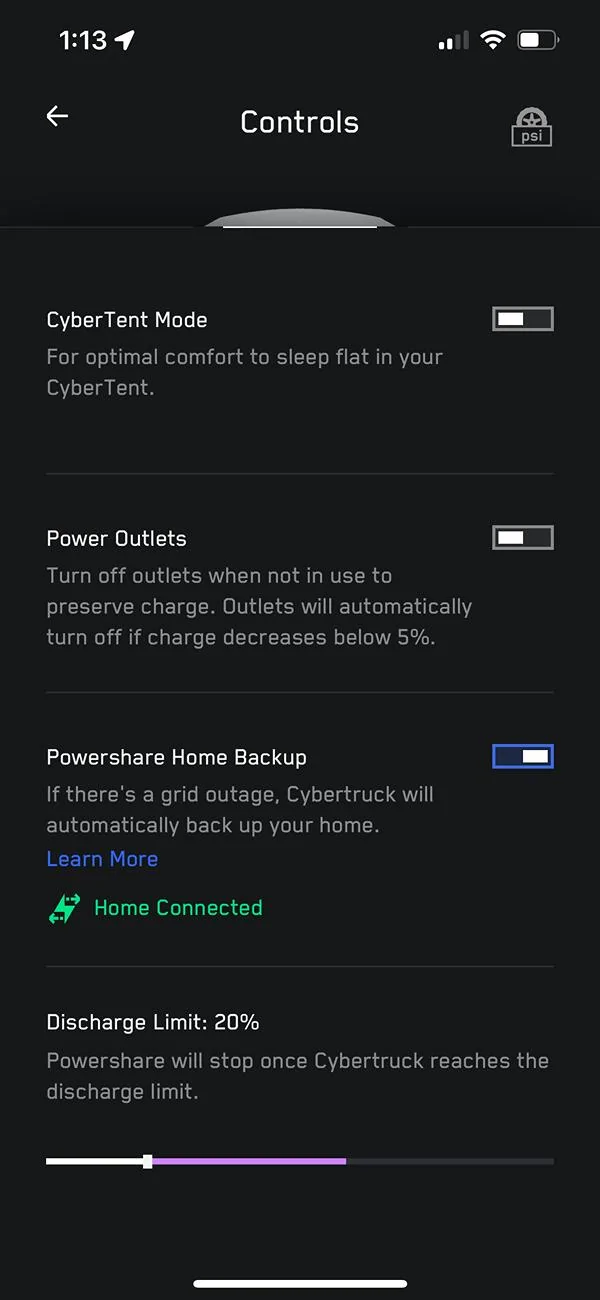
Tesla Cybertruck POWERSHARE HOME BACKUP NOW WORKING WITH POWERWALL ONLY SETUP!!! IMG_2560
Sponsored


jf64k

Well-known member
Joined
Dec 12, 2023
Threads
34
Messages
1,227
Reaction score
1,989
Location
Los Angeles
Vehicles
2020 MYLR (Lola), 2024 FS AWD (Deckard 263-54)
Country flag
Nice!! Now if they’d just add PW+solar, haha!!
 

Kensei

Member
First Name
Tom
Joined
Oct 19, 2024
Threads
2
Messages
9
Reaction score
10
Location
Socal
Vehicles
Cybertruck
Country flag
Does it work with the gen2 wall connector? I'm still waiting for PTO on my solar roof so I can't test it yet.


mbrockus

Well-known member
First Name
Mark
Joined
Jan 31, 2024
Threads
7
Messages
390
Reaction score
420
Location
Conway, WA
Vehicles
Model 3, Model X, AWD CT
Occupation
President of the Anonymous of the Anonymous Club
Country flag
I have powerwall, universal wall charger but mine doesn’t show it on the app yet.
You might need to go and check that you have the latest app on your phone. I have Apple and im just installing version 4.38.0. I have solar so I am still waiting for that software to get release to be able to use the powershare function.
 

AbblePC

Well-known member
First Name
Jeffrey
Joined
Mar 12, 2024
Threads
0
Messages
220
Reaction score
197
Location
State College PA
Vehicles
16MS90D - 23MYP - 22MYP - 21MYLR - 23MXPlaid - 24CB AT Tires/White Int
Occupation
IT Managed Service Provider
Country flag
If you have a Tesla Powerwall, a wall connector, and a Cybertruck, take a look at the Tesla app. Just noticed this recent change that takes you through a quick tutorial prior to giving you access the Powershare backup within the controls section. Plugged the truck in, and it changes to say Home Connected!
IMG_2560.jpg
Where did you first see this tutorial or know to go into it?
Was it only under the controls section of the app or was it obvious when you first opened the app, or was it populated only after you connected your Cybertruck to the wall connector?
 
OP
OP
Cyberlove

Cyberlove

Member
Joined
Mar 19, 2024
Threads
6
Messages
14
Reaction score
247
Location
CA
Vehicles
Cybertruck
Country flag
Did you have to do anything or did it just show up?
It just showed up in the app one day. To find it now, I just navigate to controls and swipe up to see it at the bottom. It shows up just below the power outlets control.

I should note that I do have both a Universal wall connector and a Tesla Solar roof.
 
OP
OP
Cyberlove

Cyberlove

Member
Joined
Mar 19, 2024
Threads
6
Messages
14
Reaction score
247
Location
CA
Vehicles
Cybertruck
Country flag
Where did you first see this tutorial or know to go into it?
Was it only under the controls section of the app or was it obvious when you first opened the app, or was it populated only after you connected your Cybertruck to the wall connector?
I just opened the app. The truck was not connected (plugged in) at the time. I believe that I went into controls and the tutorial popped up from there. Now I go into controls and see powershare controls after swiping up within the controls section.


jefflawless

Active member
First Name
Jeff
Joined
Jan 26, 2024
Threads
0
Messages
42
Reaction score
22
Location
Fontana, CA
Vehicles
S, 3, 3, X
Occupation
IT
Country flag
It just showed up in the app one day. To find it now, I just navigate to controls and swipe up to see it at the bottom. It shows up just below the power outlets control.

I should note that I do have both a Universal wall connector and a Tesla Solar roof.
Ah, you have a different setup. Do you have Powerwalls? I have a feeling those of us with the v2 gateway and Powerwalls will have to wait a little longer than those with v3 gateways.
 
OP
OP
Cyberlove

Cyberlove

Member
Joined
Mar 19, 2024
Threads
6
Messages
14
Reaction score
247
Location
CA
Vehicles
Cybertruck
Country flag
Yes, I have two Powerwalls. Complete setup at the moment is the Tesla Solar Roof, Two Powerwall 2s and the latest Universal Wall Connector.
 

bluerice

Well-known member
First Name
John
Joined
Oct 31, 2024
Threads
4
Messages
56
Reaction score
43
Location
Texas
Vehicles
cybertruck
Country flag
I've got PW2, PW2+ and tesla solar. No powershare. I saw somewhere that the update for my scenario is 2025 now.
 

scottf200

Well-known member
Joined
Jul 31, 2021
Threads
53
Messages
2,221
Reaction score
3,241
Location
Western NC
Vehicles
X; immed family 3 & Y
Country flag
I'm looking for Powerwall 3 support in our future home build. The additional WC/UWC should be the only other thing needed.

https://www.tesla.com/support/powershare

For Customers Without Powerwall
For homes not equipped with Powerwall, a Universal Wall Connector and Powershare Gateway will be required to use Powershare Home Backup. (2)

If you are adding a Powerwall to your home, we recommend installing Powerwall first to avoid any additional hardware and installation costs later. Powerwall upgrades your home to an instant, seamless backup solution that can maximize the value of your solar system and ensure your home is prepared for severe weather events. Solar Roof and solar panels add the ability to generate your own electricity and further increase your independence from the grid and utility costs.

For Customers With Powerwall
If your home is equipped with Powerwall and home charging, you do not require any additional equipment. Powershare Home Backup functionality with Powerwall is expected to be available later in 2025 through an over-the-air update. All Powerwall models will be compatible with Powershare Home Backup in the future. (2)

Our preferred home charging solution is the Wall Connector or the Universal Wall Connector on a 240 V circuit, but any generation of Wall Connector is compatible with Home Backup if using Powerwall. The home charging system must be backed up by Powerwall to enable Home Backup.

Footnote:
(2) Powershare equipment requirements and related promotional offerings, including voucher amounts, are subject to change.
 
Last edited:

Jedi2155

Well-known member
Joined
Apr 13, 2020
Threads
3
Messages
157
Reaction score
157
Location
Southern California
Vehicles
2024 Model Y AWD | FS Cybertruck AWD + FUSC
Occupation
Engineer
Country flag
I still have a Gen 2 HPWC, wondering if it works on that or if you need at least the WiFi connected Gen3.

*edit*

Didn't read the post above but the key statement was indicated as:
but any generation of Wall Connector is compatible with Home Backup if using Powerwall. The home charging system must be backed up by Powerwall to enable Home Backup.
Sponsored

 
Last edited:


Top